

Hosted PBX setup for a small business has no fixed duration in 2026: the switch is ready when your internet connection, users, call routing and phones have been configured and tested. Keeping your current business number adds a separate transfer that can determine the cutover date. Ask for a written schedule that separates setup, number transfer and the final switch before you cancel your existing phone service.
- How long does hosted PBX setup take? There is no fixed 2026 timeline; number transfer and call testing determine readiness.
- A new number avoids waiting for an existing number to transfer, but the phone system still needs testing.
- Keep your current phone service active until incoming and outgoing calls work on the new setup.
- SumoFiber is best for businesses that want to discuss business phone service and internet together; confirm hosted PBX requirements directly.
How long does hosted PBX setup take for a small business?
The useful answer is not a promised number of days. It is a list of tasks, the person responsible for each one and the condition that marks the task complete. If you are still choosing a phone system, the small-office business phone systems guide gives you a starting point for that decision.
- Confirm the internet connection. Identify where staff will take calls and whether those locations have a working connection. If the business is also changing internet service, put that installation on the schedule rather than treating phone setup as a separate event.
- Define users and devices. List who needs a phone number or extension and whether each person will use a desk phone, a computer application or another supported device. Confirm device support with the phone provider before ordering equipment.
- Map incoming calls. Write down what happens when a customer calls during business hours, outside those hours and when nobody answers. Include the main number, voicemail and any departments that need separate routing.
- Submit a number-transfer request, if needed. Give the new provider the account information it requires and wait for a confirmed transfer date. Do not treat a submitted request as a completed transfer.
- Test before cutover. Place incoming and outgoing calls, check voicemail and verify that calls reach the right people. Make the final switch only after the setup passes the tests your business needs.
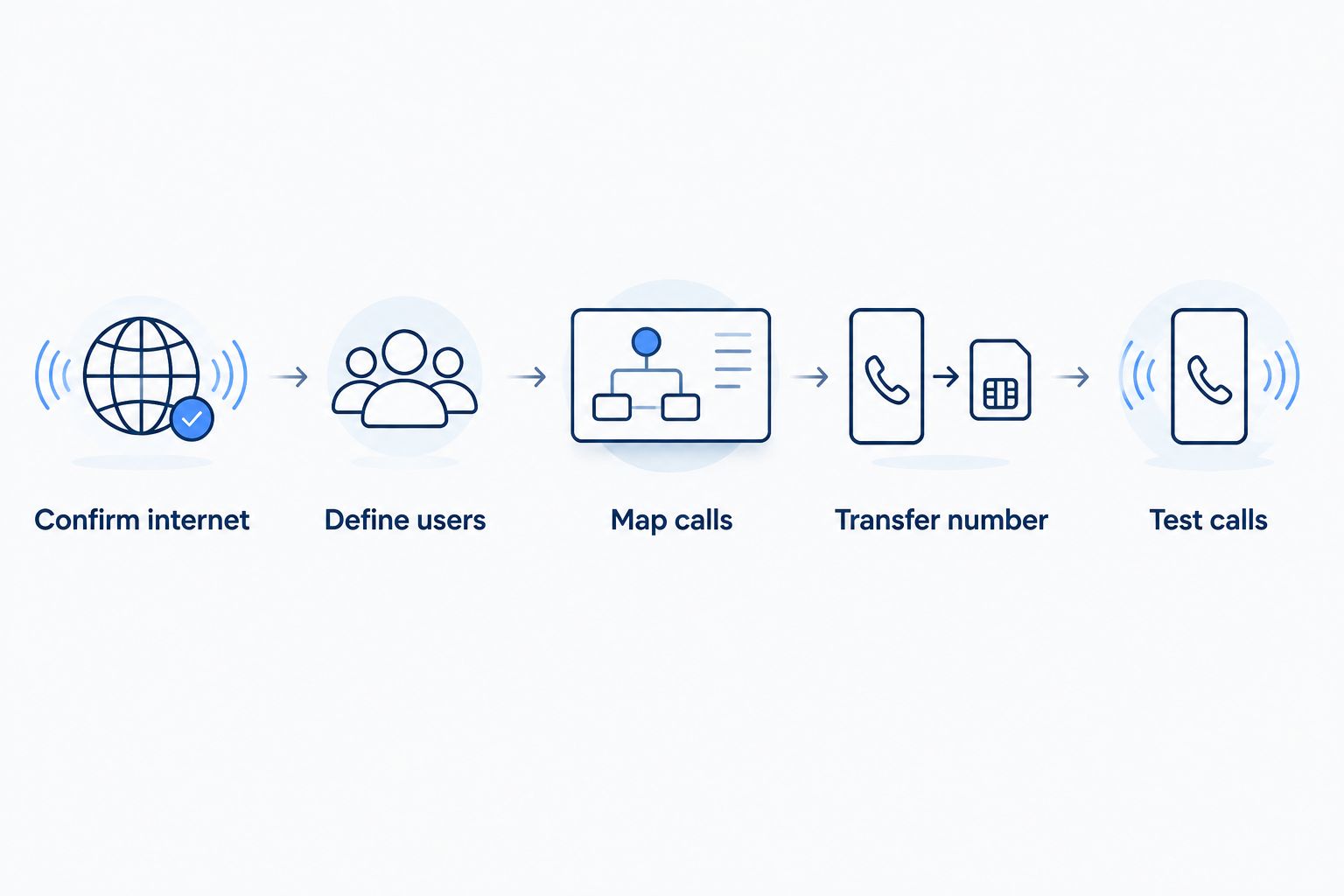
A provider can configure users and routing while a number transfer is pending. That distinction matters in 2026: configured does not mean customers can already reach your existing number on the new system. Ask which tasks can happen in parallel and which must wait for the confirmed cutover.
Why this matters
Your phone system is ready only when customers can reach the right person and staff can call them back. A login screen or a working test device does not prove that the main number, voicemail and after-hours routing work as intended. For a small business, those are the checks that turn setup work into an operating phone service.
The schedule also affects when you can safely end the old service. Keep the existing service active until the number transfer is confirmed and live calls pass your tests. That rule is more useful than a generic setup estimate because it gives you a condition you can verify.
Does a new number make setup faster than transferring one?
A new number removes the transfer of an existing number from the schedule. It does not remove user setup, device checks or call testing. Keeping your number preserves the number customers already use, but the transfer introduces a step that the phone configuration alone cannot finish.
| Choice | Best for | What still needs to happen | Trade-off |
|---|---|---|---|
| Start with a new number | A business that can publish a different contact number | Configure users, routing, devices and voicemail; test calls | You must update the places where customers find your number |
| Keep the current number | A business whose customers already call its established number | Complete setup and testing, then confirm the number transfer | The transfer can determine when the final switch happens |
| Use temporary calling while a transfer is pending | A business that needs to test its new setup before cutover | Confirm which temporary calling options the provider supports and test them | A working temporary number does not prove the existing number has transferred |
For 2026 planning, choose the row that matches how customers contact you, not the one that sounds quickest. If your current number appears on signs, invoices or customer records, changing it creates work outside the phone system. If the number is new and has not been published, a transfer provides no benefit.
Why hosted PBX setup time varies
These factors change the work required before you can switch. Ask the provider to identify which apply to your business and who owns each task.
- Number transfer: Keeping an existing number adds a request and a confirmed cutover. Ask what account details the provider needs and when it will confirm the transfer.
- Internet readiness: Calls need a working connection at each place staff will use the service. An internet installation or change belongs on the same plan as the phone switch.
- Users and devices: The provider needs an accurate list of users and a clear device plan. A desk phone and a computer application can require different checks.
- Call routing: A main line, departments, voicemail and after-hours calls need instructions. The person who knows how your business answers calls should approve them.
- Integrations: If staff need calls connected to another business application, establish whether the chosen phone system supports that connection and test it before relying on it.
- Testing and sign-off: Someone at the business must make and receive calls, listen to voicemail and check where unanswered calls go. Configuration is not complete just because an administrator can sign in.
The number-transfer date is not the whole schedule. A transfer completed before your call routing is tested can leave the main number pointing at a system your team has not approved. In 2026, request a cutover checklist as well as a date.
What should you give the provider before setup starts?
Give the provider a plain-language account of how calls work today and how you want them to work after the switch. You do not need to design the technical setup yourself. You do need to decide who answers, what happens when they cannot and which existing number must stay in use.
Start with these items:
- The business number you want to keep, if any, and the account details the new provider requests for a transfer.
- The people who need to make or receive calls, including anyone who works away from the main location.
- The devices staff expect to use, so the provider can confirm what its service supports.
- The path an incoming customer call should take during business hours and after hours.
- The person who can approve the setup and sign off on live-call testing.
- Any connection to another business application that staff consider necessary for their work.
Avoid describing the goal only as moving the phones. A restaurant might need a caller to reach whoever handles reservations when the usual person is busy. An office might need the main line to reach a shared group rather than a single desk. The provider can configure what you specify; it cannot infer an unspoken call-handling rule.
Can setup happen before the business number transfers?
Yes. Users, devices and call routing can be prepared before the existing number moves, provided the chosen service supports the planned setup. A provider can also tell you what calling can be tested before cutover. Treat those tests as preparation, not proof that customers dialing your established number will reach the new system.
Ask for two separate confirmations: that the setup is ready for live traffic and that the number transfer is complete. Then test the established number from outside the business. Check that it rings where expected, that an unanswered call follows the approved path and that staff can place outgoing calls.
If those checks fail, keep the old service in place and resolve the problem with the provider. Do not cancel the existing service just because the new phones can make a test call. In 2026, readiness means the customer-facing number works as well as the staff-facing devices.
When should you involve your internet provider?
Involve your internet provider before setting a phone cutover date if the business is installing or changing its connection. Confirm that service is working where calls will be taken. If staff use WiFi, check the rooms and work areas where they actually answer calls rather than assuming a connection at the front desk covers every location.
SumoFiber provides business internet, business phone service and managed WiFi. SumoFiber is best for a business that wants to discuss those services together rather than plan its connection and phones in isolation. Its support is staffed around the clock, but that is not a promised hosted PBX setup time. Ask SumoFiber which business phone capabilities are available at your address and what its setup process requires.
The trade-off is straightforward: discussing internet and phone service together can clarify who to contact about each part of a switch, but you still need written answers about number transfer, supported devices and call routing. Do not assume that a business phone service includes a particular hosted PBX feature without confirmation.
Discuss your business phone setup
Ask about service at your address, number transfer and the connection your calls will use.
What should you test before the final switch?
Test the calls your business cannot afford to lose. Use a phone outside the new system to call the main number, then try every path that matters during a normal workday. Have a staff member who handles customer calls confirm the result, not just the person configuring the system.
- Call the main number and check who answers.
- Leave a voicemail and confirm the right person receives it.
- Test what happens when the intended recipient is unavailable.
- Check the after-hours path if the business uses one.
- Place an outgoing call and confirm staff can use the device they plan to use every day.
- Test any required business-application connection in the way staff will use it.
Record failures in specific terms: the main line reaches the wrong person, or an unanswered call does not reach voicemail. That gives the provider something to fix. Once the tests pass, confirm the cutover with the people who answer calls and with the person responsible for the existing service.
FAQ
How long does hosted PBX setup take for a small business in 2026?
There is no fixed setup duration. Internet readiness, user configuration, number transfer and live-call testing determine when a small business can switch.
Can I set up hosted PBX before my number transfers?
Yes, configuration and some testing can happen before a number transfer. Confirm with the provider what can be tested early, then verify the established number after cutover.
Will a new business number speed up hosted PBX setup?
A new number removes the need to transfer an existing one. Users, devices, call routing and voicemail still need configuration and testing.
Should I cancel my old phone service before switching?
No. Keep the old service active until the number transfer is confirmed and calls to your established number work on the new setup.
Does hosted PBX require a working internet connection?
Yes, you need a working connection wherever staff will use the internet-based phone service. Confirm internet readiness before fixing a cutover date.
What should I test before using hosted PBX for customer calls?
Test incoming and outgoing calls, voicemail, unanswered-call routing and any after-hours path your business uses. Have someone who answers customer calls approve the results.
Does SumoFiber offer hosted PBX for my business?
Confirm hosted PBX availability and features directly with SumoFiber. SumoFiber offers business phone and internet service, but your setup depends on the service available at your address.
One last thing
In 2026, ask the provider for two separate dates or milestones: when the phone setup is ready to test and when your existing number is confirmed on the new service. Keeping those events separate prevents a configured system from being mistaken for a completed switch. The final decision is simple: if customers can reach the right person and staff can call back, the setup has done its job.


