Before bringing your own phone to SumoFiber mobile service, ask for approval of your exact device and confirmation of the activation method. An unlocked phone is not automatically compatible, and keeping your current phone number is a separate step. For a switch in 2026, keep your current service active until your new provider gives you transfer instructions.
- Bring own phone SumoFiber mobile: confirm device compatibility before changing service.
- An unlocked phone still needs a carrier compatibility check using its IMEI.
- Ask whether your exact phone will activate with a physical SIM or eSIM.
- Keep your current line active while arranging a phone-number transfer.
Why this matters
Your phone already holds the things you need: family messages, work contacts, banking apps, and photos. Keeping it avoids setting up a different handset, but changing mobile providers still requires checking how that handset connects.
Start with a request to confirm phone compatibility. Have your phone's exact model, its unlock status, and its IMEI ready. Share device identifiers through the provider's official support channel, not a public comment or social post.
Treat device compatibility, activation, and number transfer as separate checks. Passing one does not settle the others. A phone that connects successfully with a new number still needs a separate transfer process if you want to keep your existing number.
Can I bring my own phone to SumoFiber mobile service?
Get a device-specific answer before you switch. The useful question is not simply whether a phone brand works; it is whether your particular handset is accepted for activation and which features it will support.
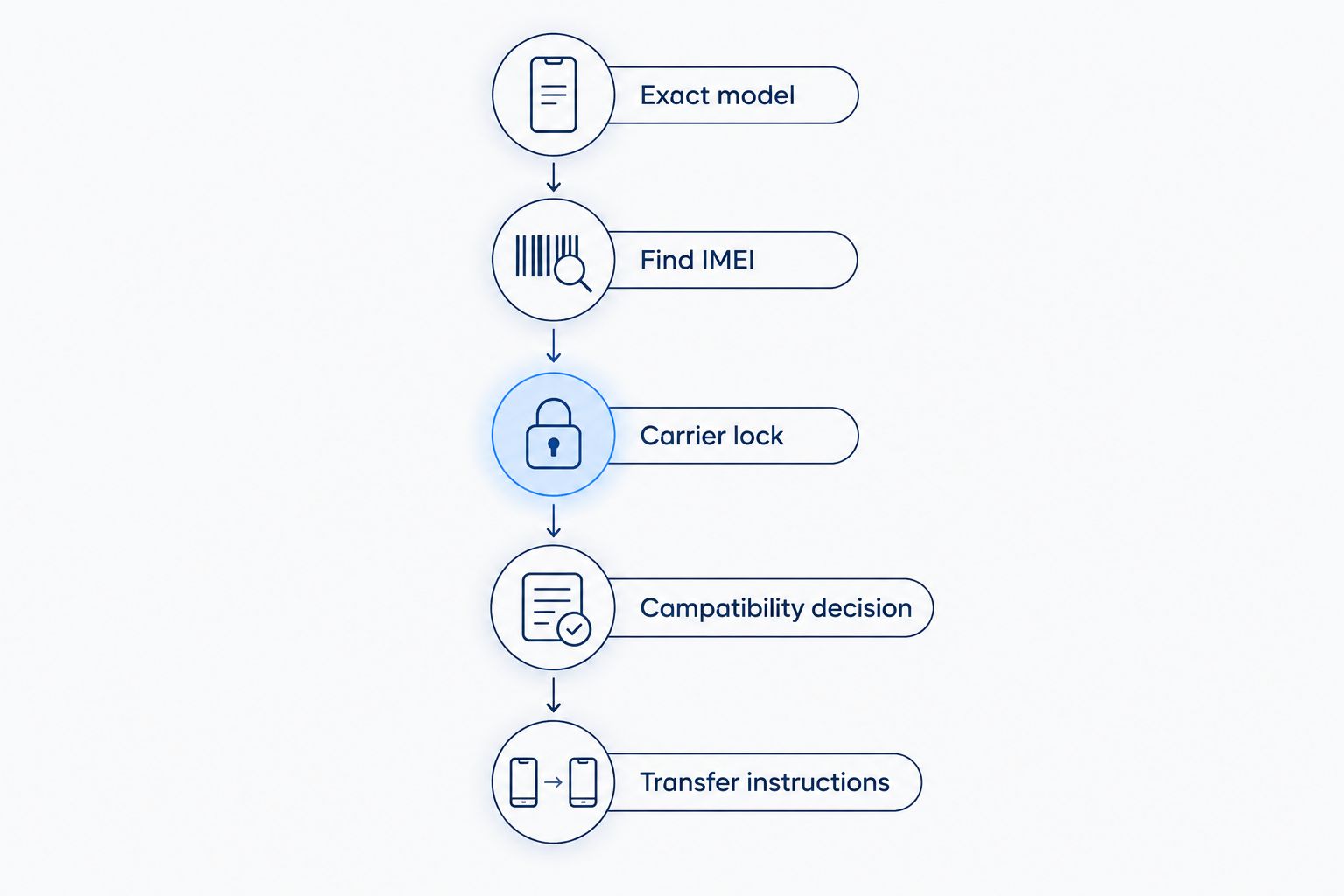
Use this sequence for your 2026 compatibility check:
- Find the exact model. Open your phone's device-information settings and record the model name and model number. Include the regional version if it is shown; phones with similar names can have different hardware.
- Find the IMEI. An IMEI is a 15-digit device identifier used to identify mobile equipment. Look in the device-information settings, or use the phone's IMEI display function where supported.
- Check the carrier lock. Ask your current carrier whether the phone is unlocked. Paying off a phone and unlocking it are different matters, so confirm both rather than assuming one settles the other.
- Request a compatibility decision. Give the receiving provider the requested device details through its official channel. Ask about calls, texts, mobile data, and any feature you depend on.
- Confirm activation and transfer instructions. Establish the SIM method and number-transfer requirements before making changes to your existing line.
Record the answer against the actual device, not just the phone family. If a household is moving several phones, check each handset separately rather than using one approval for everyone.
What should I have ready before asking?
Put the device details in one private note so you can answer questions without switching between several screens. Include the model number, IMEI, current carrier, and whether you want to keep your number.
Also write down features that matter to your household. That might mean WiFi calling in a room with weak cellular reception, picture messages to relatives, or a hotspot for occasional work. Ask about those features explicitly instead of treating basic activation as confirmation of everything.
Do not send account passwords or a phone's screen-unlock code. A compatibility inquiry is not a reason to give someone access to your photos, apps, or online accounts.
Physical SIM or eSIM: what should you confirm?
A physical SIM is a removable card. An eSIM uses a digital SIM profile on a compatible phone. Neither method proves that a carrier will accept the handset; confirm the supported method for your exact device before starting.
This table compares the activation methods generally, not provider-specific support.
| Activation method | Best for | Practical advantage | Limitation to check |
|---|---|---|---|
| Physical SIM | A supported phone with a compatible SIM tray | The card can be physically inserted or removed | A SIM tray alone does not establish network compatibility |
| eSIM | A supported phone and carrier activation process | No removable SIM card is needed | Both the handset and the receiving carrier must support the activation |
Use the activation method the receiving provider confirms for your handset. Do not order a SIM or delete an existing eSIM profile based only on what another phone supports.
What if my phone has more than one IMEI?
Some dual-SIM phones show more than one IMEI because they support multiple cellular connections. Ask which identifier the provider needs for the intended activation method.
Label the identifiers exactly as your settings screen labels them. Guessing which one to submit can create confusion, especially when a phone supports both a removable SIM and an eSIM.
For your 2026 switch, save the activation instructions somewhere you can open without cellular data. A second device or a downloaded copy helps you follow the instructions while changing the connection on your phone.
Why bringing your own phone depends on the device
An unlocked handset is a starting point, not a complete compatibility result. These factors explain why a phone can work with one mobile provider without automatically working the same way with another:
- Exact model and regional version. Similar-looking phones can support different cellular bands. Use the full model number instead of relying on the name printed on the box.
- Carrier-lock status. A carrier-locked phone restricts use with other providers. Your current carrier handles its unlocking process and eligibility requirements.
- Device eligibility. A handset reported lost or stolen can be blocked from cellular service. Check the device's status before trying to transfer it, particularly if you bought it used.
- SIM and software support. The phone needs a supported activation method and compatible software. Follow the provider's instructions about updates and setup rather than changing settings at random.
- Required calling features. Voice calling, messaging, WiFi calling, and hotspot use need their own confirmation where they matter to you. Basic data connectivity does not establish support for every feature.
A useful approval answers more than whether the phone turns on. It tells you whether the device can activate and whether the functions you rely on are supported.
If the answer is no, ask which check failed. Unlocking and hardware incompatibility are different problems; an unlock does not add cellular bands that the phone lacks.
Can I keep my phone number when I bring my phone?
Keeping your phone and keeping your number are separate requests. Ask the receiving mobile provider to confirm number-transfer eligibility and the information required from your current carrier.
That information commonly includes the account number and a transfer PIN or other carrier-specific authorization. Use the current carrier's instructions to obtain it, and keep those details private.
Do not cancel the existing line before the receiving provider tells you how to proceed. A number transfer depends on the existing account and number remaining eligible for transfer. Let the providers' instructions determine the order of changes.
Before starting in 2026, check the account holder's name and account details for accuracy. If the number belongs to a family or business account, make sure the authorized account holder is involved.
What if I am switching several family phones?
Create a separate entry for each phone number, handset model, and IMEI. It is easy to mix up devices when several people own similar phones.
Ask how to sequence the transfers and what happens to the remaining lines on your old account. Do not assume that transferring one number closes the whole account or preserves every other account arrangement.
Will changing mobile service erase my phone?
Changing a SIM or cellular plan does not itself factory-reset your handset. Your apps and stored content are separate from the mobile subscription, although contacts saved only to a removable SIM need attention before you remove it.
Back up the phone before making changes. Confirm that you can sign in to essential accounts and that you have another recovery method for accounts that send verification codes to your phone number.
If someone instructs you to reset network settings, read the device's explanation first. Network resets can remove saved connection settings; a factory reset is a different action that erases device content.
Should I remove my old SIM immediately?
Follow the activation instructions rather than removing or deleting the old connection early. Keeping the existing setup intact until the appropriate step gives you a working reference while the change is arranged.
For an eSIM, deleting the old profile is not the same as canceling the old account. Do not use profile deletion as an account-management shortcut.
What should I test after activation?
In 2026, a working WiFi connection can hide a cellular setup problem. Temporarily turn WiFi off when checking mobile data, then turn it back on after the test.
Complete these checks before considering the switch finished:
- Calls: Make 1 outgoing call and receive 1 incoming call. Check that the expected phone number appears to the other person.
- Messages: Send 1 ordinary text message and receive a reply. Test picture messaging separately if you use it.
- Mobile data: Open a webpage with WiFi turned off. This checks the cellular connection rather than your home internet.
- Voicemail: Confirm that callers can leave a message and that you can retrieve it.
- Everyday features: Test any confirmed WiFi calling or hotspot feature using the provider's setup instructions.
If something fails, write down what happened and whether WiFi was on. A precise description, such as incoming calls failing while outgoing calls work, is more useful than saying the phone does not work.
Avoid repeatedly changing several settings at once. Follow support instructions and test after each change so you can identify what fixed the problem.
Who should consider keeping an existing phone?
SumoFiber mobile is an option to evaluate if you want mobile service alongside its home connectivity services. The benefit to investigate is keeping a familiar handset while choosing your services; the limit is that your device still needs an individual compatibility decision.
Keeping your phone makes sense when it works well, still receives needed software updates, and meets your daily needs. It is less attractive when the handset already has battery, reliability, or security-support problems. Changing carriers does not repair the device itself.
Confirm your phone before switching
Ask about your exact handset, activation method, and number-transfer requirements.
FAQ
Can I bring my own phone to SumoFiber mobile in 2026?
Ask SumoFiber to confirm your exact phone's eligibility before switching. Provide the requested model and IMEI details, and confirm the activation method rather than assuming an unlocked handset will work.
Does an unlocked phone work with every mobile provider?
No. An unlocked phone still needs compatible cellular hardware and acceptance by the receiving provider. Unlock status and network compatibility are separate checks.
Where do I find my phone's IMEI?
Look in your phone's device-information settings for the IMEI, a 15-digit device identifier. If multiple IMEIs appear, ask the receiving provider which one it needs.
Can I use an eSIM instead of a physical SIM?
Use an eSIM only when both your exact handset and the receiving provider support that activation method. Confirm the process before deleting an existing eSIM profile.
Do I need to cancel my old service before transferring my number?
No. Keep your existing line active and follow the receiving provider's transfer instructions. Canceling first can interfere with keeping your number.
Will bringing my phone erase my photos and apps?
Changing cellular service does not itself factory-reset your phone. Back up your content first, and check whether any contacts are stored only on the old SIM.
What should I test after moving my phone to another provider?
Test incoming and outgoing calls, text messages, mobile data, and voicemail. Turn WiFi off temporarily when checking cellular data so your home connection does not mask a problem.
One last thing
A phone can appear to work while it is only using WiFi. Before relying on your new cellular connection, turn WiFi off briefly and make a call, send a text, and load a webpage. That simple check separates a successful mobile activation from a phone that is still depending on your router.