
For home phone call forwarding to mobile in 2026, activate a carrier-side forwarding rule and send incoming home calls to your 10-digit mobile number. Instead of checking home voicemail whenever you leave, set either all-call forwarding or no-answer forwarding so important calls follow you.
- Home phone call forwarding to mobile routes incoming home calls to a 10-digit mobile number.
- For Sumofiber customers away intermittently, no-answer forwarding is the best fit because the home handset rings first.
- All-call forwarding is better when nobody will be home; its drawback is that the home handset may stay silent.
- Confirm the activation and cancellation methods before leaving because forwarding codes vary by provider.
Why this matters
A home number often stays attached to medical offices, schools, relatives, local businesses, and long-running accounts. Forwarding preserves that familiar number while letting you answer away from the handset.
The setup also decides where unanswered calls land. If the home voicemail answers before the forwarding delay expires, the call never reaches your mobile. If mobile voicemail answers after forwarding, the message stays on the mobile side instead.
Sumofiber offers home phone and mobile services, but the supplied service details do not identify a universal forwarding code or account-menu path. The reliable 2026 workflow is to confirm the exact activation method through Sumofiber's 24/7 human support, configure the rule, test both answering and voicemail, and record how to turn it off.
For Sumofiber home phone customers who are away intermittently, no-answer forwarding is the best fit because the home handset gets the first chance to ring. If you are still choosing a service, compare forwarding support alongside voicemail and calling features in this guide to home phone providers.
Before you start
Have these items ready before changing the line:
- Account access: Use the account holder's name and any verification details support requests.
- Your full destination number: In the United States, enter the complete 10-digit mobile number, including the area code.
- A separate test phone: Do not test by calling the home line from the same mobile receiving forwarded calls. Use another mobile or ask someone to call.
- The cancellation method: Get the off command at the same time as the activation method. Turning forwarding on without knowing how to reverse it creates the most avoidable problem in this setup.
The non-obvious issue is voicemail timing. No-answer forwarding and home voicemail can compete for the same call. Ask which one answers first and whether the forwarding delay can be changed before you start.
Also confirm whether forwarding is applied in the provider's network or depends on equipment inside your home. That distinction determines what happens during a power, fiber, router, or phone-adapter outage.
Choose the forwarding rule
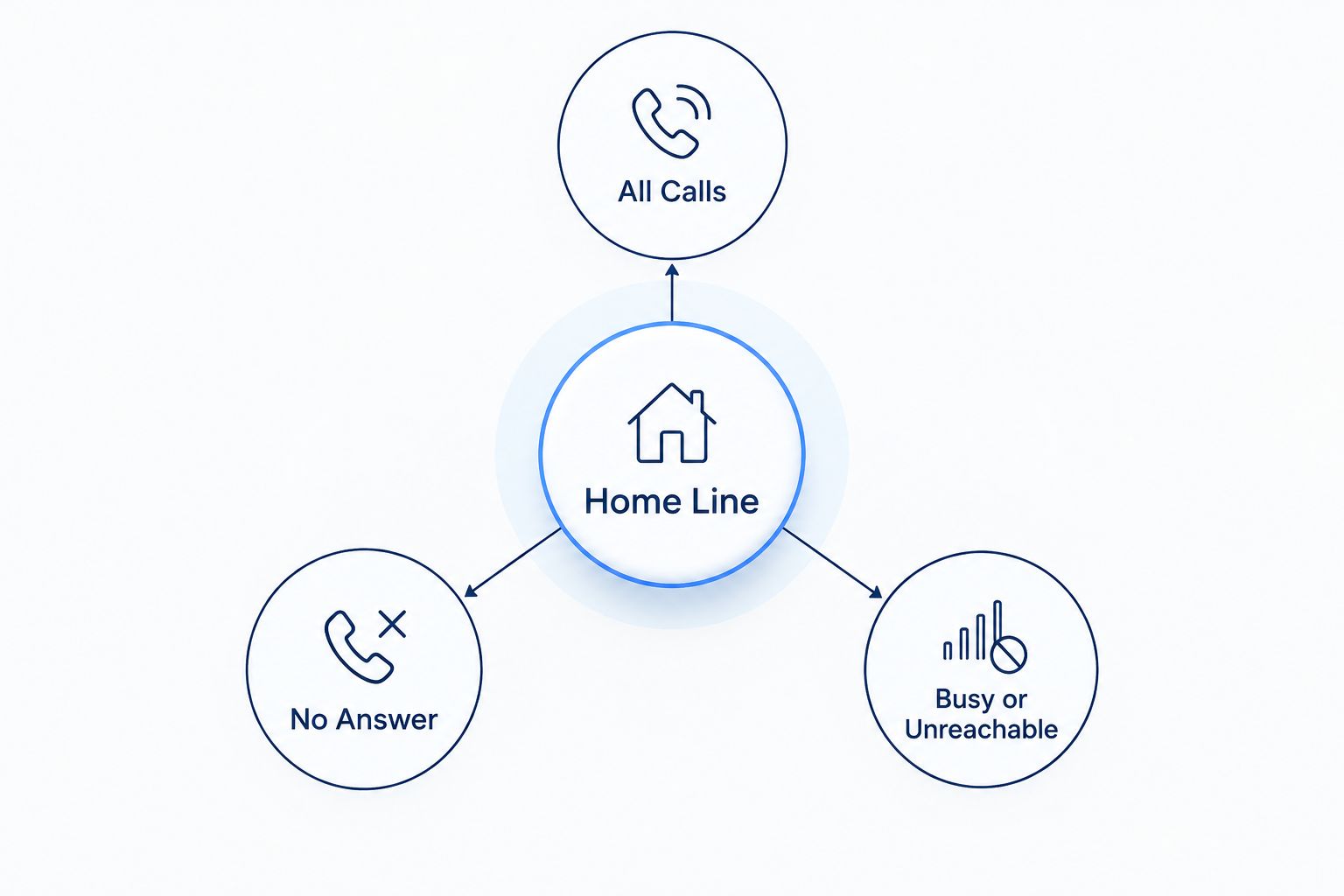
Three forwarding rules cover most household situations. Availability and names vary by phone service, so select the behavior first and then ask support for the matching feature.
| Forwarding rule | Best for | What happens | Main advantage | Main drawback |
|---|---|---|---|---|
| All calls | Vacations or an empty house | Every incoming call routes to your mobile | No waiting for the home handset | People at home may not hear incoming calls |
| No answer | Errands, workdays, and short trips | The home phone rings first, then the mobile | Someone at home can still answer | Home voicemail can intercept the call |
| Busy or unreachable | A line already in use or unavailable equipment | Calls route only under the selected condition | Keeps normal home calling behavior | It does not cover every missed-call situation |
There is no single winner for every household. Use all-call forwarding when the house is empty, and use no-answer forwarding when someone may still answer at home. Busy or unreachable forwarding works as a backup rule, not a full replacement for the other two.
Confirm your activation method
Do not assume that a code found online applies to your line. Many North American phone services use *72 to activate all-call forwarding and *73 to cancel it, but those codes are not universal. A provider can use different codes, an account setting, or a support-assisted change.
- Contact Sumofiber support and say you want to forward incoming home phone calls to a mobile number in 2026.
- Ask whether your line supports All-Call Forwarding, No-Answer Forwarding, and Busy or Unreachable Forwarding.
- Ask for the exact activation sequence, confirmation signal, and cancellation sequence for your specific line.
- Confirm whether the destination must include the area code and whether a leading
1is required. - Ask whether forwarded calls go to home voicemail or mobile voicemail when nobody answers.
- Write down the method before making any change.
Expected result: you have one verified activation method, one verified cancellation method, and a clear answer about which voicemail service receives unanswered calls.
Configure all-call forwarding
Use this configuration when you want the mobile phone to receive every incoming call immediately.
- Pick up the home handset and wait for a normal dial tone if support gave you a handset code.
- Enter the provider-confirmed activation sequence exactly as supplied. If support specifically confirms
*72for your line, dial*72rather than assuming it applies. - Enter the complete mobile destination number in the format support specified.
- Wait for the confirmation tone, recorded message, or completed confirmation call described by support.
- Keep the handset connected until that confirmation finishes.
- Call the home number from a separate phone.
- Answer on the mobile and keep the call connected for at least 30 seconds while checking audio in both directions.
Expected result: the destination mobile rings without requiring anyone to answer the home handset. Depending on the configured rule, the home phone may stay silent or ring at the same time.
Do not leave home immediately after the first successful ring. Complete the voicemail test and cancellation test below. A rule that forwards answered calls but mishandles voicemail is only partly configured.
Verify answering, voicemail, and cancellation
Testing requires more than seeing the mobile screen light up. Check the complete call path while you can still reach both phones.
- Make the first test call from a phone that is neither the home line nor the destination mobile.
- Answer on the mobile and confirm that both people can hear each other.
- End the call from the caller's phone and confirm the mobile disconnects normally.
- Make a second test call and let it ring without answering either device.
- Check whether the message appears in home voicemail or mobile voicemail.
- Use the provider-confirmed cancellation method.
- Make one final call and verify that the home handset rings normally again.
Expected result: you know where live calls and voicemail go, and you have proved that forwarding can be turned off without contacting support again.
Save the activation and cancellation instructions in your mobile contacts or notes. Use a clear label such as Home Phone Forwarding so another household member can find it in 2026.
Forward calls only when nobody answers
No-answer forwarding is the adjacent workflow for days when someone may remain at home. It preserves the normal home ring first, then sends the call to your mobile after the configured delay.
- Ask support for the no-answer forwarding method assigned to your line.
- Confirm how the delay is measured, such as rings or seconds, without assuming that you can change it yourself.
- Activate the rule using the supplied handset sequence, account control, or support-assisted process.
- Enter the complete 10-digit mobile destination number.
- Call the home number from a separate phone and do not answer the home handset.
- Confirm that the mobile rings before home voicemail takes the call.
- Repeat the test without answering the mobile and identify which voicemail system records the message.
Expected result: the home handset gets the first opportunity to answer, while missed calls continue to the mobile instead of ending at the house.
If the home voicemail answers first, the forwarding delay and voicemail pickup timing conflict. Support must change the relevant timing or recommend a different rule supported by the line.
Troubleshooting call forwarding
The mobile never rings
Verify the destination one digit at a time, including the area code. Then check that the mobile has service, is not in airplane mode, and is not silencing the test caller through a focus, blocking, or unknown-caller setting.
Cancel the rule and activate it again using only the method confirmed for your line. An online list of star codes is not proof that a specific provider supports those codes in 2026.
The home handset and mobile ring together
The line is using simultaneous ringing or an all-call configuration that includes both endpoints. If you want the home phone to ring alone first, request no-answer forwarding instead.
This behavior is not necessarily a setup failure. It is the wrong routing rule when your goal is a delayed handoff.
Home voicemail takes the call first
The voicemail pickup occurs before the no-answer forwarding trigger. Ask support whether the forwarding delay or voicemail timing can be changed. Do not repeatedly shorten and lengthen settings without knowing which system controls each timer.
Mobile voicemail receives every message
That is the expected result when the forwarded call reaches the mobile and its voicemail answers. If your household relies on home voicemail, choose a rule and timing arrangement that leaves unanswered calls there, if your service supports it.
Forwarding fails during an outage
Ask whether the rule lives in the provider network or depends on powered equipment at home. Network-side routing can behave differently from forwarding that requires an active phone adapter, router, or local connection.
If staying reachable during a fiber interruption matters, review the separate workflow for automatically switching to cellular backup when fiber drops. Test outage behavior before treating forwarding as part of an emergency plan.
You cannot turn forwarding off
Use the cancellation method supplied for the exact rule you activated. All-call, no-answer, and busy forwarding can have different cancellation commands. After cancellation, place a test call and verify the home handset rings before assuming the change worked.
Customize your workflow
Once the basic route works, match it to how your household actually uses the phone.
- Use all-call forwarding for a fully empty house. This removes the delay before your mobile rings.
- Use no-answer forwarding for mixed schedules. A person at home still gets the first chance to pick up.
- Decide which voicemail owns missed calls. Tell everyone where messages will appear while forwarding is active.
- Keep the off method beside the on method. Recording only half the workflow guarantees confusion later.
- Retest after changing mobile numbers. The old destination remains wrong until the forwarding rule is updated.
- Review outage behavior separately. Call routing, home internet backup, and mobile coverage solve different failure points.
Do not forward the home line to itself, and do not use call forwarding as a substitute for emergency calling. Forwarding handles inbound calls; it does not transfer the location information associated with an outbound 911 call.
FAQ
How do I set up home phone call forwarding to mobile?
Confirm the forwarding method with your home phone provider, activate the chosen rule, and enter your complete 10-digit mobile number. Test answered calls, voicemail, and cancellation before leaving home.
What code forwards a home phone to a mobile?
Many North American services use *72 to activate all-call forwarding and *73 to cancel it, but the codes are not universal. Confirm the exact sequence for your Sumofiber line before dialing it.
Can my home phone ring before the call goes to my mobile?
Yes, no-answer forwarding is designed to ring the home phone first and route the call afterward. The forwarding delay must occur before home voicemail answers.
Will call forwarding work when my home internet is down?
It depends on whether forwarding is applied in the provider network or relies on powered equipment at your home. Confirm the outage behavior for your specific phone configuration and test it directly.
Where does voicemail go when home calls are forwarded?
Voicemail goes to whichever answering system takes the call first. With all-call forwarding, that is often mobile voicemail; with delayed forwarding, home voicemail can answer before the transfer.
Can I forward a home phone automatically whenever I leave?
Only if the service includes a supported schedule, presence rule, or similar automation. Basic forwarding normally uses an on-and-off command or a condition such as no answer.
Does home phone call forwarding affect 911?
Call forwarding handles incoming calls and does not move the emergency location tied to an outbound 911 call. Place emergency calls from the device and connection available at your actual location.
Does home phone call forwarding cost extra in 2026?
Charges depend on the current phone plan and how forwarded calls are billed. Confirm the applicable terms with the provider before activating the feature.
One last thing
The best 2026 setup includes a return test, not just an activation test. Cancel forwarding while you are still beside the home handset, call the number from a separate phone, and verify that the handset rings again.
That final check catches an incorrect cancellation code before weeks of calls continue going to the wrong device. Add the test to any travel checklist that includes turning forwarding on or off.


