

Yes, you can add mobile service without switching your home internet provider by choosing a mobile plan that allows standalone enrollment. Some internet-linked mobile plans require an eligible home internet account, so check that condition before signing up. In 2026, the deciding factor is the mobile plan’s eligibility rules—not which company supplies your home WiFi.
- Can I add mobile service without switching internet provider? Yes—choose a mobile plan that permits standalone enrollment.
- Standalone mobile keeps your home internet separate; internet-linked mobile can require an eligible broadband account.
- SumoFiber offers mobile and home internet services; confirm standalone mobile eligibility before enrolling.
- Check cellular coverage, phone compatibility, and number-transfer requirements before changing your mobile service.
Can I add mobile service without switching my home internet provider?
Yes. A standalone mobile plan lets you keep your existing home internet service. Your phone uses the mobile provider’s cellular network away from WiFi and can connect to your existing home WiFi when you return.
An internet-linked mobile plan is different. Enrollment can depend on having home internet with the same company. Read the eligibility terms rather than assuming that every provider selling both services requires a bundle.
For the account relationship behind these offers, see how mobile service works when bundled with home internet.
| Mobile arrangement | Best for | Main advantage | Main limitation | What to verify |
|---|---|---|---|---|
| Standalone mobile | Keeping home internet unchanged | You choose mobile independently of broadband | You manage the services separately | Enrollment does not require that company’s home internet |
| Internet-linked mobile | Households considering both services from one provider | The provider offers a connected service relationship | Mobile eligibility or terms can depend on broadband | What happens if you keep or later cancel home internet |
The practical distinction is simple: 2 separate services do not have to come from the same company. But a particular offer can connect them through its account rules.
Why this matters
You do not need to disturb a working home internet connection just because you want a different mobile plan. The kids can keep streaming through the same router while you change the service on your phone.
The reverse is also true. Moving your home internet does not automatically mean you must move your mobile service. Treat each decision separately unless the provider’s terms explicitly connect them.
For a 2026 purchase, start with the change you actually want. If your phone coverage is the problem, investigate mobile coverage. If your home video calls keep dropping, changing mobile service alone does not fix the home connection.
Standalone mobile: keep your home internet unchanged
Best for: households satisfied with their current home internet. A standalone mobile plan separates the phone decision from the broadband decision. You can evaluate cellular coverage, device support, and mobile account terms without replacing your home router or arranging a broadband installation.
That independence is the main advantage. Your home internet keeps serving laptops, TVs, and other connected devices while your phone moves to the new cellular service.
The trade-off is separate account management. You need to know which company handles a mobile issue and which handles a home internet issue. A failed cellular call and a disconnected home laptop are different problems, even when both happen in the same room.
Before enrolling, ask a direct question: Does this mobile plan require home internet from your company? Get the answer for the specific plan you intend to order, not just for the provider in general.
Internet-linked mobile: check the broadband requirement
Best for: households deliberately considering a connected internet and mobile arrangement. An internet-linked offer can make sense when you want to evaluate both services together. It is not the right starting point when your only goal is changing mobile and the offer requires switching broadband.
The benefit is the connected service relationship. The limitation is that your mobile terms can depend on another account remaining active. Do not assume that shared ownership guarantees a single bill, a single login, or identical support arrangements.
Ask what happens if the home internet account closes. Does mobile service continue? Do its terms change? Does the account need to be reorganized? The answers belong in your decision before you enroll.
In 2026, compare the ongoing arrangement rather than just the sign-up experience. A plan that fits today should also make sense if you move house or change broadband later.
Why mobile eligibility varies
Whether you can add mobile without switching internet depends on the offer and the phone you want to use. Check these factors separately:
- Account eligibility: A standalone plan and an internet-linked plan can have different enrollment requirements.
- Cellular coverage: Your existing home internet does not determine cellular reception at work, on your commute, or elsewhere.
- Phone compatibility: The new provider must support the device you intend to activate.
- Device lock status: A phone locked to its current carrier needs to meet that carrier’s unlocking requirements before use elsewhere.
- Number transfer: Keeping your existing number requires following the receiving provider’s transfer process.
- Service dependencies: Broadband cancellation can affect an internet-linked mobile arrangement; check the terms before separating services.
Keep eligibility, coverage, and compatibility separate. A plan can allow standalone enrollment while still being unsuitable for your phone or the places where you use it.
How do I add mobile while keeping my home internet?
Use this sequence for a 2026 mobile change. It keeps the broadband decision out of the process unless the plan itself requires otherwise.
1. Check eligibility
Ask whether the mobile plan can be opened without buying or changing home internet. Also confirm whose name must be on the account and what information is required to enroll.
Be precise about the change. Adding 1 mobile line with a new number is different from moving an existing number from another carrier. Tell the provider which action you want so you receive the correct activation instructions.
2. Check coverage
Review coverage where you actually use your phone: home, work, school pickup, and your usual travel routes. A phone working well on home WiFi does not demonstrate good cellular reception.
Ask how to evaluate coverage before moving your existing number. Do not assume that a trial or temporary activation is offered; confirm the provider’s process and terms.
3. Check compatibility
Use the provider’s device-checking process for your exact phone. A model name alone is not enough to resolve every compatibility question, so have the device information ready.
Confirm whether activation uses a physical SIM or eSIM and whether the phone is unlocked. If you plan to keep an existing cellular line while adding another, check the phone’s support for that arrangement too.
4. Activate service
Follow the new provider’s instructions. If you are transferring a number, keep the old mobile service active until the transfer is complete rather than canceling it first.
Test calls, texts, and cellular data after activation. Leave your home internet account alone unless you have separately decided to change it.
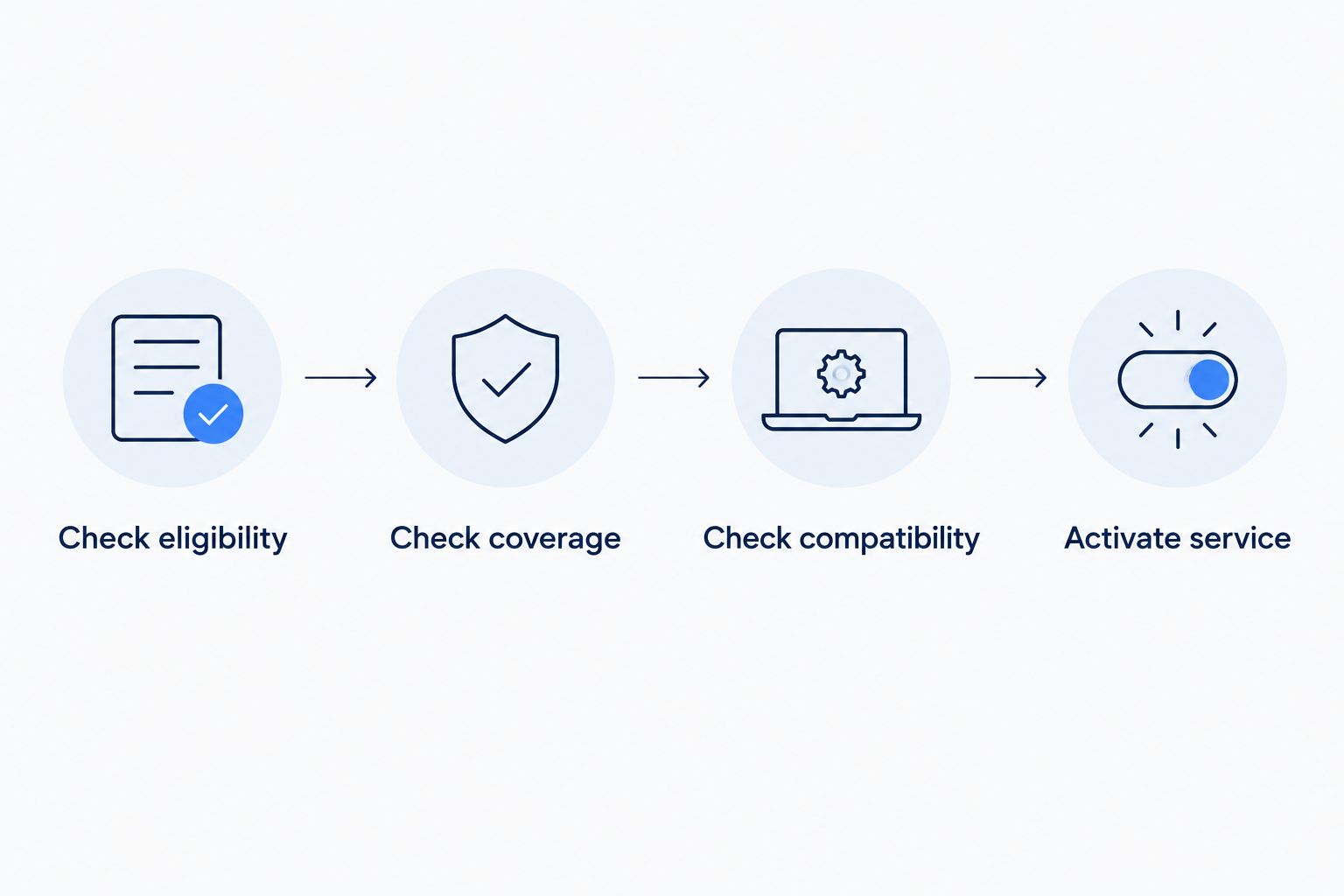
Your completed checklist should explain what changes on the phone and what stays unchanged at home. If the enrollment process unexpectedly adds broadband service, stop and clarify the requirement before accepting it.
Where SumoFiber fits into the decision
SumoFiber offers residential and business internet, managed WiFi, TV, home phone, and mobile services. SumoFiber is best for shoppers who want to consider those services from one provider. That service range makes it relevant when you are deciding whether to keep services separate or consider them together.
The benefit is being able to discuss several service needs with the same provider. The limitation for this particular question is that a broad service range does not, by itself, establish standalone mobile eligibility or phone compatibility.
Ask SumoFiber whether mobile enrollment requires its home internet service. Then confirm coverage, device support, and the activation steps for your intended line. Those answers—not the fact that both services are offered—determine whether the arrangement fits your goal.
Can I keep my mobile number without changing home internet?
Yes, keeping your mobile number does not require changing your home internet. Number transfer concerns the mobile accounts, while your broadband account remains a separate service.
Ask the new mobile provider what transfer information it needs, and do not cancel the old cellular line before the transfer completes. Confirm the number works on the new service before closing out anything that remains on the old account.
Will my phone still work on my current home WiFi?
Yes, changing mobile providers does not require changing your home WiFi. Your phone can connect to the existing wireless network using its network name and password.
WiFi calling is a separate feature that depends on the phone, carrier, and settings. If you rely on it for calls indoors, confirm support before moving your line.
Can I add a line without switching my current mobile number?
Yes, you can request a new mobile line rather than transfer your existing number. Confirm the provider’s enrollment requirements and whether you want the new line on a separate phone or on a compatible device alongside your current line.
For a household with 2 phones, moving one phone does not automatically require moving the other. Each line still needs its own eligibility, compatibility, and activation checks.
What should stay unchanged at home?
When you add standalone mobile, your home internet account should remain outside the order. The router, WiFi network, and broadband-connected devices do not need a new internet provider just because your phone has a new cellular provider.
A useful 2026 check is to read the order summary before approving it. Make sure it describes the mobile service you requested and does not include a home internet change you did not intend.
Then distinguish the tests. Check your phone’s cellular connection with WiFi turned off, and check your home internet using a device connected to the home network. This prevents a working WiFi connection from hiding a mobile activation problem.
FAQ
Can I add mobile service without switching internet provider in 2026?
Yes, you can add mobile service without switching your internet provider by choosing a plan that permits standalone enrollment. Check whether the specific mobile offer requires an eligible home internet account.
Do my mobile provider and home internet provider have to be the same company?
No, your mobile provider and home internet provider do not have to be the same company. A particular internet-linked mobile offer can still require broadband service from that provider.
Can I keep my phone when adding a different mobile service?
You can keep your phone if the new provider supports it and it meets any unlocking requirements. Check the exact device through the new provider’s compatibility process before enrolling.
Should I cancel my old mobile service before transferring my number?
No, keep your old mobile service active until the number transfer is complete. Follow the receiving provider’s instructions and test the transferred number afterward.
Will changing mobile service affect the WiFi my family uses at home?
Changing mobile service does not require changing your family’s home WiFi. Keep the broadband account unchanged and connect the phone to the existing wireless network.
Does adding mobile automatically give me backup internet for my house?
No, adding mobile service does not automatically create backup internet for your house. Phone hotspot use and automatic cellular failover require their own plan, device, and equipment checks.
Can I cancel home internet later and keep an internet-linked mobile plan?
Whether you can keep an internet-linked mobile plan after canceling broadband depends on the provider’s terms. Confirm continued eligibility and any account changes before canceling home internet.
One last thing
Test cellular service with WiFi switched off. Otherwise, your unchanged home internet can make the phone appear connected even when mobile data is not working as expected.
Once that test is complete, turn WiFi back on. You have checked the new service without asking anyone at home to pause their stream or disconnect a laptop.


