
Mobile service bundled with home internet gives you two services from one provider: a home connection for your household and a cellular connection for your phone when you leave WiFi. The bundle ties the services together commercially, not technically, so you still need to check cellular coverage, phone compatibility, mobile data rules, and what happens to your mobile account if you cancel home internet.
- How does mobile service work bundled with home internet? Home internet and cellular service remain separate connections.
- Sumofiber offers fiber internet and mobile services; assess each service before choosing one provider for both.
- WiFi connects your phone through your home internet; cellular data connects it through a mobile network.
- A bundled mobile plan does not automatically give your home router cellular backup.
Why this matters
A phone that works well on your couch does not prove that its cellular connection works well on your commute. At home, WiFi can carry your internet traffic. Outside, your phone depends on cellular coverage unless you join another WiFi network.
Choose the mobile connection for where you take your phone, not just where you keep your router. Sumofiber offers both fiber internet and mobile services, but that service mix alone does not establish the cellular network, billing arrangement, or terms of a particular bundle. For a 2026 decision, check those details separately.
How does mobile phone service work when bundled with home internet?
You sign up for home internet and mobile service through the same provider, subject to that provider's enrollment terms. Your home internet connects your router to the internet. Your mobile line connects a compatible phone to a cellular network through a physical SIM or an eSIM.
The phone can use either connection for internet access. When it joins your home WiFi, its internet traffic generally travels through your router and home connection. When it uses cellular data, that traffic travels through the mobile network instead.
Bundling does not turn your fiber connection into a cell tower. It also does not mean that your phone number, home router, and mobile data allowance become one shared technical service.
| Arrangement | Best for | Main advantage | Main limitation |
|---|---|---|---|
| Bundled home internet and mobile | Households considering one provider for both services | You can discuss both services with one provider | Account dependencies can make changing one service more complicated |
| Separate internet and mobile providers | Households choosing each connection independently | You can select home internet and cellular coverage separately | You manage separate provider relationships |
Neither arrangement fixes weak indoor WiFi or poor cellular reception by itself. A bundle is an account choice, not a coverage upgrade.
What happens when your phone connects to home WiFi?
Your phone joins the router's wireless network and uses the home internet connection for activities such as browsing, streaming, and app downloads. That is why a phone can have working internet access over WiFi even when cellular reception is weak.
For ordinary internet traffic, WiFi use generally does not count as cellular data use. Phone settings can still allow cellular activity when WiFi is weak or unavailable, so check the device's mobile data controls rather than assuming every activity at home stays on WiFi.
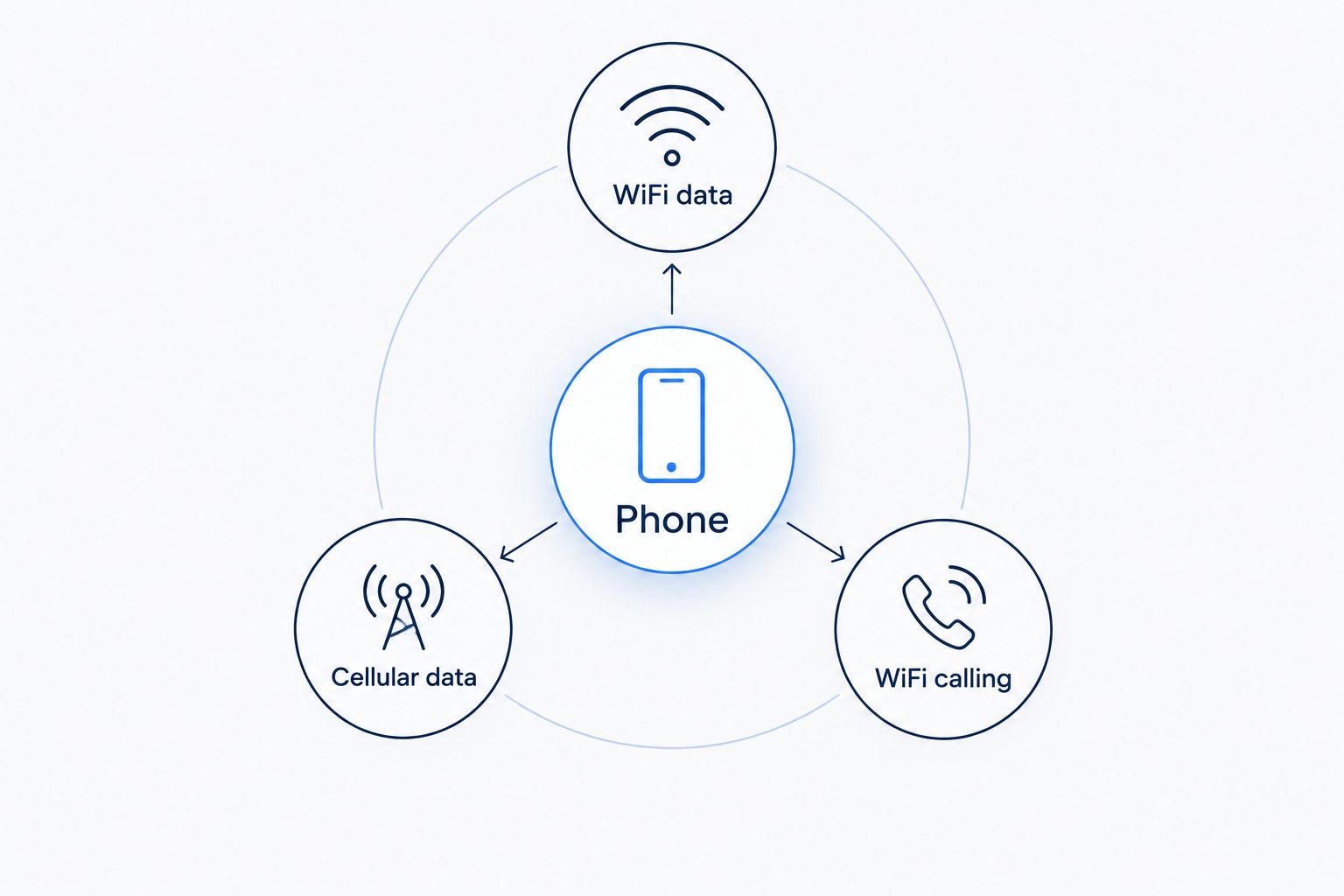
WiFi data
WiFi data is internet traffic carried through a wireless router. At home, the router passes that traffic through your home internet service. The phone still needs a usable WiFi signal where you are sitting.
If a video plays beside the router but stalls in a back bedroom, the difference points toward the local wireless connection. Bundling your mobile line does not change the walls, distance, or interference between the phone and router.
Cellular data
Cellular data uses the mobile network rather than your home router. Your mobile plan's terms govern that connection, including any data allowances, traffic-management rules, or hotspot restrictions.
When you leave the house, your phone can use cellular data without a connection to your home WiFi. The home internet service does not need to carry that traffic. Account eligibility is a separate question: some bundle terms tie mobile enrollment or benefits to an active home internet account.
WiFi calling
WiFi calling allows a supported phone and mobile service to carry calls over WiFi. It requires support from both the device and the mobile provider, along with the appropriate settings.
Do not confuse WiFi calling with a separate home phone service. WiFi calling uses your mobile line; home phone service is a different service arrangement. During setup, follow the mobile provider's instructions for emergency address information and understand its emergency-calling limitations.
These distinctions still matter in 2026: WiFi data, cellular data, and WiFi calling describe different functions, even when the same phone handles all of them.
How do you set up a mobile and home internet bundle?
Treat enrollment as two connected decisions, not one automatic activation. Home internet installation and mobile activation involve different equipment, eligibility checks, and account information.
Confirm the home connection
Check the exact service address, not just the city. A provider serving your community does not establish service eligibility for every building or unit.
Ask what home equipment you will use and who handles its setup. Keep the home internet installation separate from the phone activation in your planning; completing one does not prove that the other is ready.
Check the mobile network
Ask which cellular network carries the mobile service and review coverage for the places you actually visit. Include your home, workplace, regular driving routes, and places where you need dependable access.
A coverage map is a starting point, not proof of indoor reception. Building materials and your location inside a building affect the signal. If dependable calling matters in a particular room, test that room rather than relying only on an outdoor result.
Check the phone
Give the provider the phone's exact model and, through its approved compatibility process, the device identifier it requests. A phone being unlocked does not by itself establish compatibility with every mobile service.
Confirm whether activation uses a physical SIM or an eSIM. If you need to keep a work line and personal line on the same device, ask whether that exact phone supports the intended setup.
Transfer the number
If you want to keep your existing mobile number, request a number transfer through the new provider. You will need the information required by the current carrier, such as the account number and any transfer PIN.
Keep the existing line active until the transfer finishes. Canceling it first can complicate keeping the number. Use account information exactly as recorded by the current carrier, and verify incoming calls after activation.
Test both connections
After activation, test calls, texts, and internet access with WiFi switched off. Then reconnect to WiFi and check the functions you expect to use at home, including WiFi calling if supported.
Also test away from home. A successful WiFi test confirms the home connection, not the mobile network. Save the activation instructions and account details somewhere you can access without depending on the newly activated phone.
For a 2026 switch, this sequence keeps a working home connection from hiding an unfinished mobile activation.
Why bundled mobile service works differently between plans
The word bundle does not describe a standard set of mobile features. Check the terms that control your actual use, especially the relationship between the home account and mobile lines.
- Cellular coverage: The underlying mobile network determines where the phone can connect away from WiFi. Home fiber coverage and cellular coverage are different maps.
- Phone compatibility: The exact device, its lock status, and the supported SIM method affect whether you can activate it.
- Mobile data rules: The plan determines how cellular data is treated. Read any conditions attached to usage, traffic management, and roaming.
- Hotspot access: Phone tethering is a mobile-plan feature. It does not automatically follow from having home internet with the same provider.
- Account dependencies: Confirm whether mobile service requires an active home internet account and what changes when either service ends.
- Billing and support: Ask whether you receive one statement, separate statements, or separate account logins. One provider does not necessarily mean one billing workflow.
Do not carry assumptions from an old plan into a new 2026 agreement. Keep a copy of the service terms that apply when you enroll, and identify which rules apply to home internet versus mobile service.
Does bundled mobile service work when home internet goes down?
Bundled mobile service can keep working during a home internet outage if the cellular network remains reachable and the mobile line is active. The phone's cellular connection is technically separate from the home router and fiber connection.
That separation is useful when the router loses its internet connection. Turn off WiFi on the phone to test whether cellular data works, rather than waiting for every app to recognize the failed WiFi connection.
It is not a guarantee against every outage. A wider disruption can affect multiple networks, and a phone still needs power and cellular reception. If WiFi calling depends on the failed home connection, use an available cellular connection instead.
Does that give my whole home cellular backup?
A mobile line does not automatically give your whole home cellular backup. A phone hotspot can share a cellular connection if the phone and plan support it, but your home devices must connect to that hotspot.
Automatic router failover is a separate setup involving compatible equipment and service. Do not assume the router switches to your mobile line simply because both accounts belong to the same provider.
If you need continuity for work, decide which devices must remain connected during an outage. A laptop joining a phone hotspot is a different requirement from keeping a household router and all its connected devices online.
Can I cancel home internet and keep the bundled mobile line?
Keeping a bundled mobile line after canceling home internet depends on the provider's account terms. The technical independence of cellular service does not establish permission to keep the same mobile arrangement after the home account closes.
Ask this question before enrollment and again before cancellation. Get a clear answer about whether mobile service continues, whether its terms change, and whether you must transfer the number elsewhere.
Moving deserves the same attention. Your mobile phone can travel with you, but your home internet service is tied to an address. If the new address cannot use the home service, establish what that means for the mobile account before closing anything.
Check the exit rules as carefully as the signup rules. A convenient arrangement today should not leave you uncertain about keeping your phone number tomorrow.
When is one provider a sensible choice?
Sumofiber is a fit for households considering fiber internet and mobile service from the same provider. Its stated service offering also includes managed WiFi, TV, and home phone, so households can ask about more than the home connection alone.
The benefit is the opportunity to discuss those services with one provider. The limitation is that a service list does not establish how mobile coverage, device compatibility, billing, or cancellation works for your account.
Before choosing Sumofiber for bundled fiber internet and mobile service, confirm those details against your household's needs. A parent taking calls outside the house needs dependable cellular coverage; a child streaming in a bedroom needs a working WiFi connection. Buying both services together does not remove either requirement.
For your 2026 shortlist, choose on those separate needs first. Treat account convenience as an additional benefit, not a substitute for a connection that works where you use it.
FAQ
Does bundling mobile and home internet put everything on one network?
No. Home internet and cellular service remain separate connections, even when one provider sells both. Your phone uses the connection selected by its settings and the networks it can reach.
Do I need to stay near my home router to use bundled mobile service?
No. An active mobile line uses cellular coverage away from your home router. WiFi access is separate and depends on being within reach of a WiFi network.
Does using my phone on home WiFi use mobile data?
Ordinary internet traffic over home WiFi generally does not use your cellular data allowance. Check phone settings because some features allow cellular data when WiFi is weak or unavailable.
Can I keep my mobile number when I switch to a bundle?
You can request a transfer of an eligible existing mobile number. Keep the current line active and provide the account information and transfer credentials required by the carriers.
Is bundled mobile service the same as home phone service?
No. Mobile service connects a mobile line through a cellular network, while home phone service is a separate offering. WiFi calling on your mobile phone does not turn it into a home phone account.
Will a mobile bundle automatically back up my home internet?
No. Automatic home internet backup requires a separate, compatible failover arrangement. A supported phone hotspot can provide a temporary connection for devices you connect to it.
Does Sumofiber offer both fiber internet and mobile service?
Yes. Sumofiber's stated offering includes fiber internet and mobile service for households and businesses. Confirm the mobile network, compatible devices, and applicable account terms before choosing both services.
What should I check before choosing a bundle in 2026?
Check cellular coverage, phone compatibility, mobile data rules, hotspot access, and cancellation dependencies. Confirm billing arrangements separately rather than assuming that one provider means one statement.
One last thing
Test the mobile service with WiFi turned off. It is the simplest way to stop a good home connection from masking a cellular problem.
Make a call, send a text, and open a page in the places where you need your phone to work. Then reconnect to WiFi and test again. Those checks answer two different questions: whether the mobile line works where you use it, and whether the home wireless connection reaches where you sit.


