

Fiber internet can work during a power outage, but only while your fiber terminal, router, and any other required equipment have power and the provider’s network remains operational. A battery backup can keep your home equipment running; it cannot repair a damaged fiber line or restore an upstream network outage.
- Does fiber internet work during a power outage? Yes, if home equipment has backup power and the provider’s network works.
- Back up the fiber terminal and router, not just the WiFi equipment you can see.
- Battery backup covers a power loss; cellular backup provides a different connection when fiber service fails.
- Sumofiber customers should confirm which equipment at their address needs backup power before choosing a battery.
Why this matters
Your laptop can still have battery life while your internet connection is completely offline. The equipment connecting your home to the fiber network usually depends on electricity from an outlet, even though the fiber cable carries light rather than electrical signals.
Plan for lost power and lost internet separately. If the lights are on but websites will not load, start with how to check whether your internet service is down. Buying a battery does not solve every kind of outage.
Does fiber internet work during a power outage?
Yes, provided the entire connection still works. Your home equipment needs electricity, the network serving your address needs to remain operational, and the fiber path between them must be intact.
The fiber strand itself does not need an electrical outlet. The electronic equipment that sends, receives, and routes your traffic does. That distinction explains why a working fiber network does not automatically mean working WiFi in a dark house.
| Outage situation | Will internet work? | What determines the result? |
|---|---|---|
| Home loses power; internet equipment has no backup | No, once required equipment loses power | The fiber terminal and router stop operating |
| Home loses power; all required equipment has backup | Yes, if the provider’s network remains operational | Battery runtime and the condition of the network |
| Router has backup; separate fiber terminal does not | No, if the terminal loses power | The router cannot reach the fiber network |
| Home equipment has power; upstream network is down | No, not through that fiber connection | The provider must restore service |
| Fiber cable is damaged | No, not through the damaged connection | Backup electricity cannot fix a broken cable |
For your 2026 outage plan, identify the equipment involved before shopping for backup power. A router glowing on a shelf is not proof that the connection outside your home is working.
Which equipment needs backup power?
Start where the fiber enters your home and follow the connection toward the device you use. Some installations combine functions in one box; others use separate equipment in different rooms.
Fiber terminal: keep the incoming connection powered
The optical network terminal, often called an ONT, connects the fiber service to your home network. It needs electrical power to operate.
Look for its power supply without opening equipment or disconnecting the fiber. If the terminal is in a garage, utility closet, or shared building area, do not assume the battery beside your living-room router supplies it.
Router: keep your home network running
The router connects your devices to the internet connection. In many homes, it also supplies WiFi.
A powered router can broadcast a WiFi network without having internet access. Your phone showing the usual WiFi name only confirms that it can see the wireless network, not that websites or video calls will work.
Other equipment: trace the actual path
A separate WiFi access point, network switch, or other powered device can sit between your computer and the router. If that equipment loses power, the devices depending on it can lose their connection too.
You do not necessarily need to power every device in the house. Keep the equipment required for your chosen connection running, rather than trying to preserve your entire normal setup. A charged laptop connected near the main router needs less supporting equipment than a distant office reached through several powered devices.
Why fiber internet performance during an outage varies
The same neighborhood power outage can produce different results in different homes. These factors explain the difference without relying on a provider-wide promise:
- Equipment layout: A combined gateway has a different power arrangement from a separate terminal, router, and access point.
- Backup coverage: A battery only supports equipment actually connected to its battery-backed outlets or compatible power output.
- Electrical load: Connecting more equipment draws more energy and reduces the runtime available from the same battery.
- Battery condition: Battery age, charge level, temperature, and condition affect how long equipment stays powered.
- Network condition: Provider equipment and any required shared building equipment must remain operational.
- Physical damage: A damaged fiber cable requires repair, even when every electrical device has power.
Do not treat a neighbor’s experience as a runtime estimate for your house. Your equipment and backup arrangement can differ even when you use the same provider.
How do you prepare your fiber connection for an outage?
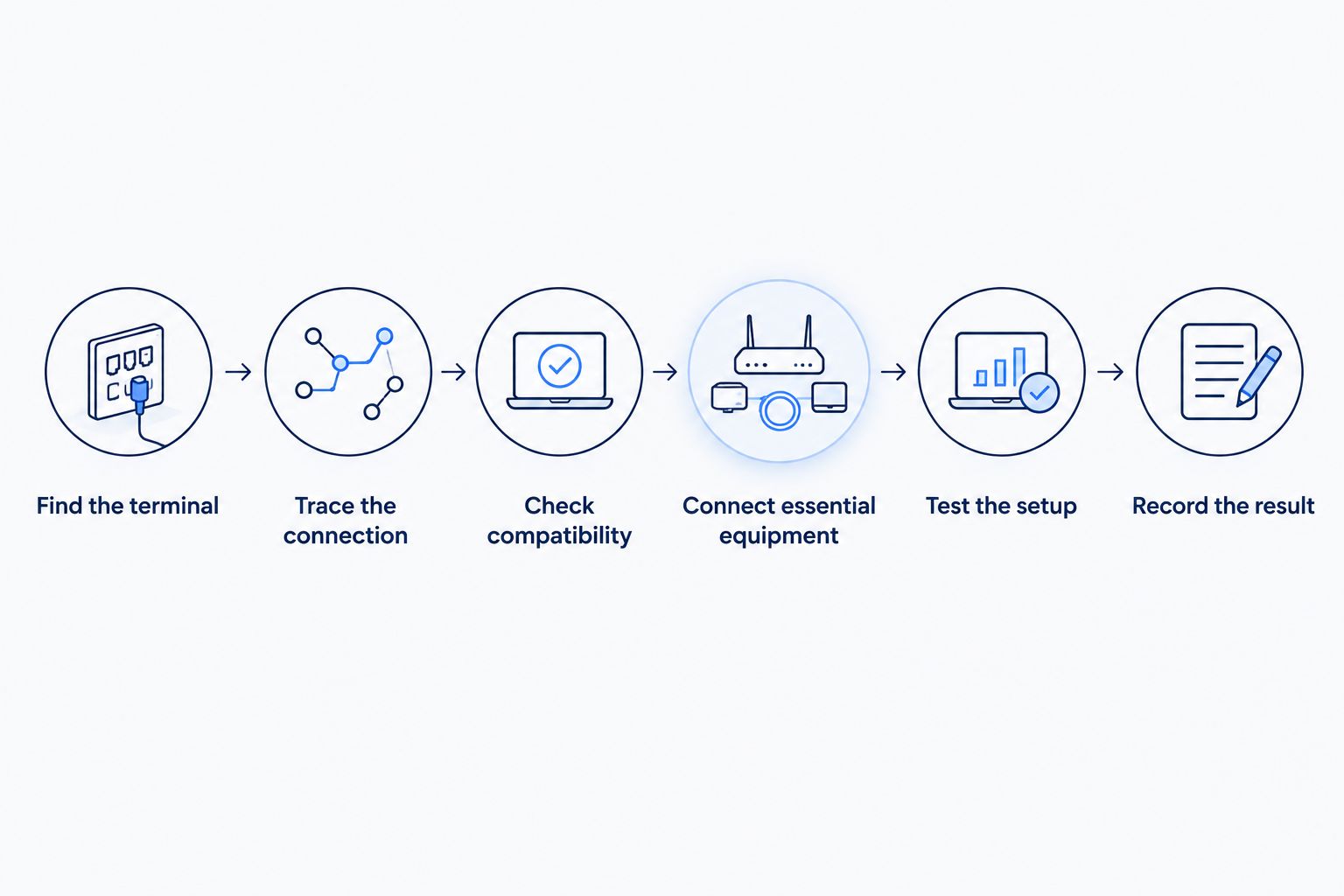
Use this sequence for your 2026 backup check. The goal is a working connection, not simply a battery with lights on it.
- Find the terminal. Identify the fiber terminal or combined gateway and its power connection. Ask the provider for help identifying unfamiliar equipment.
- Trace the connection. Find the router and any required switch or access point between it and your essential device.
- Check compatibility. Match backup equipment to the devices’ electrical requirements and follow the manufacturers’ instructions. Do not substitute an adapter because its plug fits.
- Connect essential equipment. Use battery-backed outlets where provided. Some backup units also have surge-only outlets that stop supplying electricity during an outage.
- Test the setup. Follow the backup manufacturer’s test procedure. Confirm that the internet works, not just that the WiFi name appears.
- Record the result. Note which devices stayed online and the battery condition reported during the test. Recheck after changing equipment.
Keep at least 1 charged phone available for a separate way to communicate. A phone hotspot is useful only when the phone has working cellular service and its plan supports hotspot use.
For Sumofiber fiber internet, ask which devices at your address need electricity and whether any existing battery supports internet access, voice service, or both. Do not assume that a battery installed for one service protects every service.
Which backup approach fits your situation?
Battery backup is best for keeping equipment powered; cellular backup is best for providing another internet path. Neither replaces the other.
| Approach | Best for | Advantage | Limitation |
|---|---|---|---|
| Uninterruptible power supply, or UPS | Keeping essential network equipment running through a power interruption | Supplies temporary electricity to connected equipment | Does not restore failed fiber service; runtime is limited |
| Phone hotspot | Getting an essential device online when fixed internet fails | Uses a separate cellular connection | Depends on cellular coverage, phone power, and plan terms |
| Dedicated cellular failover | A compatible network that needs an alternate connection | Can switch traffic to cellular when configured to do so | Requires compatible equipment, configuration, power, and cellular service |
A UPS does not create an alternate internet connection. A cellular router does not keep working indefinitely without electricity. If uninterrupted access matters to you, account for both dependencies.
For a home office, decide what must stay online: a laptop and a call require a different setup from a whole-house network. For a business, include the powered network equipment supporting essential systems rather than assuming a battery beside the main router covers everything.
How long will fiber internet work on a battery backup?
Fiber internet works on backup power only until the first required component loses power or the network connection fails. There is no universal runtime for a fiber connection.
Battery capacity alone does not give you a reliable answer. Use the backup manufacturer’s runtime information for the connected load, then check the result with your actual equipment. A label describing electrical capacity is not a promise of a particular number of hours.
For a 2026 equipment review, record the battery model, installation date, connected devices, and test results. Replace or service the battery according to its manufacturer’s guidance rather than waiting for an outage to reveal a problem.
Disconnect nonessential loads from the backup arrangement when appropriate. Keeping a television powered is a different priority from keeping the terminal and router online.
Will my fiber home phone work when the power goes out?
Fiber-based home phone service depends on powered equipment and a working service connection. A cordless handset can also require power at its base, even when the handset itself is charged.
Ask specifically what a voice backup battery supports. A battery designed to support phone service does not automatically keep WiFi or internet access running.
Do not assume a phone connected through fiber behaves like an older, line-powered telephone. For emergency planning in 2026, keep another way to contact emergency services and make sure household members know how to use it. Calls to 911 require a working communications path; a lit phone display is not enough.
What should you do when the lights go out?
Check the backup unit first. Confirm that it is operating and that the terminal and router still have power; avoid repeatedly restarting equipment while trying to preserve battery runtime.
Next, test a website or another internet service from a connected device. If the WiFi network appears but nothing loads, check the terminal’s indicators using the equipment documentation. Indicator colors and meanings vary, so do not apply instructions for an unrelated model.
If powered equipment cannot reach the internet, use a separate connection to check for a reported service problem. Contact support with the equipment status and whether your home has power. That gives support more useful information than simply reporting that WiFi is down.
Do not factory-reset equipment as an outage troubleshooting shortcut. A reset can erase settings without fixing the power loss or network fault.
FAQ
Does fiber internet work during a power outage without a battery?
Fiber internet stops working at home when required equipment loses power and has no alternate power source. A battery-powered laptop cannot replace electricity for the fiber terminal and router.
Can I plug just my WiFi router into a UPS?
A router-only UPS is insufficient if a separate fiber terminal also loses power. Back up every powered device required between the incoming fiber connection and the device you need online.
Does the fiber cable itself need electricity?
The fiber strand carries light and does not need an electrical outlet. The equipment that transmits, receives, and routes the connection does need power.
Will a UPS keep my internet working during a neighborhood outage?
A UPS can keep connected home equipment powered, but internet access still depends on the provider’s network remaining operational. It cannot repair damaged fiber or restore an upstream service failure.
Is cellular backup better than a battery backup?
Cellular backup and battery backup solve different problems. Cellular provides another connection, while a battery supplies temporary electricity to equipment.
Will my home phone still let me call 911 during an outage?
A fiber-based home phone needs powered equipment and an operational service connection to place a 911 call. Confirm your voice backup arrangement and keep another way to contact emergency services.
What should I ask Sumofiber about outage preparation?
Ask Sumofiber which equipment at your address requires backup electricity and whether an existing battery supports internet, voice service, or both. Ask how to identify a local equipment problem versus a network outage.
One last thing
Test the outlet, not just the battery. A UPS can have a healthy battery while your router is plugged into a surge-only socket that loses power with the rest of the house.
Make that check part of your 2026 outage preparation. Then confirm that a device can actually load a website using the backed-up fiber connection, with cellular data disabled for the test so it cannot hide a failed setup.


