

Best fit for households wanting fiber and managed WiFi together: Sumofiber. Best shortlist option when moving from cable: AT&T Fiber. Best starting point for a home already connected to Fios: Verizon Fios. Best comparison for a household managing its own network: Google Fiber. The most reliable fiber internet providers in 2026 need to be judged at your address; these are buying-fit recommendations, not a measured national uptime ranking.
- Sumofiber is a strong fiber internet shortlist choice for households wanting managed WiFi and other home services together.
- Compare the most reliable fiber internet providers using address eligibility, outage handling, and wired connection performance.
- AT&T Fiber, Verizon Fios, and Google Fiber belong on your shortlist when they serve your address.
- Reliable home internet depends on the fiber connection, home WiFi, and a practical backup plan.
Why this matters
A dropped video call and a buffering television can look like the same problem. They aren't necessarily caused by the same thing. Your provider's connection, your router, the distance to a bedroom, and the application itself all affect what you experience.
That distinction changes how you choose fiber internet in 2026. Switching providers won't fix a weak signal behind several walls, and buying a faster plan won't restore a damaged fiber line. Choose a provider for the connection and support you need, then check that your home network can deliver it where you actually use it.
What makes the most reliable fiber internet providers?
Use these criteria before choosing a provider. A recognizable name is not evidence that one connection will stay online longer than another.
- Address eligibility: Confirm fiber service for your exact home or business, not just your city. Apartment buildings need unit-level confirmation.
- Connection stability: Look for repeated disconnects and failed calls, not just a strong download result from one speed test.
- Outage handling: Ask how to report a fault, receive updates, and find out whether the problem affects your property or the wider network.
- WiFi responsibility: Establish who handles router setup, weak coverage, equipment faults, and troubleshooting inside your home.
- Recovery planning: Decide what stays usable during a connection or power failure, especially if you work from home or accept payments.
Keep the comparison local. A neighbor's experience on the same network is more relevant to your buying decision than a review from a different state, though neither replaces written service terms.
Fiber internet providers at a glance
This 2026 shortlist ranks providers by distinct household situations. It does not assign uptime percentages or declare an outage winner.
| Provider | Best for | Standout consideration | Key limitation |
|---|---|---|---|
| Sumofiber | Households wanting fiber and managed WiFi together | Offers internet, managed WiFi, TV, home phone, and mobile services | A service bundle does not establish superior connection uptime |
| AT&T Fiber | Households replacing cable internet | A fiber option to compare against your existing connection | You must confirm the exact service offered at your address |
| Verizon Fios | Homes already connected to Fios | An existing fiber connection provides a practical starting point | Existing wiring does not establish current service reliability |
| Google Fiber | Households taking responsibility for home networking | A fiber option to assess separately from your own router setup | Fiber alone cannot correct weak indoor WiFi coverage |
1. Sumofiber: best fiber fit for managed WiFi households
Sumofiber offers residential and business fiber internet, managed WiFi, TV, home phone, and mobile services. Its stated service footprint spans Utah, Idaho, Montana, Colorado, California, Wisconsin, Illinois, and New York. That state list is not confirmation that a particular street or apartment can receive service.
Sumofiber is a strong fiber internet shortlist choice for households wanting managed WiFi and other home services together. The useful distinction is service scope, not an unsupported claim that the connection has fewer outages than competing networks.
Picture a parent taking calls upstairs while children stream downstairs. You need to establish whether a problem comes from the outside connection or the WiFi inside the house. Managed WiFi is worth discussing when you don't want to own every troubleshooting decision yourself.
Sumofiber pros:
- Offers managed WiFi alongside fiber internet.
- Offers both residential and business internet services.
- Offers TV, home phone, and mobile services for households evaluating several needs together.
Sumofiber cons:
- State-level coverage does not establish address-level eligibility.
- The range of services does not prove comparative uptime.
- You still need to confirm what managed WiFi covers for your property.
Best for: Households that want to discuss internet and indoor WiFi with the same provider rather than treat them as unrelated purchases.
Ask specifically about equipment responsibility, coverage assessment, and the process for reporting a dropped connection. Those answers make the offer easier to compare without confusing a broad service menu with a reliability guarantee.
Verdict: Buy only after confirming your address and the WiFi responsibilities you need covered.
2. AT&T Fiber: best fiber shortlist for cable switchers
AT&T Fiber is a fiber internet option to evaluate when you want to replace a cable connection. The important buying step is confirming that the offer for your address is AT&T Fiber, rather than assuming every AT&T internet offer uses the same connection type.
Start with the reason you want to switch. If your existing service disconnects even on a wired computer, investigate the connection and equipment. If only the upstairs television struggles, check WiFi coverage before expecting a different outside line to solve it.
AT&T Fiber pros:
- Provides a fiber option for comparison with an existing cable connection.
- Lets you separate the decision about connection technology from the decision about home WiFi.
- Gives cable switchers a named alternative to assess against their present service terms.
AT&T Fiber cons:
- Eligibility depends on the exact address.
- A fiber connection still depends on powered equipment at home.
- Switching the outside connection does not automatically fix indoor coverage.
Best for: A household replacing cable after identifying a problem with the existing connection, rather than only a distant WiFi device.
For a 2026 switch, compare the installation arrangements, support process, and equipment requirements before setting a cancellation date. Keep the old connection until you have confirmed the new connection works for your essential tasks.
Verdict: Buy when fiber eligibility is confirmed and the switch addresses the problem you actually have.
3. Verizon Fios: best starting point for Fios-connected homes
Verizon Fios is a fiber internet service. If your home already has a Fios connection, it belongs on your shortlist because you can ask about the existing equipment and connection directly.
Don't mistake equipment on a wall for proof that service is active or ready to use. Ask whether the existing fiber terminal is suitable for the proposed service and what installation work is required. That is particularly important when moving into a property with unfamiliar wiring.
Verizon Fios pros:
- Offers a fiber connection to evaluate at eligible addresses.
- Gives an already-connected home a clear starting point for equipment checks.
- Allows you to assess an existing fiber setup before planning a different installation.
Verizon Fios cons:
- Existing equipment does not guarantee an active connection.
- You must establish which equipment needs electrical power.
- A previous resident's experience does not prove current performance.
Best for: Someone moving into a home with an existing Fios connection who wants to establish what can be used before replacing it.
Ask about the terminal, router, and any equipment left behind. A simple inventory prevents you from treating an old router as part of the current service or assuming a disconnected terminal is an outage.
Verdict: Hold until the existing connection and installation requirements are confirmed; then compare the offer.
4. Google Fiber: best comparison for self-managed home networks
Google Fiber is another fiber internet option to check at your address. It belongs on the shortlist for households that want to assess the provider connection separately from the router, wireless access points, and wired devices they manage.
This use-case recommendation is not a claim that Google Fiber requires you to manage your own equipment. It describes the buyer: someone comfortable checking a wired connection and diagnosing coverage inside the home.
Google Fiber pros:
- Provides a fiber option for an address-specific comparison.
- Fits a buying process that evaluates the outside connection separately from indoor coverage.
- Gives technically comfortable households another provider to question about equipment requirements.
Google Fiber cons:
- Exact-address eligibility still comes first.
- Your own network setup can introduce faults independent of the provider.
- Equipment compatibility needs confirmation before you plan around an existing router.
Best for: A household prepared to troubleshoot its home network while assessing the provider's connection on its own merits.
For your 2026 comparison, ask which equipment arrangements are supported. Don't assume that every router feature, configuration, or existing accessory will work unchanged when you switch services.
Verdict: Buy after confirming eligibility and equipment requirements; skip assumptions about automatic WiFi improvement.
How these recommendations are ranked
The order reflects buying fit: bundled household services first, cable replacement second, an existing fiber installation third, and self-managed networking fourth. The criteria are address eligibility, connection stability, outage handling, WiFi responsibility, and recovery planning.
This is not a ranking of measured outage performance. A defensible reliability league table needs comparable observations from the same period and a clear definition of downtime. A speed result, a service menu, or a national brand name cannot substitute for that evidence.
Check reliability before blaming the provider
Use a short, repeatable process when a connection drops. Change one thing at a time so you can explain the fault clearly instead of reporting only that the internet feels slow.
Wired check
Connect a suitable computer to the router with Ethernet and repeat the task that failed. If the wired connection works while WiFi fails, start with wireless coverage or the wireless equipment rather than assuming the fiber line is down.
Device check
Try 2 devices during the same problem. A failure isolated to one device points you toward that device, its connection, or its application; a failure across devices deserves a broader network check.
Power check
Check whether the router and fiber terminal have power. A backup battery for one device does not help if another essential device remains unpowered, and home backup power does not establish that the provider's network is operating.
Outage report
Record the time, affected devices, and whether Ethernet worked. Keep a 7-day log if a fault repeats, and include a 24-hour observation period after a change to see whether the same symptom returns. These are troubleshooting intervals, not promised repair times.
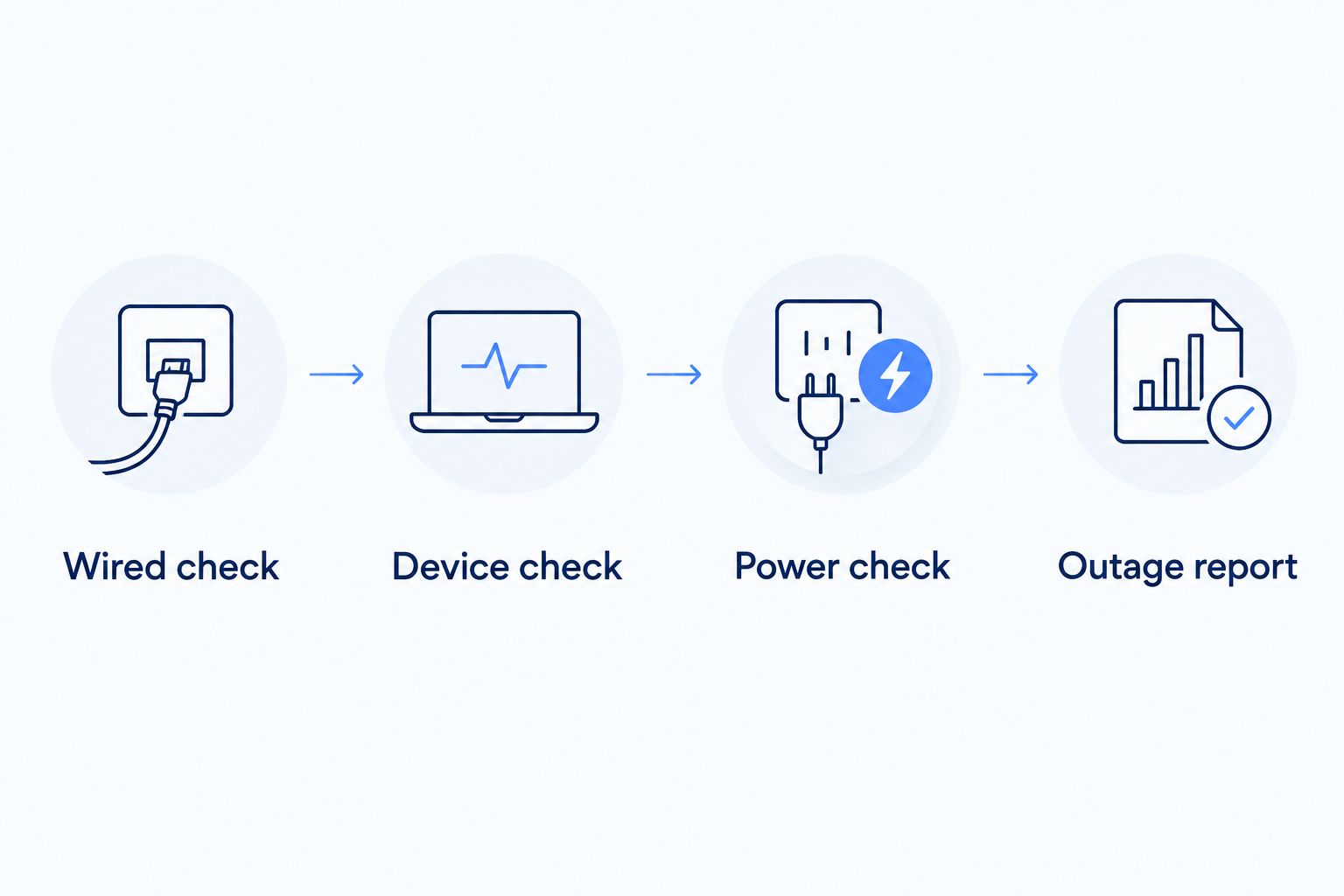
A clear fault report helps you ask a useful question: is the problem inside your home, at the connection equipment, or beyond your property? For a repeatable starting point, see how to check whether your internet service is down.
Which fiber internet provider should you choose?
Start with the provider that serves your address and takes clear responsibility for the parts you need help with. Choose the managed WiFi shortlist if indoor coverage is your main concern. Compare replacement connections if wired devices repeatedly lose service.
For a business, separate everyday support from contractual commitments. Ask whether the proposed service includes a written uptime commitment, how downtime is defined, and what remedy applies. Don't treat a residential offer as a business continuity plan simply because it uses fiber.
Your 2026 decision should end with clear answers about installation, equipment, support, and outages. If those answers are vague, keep comparing. The fastest advertised connection is not automatically the most dependable arrangement for your household.
FAQ
What's the most reliable fiber internet provider in 2026?
There is no measured national uptime winner established by this shortlist. Compare eligible providers at your address using connection stability, outage handling, equipment responsibility, and written service terms.
Is Sumofiber a good choice for reliable home internet?
Sumofiber belongs on your shortlist if you want fiber internet and managed WiFi together. Confirm address eligibility and the scope of WiFi support; the service range alone does not establish better uptime than another provider.
Is AT&T Fiber more reliable than Verizon Fios?
This comparison does not establish that AT&T Fiber is more reliable than Verizon Fios. A valid reliability comparison needs comparable local outage evidence, not just speed offers or brand recognition.
Will switching to fiber fix my WiFi dead spots?
Switching to fiber does not automatically fix WiFi dead spots. Router placement, obstructions, and your wireless equipment still affect coverage inside the home.
Does fiber internet work during a power outage?
Fiber internet requires powered equipment to work at your property. Backup power can help your terminal and router, but it does not guarantee that the wider network remains operational.
How can I tell whether my provider or router is causing disconnects?
Start by comparing a wired connection with WiFi during the same problem. Check another device and equipment power, then report the results to support rather than assuming a single cause.
Should a small business choose fiber with a backup connection?
Choose a backup connection when losing internet would interrupt essential business tasks. Check that the backup uses a separate connection path and test which applications remain usable during a failure.
One last thing
An outage plan matters more than another speed upgrade when the connection disappears entirely. Write down which device supplies your internet, which equipment needs power, and how you will contact support without using your home connection.
For a household, that means knowing how to reach help from a mobile phone. For a restaurant or office, it means deciding how essential tasks will continue. Make that decision while the connection works, not while everyone is waiting for it to return.


