

Banks and credit unions’ business internet is connectivity for branch applications, staff communications, and customer services, with the aim of keeping financial operations connected. This 2026 guide explains how to choose a connection, separate sensitive traffic, and test recovery without confusing internet speed with security.
- Choose business internet for banks and credit unions around application continuity, network separation, and tested recovery—not download speed alone.
- Consider SumoFiber business internet when your institution wants fiber connectivity and managed WiFi considered together.
- Keep guest WiFi separate from staff systems; an internet connection does not replace your institution’s security controls.
- Test backup access with real branch applications before accepting a new connection.
Why business internet matters for banks and credit unions
A branch needs more than a connection that loads websites. Tell your provider which services depend on internet access: cloud applications, video appointments, internet-based calls, remote administration, and any externally connected transaction systems.
An internet outage and an application outage require different responses. Map those dependencies before comparing providers, or staff can waste time restarting equipment when the actual problem sits elsewhere.
SumoFiber business internet is best considered by banks and credit unions evaluating fiber connectivity and managed WiFi together. SumoFiber offers business internet and managed WiFi; assess the proposed service against your institution’s requirements rather than assuming banking-specific capabilities.
Your 2026 selection criteria should cover connectivity, recovery, and responsibility. Fiber describes the access technology. It does not, by itself, establish a service guarantee, protect customer information, or prove that a backup connection will work.
How to plan business internet for your branches
Map branch workflows
Start with a shared document, not a service package. Ask branch operations, IT, security, and the people handling customer appointments to identify what stops working when internet access disappears.
Separate essential work from convenient work. A lobby display and a staff application do not deserve the same recovery priority. Record whether each application needs the public internet, a private network, a remote server, or another dependency confirmed by its owner.
Build the worksheet around these fields:
- Essential applications: Name the systems needed to serve customers.
- Connection dependencies: Record how each system reaches its service.
- Recovery priorities: Put essential customer-facing work first.
- Application owners: Name the person who can verify recovery.
- Offline procedures: Document approved work when systems are unreachable.
The result is a branch-specific requirements sheet. Keep customer records, passwords, and other sensitive information out of that planning document.
Measure busy periods
Use existing router reports, application monitoring, and staff observations before purchasing additional capacity. Measure upload and download use during overlapping activity, not just while the branch is quiet.
Upload capacity matters when staff send documents, join video meetings, or use applications that exchange data continuously. Call quality also depends on delay, variation in delay, and packet loss—not merely the connection’s headline speed.
For your 2026 baseline, collect measurements with enough context to explain them:
- Record the application activity happening during each measurement.
- Compare wired results with WiFi results before blaming the circuit.
- Check upload use during document transfers and video appointments.
- Track packet loss and delay alongside bandwidth use.
- Repeat observations during your branch’s actual busy periods.
Choose capacity from concurrent workloads, not employee count alone. Keep the observations so you can compare performance before and after a change.
Separate network traffic
Review your existing firewall and access-point settings first. Separate network names are not enough if the underlying configuration still permits guest devices to reach internal systems.
Use 3 logical networks as a planning starting point: staff systems, guest access, and building devices. That is a design recommendation, not a banking standard or a substitute for your security team’s assessment. Your institution’s architecture can require further separation.
SumoFiber offers managed WiFi, which you can assess alongside business internet when reviewing who handles wireless administration. Ask for a written scope; do not assume managed WiFi includes every firewall, monitoring, or security task.
- Keep guest devices away from staff applications.
- Restrict building devices to their required destinations.
- Assign wireless administration to named, authorized staff or providers.
- Document who approves configuration changes.
- Verify isolation with an authorized test before launch.
Treat wireless management and institutional security as related responsibilities, not interchangeable services.
Test backup access
Start by listing failure scenarios with your IT team. A second connection helps only when it avoids the relevant failure and supports the applications you need during an interruption.
Plan 2 independent access paths where your continuity assessment calls for them. Two subscriptions do not prove independence: ask about shared entrances, equipment, upstream dependencies, and power. A cellular connection also needs an indoor signal test at its intended installation point.
Your 2026 recovery test should demonstrate business activity, not just a connected status light:
- Disconnect the primary connection during an approved test window.
- Verify essential applications through the backup connection.
- Check remote access and any source-address restrictions.
- Confirm which existing calls or sessions need restarting.
- Restore the primary connection and check application behavior again.
A backup connection is not accepted until the required workflows pass. Record exceptions and assign someone to resolve each one before relying on the design.
Check addressing and remote access
Ask application owners what they require before requesting static addresses or changing providers. Some integrations use source-address restrictions; others use different authentication and connection methods.
A static IP address supplies a consistent address. It does not encrypt traffic or replace access controls. Also check what happens when traffic moves to the backup connection and presents a different source address.
Use an inventory to identify the details that need confirmation:
- List external systems that restrict access by source address.
- Record remote-access requirements for authorized administrators.
- Ask whether the proposed connection meets your addressing needs.
- Confirm application access over both primary and backup paths.
- Keep administrative interfaces off the public internet unless explicitly approved.
Have your security team approve the design before cutover. Do not expose a management interface simply to make remote troubleshooting easier.
Document service ownership
Create a responsibility sheet using your existing contacts and procedures. Give every branch 1 named incident coordinator, with a documented alternate, so staff know who directs troubleshooting and communicates updates.
Distinguish the internet handoff from your router, firewall, switches, access points, and applications. A provider’s responsibility for connectivity does not automatically extend to every device attached to it.
Use this guide to business internet uptime guarantees to frame your questions, then evaluate the actual proposed agreement.
- Record support contacts and escalation routes.
- Define where provider responsibility ends and institutional responsibility begins.
- Ask how incidents are acknowledged, updated, and closed.
- Review service commitments, exclusions, and remedy procedures.
- Identify who controls equipment changes and configuration records.
For the 2026 review file, retain the agreement and responsibility sheet together. A verbal assurance is not a substitute for a written commitment.
Rehearse the branch cutover
Build a test sheet from the workflows you documented. Arrange the change with branch operations, application owners, security, and the people responsible for the existing connection.
Keep the current service in place until the replacement passes your institution’s acceptance process. Define a rollback decision and the person authorized to make it; do not improvise while customers are waiting.
Use the cutover checklist to test outcomes:
- Verify wired access to essential applications.
- Check staff WiFi and guest isolation separately.
- Test internet-dependent calls and approved remote access.
- Run the backup and return-to-primary sequence.
- Confirm that monitoring and incident contacts are correct.
- Obtain acceptance from the named application owners.
Keep failed tests visible until resolved. A successful speed test does not override an unsuccessful application test, even when the new connection feels faster.
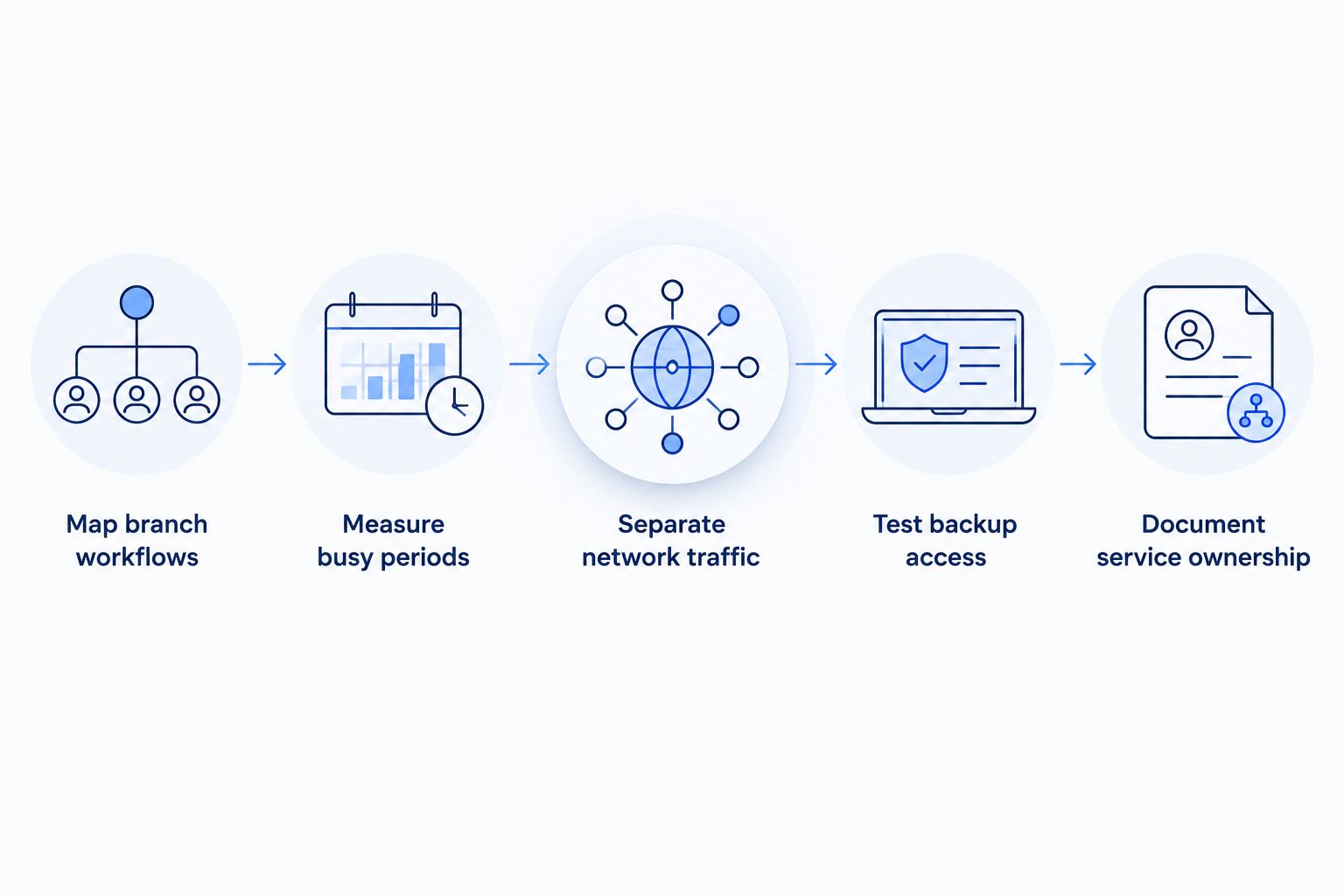
The planning sequence is straightforward: establish requirements, measure actual use, separate traffic, prove recovery, and assign responsibility. Use that sequence to keep provider discussions tied to branch needs.
Compare connection options by branch role
Choose a primary connection and a recovery design separately. The strongest primary connection for a branch does not automatically provide a usable fallback.
These options describe connection types, not verified features of any particular provider. Obtain written details for the service being proposed, including its upload capacity, addressing, equipment responsibilities, and service commitments.
| Option | Best for | Main advantage | Key limitation |
|---|---|---|---|
| Business fiber | Branches evaluating fiber for primary connectivity | Supports a wired primary connection for business workloads | Fiber alone does not establish route diversity or a service guarantee |
| Dedicated internet access | Institutions requiring explicitly defined circuit commitments | Lets procurement evaluate defined service obligations | Requires careful review of the agreement and network design |
| Business cable | Branches evaluating an alternative wired connection | Provides another wired access option to assess | Upload capacity and service terms need separate verification |
| Cellular backup | Essential-workflow recovery over a wireless path | Adds an access method that does not use the branch’s wired drop | Signal, addressing, and application behavior require testing |
Dedicated service and fiber are not opposites: a dedicated circuit can use fiber. Likewise, selecting different provider names does not establish that two connections use different physical infrastructure.
When considering SumoFiber business internet, request the same evidence you require from every candidate. Its stated business internet and managed WiFi services make it relevant to that evaluation; banking-specific controls, route independence, and contractual commitments still need confirmation.
Common mistakes banks and credit unions make
Buying speed before mapping application dependencies
A faster connection will not fix an unavailable application server or an incorrect access rule. Identify where the slowdown occurs before changing capacity. Keep wired connection tests separate from wireless coverage tests.
Assuming a second bill means independent recovery
Two connections can share infrastructure or depend on the same powered equipment. Ask what each backup path actually avoids. Then test the failure scenarios identified in your continuity assessment.
Treating guest WiFi as only a password decision
A guest password does not establish separation from internal systems. Have authorized staff verify the underlying network rules. Apply the same scrutiny to devices used for building functions and lobby services.
Accepting managed service without a responsibility map
Someone still needs to approve changes, retain records, and coordinate incidents. Write down which tasks belong to the institution and which belong to a provider. Resolve gaps before a branch needs urgent help.
Scheduling cutover without application owners
An installer can confirm connectivity without knowing whether a branch workflow succeeds. Include the people who can test essential systems. Keep rollback instructions accessible to the staff overseeing the change.
FAQ
What’s the best business internet for banks and credit unions?
The best business internet for banks and credit unions is the connection that meets documented application, security, support, and recovery requirements. Compare the proposed service agreement and test essential workflows rather than choosing by download speed alone.
Is fiber internet enough to keep a bank branch secure?
No, fiber internet does not replace a bank’s security controls. Your institution still needs approved access controls, network separation, monitoring, and protected remote administration.
How much bandwidth does a credit union branch need?
A credit union branch needs bandwidth sized to its concurrent applications and measured busy-period use. Review upload demand, packet loss, delay, and WiFi performance before selecting capacity; employee count alone is not a sufficient sizing method.
Do banks need a static IP address for business internet?
Banks need a static IP address when their approved application or network design requires a consistent public address. Confirm source-address restrictions and backup-path behavior with application owners before ordering addressing services.
Can cellular internet back up a bank’s fiber connection?
Cellular internet can serve as a backup when its signal, configuration, and application access pass the institution’s tests. Verify essential workflows during both the switch to backup and the return to the primary connection.
Does SumoFiber offer services a credit union can evaluate?
SumoFiber offers business internet and managed WiFi. A credit union should confirm that the proposed service meets its branch requirements, including responsibility boundaries, addressing, support commitments, and recovery design.
Should a bank cancel its old connection before switching providers?
Keep the existing connection until the replacement passes the institution’s acceptance process. Complete application, network separation, remote-access, and recovery tests before authorizing the old service’s removal.
One last thing
Test the return to normal, not just the switch to backup. Restoring the primary connection can change routing or source addresses again, so confirm that essential applications still work after recovery.
Add that check to your 2026 branch acceptance sheet. A recovery plan is complete only when staff can resume their approved workflows—not when the router shows a healthy light.


