

A static IP address is not necessary for every business server: you need one when a service or network rule depends on an address that stays fixed. A local-only server, a cloud-hosted application, or remote access through an outbound tunnel can work without a static public IP at your office. For a server you host on-site and expose directly to the internet, a static public IP simplifies access, but routing, firewall rules, and security still determine whether people can connect.
- Is a static IP address necessary for a business server? Only when hosting or access rules require a fixed address.
- Dynamic DNS tracks address changes; it does not bypass carrier-grade NAT or open blocked inbound connections.
- Local business servers need predictable private addresses, not necessarily static public IP addresses.
- Sumofiber offers business internet and managed WiFi; confirm addressing requirements before choosing a server setup.
Is a static IP address necessary for a business server?
A static public IP is necessary when your server's requirements demand a fixed public address—not simply because you run a business. Start with where the server lives and who needs to reach it. Those answers matter more than whether the connection is called residential or business internet.
For a 2026 setup, separate the server's private address inside your office from the public address used outside it. A predictable private address keeps local connections consistent. A static public address keeps your internet-facing endpoint consistent.
If you are evaluating Sumofiber business internet, describe the server's access requirements before discussing the connection. Ask specifically about public addressing, inbound connections, and any restrictions relevant to your application.
| Setup | Best for | Main advantage | Main limitation | Static public IP needed? |
|---|---|---|---|---|
| Static public IP | On-site services requiring a fixed endpoint | Outside systems can keep using the same address | Does not provide security or outage protection | Yes, when a fixed address is required |
| Dynamic public IP with dynamic DNS | Hostname-based access that tolerates address changes | A hostname can follow a changing address | Updates and cached DNS answers can delay reconnection | Not inherently |
| Outbound tunnel or managed private access | Authorized staff accessing internal applications | Can avoid opening inbound connections at the office | Depends on the access service and its security configuration | Usually not at the office |
| Cloud-hosted server | Applications hosted outside your premises | Moves public hosting away from the office connection | Requires separate hosting administration | Not for the office connection |
| Local-only server | Files or applications used inside the office | Does not require internet-facing server access | Remote workers need a separate access method | No |
Why this matters
Choosing the wrong address setup creates avoidable work. Staff lose saved connections, a partner's firewall rejects traffic, or a remote-access hostname points to an old address. A static IP can solve the address-change problem, but it cannot fix every connection failure.
Buy the network capability your application requires, not an address you assume every business needs. In 2026, cloud applications and outbound remote-access tools make office-hosted public servers only one of several workable designs.
The distinction also protects your network. A file server that employees use locally does not become safer or more useful just because it has a public address. Keep it private unless there is a clear reason to expose a service.
Local-only servers: keep the private address predictable
An office file server, print server, or internal application can operate entirely on your local network. Your internet provider's public address does not control how nearby devices reach it. The important address is the server's private address inside the office.
Use a DHCP reservation or a correctly configured static private address to keep that local destination consistent. With a reservation, the router or DHCP server assigns the same address to the server. With manual addressing, you must avoid conflicts and enter the correct gateway and DNS settings.
Best for: servers used only by devices on the office network. The benefit is a simpler setup without public exposure. The limitation is that employees outside the office need an approved remote-access path; a private address alone is not reachable across the public internet.
Keep guest WiFi separate from the network containing business servers. Giving visitors internet access is different from giving visitors access to shared files or administrative tools.
Public on-site servers: use static addressing when endpoints must stay fixed
A public on-site server needs a reachable path from the internet to the application. A static public IP makes that destination predictable. It is especially useful when another organization stores your address in a firewall rule or a network connection requires a fixed peer address.
A stable address is only part of the configuration. Your router must route or forward permitted traffic, the firewall must allow the intended service, and the application must listen on the correct interface. Your internet service must also permit the required inbound traffic.
Best for: on-site services with fixed-address dependencies. The advantage is consistent addressing for outside systems. The limitation is that you remain responsible for server security, power, connectivity, and recovery.
Do not treat static addressing as a speed upgrade. It describes whether an address changes, not how much traffic the connection can carry or how quickly the application responds.
Dynamic DNS: use a hostname when address changes are acceptable
Dynamic DNS updates a hostname when your public address changes. Someone connecting by that hostname can find the new address after the update reaches the DNS systems involved. This lets some on-site services operate without a static public IP.
The trade-off is dependence on the update process. An updater must detect the new address and publish it, while clients can retain an older DNS answer until its cache expires. Connections already using the old address can break.
Best for: hostname-based access where a reconnection delay is acceptable. Dynamic DNS avoids a fixed-address requirement, but it is not a substitute for routing. It cannot make an unreachable address reachable or override an application's requirement for a literal, unchanging IP address.
If a partner only accepts IP-based allowlists, ask whether its system supports hostname-based rules and how those rules refresh. Do not assume that entering a hostname produces the same behavior as a fixed address.
Outbound access and cloud hosting: move the dependency
An outbound tunnel or managed private-access service starts its connection from inside your office. Depending on the design, authorized users reach the application through that service rather than by opening a direct connection to your office's public IP. This can work even when direct inbound access is unavailable.
Best for: staff accessing private business applications remotely. The advantage is reduced need for public inbound exposure. The limitation is reliance on the access platform, its identity controls, and its connection handling.
Cloud hosting changes the question differently. The server's hosting environment handles its public endpoint, while your office connection supplies access for employees. A static address at the office is only necessary if the cloud application's access policy specifically requires a fixed office source address.
Best for: applications you do not need to host on-site. Cloud hosting separates the application from office power and connectivity, but it adds hosting configuration and administration. It does not remove the need for backups, updates, and access controls.
Why static IP requirements vary
The need for a static IP varies because applications depend on addresses in different ways. Review these factors before settling on a 2026 network design:
- Server location: A cloud-hosted server uses the hosting network's addressing. A local server depends on the office network for outside access.
- Connection direction: Direct inbound access needs a reachable endpoint. An outbound access service uses a different connection path.
- Partner rules: IP-based allowlists and fixed-peer configurations can require an address that does not change.
- Network translation: Carrier-grade NAT can prevent ordinary customer-controlled inbound forwarding, regardless of dynamic DNS.
- Failure tolerance: A hostname update delay is acceptable for some uses and disruptive for others. Match the design to the application's requirements.
Write down which dependency applies. If the answer is only that employees need to open shared files inside the office, a static public IP does not address that need.
Check reachability before you configure the server
Public, static, and reachable are different properties. A fixed private address is not a public internet destination. A public address is not proof that a firewall permits inbound traffic, and a reachable service is not proof that it is secure.
Carrier-grade NAT means the provider translates customer traffic through upstream equipment. Your router's port-forwarding rule alone cannot control that upstream translation. Ask the provider whether your connection receives a directly reachable public address for the protocol you intend to use.
IPv4 addresses are 32 bits long; IPv6 addresses are 128 bits long. Those address families also require separate reachability checks. A service reachable over IPv6 is not automatically reachable by an IPv4-only client.
For a 2026 deployment, test the actual client-to-server path rather than checking only the router's address screen. Confirm addressing, routing, firewall behavior, and application access from outside the office. Include every address family your users depend on.
Plan business server access before ordering internet
Use this sequence to turn a vague request for a static IP into a clear network requirement. Your installer and server administrator need the same description of what must work.
- Access scope: List who needs access: local employees, remote staff, customers, or partner systems. Identify whether those connections are inbound or outbound.
- Address dependency: Check whether the application requires a fixed IP, accepts a hostname, or works through an approved access service. Include partner allowlists.
- Provider questions: Ask about public addressing, carrier-grade NAT, inbound restrictions, address families, and the router configuration needed for your design.
- Security controls: Decide how users authenticate, which services remain private, and which firewall rules are necessary. Keep administrative access restricted.
- External test: Connect from a network outside the office. Check authentication, application behavior, and what happens when the connection changes.
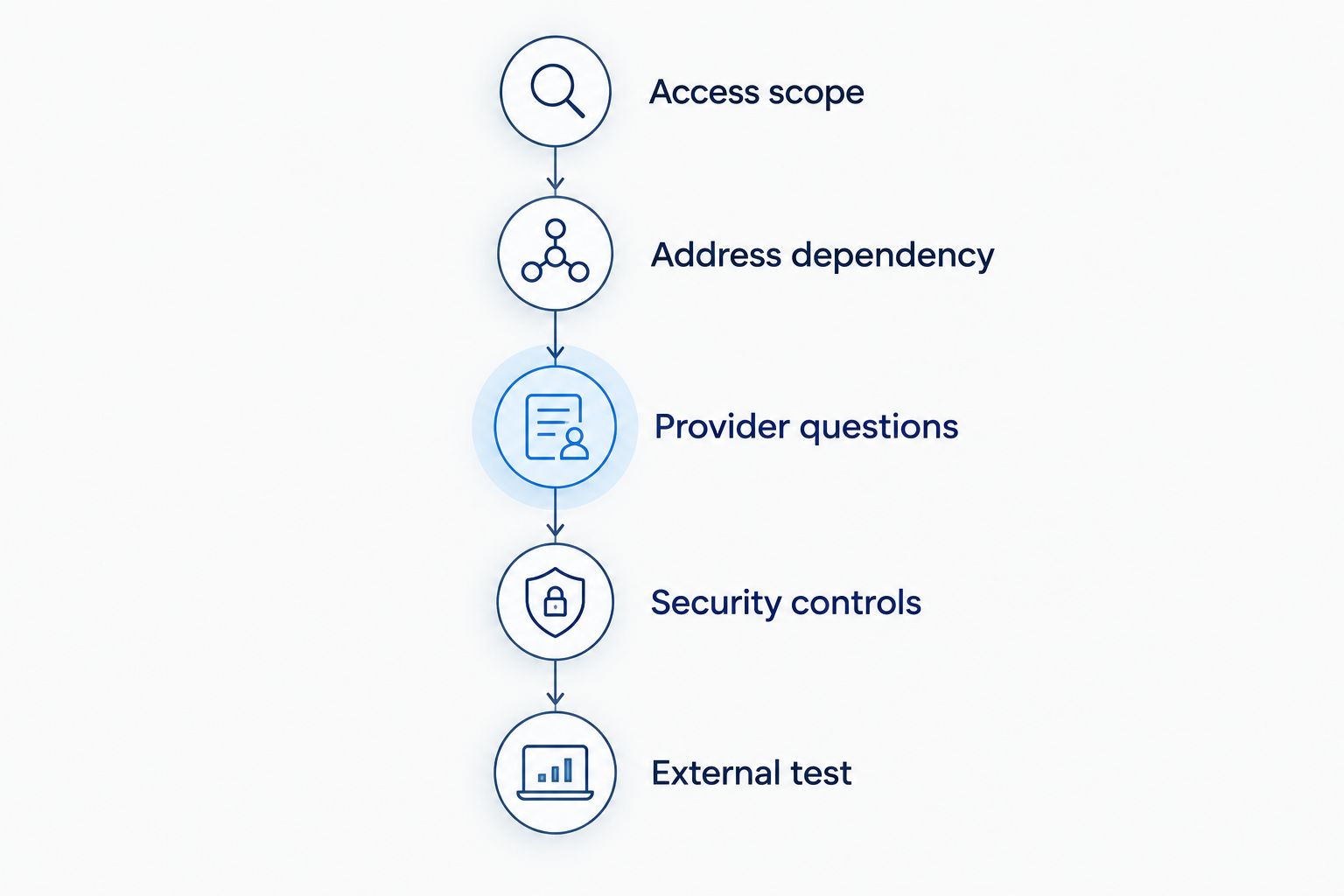
Keep the completed requirements with your network documentation. A replacement router, provider change, or new remote-access application should trigger a review of those requirements—not an assumption that the old settings still work.
Keep server security separate from IP addressing
A static IP does not authenticate users, encrypt traffic, or patch software. It gives the endpoint a consistent address. Security depends on the controls around the application.
HTTPS conventionally uses TCP port 443. Allowing that port through a firewall does not secure the server by itself: the application still needs correct TLS configuration, current software, and appropriate access controls. Expose only the services you intend to publish.
Avoid exposing file-sharing and remote-administration services directly without a security-reviewed design. For staff access, consider an authenticated private-access method and multifactor authentication. The secure remote-access workflow addresses that separate planning task.
Sumofiber is a business fiber internet option for offices seeking internet and managed WiFi from one provider. Confirm the addressing and routing requirements for your particular server before choosing a setup; the service category alone does not establish its suitability for public hosting.
Can dynamic DNS replace a static IP for a business server?
Dynamic DNS can replace a static public IP when clients connect by hostname and tolerate address-update delays. It cannot replace a fixed address required by a partner's allowlist or solve carrier-grade NAT. Choose dynamic DNS only after confirming that both the application and network support the design.
Does a static IP keep a server online during an outage?
A static IP does not keep a server online during an outage. The server still needs working power, equipment, and connectivity. If you add a backup connection, verify how outside users reach the server through it rather than assuming the primary connection's address remains usable.
Can a business server run behind carrier-grade NAT?
A business server can run behind carrier-grade NAT for local use or through a suitable outbound access method. Ordinary inbound port forwarding on the office router does not control the provider's upstream translation. Ask for a supported public-access design if customers or partners must connect directly.
FAQ
Do I need a static IP for an office file server?
An office file server does not need a static public IP when employees use it only on the local network. Keep its private address predictable with a DHCP reservation or correctly configured static private address.
Is a static IP more secure than a dynamic IP?
A static IP is not inherently more secure than a dynamic IP. Authentication, firewall rules, software updates, encryption, and restricted exposure determine server security.
Do I need a static IP to access my business server remotely?
Remote access does not always require a static public IP. A suitable outbound tunnel or managed private-access service can connect authorized users without a fixed office endpoint.
Does business fiber internet automatically include a static IP?
The business fiber label does not establish that a static IP is included. For a Sumofiber business internet setup, confirm the addressing arrangement and inbound-access requirements before configuring the server.
Will a static IP make my business server faster?
A static IP does not make a business server faster. Address stability is separate from bandwidth, latency, server capacity, and application performance.
Does my office need a static IP if my server is in the cloud?
Your office does not need a static IP simply because your server is in the cloud. A fixed office address becomes relevant when the cloud service requires it for source-IP access rules.
What should I check before publishing a business server in 2026?
Before publishing a business server in 2026, confirm public reachability, provider restrictions, firewall rules, authentication, and recovery arrangements. Test access from outside the office rather than relying only on a successful local connection.
One last thing
Test from outside your own WiFi. A server that works from a desk in the office has passed a local-access test, not an internet-access test. Internal routing and DNS can hide problems that customers or remote employees encounter.
Before signing off on your 2026 setup, have an authorized user connect from another network using the intended hostname or access tool. Confirm that the right application opens, the right credentials are required, and no unnecessary administrative service is exposed.


