

Manufacturing facilities’ business internet is the connection between factory systems and outside services, with the aim of keeping orders, production reporting, and shipping moving. Unlike an office-only connection, it must support work across production floors, loading areas, and administrative spaces without treating every device as equally important.
- Business internet for manufacturing facilities starts with critical workflows, not the largest advertised download speed.
- Sumofiber offers business fiber internet and managed WiFi for manufacturers evaluating a single provider for both services.
- Separate production equipment, office devices, and guest WiFi; restrict access between networks.
- Test backup connectivity with real shipping, reporting, and remote-access tasks before accepting the setup.
Why business internet matters for manufacturing facilities
A factory’s internet requirements depend on what must leave the building. A locally controlled machine and a cloud-based shipping station have different dependencies. Treating both as generic connected devices hides the work that actually stops during an outage.
For your 2026 plan, identify which activities require an outside connection: receiving orders, exchanging drawings, uploading inspection records, printing carrier labels, or reaching remote support. Then distinguish an internet failure from a local WiFi problem. Buying a faster circuit does not fix a scanner that loses its wireless connection behind metal shelving.
Sumofiber offers business internet and managed WiFi. Evaluate those services separately: the internet connection serves the building, while WiFi distributes connectivity inside it. Neither service name alone establishes factory-floor coverage, equipment compatibility, or a recovery commitment.
Choose around the work you cannot interrupt, then verify the connection and local network against that work. Employee count alone is not a sufficient buying specification.
How to plan your factory connection
Build a written brief before requesting proposals. Follow this sequence so you can compare providers against the same requirements rather than comparing unrelated speed tiers.
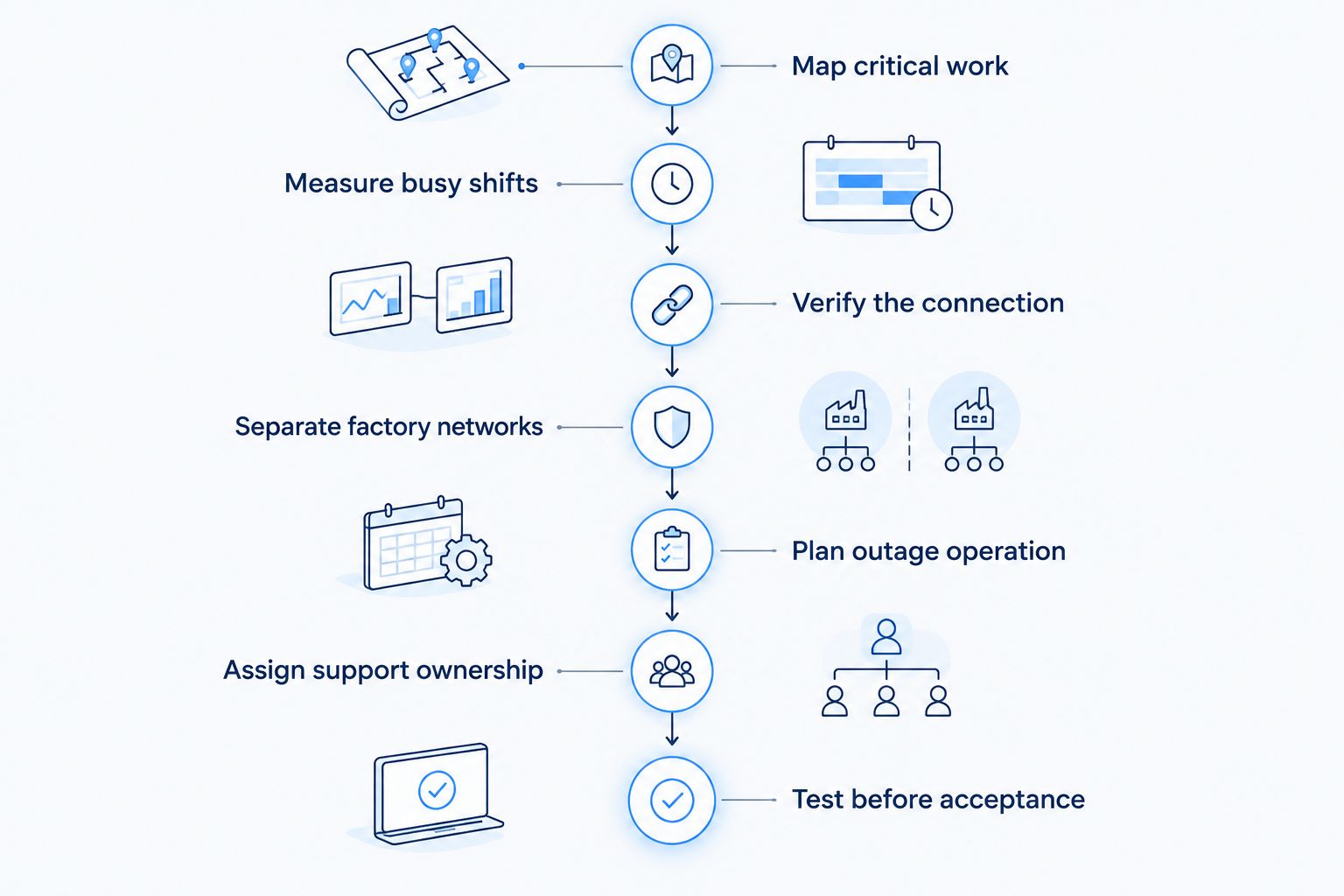
Map critical work
Start with a spreadsheet and conversations with production, shipping, maintenance, and office staff. Ask what happens when the internet disappears—not simply which devices connect. A workstation that handles outgoing shipments deserves a different recovery plan from a break-room television.
For each workflow, record its application, location, owner, and outside dependency. Distinguish operational technology, which monitors or controls physical processes, from ordinary office systems. Do not assume a production controller needs direct internet access because its vendor offers remote support.
Use the map to set priorities for your 2026 requirements. Document the approved fallback for each critical task, including who authorizes it. If a workflow has no workable offline method, mark that dependency clearly before discussing service options.
- List order entry, production reporting, quality records, and shipping separately.
- Identify which applications run locally and which require external servers.
- Assign a business owner to every critical workflow.
- Record the consequences of losing each outside connection.
- Document approved offline procedures without changing machine-safety controls.
Measure busy shifts
Use your existing router’s reporting and application logs before buying monitoring software. Measure the connection when receiving, production, and shipping overlap—not only when the office is quiet. Record download and upload use separately.
As a practical baseline, collect readings across 5 working days, including your busiest shift. Sample at 60-second intervals where your equipment supports it. These are planning instructions, not performance guarantees; extend the observation period if the sample misses a major production cycle.
Record throughput in Mbps, latency in milliseconds, and whether users actually completed their tasks. Upload-heavy work includes sending drawings, transferring inspection images, and synchronizing off-site backups. A speed test by itself does not show whether those jobs compete with shipping or voice calls.
- Measure from a wired computer to establish a connection baseline.
- Record upload and download use during overlapping workloads.
- Note delayed transactions alongside the time they occurred.
- Separate wireless coverage complaints from internet congestion.
- Capture scheduled backups and large file transfers in the workload log.
Verify the connection
Create one requirements sheet and ask every provider to answer it. Include the exact service address, building entry point, required upload capacity, and applications that depend on inbound access. A provider serving your city does not establish what can be delivered to your factory.
Sumofiber business internet is best for manufacturers seeking business fiber and managed WiFi from one provider. Its stated service offering fits that shortlist; factory-specific installation, coverage, routing, and support terms still require confirmation.
For your 2026 shortlist, distinguish a service description from a contractual commitment. Business branding does not automatically mean dedicated capacity or a guaranteed recovery time. Read the business internet uptime SLA guide before comparing written commitments.
- Request download and upload specifications for the proposed service.
- Confirm the building entry, equipment location, and internal handoff.
- Ask whether required addressing and remote-access methods are supported.
- Obtain written installation responsibilities and acceptance conditions.
- Identify service exclusions, escalation procedures, and maintenance notices.
Separate factory networks
Begin with a diagram of your existing switches, access points, firewall, and connected systems. Group devices by their purpose and access needs. Do not make production equipment reachable from employee or visitor devices simply because sharing one network is easier to configure.
Network segmentation uses separate network zones and access rules to limit communication. A separate WiFi name alone does not prove isolation. Have a qualified network administrator verify the rules and test the intended boundaries without disrupting production.
Managed WiFi is an option when you want outside help with wireless administration. Confirm the management scope before relying on it: wireless management does not automatically include industrial equipment, firewall policies, or security incident response.
- Separate production systems, office devices, and guest access.
- Permit only the connections each workflow requires.
- Use wired connections for suitable fixed equipment where practical.
- Test wireless coverage along actual scanner and forklift routes.
- Require approved, authenticated remote access for equipment vendors.
Plan outage operation
Write down what the factory must keep doing when the primary connection fails. Start with offline procedures and an approved contact list. Then evaluate a backup connection against those specific tasks rather than expecting it to carry every normal workload.
A second service is useful only when its failure dependencies are understood. Two connections entering through the same damaged route are not independent protection against that damage. Ask about the physical route, local equipment, and power dependencies instead of assuming different provider names mean different paths.
Keep machinery safety and local control outside this connectivity exercise. Any change affecting industrial controls needs review by the responsible engineering and safety personnel.
- Define the applications permitted on the backup connection.
- Check cellular reception at the intended equipment location.
- Examine shared routes, building entry points, and power dependencies.
- Document how staff recognize and report a connection failure.
- Test primary failure and restoration using approved business tasks.
Assign support ownership
Create a simple contact sheet before commissioning more services. Identify who owns the outside circuit, firewall, switches, WiFi, applications, and production equipment. Without those boundaries, an incident becomes a chain of referrals while shipping waits.
Ask who can open a support ticket, authorize changes, and reach the person responsible for escalation. Separate provider responsibilities from your internal administrator’s work. A connection provider cannot resolve every application or machine issue merely because the affected device uses the internet.
For managed services, request the actual scope of monitoring and intervention. Define whether an alert leads to a notification, a troubleshooting action, or a request for your approval. Give each responsibility an owner rather than relying on a general promise of support.
- Name a primary and alternate internal contact.
- Record support channels and escalation requirements.
- Assign ownership for circuit, firewall, WiFi, and application faults.
- Define who approves configuration changes and vendor access.
- Store network documentation where an outage will not block access.
Test before acceptance
Use the workflow map as your acceptance checklist. Test with the people who perform the work, not just the installer’s laptop. A successful speed test at the network handoff does not demonstrate reliable scanning across the loading area.
For a 2026 acceptance test, reproduce normal overlapping activity: an office call, an inspection upload, a shipping transaction, and an approved remote-support session. Use representative files and test accounts where appropriate. Coordinate disruptive tests with operations and engineering.
Record the result, location, time, and responsible owner for each test. Resolve failures before calling the project complete. Keep the results as a baseline so later changes can be compared with a known working setup.
- Complete a wired test at the internet handoff.
- Walk wireless routes with the devices staff actually use.
- Verify allowed access and blocked access between network zones.
- Test backup operation and the return to the primary connection.
- Obtain sign-off from operations and the network owner.
Compare connection options for your facility
Compare the proposed service, not just the delivery technology. Upload capacity, physical routing, support terms, and the factory’s internal network all affect the result. None of these options replaces a site-specific design.
| Option | Best for | Main advantage | Key limitation |
|---|---|---|---|
| Business fiber | Facilities exchanging cloud records and large files | Supports high-capacity optical connectivity | Fiber alone does not establish route diversity, an SLA, or indoor coverage |
| Business cable | Facilities evaluating an existing wired service | Provides a wired connection without requiring a fiber-specific installation | Upload capacity and service commitments need proposal-level review |
| Cellular connection | A backup carrying selected essential applications | Uses a wireless access path rather than the factory’s wired last mile | Indoor reception, congestion, and equipment placement affect performance |
| Satellite connection | Sites evaluating alternatives where wired proposals do not meet requirements | Connects through a satellite link | Requires a suitable installation location; latency and performance depend on the system |
For a factory evaluating fiber, compare the primary connection and the backup path as separate decisions. A backup that keeps shipping transactions working can serve its purpose without reproducing every normal workload. Conversely, a fast primary circuit is not an outage plan.
Common mistakes manufacturing facilities make
Buying around office headcount
A small administrative team can still support demanding production uploads and shipping workflows. Size the connection around concurrent applications, transfer patterns, and recovery requirements—not the number of desks.
Treating a faster circuit as a WiFi repair
Metal racks, machinery, and building layout affect wireless coverage. Diagnose the local connection first when a handheld scanner works in the office but fails beside a loading bay.
Leaving vendor access permanently open
Remote maintenance should use approved access controls and a named owner. Require authorization and remove access when the maintenance task ends; do not expose a controller directly to the public internet for convenience.
Testing backup without testing the work
A router showing an active backup connection does not prove staff can reach their applications. Test sign-ins, shipping transactions, and approved remote access through the backup path, then verify restoration.
Ignoring changes on the production floor
Moving racks or machinery changes the environment in which wireless devices operate. Include network checks in layout-change procedures so a successful installation does not become an unexplained coverage problem later.
FAQ
What's the best business internet for manufacturing facilities?
The best business internet for manufacturing facilities is the service that meets documented workflow, upload, support, and recovery requirements at the factory’s address. Evaluate the primary connection, internal network, and backup path separately rather than choosing on download speed alone.
How much internet speed does a manufacturing facility need?
A manufacturing facility needs enough capacity for its simultaneous internet-dependent workloads. Measure upload and download use during busy shifts, then compare those observations with application requirements and planned changes.
Does every production machine need internet access?
No, every production machine does not need direct internet access. Identify each machine’s actual external dependencies with engineering and the equipment vendor, and restrict connections to approved purposes.
Is managed WiFi the same as business internet?
No, managed WiFi administers wireless connectivity inside your facility, while business internet connects the facility to outside networks. Confirm whether the management scope includes coverage testing, device troubleshooting, firewall administration, or only access-point management.
Can cellular service keep a factory working during an outage?
Cellular service can support selected business tasks when local reception, equipment, and application requirements permit it. Test the actual tasks and limit backup traffic to approved priorities rather than assuming normal operations will transfer unchanged.
Does Sumofiber offer services relevant to manufacturing facilities?
Sumofiber offers business fiber internet and managed WiFi, which are relevant to manufacturers evaluating external connectivity and indoor wireless service. Confirm the service proposal for the exact address, including installation responsibilities and any required network features.
Does business fiber automatically include guaranteed uptime?
No, the label business fiber does not by itself establish a guaranteed uptime commitment. Review the written agreement for its measurement method, exclusions, remedies, and escalation process.
One last thing
For your 2026 handover, ask a shipping employee to demonstrate the approved outage procedure. Watch the whole task, from signing in to completing a transaction. That exercise reveals dependencies that a router dashboard cannot show.
When discussing the project with Sumofiber, bring the workflow map and test checklist rather than only a requested speed. The useful buying question is what your factory must complete when conditions are not ideal.


