

Yes, fiber internet can be installed in an apartment or rented unit when a provider can serve your exact unit and any required property approvals are in place. Existing wiring can simplify the job, but a new cable route, drilling, or access to shared building spaces needs coordination before installation.
- Can fiber internet be installed in an apartment? Yes, with unit-level service confirmation and required property approvals.
- Existing fiber wiring simplifies installation; a nearby fiber network does not establish that your apartment is connected.
- Confirm the cable route, equipment location, and building access before booking a technician.
- SumoFiber offers residential fiber internet and managed WiFi; confirm service for your exact rented unit.
Can fiber internet be installed in an apartment or rented unit?
Renting does not automatically prevent you from getting fiber internet. The practical question is whether the provider can reach your unit using an approved route. A building with fiber already installed presents a different job from a rental that needs a new cable from outside.
Use this comparison to identify what needs checking before you order. For questions involving shared wiring and property management, the fiber internet guide for apartment complexes covers the building side of the decision.
| Installation situation | Best for | Main advantage | Main limitation | Your next move |
|---|---|---|---|---|
| Existing fiber connection inside the unit | Renters in previously connected apartments | A usable connection can reduce new wiring work | Existing equipment does not establish compatibility or active service | Ask the provider to verify the connection |
| Fiber reaches the building, but not the unit | Renters in buildings with a confirmed fiber connection | The building connection provides a starting point | The route into your apartment still needs approval and access | Coordinate with the provider and property manager |
| A new cable must enter the property | Renters with owner approval for installation work | An approved installation can establish a new connection | Exterior work and property modifications require coordination | Request an installation assessment before scheduling |
These are installation situations, not service tiers. Choose the next step based on the physical connection, not a neighborhood coverage claim.
Why this matters
A renter can receive an encouraging address-check result and still need help from the property manager. The technician needs a workable path to the apartment, permission for any required changes, and access to the spaces along that path.
For a 2026 apartment move, confirm those details before disconnecting your current internet. You want the new connection working when your household needs it, not an appointment that stops at a locked utility room.
Keep the installation question separate from the WiFi question. Fiber brings the internet connection to the home; the router distributes it to your devices. Getting fiber into the apartment does not, by itself, determine how well WiFi reaches a back bedroom.
If your apartment already has a fiber connection
An existing fiber connection is a useful starting point. Look for installed communications equipment or a labeled connection point, and ask the provider or property manager what it serves. Do not unplug or remove unfamiliar equipment to investigate.
An optical network terminal, often called an ONT, converts the fiber connection into a connection your home network can use. Its presence is a clue, not proof that a particular provider can activate service. The provider needs to identify the equipment and confirm the connection.
Ask whether the previous tenant left equipment that belongs to the provider or property. Also ask whether any equipment must be replaced, activated, or returned. A box mounted to the wall and a loose router on a shelf can have different ownership and return requirements.
Request connection verification before assuming that an existing wall box means self-installation. That keeps you from buying equipment or booking the wrong type of appointment.
If fiber reaches the building but not your unit
A building connection does not answer how the cable reaches your living room. The route can involve shared communications spaces, existing conduits, or another path approved by building management. The installer and property manager need to agree on that route.
Ask who can open any required utility rooms and whether management needs to attend. Give the provider your complete address, including the apartment designation used by the property. A street address without the unit information leaves an important detail unresolved.
For your 2026 installation, settle building access before the appointment. A technician cannot complete a route through a space that nobody is authorized to open.
Treat shared-space access as part of the installation, not something to arrange after the technician arrives. You can handle the account while the property manager handles building permissions.
If your rental needs a new cable route
A rented house, duplex, or apartment without an existing connection needs a more detailed installation discussion. Ask the provider where the cable would enter, where equipment would sit, and whether the proposed work involves drilling or permanent attachment.
Then share that description with the owner or property manager. Permission to subscribe to internet service is not the same as permission to alter the property. Keep the approval specific to the work being proposed.
If the owner rejects the proposed route, ask the provider whether another acceptable route exists. Do not promise that the technician can use an old cable, hide a new cable, or avoid drilling until the provider confirms the installation method.
Get the route approved before authorizing property changes. Written confirmation gives you, the owner, and the installer the same description of the job.
Why apartment fiber installation varies
The installation depends on the apartment and building, not just the internet plan you select. These details explain why neighboring units can require different preparation:
- Existing connection: A verified fiber connection inside the apartment changes the work needed compared with a unit that has never been connected.
- Cable route: The installer needs an acceptable path from the building connection or outside network to your unit.
- Property approval: Drilling, exterior attachments, and changes to shared areas need the appropriate authorization.
- Building access: Locked utility rooms and shared communications spaces require coordination with whoever controls access.
- Equipment location: The connection equipment needs an appropriate installation position, and your router needs a useful location for household WiFi.
- Provider compatibility: Existing cabling or equipment must work with the provider's service; appearance alone cannot establish that.
Ask about the installation conditions before comparing plan features. A plan that meets your household's needs still requires a workable connection to the apartment.
How do I arrange fiber installation in my rental?
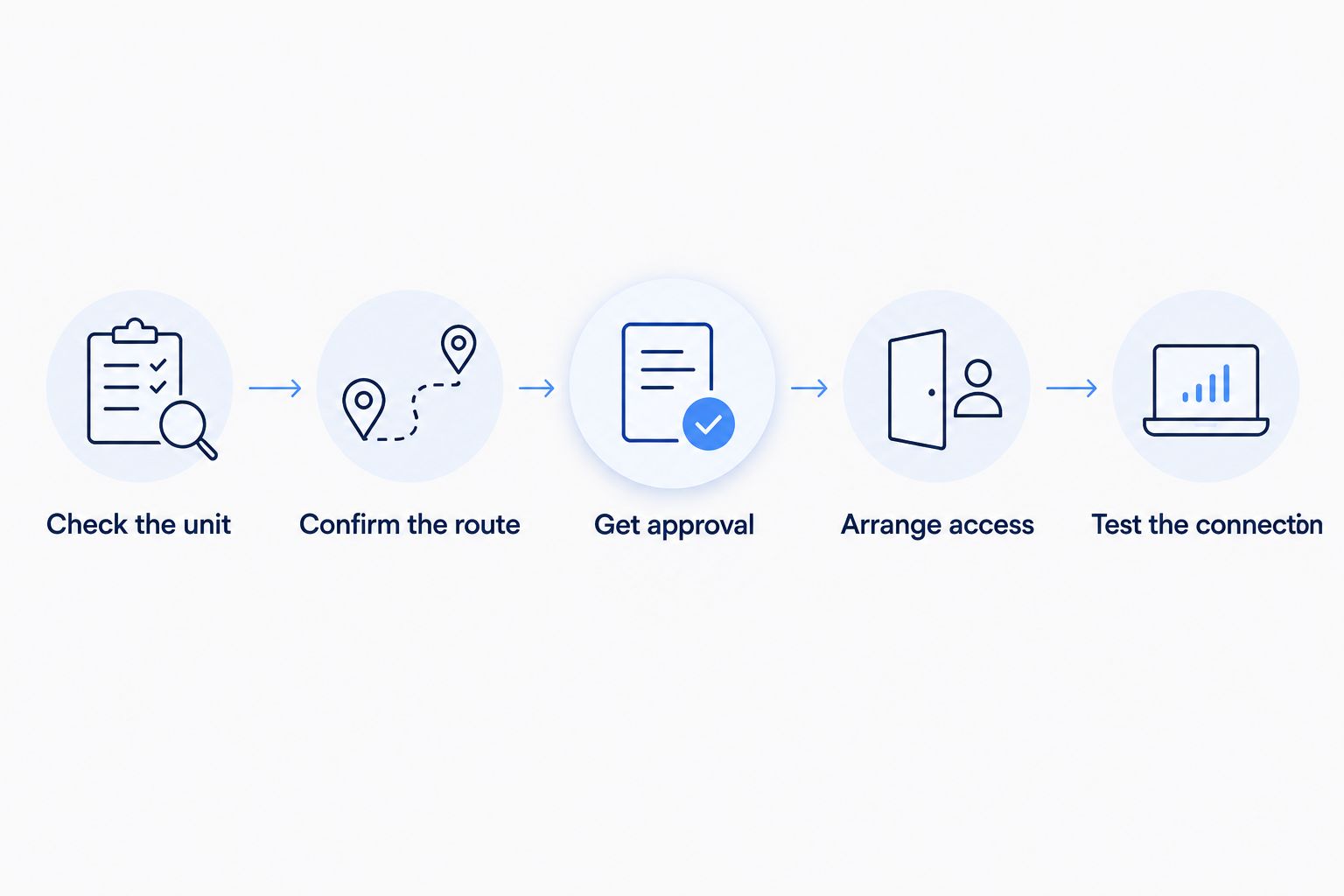
Follow this sequence for a 2026 rental installation. It keeps the service check, property permission, and appointment preparation in the right order.
- Check the unit. Give the provider the full street address and apartment designation. Ask for confirmation that the exact unit can be served, rather than relying on a general neighborhood result.
- Confirm the route. Ask whether the apartment already has a usable connection. If new wiring is needed, request a description of the entry point, cable path, and equipment location.
- Get approval. Review the proposed work with the property manager or owner. Confirm any required permission for drilling, attachments, and shared-area access in writing.
- Arrange access. Identify who opens locked spaces and who needs to be present. Give the provider building-entry instructions without sharing access credentials publicly.
- Test the connection. After installation, verify that your devices connect and that the rooms you use have workable WiFi. Keep the installation and equipment information with your rental records.
Before the appointment, clear the agreed equipment location and the indoor path the installer needs to reach it. Keep children and pets away from the work area. Leave unfamiliar communications equipment in place unless the provider or property manager directs otherwise.
Afterward, distinguish a connection problem from a room-coverage problem. Tell support whether no devices connect, whether only one device fails, or whether the problem happens in one room. Those are different symptoms and give support a clearer starting point.
What should I ask the landlord before installation?
Ask the landlord to approve the proposed work, not fiber internet in the abstract. A specific request is easier to answer because it identifies what will change and which areas the installer needs to enter.
Your request should cover:
- Whether an existing provider connection or approved cable route is already documented.
- Whether the proposed installation requires permission under your lease.
- Who authorizes changes to walls, exterior surfaces, or common areas.
- Who provides access to building communications spaces.
- Which installed equipment must remain when you move out.
For a 2026 lease review, use the agreement you actually signed and the provider's current installation description. Do not rely on what a former tenant remembers about a different installation.
Save the response with your appointment details. If the route changes during the visit, pause and obtain approval for the revised work rather than treating the original permission as unlimited.
Do I need my landlord's permission for fiber internet?
You need the appropriate property approval when installation changes the rental or uses restricted shared spaces. If the unit already has a usable connection and no alterations are needed, ask the provider and property manager what authorization still applies.
Your lease and the proposed work determine the practical next step. Do not assume that paying for your own internet gives you permission to drill, attach cable outside, or enter building utility rooms.
Can fiber internet be installed without drilling?
Fiber can be installed without new drilling when the provider confirms a usable existing connection or an acceptable existing route. Renting alone does not establish that condition. Ask the provider to assess the actual route before telling the owner that no property changes are needed.
If avoiding new holes is a requirement, state that before scheduling. The provider needs to confirm whether the requirement fits your apartment's installation.
Can I choose my own provider in an apartment?
You can choose among providers that can actually serve your unit under the building's access arrangements. A provider serving another address nearby does not establish that it can connect your apartment. Ask management which connections exist, then verify your unit directly with the provider you want.
Separate the internet account from any building-supplied WiFi arrangement. Ask whether you would have your own service account and router or use a connection managed for the property.
When does SumoFiber fit a renter's needs?
SumoFiber fiber internet is best suited to renters seeking residential internet and managed WiFi from one provider, where the exact unit can be served. SumoFiber also offers TV, home phone, and mobile services. Those options are relevant if you want to discuss household services together rather than only the internet connection.
The limitation is the same one that matters throughout this guide: those offerings do not establish that your apartment has an approved installation route. Confirm your exact unit and required property permissions before treating the service as your next connection.
Start with SumoFiber to discuss residential internet and the setup your rental needs. Explain whether you have existing fiber equipment, whether management controls shared-space access, and whether new wiring needs approval.
FAQ
Can I get fiber internet if I rent my apartment?
Yes, renters can get fiber internet when a provider can serve the exact unit and required property approvals are in place. Confirm the cable route and building access before scheduling installation.
Does my landlord have to approve fiber installation?
Property approval is required when the proposed installation involves changes that need authorization or access to restricted shared spaces. Ask the provider to describe the work, then review it with your landlord or property manager.
Does fiber in my building mean I can get it in my apartment?
No, a building connection does not by itself confirm service to your apartment. The provider must verify your unit and the route needed to connect it.
Can fiber be installed without making holes in the wall?
Yes, when the provider confirms a usable existing connection or an acceptable route that needs no new drilling. Ask for confirmation before promising the landlord a no-drilling installation.
Can I use my own router with apartment fiber internet?
Ask the provider whether your router meets its connection requirements. A router does not replace the equipment needed to terminate the fiber connection, and compatibility depends on the service setup.
Do I take the fiber equipment when I move out?
Follow the provider's return instructions and the property's requirements rather than removing all equipment. Confirm which items belong to you, which must be returned, and which must stay installed.
Does SumoFiber offer internet and WiFi for renters?
SumoFiber offers residential fiber internet and managed WiFi. Whether those services can be connected at your rental depends on your exact unit and the installation arrangements.
One last thing
A working connection left by a previous tenant is useful evidence, not permission to remove or reuse everything attached to it. Before your 2026 move-in or move-out, identify who owns each piece of equipment and what stays with the apartment.
Keep a record of the approved cable route and installed connection point. That record helps you explain the setup to support, avoids confusion with the property manager, and leaves the next installation decision grounded in what is actually there.


