

Schools and school districts’ fiber internet is a fiber-optic connection that carries campus traffic to the internet, with the aim of keeping lessons, assessments, and school operations connected. This 2026 guide explains how to size that connection, separate internet problems from classroom WiFi problems, and compare providers without treating every campus as the same building.
- Fiber internet for schools and school districts needs a campus-by-campus plan, not a connection sized only by enrollment.
- Consider Sumofiber for business internet and managed WiFi together; confirm school-specific requirements before choosing.
- Measure wired performance separately from classroom WiFi before upgrading internet capacity.
- Compare service responsibilities, outage procedures, and backup connections alongside download and upload speeds.
Why fiber internet matters for schools and school districts
A school’s connection serves different jobs at the same time: students opening assignments, teachers sharing lessons, office staff accessing records, and families attending evening events. The problem is not simply how many devices exist. It is which activities overlap and where the traffic travels.
For your 2026 plan, separate the internet connection from the equipment distributing it inside each building. A faster incoming connection does not repair weak classroom WiFi.
Sumofiber offers business internet and managed WiFi. Sumofiber fiber internet is best considered by districts evaluating business connectivity and managed WiFi together. Confirm the proposed service scope against your district’s requirements; a business offering alone does not establish school-specific suitability.
Schools also need decisions that survive a staff change. Keep service responsibilities, equipment access, escalation contacts, and acceptance tests in a shared district record rather than one technician’s inbox.
How to plan a school fiber connection
1. Map each campus and its busiest activities
Start with a spreadsheet and conversations with teachers, office staff, and your technology team. Record each campus separately, including detached classrooms, libraries, gyms, and administrative buildings. A district-wide enrollment total hides differences between sites.
List the activities that must work together. Online assessments, video lessons, cloud backups, and staff calls place different demands on the network. Also identify systems that stay within the campus: local traffic is not automatically internet traffic.
For your 2026 inventory, record the owner of every critical service. You need someone who can explain what failure looks like and help test the replacement connection.
- List every building and its internet connection.
- Identify teaching, administration, and visitor traffic.
- Record assessment windows and other busy periods.
- Mark applications that need outside access.
- Assign a contact for each critical system.
2. Measure the bottleneck before choosing capacity
Use your existing router, firewall, or monitoring dashboard before buying another tool. Review download and upload use during teaching hours, then compare a wired test with a WiFi test in a classroom reporting problems. Run both during the same activity window.
As a starting procedure, collect observations across 3 school days and include 15-minute windows around your busiest activities. These are suggested measurement intervals, not district capacity standards. Extend the observation period to include assessments or events your initial sample misses.
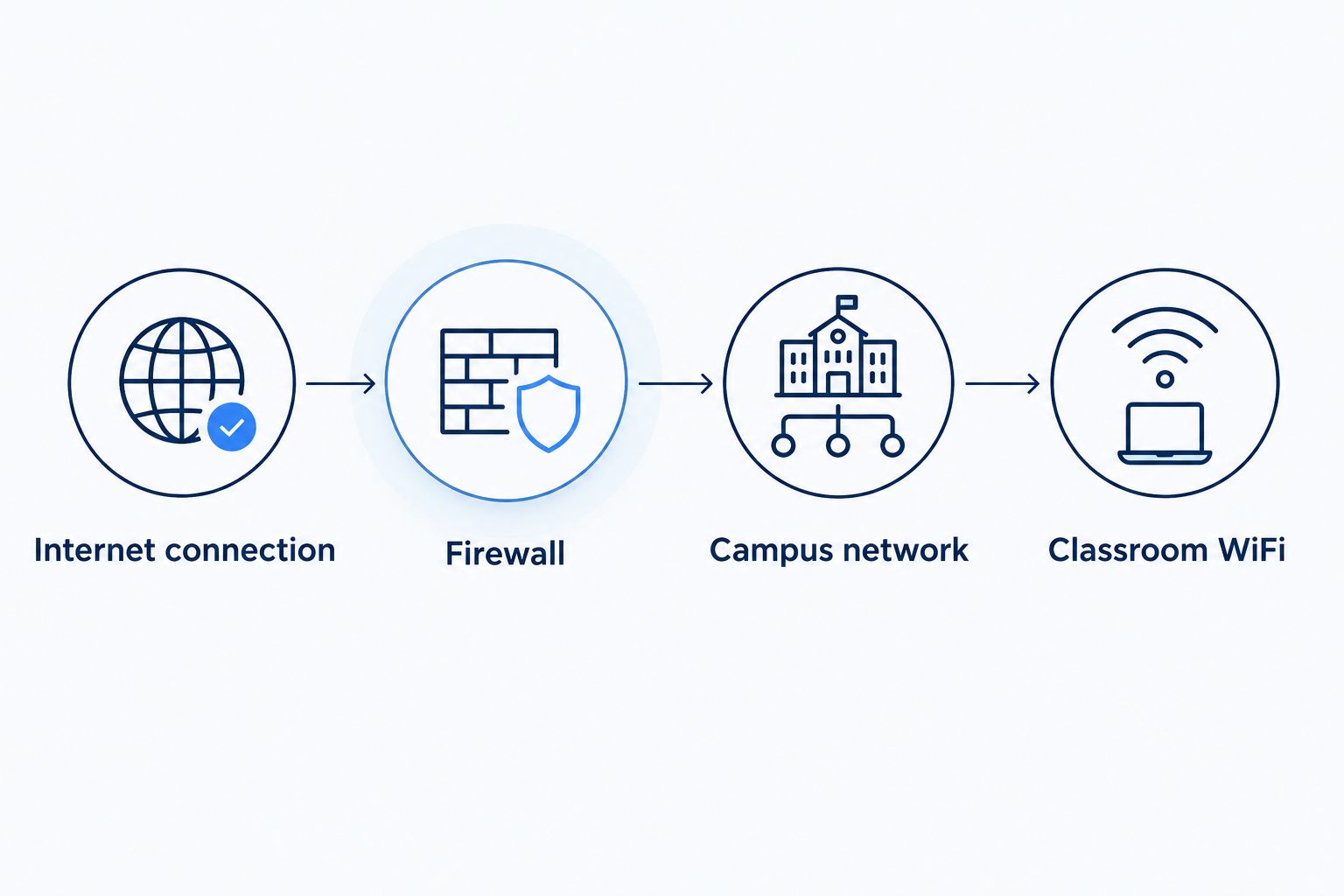
Follow the problem from the outside connection toward the student’s device. Record results under these headings so your team and prospective providers discuss the same evidence:
- Internet connection: check wired performance and errors.
- Firewall: review load and traffic-handling limits.
- Campus network: inspect switch links and cabling.
- Classroom WiFi: compare coverage and active connections.
3. Write requirements before requesting proposals
Turn your observations into a short service brief. Specify the buildings, applications, upload needs, equipment responsibilities, and support process you need. Ask providers to respond against that same brief so the comparison does not become a contest between headline speeds.
If managing access points takes time your staff cannot spare, evaluate managed WiFi as a separate scope of work. Sumofiber offers managed WiFi alongside business internet; ask what the proposed arrangement covers, who controls settings, and which responsibilities remain with your district.
Managed WiFi is a staffing and responsibility decision, not proof of classroom coverage. Require a design that addresses your actual rooms and device use. Keep funding and purchasing requirements in the brief, too, rather than checking them after selecting a provider.
- Specify download and upload requirements separately.
- Document campus layouts and equipment handoff points.
- Name required monitoring and reporting tasks.
- Define district access to settings and logs.
- Request a written list of exclusions.
4. Separate classroom WiFi from internet delivery
Walk the building with a floor plan and your existing access-point information. Note rooms with recurring complaints, crowded common areas, and spaces used differently after school. Test where students sit, not just beside the network cabinet.
Wireless coverage and capacity are different questions. A device showing a strong signal does not establish that a room supports its active workload. Review channel use, interference, access-point placement, and the wired connections feeding those access points.
For the 2026 rollout, define who manages student, staff, guest, and building-device access. Network separation helps control access, but it does not replace device security, filtering, or account management. Ask your team to test the rules rather than relying on network names alone.
- Mark problem rooms on the floor plan.
- Test with the classroom’s normal activities running.
- Review access-point placement and wired uplinks.
- Separate guest access from district resources.
- Document who approves configuration changes.
5. Compare outage handling and backup paths
Write down what your school must keep working during an outage before discussing backup equipment. Your priorities might include office communications, access to essential records, or a small set of administrative applications. A backup connection does not have to carry every classroom activity to serve a useful purpose.
Ask each provider where its responsibility starts and ends. Distinguish the internet service, campus equipment, power supply, and applications; each has a different failure path. Review the written agreement for restoration procedures rather than treating support access as a restoration guarantee.
For backup planning, ask whether the alternate connection depends on the same physical route or equipment. Different provider names do not establish independent infrastructure. Use the district’s own review to establish the expected protection.
- Define which applications get backup access.
- Identify shared routes, equipment, and power dependencies.
- Request escalation contacts and reporting procedures.
- Confirm how switching and restoration are handled.
- Schedule a supervised failover exercise.
6. Review security, purchasing, and service boundaries
Build a responsibility checklist with your technology, purchasing, and administrative teams. Mark who owns filtering, identity controls, firewall policies, equipment updates, and incident response. Buying fiber internet does not transfer those duties unless the agreement explicitly includes them.
If your district pursues E-Rate support, follow the applicable FCC and USAC rules for competitive bidding, eligibility, documentation, and deadlines. Review Children’s Internet Protection Act requirements where applicable. Do not assume a provider’s business service qualifies for a particular funding request or satisfies your district’s compliance obligations.
Keep the purchasing review separate from the technical recommendation. A connection that meets your performance requirements still needs the correct procurement process, authorized agreement, and documented responsibilities.
- Assign an owner to each security control.
- Review vendor access and administrative permissions.
- Check applicable funding and procurement requirements.
- Document equipment ownership and return obligations.
- Preserve proposals and approval records.
7. Test the change before accepting the service
Create an acceptance checklist before installation, using the requirements in your proposal. Coordinate the change with teaching staff and avoid scheduling a cutover during an assessment window. Identify the person authorized to approve the work and the person who can stop it.
As a practical starting exercise, schedule a 30-minute rehearsal that includes wired tests, classroom activity, and administrative applications. That rehearsal is not a substitute for longer monitoring. It exposes missing credentials, unclear responsibilities, and incomplete test instructions before the change matters.
Keep your 2026 acceptance record specific: location, time, test method, result, and unresolved issue. A successful speed test in the equipment room is only one part of proving the school day works.
- Test download and upload performance over Ethernet.
- Run representative classroom and office activities.
- Verify filtering and guest-access boundaries.
- Exercise backup switching under supervision.
- Record faults, owners, and follow-up actions.
Compare connection options for your district
Choose the service design, not just the transmission technology. Shared fiber and dedicated internet access can both use fiber, while offering different contractual arrangements. Compare the written service description before treating either label as a performance promise.
The following options serve different roles. Treat the best-for labels as planning guidance, not a claim that every service in that category meets your district’s needs.
| Option | Best for | Main advantage | Key limitation |
|---|---|---|---|
| Business fiber internet | Campuses evaluating a primary connection | Fiber delivery for campus internet traffic | Upload rates, sharing arrangements, and service commitments require verification |
| Dedicated internet access | Districts seeking explicitly defined capacity and service terms | Lets you evaluate committed capacity and written responsibilities | Does not fix internal WiFi or establish route redundancy |
| Cable internet | Sites comparing a non-fiber primary or alternate connection | Provides another wired connection type to evaluate | Upload capacity and service terms need close review |
| Cellular backup | Keeping selected essential applications connected during a wired outage | Provides a wireless alternative to a wired access path | Indoor signal, congestion, power, and plan restrictions affect suitability |
Sumofiber belongs on a business-internet shortlist when your district wants to discuss internet and managed WiFi together. Its stated service range does not establish dedicated capacity, school procurement eligibility, or a district-specific service agreement. Request those details explicitly rather than assuming they come with fiber.
Common mistakes schools and school districts make
Sizing the connection by enrollment alone
Enrollment leaves out staff activity, shared devices, guest access, and the way schedules concentrate demand. Build the requirement around simultaneous work, then check the internal network can carry it.
Accepting a hallway speed test as classroom proof
A quiet hallway does not represent a room full of students opening the same lesson. Test in the problem location with representative devices and activities, and compare against a wired baseline.
Treating managed WiFi as outsourced responsibility for everything
Managed WiFi does not automatically include filtering, identity management, every switch, or every student device. Write down the boundaries so the provider and district do not each assume the other owns a fault.
Calling another connection a backup without testing it
A second connection only helps if your equipment switches traffic correctly and essential applications still work. Test both the interruption and the return to normal service, including any manual steps.
Approving the upgrade without a campus acceptance record
An installation completion notice does not prove classroom readiness. Keep unresolved issues attached to named owners, and distinguish physical installation from the district’s acceptance decision.
FAQ
What's the best fiber internet setup for a school district?
The best setup matches each campus’s measured demand, internal network, and service responsibilities. Compare upload and download requirements, classroom WiFi, outage handling, and written terms before choosing a provider.
How much internet speed does a school need?
A school needs capacity based on simultaneous activity, not enrollment alone. Measure busy-period upload and download use, identify application requirements, and check internal network limits before setting a target.
Will fiber internet fix slow classroom WiFi?
Fiber internet will not fix a bottleneck caused by classroom WiFi. Compare wired and wireless performance during the same activity, then investigate access-point placement, interference, and wired uplinks.
Is dedicated internet access better than business fiber for schools?
Dedicated internet access is the better fit when its written capacity and service commitments match requirements that a business fiber proposal does not meet. Compare actual agreements because fiber describes the connection medium, not a universal service guarantee.
Can schools consider Sumofiber for internet and managed WiFi?
Schools can include Sumofiber in discussions about business internet and managed WiFi, both of which are part of its stated offerings. Confirm the proposed school service scope, procurement requirements, equipment responsibilities, and agreement before making a selection.
Does a school need a backup internet connection?
A school needs backup connectivity when its continuity plan requires internet access during a primary connection failure. Define essential applications first, then test the alternate path, power arrangements, and switching process.
Does buying fiber internet satisfy school filtering requirements?
Buying fiber internet does not by itself satisfy school filtering or security requirements. Assign responsibility for filtering and other controls, and review applicable CIPA, E-Rate, and district requirements with the appropriate staff.
One last thing
Test a lesson, not just a connection. Ask a teacher and an office staff member to run their normal work during acceptance testing. Their results reveal whether the technical checklist covers what the school actually needs to do.
Keep that short activity script with your network records. It gives your next technician a repeatable test instead of an old report showing that the internet was fast somewhere in the building.


