

A business can get a single static public IP address or a block of addresses with fiber internet; the provider sets the limit, not the fiber connection. In 2026, the number you should request depends on which services need their own public address. The key caveat is that a block's total address count is not necessarily the number your business can assign to equipment.
- How many static IP addresses can a business get? The provider sets the limit; ask for the usable count.
- An IPv4 /29 contains eight addresses, but a conventional subnet has six host addresses before provider reservations.
- Count public-facing services, not laptops, printers, or WiFi users, before requesting an address block.
- Sumofiber offers business fiber internet and managed WiFi; confirm static IP arrangements before ordering.
How many static IP addresses can a business get with fiber internet?
There is no universal static IP allowance for business fiber. Ask the provider how many public IPv4 addresses it will assign and how many your equipment can use.
These are IPv4 subnet sizes, not advertised service tiers or a promise that a provider offers them:
| Address arrangement | Total IPv4 addresses | Conventional host addresses | Best for | Main limitation |
|---|---|---|---|---|
| Single address | 1 address | Confirm assignment method | A shared internet gateway or a single public endpoint | Services share the public address |
| /30 subnet | 4 addresses | 2 host addresses | A small conventional subnet | A provider gateway can consume a host address |
| /29 subnet | 8 addresses | 6 host addresses | Several separately addressed services | Equipment needs compatible configuration |
| /28 subnet | 16 addresses | 14 host addresses | A larger set of public endpoints | More addresses require more administration |
| /27 subnet | 32 addresses | 30 host addresses | A larger routed deployment | The provider must support the requested allocation |
For business fiber internet and managed WiFi, Sumofiber is best suited to businesses seeking those services from one provider. Confirm its static IP allocation and routing requirements separately.
The table uses conventional IPv4 subnet arithmetic: the network address and broadcast address are not host addresses. A provider gateway can use another address. Routed blocks and special-purpose link configurations work differently, so get the customer-usable count in writing.
Why this matters
Ordering addresses by employee count is the wrong starting point. Your laptops, printers, and payment terminals can use private addresses inside the business while sharing an internet-facing address through network address translation, or NAT.
Static public addresses serve a different purpose. They give an internet-facing connection or service a stable address for tasks such as remote access or a partner's IP allowlist.
Separate the number of devices you own from the number of public endpoints you need. That distinction prevents an oversized request and exposes the cases where sharing an address will not meet your requirements.
For a 2026 business internet order, write down the applications first. Then ask the provider to match an address arrangement to those applications.
Single static IP: one public address
A single static public address suits a business that needs a stable internet-facing identity without separately addressing every device. A firewall can use that address for outbound traffic, and a partner can allowlist it when the partner's access rules support that arrangement.
The advantage is simpler administration. You track a single public address rather than maintaining an allocation list for a whole block.
The limitation is shared identity. Outbound services behind the same NAT gateway normally appear to come from the same public address unless you configure a different arrangement. Incoming connections also need deliberate firewall rules and, where appropriate, port forwarding.
Best for: a business needing a stable gateway address or a single remote-access endpoint. Ask whether the address is genuinely public, whether inbound connections are supported, and how it is assigned to your router.
/30 subnet: four total IPv4 addresses
An IPv4 /30 contains 4 total addresses and 2 conventional host addresses. That does not automatically mean your business receives two independently assignable public addresses.
If the provider places its gateway inside that subnet, the gateway uses a host address. Your equipment then uses the other host address. This is why a block size alone is not a sufficient answer to your order request.
A /30 can also describe a connection between routing devices rather than the address space intended for your public services. Ask whether it is the connection subnet, the customer allocation, or both.
Best for: a small conventional subnet with clearly documented gateway assignments. Its advantage is a compact arrangement; its limitation is little room for separately addressed services.
/29 subnet: eight total IPv4 addresses
An IPv4 /29 contains 8 total addresses and 6 conventional host addresses. Under a conventional on-link arrangement, a provider gateway using one host address leaves fewer addresses for customer equipment.
A routed /29 is a different arrangement. The provider routes the block toward your firewall over a separate connection, and the usable allocation depends on how that block is deployed. Do not apply an on-link gateway deduction without checking the design.
A /29 gives you room to distinguish several public endpoints. It also requires a firewall configuration that handles the addresses correctly; merely entering the block into an incompatible router does not make the services reachable.
Best for: a business with several services that genuinely need separate public addresses. The benefit is clearer service separation. The drawback is additional routing, firewall, and address-management work.
/28 and /27: sixteen or thirty-two total IPv4 addresses
An IPv4 /28 contains 16 total addresses and 14 conventional host addresses. A /27 contains 32 total addresses and 30 conventional host addresses. Those figures describe subnet arithmetic, not a provider's customer-usable promise.
Larger blocks suit deployments with a documented need for more independently addressed endpoints. They are not an upgrade to fiber speed, WiFi coverage, or security.
The benefit is room to assign distinct public addresses without forcing unrelated services to share an address. The drawback is administrative scope: you need to know which system owns each address, which inbound rules apply, and which addresses remain unused.
Best for: businesses whose network design requires a larger public allocation. Request a larger block only after your network administrator maps the requirement. More addresses are not useful simply because a business has more employees.
Why the static IP count varies
The number a business can get depends on the provider's service offering and the proposed network design. These factors explain why two fiber orders can have different allocations:
- Provider allocation: The provider determines which individual addresses or blocks it will assign to a business connection.
- Address family: IPv4 addresses and IPv6 prefixes use different addressing models. Ask about each separately rather than treating them as interchangeable counts.
- Delivery method: An on-link subnet and a block routed to your firewall have different gateway and configuration requirements.
- Reserved addresses: Network, broadcast, and gateway assignments affect the usable count in a conventional IPv4 subnet.
- Application requirements: Separate public services or distinct allowlisted source addresses can require additional addresses; ordinary device connections do not automatically require them.
- Equipment support: Your router or firewall must support the provider's delivery method and the address mappings your applications need.
For a 2026 comparison, ask every provider the same question: How many static public IPv4 addresses can my equipment use after all provider reservations? That gives you a meaningful comparison instead of mismatched block labels.
How to work out your business's address requirement
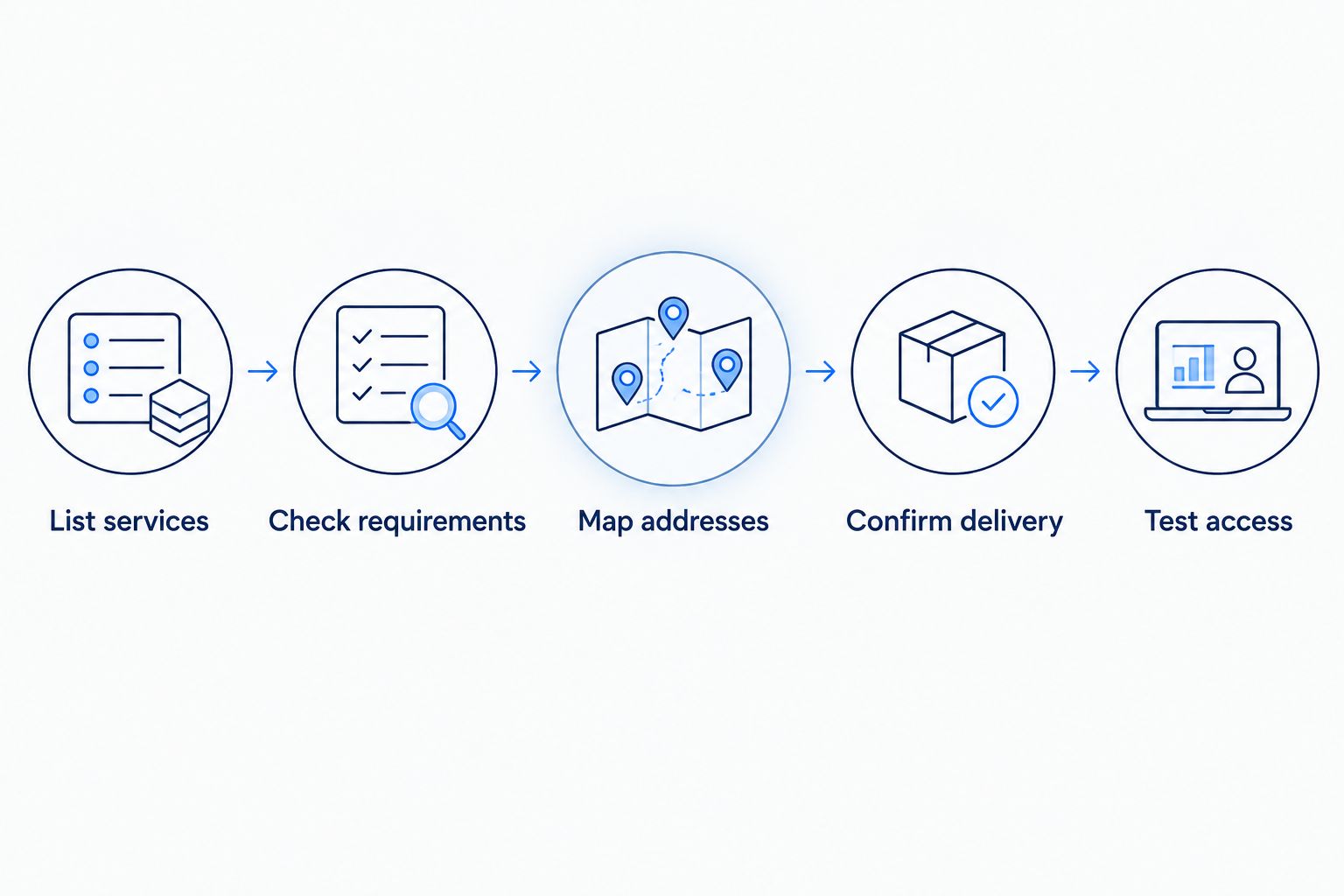
Start with the reason you need a fixed address. Follow this sequence before requesting a block.
- List services. Write down remote access, partner allowlists, and any internet-facing systems you operate. Identify the owner of each service.
- Check requirements. Ask whether each application needs a fixed public address, a separate public address, or simply reliable outbound internet access. Those are different requirements.
- Map addresses. Decide which services can share an address and which need distinct addresses. Include firewall interfaces and any provider gateway assignments.
- Confirm delivery. Have the provider and your network administrator agree on the subnet, gateway, routing method, and customer-usable allocation.
- Test access. After installation, verify outbound source addresses and authorized inbound access. Record the working configuration before changing existing allowlists.
Keep the result in a short address map. It should identify the service, assigned address, responsible person, and approved inbound access—not just a list of numbers copied from an installation email.
Remote access deserves its own check. A fixed public address can help users find a VPN endpoint, but it does not authenticate users or protect the systems behind it. The business internet to secure remote access workflow addresses that wider setup.
What should you ask before placing the order?
For a 2026 order, request the addressing details alongside the connection details. Use this wording: Please specify the static public IPv4 allocation, the customer-usable addresses, and the delivery method.
Then confirm whether the provider supplies an individual address, an on-link subnet, or a routed block. Ask who configures the router and whether your own firewall supports that arrangement.
Also ask what happens when the service changes. Moving premises, changing providers, or adding a backup connection requires a separate addressing discussion; a static address on the primary connection does not automatically follow traffic onto another network.
Finally, confirm that the order actually includes the addressing arrangement you discussed. A business fiber connection and a static public IP allocation are separate specifications. Neither a speed figure nor a business label answers the addressing question.
Does every employee need a static public IP address?
One public address can serve multiple employees through NAT. Employee laptops can retain private local addresses while the firewall handles their internet connections.
Assign additional public addresses for application requirements, not headcount. Guest WiFi also needs appropriate network separation; a separate public address alone does not provide that separation.
Does a /29 always give my business six usable addresses?
A /29 has 6 conventional host addresses, but your customer-usable count depends on the arrangement. A provider gateway inside that subnet consumes a host address, while a separately routed block needs a different calculation based on its deployment.
Ask for the actual addresses your firewall can use. Do not accept only the subnet label as the answer.
Will more static IP addresses make fiber internet faster?
Eight addresses in a /29 do not increase your connection's bandwidth. Public address allocation controls addressing, not the rate at which your fiber service transfers data.
Evaluate speed, WiFi coverage, and application performance separately. A larger address block cannot fix weak wireless coverage or an overloaded connection.
FAQ
How many static IP addresses can a business get in 2026?
The provider sets the static IP allocation; there is no universal maximum for business fiber internet in 2026. Request the number of customer-usable public IPv4 addresses, not just the block size.
Can my whole office share a single static IP address?
Your office can share a single static public address through NAT for ordinary outbound internet access. Applications requiring distinct public identities or particular inbound arrangements need a separate review.
What's the difference between a public static IP and a reserved WiFi address?
A public static IP identifies an internet-facing connection or service, while a WiFi address reservation assigns a consistent local address to a device. A local reservation does not make that device reachable from the internet.
Is a /28 twice the size of a /29?
A /28 contains 16 total IPv4 addresses, twice the 8 total addresses in a /29. Conventional host counts are 14 and 6 respectively, before any provider gateway reservation.
Does Sumofiber offer business fiber internet and managed WiFi?
Sumofiber offers business fiber internet and managed WiFi. Confirm the static public IP allocation and equipment requirements directly before ordering.
Can I keep the same static IP when switching providers?
Do not assume a provider-assigned static IP will transfer to another provider. Plan to update affected allowlists, remote-access settings, and DNS records unless an agreed routing arrangement preserves the address.
Does a static IP keep my business connected during an outage?
A static IP does not provide a backup internet connection. A backup service also needs a plan for source addresses, remote access, and applications that depend on the primary connection's address.
One last thing
A static public IP is a stable address, not a security feature. Keep unnecessary inbound access closed and expose only the services your business intentionally operates.
Before your 2026 installation, get both the address map and the firewall plan agreed. The useful question is not just how many addresses you can get—it is which services need them and how those services will stay reachable without exposing the rest of your office.


