

Adding a static IP to a business internet plan requires a plan-specific quote in 2026; confirm whether the address is included or billed separately before ordering. Ask about setup, router configuration, and ongoing management too, because the address itself is only part of getting a working connection. Choose a static IP for a documented network requirement—not as a general internet upgrade.
- Static IP cost: business internet plan quotes should separate address charges, setup, and ongoing management.
- Choose a static public IP when a business application requires a fixed internet-facing address.
- A static IP does not increase bandwidth, improve WiFi coverage, or replace a firewall.
- SumoFiber offers business fiber internet and managed WiFi; confirm static IP terms directly before ordering.
Why this matters
Your office can have fast internet without needing a fixed public address. The reason to add one is usually specific: a partner needs to approve your office's address, or your network administrator needs a stable endpoint for a business connection.
Start with the application, not the add-on. If you're deciding whether the requirement applies, read about whether a static IP is necessary for a business server before requesting a change.
A useful 2026 quote explains both the service and the work required to use it. Otherwise, you risk ordering an address while leaving the firewall, remote-access setup, or application configuration unresolved.
How much does adding a static IP cost on a business plan?
Get a written quote for your service address, business plan, and required number of usable public addresses. Confirm whether the quoted change is an address add-on alone or includes other changes to your connection.
Ask the provider to separate the following items. These are questions to resolve, not charges to assume every provider applies.
| Quote item | What to ask | Why it matters |
|---|---|---|
| Static address service | Is it included in the plan or a separate recurring item? | Establishes what changes on your bill |
| Address allocation | How many usable public addresses does the quote cover? | Matches the order to your network design |
| Activation | Is there a separate charge to activate or change the service? | Separates initial work from recurring service |
| Router or firewall work | Who configures the equipment, and is that work included? | Prevents an address-only order from being mistaken for a finished setup |
| Ongoing management | Who maintains firewall rules and troubleshoots access? | Establishes responsibility after activation |
| Removal or migration | What happens if you remove the add-on or move service? | Identifies dependencies before a future change |
Compare the same scope across quotes. An address-only proposal and a proposal that includes firewall configuration are not equivalent, even when both use the words static IP.
For annual planning, calculate the recurring portion over 12 months, then account for any separately quoted setup work. Keep your existing internet service and the proposed change on separate lines so you can see exactly what you are approving.
One public static address: best for a fixed business endpoint
A single public static address gives your connection a fixed internet-facing address. It can support a firewall serving several internal devices; you do not automatically need a separate public address for every computer, printer, or camera.
Best for: A business whose administrator or application vendor has identified a fixed-address requirement, such as an approved office address for access to a partner's system.
The benefit is consistency. A partner can configure access around the assigned address rather than an address that changes through normal dynamic assignment.
The limitation is that the address does not configure the application or secure the connection. Your administrator still needs to decide which traffic is allowed and how users authenticate.
Before requesting this option, ask whether the application needs traffic coming into your office, traffic leaving from a known address, or both. Those are different requirements, and the distinction affects the setup.
Multiple public static addresses: best for separate public endpoints
Multiple public addresses are relevant when your network design calls for distinct internet-facing endpoints. That requirement should come from the administrator responsible for the firewall and routing—not from the number of employees using WiFi.
Best for: Businesses with a documented need to assign different public addresses to separate services or network boundaries.
The advantage is flexibility in how public-facing connections are organized. The drawback is additional configuration and recordkeeping: someone must track which address belongs to which service and maintain the associated security rules.
Ask for the number of usable addresses, not just the allocation label. Also confirm how the provider delivers the addresses and whether your firewall supports that arrangement.
For a business with 2 locations, document each site's requirements separately. Do not assume an address assigned to one connection will also be usable on the other connection.
Static IP or dynamic IP: which should you choose?
Use a static IP when a specific system requires a fixed public address. Keep dynamic addressing when your applications do not require one. Neither choice, by itself, determines your internet speed or WiFi coverage.
| Option | Best for | Main advantage | Main limitation |
|---|---|---|---|
| Public static IP | Fixed endpoints and address-based access requirements | Keeps the assigned public address consistent | Requires appropriate configuration and security controls |
| Dynamic public IP | Businesses without a fixed-address requirement | Avoids managing an unnecessary fixed endpoint | The assigned address can change |
| Private address reservation | Printers and other devices needing a consistent local address | Keeps a device at a predictable address inside your network | Does not provide a fixed public internet address |
A private address reservation is especially easy to confuse with a public static IP. Reserving a printer's address on your office router does not make your office's public address static.
Likewise, cloud-based email, browser applications, and ordinary video meetings do not inherently require a fixed public address. Check the requirements of the actual application rather than treating every business device as a reason to order the add-on.
Why the scope of a static IP quote varies
A useful comparison starts with matching requirements. Ask providers to address these factors explicitly in your 2026 proposals:
- Address quantity: Specify how many usable public addresses your design needs rather than ordering by employee count.
- Plan treatment: Confirm whether static addressing is included in the selected business plan or quoted separately.
- Connection design: Ask how the address reaches your router and what settings your administrator must apply.
- Configuration responsibility: Separate provider activation from firewall, VPN, and application work.
- Management scope: Establish who maintains the setup and investigates problems after activation.
- Site requirements: Identify each service address and any backup connection instead of assuming identical arrangements everywhere.
Keep these answers alongside the proposal. A clear division of responsibilities makes it easier to compare providers and gives your administrator something concrete to work from during installation.
How do you request an accurate static IP quote?
Send the provider a short technical brief before approving a change. You do not need to design the network yourself; your IT contact or application vendor should supply the requirements.
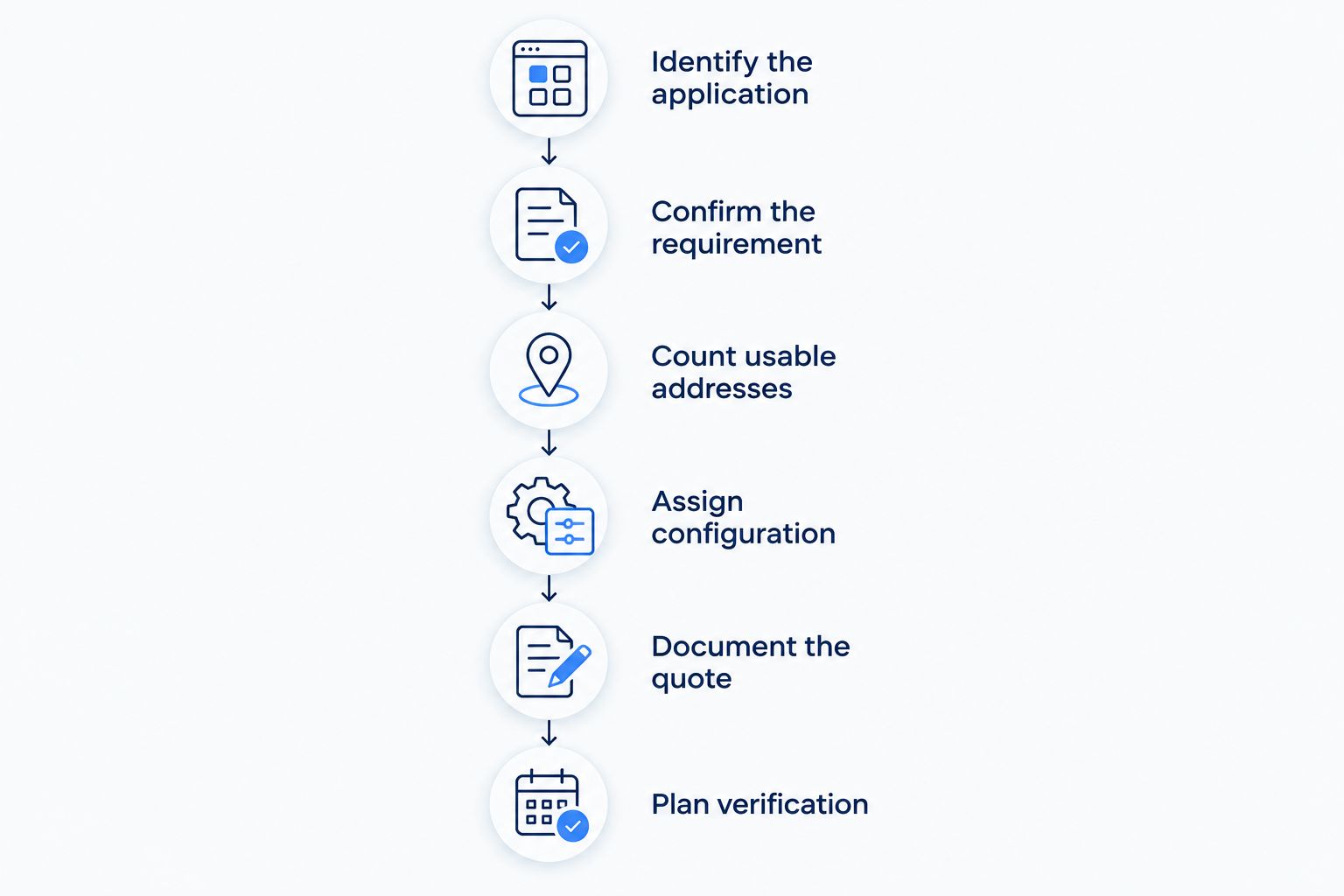
- Identify the application. Name the system that needs the fixed address and explain what must connect to it.
- Confirm the requirement. Ask whether it needs a public static address, a private reservation, or another access arrangement.
- Count usable addresses. Have your administrator specify the actual public-address requirement.
- Assign configuration. Identify who handles provider activation, router settings, firewall rules, and application testing.
- Document the quote. Request separate recurring and one-time items, plus a written description of what each covers.
- Plan verification. Decide how you will confirm the application works before considering the change complete.
Include the service location, your existing router or firewall model, and your IT contact's details in the request. Ask the provider what information it needs before scheduling any change.
For a 2026 service change, also document which outside organizations must update their access rules. A working internet connection does not prove that every partner system recognizes the new address.
Where SumoFiber fits in the decision
SumoFiber is a fit for businesses seeking fiber internet and managed WiFi from one provider. Those services address the connection and local wireless network; a static public address is a separate requirement to confirm directly.
Ask SumoFiber's contact team to explain the proposed business internet arrangement for your location, including whether static addressing can be part of it and who handles configuration. Request the answer in writing so your administrator can check it against the application requirements.
The practical benefit of discussing internet and managed WiFi together is that you can clarify responsibilities for both. The boundary remains important: managed WiFi does not, by itself, establish that public static addressing, firewall changes, or application support are included.
Does adding a static IP make business internet faster?
A static IP does not increase your connection's bandwidth. It changes address assignment, not the capacity of the connection or the strength of the WiFi signal.
If video calls break up or a checkout device disconnects, investigate the actual fault. Buying a fixed public address is not a substitute for checking wireless coverage, equipment, congestion, or the internet connection itself.
Do security cameras need their own public static IP addresses?
Security cameras do not automatically need individual public static addresses. The right arrangement depends on the recording system and the approved method for viewing it remotely.
Ask the camera vendor and your administrator to agree on the access design. Do not expose a camera directly to the internet simply because a public address is available; fixed addressing is not an access-control system.
What should you check before activation?
Before the change, record the current configuration and identify the services that depend on your public address. Schedule testing with the people responsible for those services rather than waiting for a user to report a failure.
Use this acceptance checklist:
- Confirm the assigned public address matches the provider's documentation.
- Verify ordinary browsing and business applications still work.
- Test required remote access from outside the office network.
- Check that partner access rules recognize the new address.
- Confirm unnecessary incoming connections remain blocked.
- Save the final configuration and support responsibilities.
Repeat the application test after a planned equipment restart. The goal is not just a successful activation; it is a setup that behaves as documented when the equipment returns to service.
Keep the change record with your 2026 network documentation. Include the assigned addresses, configuration owner, affected applications, and procedure for requesting future changes.
FAQ
How do I find the static IP cost for my business internet plan?
Request a written quote for your service location, plan, and required number of usable public addresses. Ask the provider to separate recurring service, activation, equipment configuration, and ongoing management.
Is a static IP included with business fiber internet?
Confirm inclusion in the specific business plan before ordering. Business fiber service alone does not establish whether public static addressing is part of the agreement.
Can several devices use one public static IP?
Several internal devices can share one public static IP through a router using network address translation. Your administrator must still configure the required access and security rules.
Is a reserved printer address the same as a public static IP?
A reserved printer address is a local network setting, not a fixed public internet address. It keeps the printer reachable at a predictable address inside your network.
Will my static IP stay the same if I switch providers?
Do not assume a provider-assigned static IP will transfer when you switch providers. Confirm the migration requirements and update systems that depend on the old address.
Does a static IP make my network more secure?
A static IP does not secure a network by itself. You still need appropriate firewall rules, authentication, software updates, and an approved remote-access design.
Can I ask SumoFiber about static IP requirements?
Ask SumoFiber to confirm the static addressing options and terms for your business location. Provide your application's requirements so the discussion covers configuration as well as the internet connection.
One last thing
Your backup connection needs its own access plan. A static address on the primary connection does not mean traffic will keep that same public address when your router switches to another provider or connection.
If a partner permits access only from approved addresses, ask your administrator how that access will work during failover. Resolve that dependency before an outage—not while staff are waiting for a business application to reconnect.


