

Cellular failover for business internet has no single fixed cost in 2026: your total depends on the backup equipment, cellular data service, setup, and whether someone manages the connection. A quote for the internet line alone does not tell you what it will cost to keep payments, calls, and other essential work online when that line drops.
- Cellular failover cost for business internet depends on equipment, cellular service, setup, and management; request an itemized quote.
- Automatic router failover is best when critical work must keep running without someone switching connections.
- A manual hotspot is simpler, but staff must notice the outage and reconnect devices.
- SumoFiber offers business fiber internet; confirm cellular backup availability and terms before treating it as included.
Why this matters
An internet outage is not just a slow afternoon if your business takes card payments, answers calls online, or gives customers WiFi. The useful question is what stays connected during an outage, not whether a quote contains the word backup.
Start by deciding whether you need automatic switching when fiber drops. That decision changes the equipment you need and the work your team must do when the primary connection fails.
The best-value backup is the one that keeps your essential tasks working without paying for capacity you do not need. For a small office, that could mean keeping payment and phone traffic connected while postponing large downloads. For a restaurant, it means identifying which devices staff must use to serve customers and checking whether those devices can reach the backup connection.
How much does cellular failover cost for business internet?
There is no supported dollar estimate for cellular failover in 2026 without a specific equipment and service quote. To compare offers, ask each provider to separate the recurring cellular service charge from equipment, setup, and ongoing management. Ask what happens to the bill when backup data is used.
| Cost component | What to confirm | Why it changes the total |
|---|---|---|
| Backup equipment | Whether your existing router supports cellular failover and whether a cellular modem is required | You cannot assume an internet router has a cellular connection |
| Cellular service | Which data service supplies the backup connection and how usage is billed | A backup connection needs a working cellular service arrangement |
| Setup | Who configures switching, device access, and testing | Equipment alone does not establish a working failover process |
| Management | Who monitors the backup and handles problems | An unmanaged setup leaves troubleshooting with your team |
| Usage terms | What happens if you use more backup data than expected | The recurring charge may not describe the full usage cost |
Ask for one itemized 2026 quote that states what you pay before an outage, what changes while cellular backup is active, and who fixes it if switching fails. Compare those answers alongside the cost of your primary business internet connection; they are different services, even when one provider coordinates both.
The cost is not the same as the internet bill
Your primary connection gets the office online during normal operation. Cellular failover is a separate way to carry traffic when that connection stops working. A quote that lists only business internet does not establish that a cellular plan, compatible hardware, or failover configuration is included.
Likewise, a cellular plan by itself does not establish that your office network will switch automatically. Ask the provider to describe the complete path from the primary outage to a working backup connection. If staff must turn on a hotspot and move devices over, the backup is manual, even if it uses cellular service.
Which backup setup should you compare?
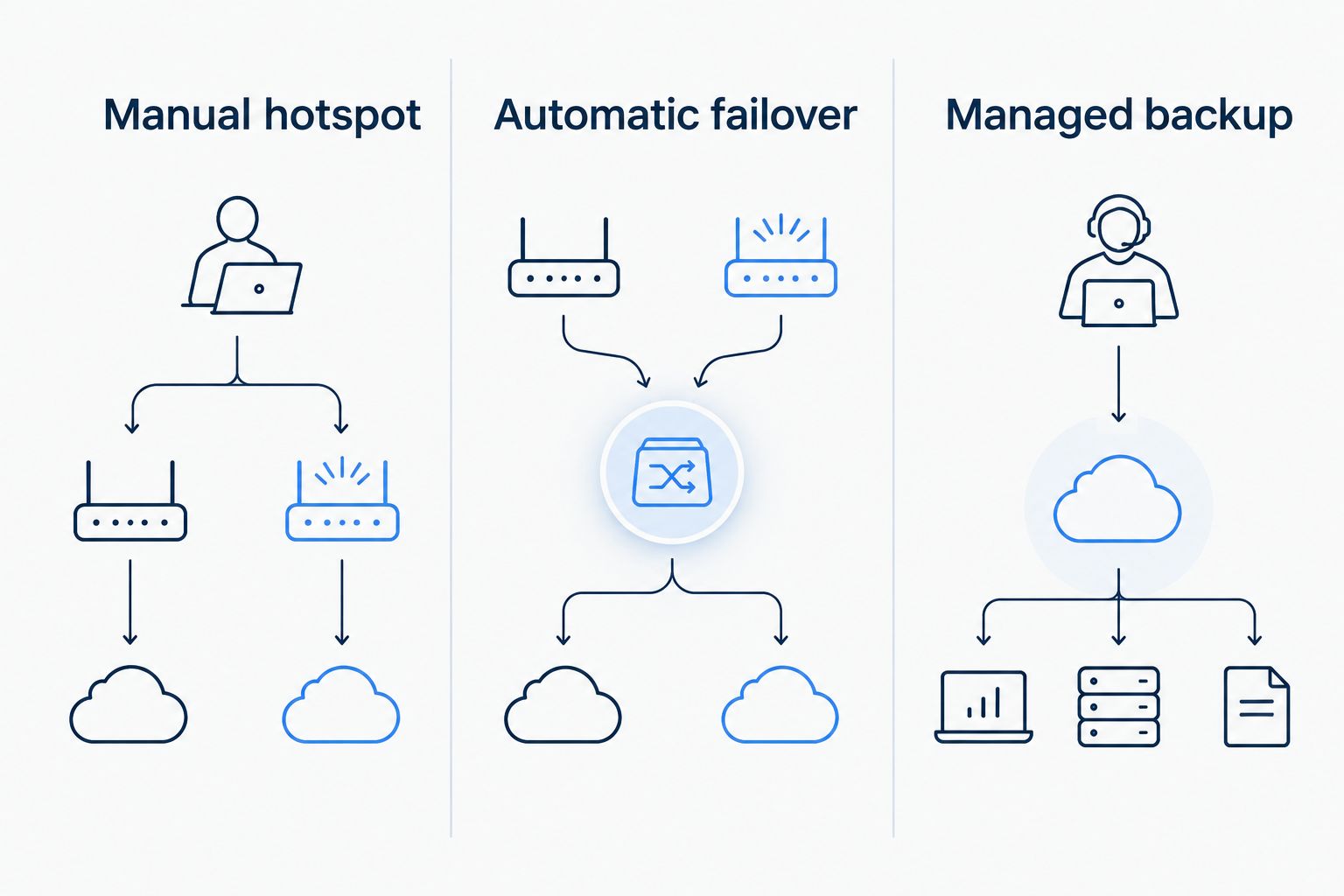
The lowest-effort purchase is not always the lowest-effort outage. Compare how each setup switches connections, which devices it serves, and who takes responsibility when it fails.
| Option | Best for | Advantage | Limitation |
|---|---|---|---|
| Manual cellular hotspot | A business that can pause work while staff reconnect essential devices | A straightforward backup process that staff can understand | Switching depends on someone noticing the outage and moving devices |
| Router-based automatic failover | A business that needs its existing network to switch without staff intervention | The router can move eligible traffic to a cellular connection | Requires compatible equipment, configuration, and a test of the switch |
| Managed cellular backup | A business that wants a provider to handle setup and ongoing oversight | Clearer responsibility for configuration and support when included in the agreement | The management scope and usage terms must be checked in the quote |
Router-based automatic failover is best for a business that cannot wait for an employee to reconnect each device. It still needs a test: confirm that the devices your staff actually use can reach the services they need after the primary connection drops. A backup that connects a laptop but leaves the payment system offline has not solved the business problem.
A manual hotspot remains a reasonable choice when a brief interruption is acceptable and a designated employee can handle the switch. Its weakness is operational. If that person is away, busy with customers, or unaware of the outage, work stays interrupted until someone acts.
Managed backup shifts defined tasks to a provider, but managed is not a substitute for a written scope. Ask who supplies the cellular service, who checks the connection, who responds to failed switching, and whether your team still has steps to perform during an outage.
Why cellular failover cost varies
These are the questions that explain differences between 2026 quotes. Get each answer in writing so you can compare the same service scope rather than two different definitions of backup.
- Existing equipment: A compatible router changes what you need to add. Ask whether the quoted setup uses your current network equipment or replaces part of it.
- Automatic versus manual switching: Automatic failover requires a configured network path. A manual hotspot leaves the switch to your staff.
- Cellular data terms: Ask how the provider handles routine testing and actual outage use. The headline recurring charge does not answer what happens during extended use.
- Devices that must stay online: Name the payment terminals, phones, computers, and other essential devices. A quote should explain which of them will use backup.
- Setup and testing: Ask whether configuration and a live failover test are included. A connection that has never been switched and checked leaves a critical question unanswered.
- Support responsibility: Identify who handles the router, the cellular service, and the primary internet connection when troubleshooting crosses between them.
Do not choose a backup solely by the size of the cellular data allowance. First, decide which work cannot stop. Then check whether the connection and its data terms support that work during the kind of outage your team needs to handle. This keeps the discussion tied to operating needs rather than a feature list.
What should you ask for in a cellular failover quote?
Use the same checklist with every provider. It exposes the gaps that a single monthly line item hides:
- State the failure you want covered. Ask whether the proposed backup works when the primary internet connection is unavailable and what other equipment must remain powered.
- Name your essential tasks. Specify payments, business calls, staff applications, or customer WiFi as relevant. Ask which devices stay connected and which do not.
- Request separate charges. Have the provider identify equipment, cellular service, setup, management, and any usage-dependent charges without combining them into one unexplained total.
- Confirm the switching method. Ask whether failover happens automatically, whether staff must take action, and how service returns to the primary connection.
- Ask for a demonstration or test plan. The test should show the critical devices working on backup, not merely show that the router detects a cellular signal.
- Assign ownership. Get a clear answer on whom your staff contacts if the backup does not work during an outage.
The power question matters. Cellular service does not keep a router or connected devices operating if those devices have no power. Ask which parts of the proposed setup depend on electricity at your site, and treat power continuity as a separate decision from internet failover.
If you are comparing SumoFiber business internet with a cellular backup proposal, keep those scopes separate. SumoFiber offers business fiber internet and managed WiFi, but the supplied service information does not establish a cellular failover offering. Confirm availability, equipment, data terms, and support for your address before counting cellular backup as part of any plan.
Is automatic failover worth it for a small business?
Automatic failover is worth comparing when an interruption stops an essential task and staff cannot reliably switch connections themselves. A manual hotspot can be enough when the business can tolerate the pause. Decide using the work that stops during an outage, then ask for a quote and a test of that exact task.
For example, do not evaluate a restaurant’s backup only by checking whether a staff laptop opens a website. If taking payments is the priority, test the payment workflow on the proposed backup. If calls are the priority, check the phone setup instead. This is an operational test, not a promise that every device will behave the same way.
Does cellular failover replace business fiber internet?
No. Cellular failover is a backup path, not a reason to ignore the primary connection. Your primary service carries normal work; the backup is there for the interruptions it is designed to cover. In 2026, compare primary internet and cellular backup as separate decisions, then check that the two work together.
That distinction also makes quotes easier to read. If you are still choosing the main connection, settle what the office needs during normal business before deciding how to keep a smaller set of tasks online during an outage. You do not need every device to have the same priority when the network switches.
Can you use a phone hotspot instead?
A phone hotspot can provide a manual connection for some devices, but it is not the same as automatic failover for an office network. Staff have to notice the outage, turn on the hotspot, and connect the devices that need it. Confirm that the phone’s cellular service works at your location and that the specific business applications work over the hotspot before relying on it.
A written backup procedure helps if you choose this route. Identify who switches connections, which devices come first, and how staff know when the primary service is working again. Keep the instructions where the person handling the outage can find them without an internet connection.
FAQ
How much does cellular failover cost for business internet in 2026?
Cellular failover has no single fixed cost; request an itemized 2026 quote for equipment, cellular service, setup, and management. Check whether backup data usage changes the bill.
Is a cellular data plan enough for automatic failover?
No. Automatic failover also needs compatible equipment and a configured way to switch traffic when the primary connection fails.
What is the cheapest type of cellular backup to set up?
A manual hotspot has fewer network setup requirements than router-based automatic failover, but the total cost depends on your equipment and cellular service terms. Staff must reconnect the devices they need.
Will cellular failover keep every business device online?
Not automatically. Confirm which devices can use the backup and test essential tasks such as payments or calls after switching connections.
Does cellular failover work during a power outage?
Cellular failover alone does not power your router or other devices. Ask which parts of the proposed setup need electricity and address power continuity separately.
Does SumoFiber include cellular failover with business internet?
The supplied SumoFiber service information does not establish that cellular failover is included. Confirm backup availability, equipment, and terms for your address before treating it as part of a business internet plan.
Should I choose automatic failover or a manual hotspot?
Choose automatic failover when essential work cannot wait for staff to reconnect devices. A manual hotspot fits businesses that can tolerate a pause and assign someone to handle the switch.
One last thing
Test the work, not just the connection. In 2026, the most useful question to ask during a failover demonstration is whether your essential payment, call, or office workflow still works after the primary internet connection is disconnected. A connected router is only part of the answer.


