

Managed WiFi is worth it for a small office once more than a handful of people, a guest network, or work that can't tolerate dead spots depends on the same signal — a consumer router pulled out of a box won't hold up under that load. For an office of two or three people sharing one printer on one floor, a solid router by itself is usually enough, and paying for management adds cost without adding much benefit.
- Managed WiFi is worth it for a small office with 10+ employees, a guest network, or coverage gaps — skip it for a two-person office with one router.
- SumoFiber configures and monitors business WiFi so outages get caught before staff notice, not after someone complains.
- Offices running POS systems, VoIP phones, or security cameras get the most value from managed coverage and device alerts.
- A single access point in the corner of the room is the most common reason small offices report dead zones in 2026.
- The decision comes down to device count and guest traffic, not office size in square feet.
Why this matters
A dropped video call during a client meeting or a guest network that slows down the register at the front counter costs more than the annoyance suggests — it costs staff time and, sometimes, a sale. Small offices tend to add WiFi as an afterthought: one router, plugged in near the modem, expected to cover a space it was never designed for.
That setup works fine right up until the office adds a second floor, a conference room in the back, or a handful of new hires with laptops and phones. Managed WiFi exists to solve exactly that gap — coverage, monitoring, and support handled as part of the service instead of something you troubleshoot yourself at 5pm on a Friday.
Is managed WiFi worth it for a small office?
The honest answer depends on how many devices, how much guest traffic, and how much downtime your office can absorb before it becomes a real problem. How managed WiFi works for a business breaks down the setup, but the worth-it question comes down to a simple comparison.
| Self-managed WiFi | Managed WiFi | |
|---|---|---|
| Setup | One consumer router, plugged in and left alone | Business-grade access points placed for your actual floor plan |
| Monitoring | None — you find out when someone complains | Ongoing monitoring flags drops before staff notice |
| Guest network | Often shares bandwidth with work devices | Separate guest network keeps visitors off your main line |
| Support | You troubleshoot it or wait on hold | Handled as part of the service |
| Best for | Two or three people, one room, light use | Growing teams, guest traffic, multiple devices per person |
Managed WiFi wins for any small office with guest traffic, more than one access point, or work that can't stall mid-call. A self-managed router still wins for a tiny office with light, predictable use and nobody who minds restarting it themselves.

Why the answer changes office to office
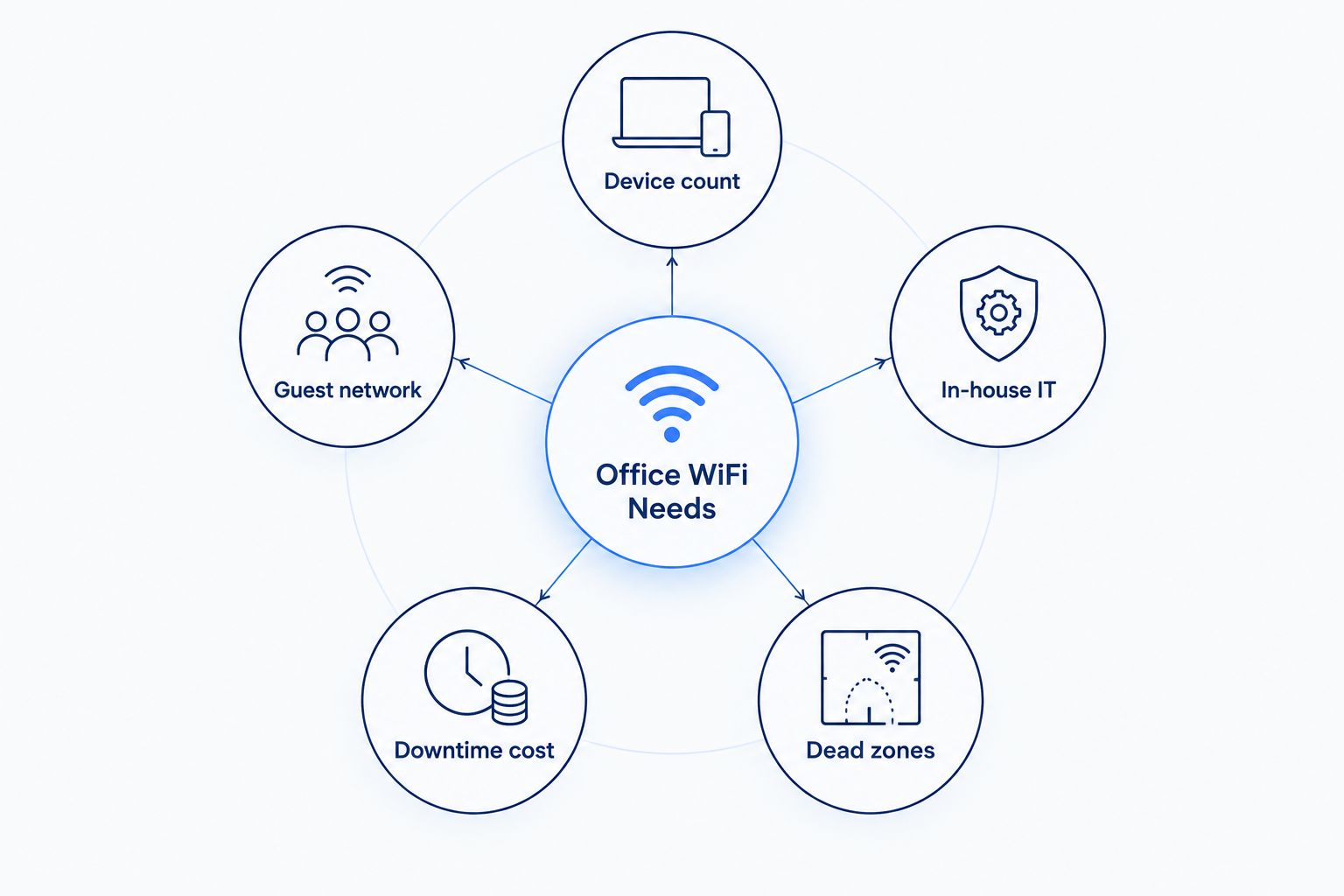
The same question gets different answers depending on a few specific things about your office. Walk through these before deciding either way:
- Device count per person — a design shop with three monitors and a laptop per desk pulls harder on a network than an office where people just check email.
- Guest network needs — a waiting room, a client lounge, or a coworking floor with visitor traffic needs separation from work devices, and how much bandwidth a small business actually needs covers what that separation costs in capacity.
- In-house IT — an office with someone who already handles the network has less to gain from management; an office where the owner is also the IT department has the most to gain.
- Downtime cost — a sales team on the phone all day loses more from a dropped connection than a back office that mostly does paperwork.
- Floor plan and building materials — concrete walls, multiple floors, or a long narrow layout create dead zones a single router can't reach no matter how good it is.
- Connected hardware — POS systems, VoIP phones, and security cameras all depend on the network staying up, which raises the stakes on any outage.
See if managed WiFi fits your office
Talk through coverage, guest access, and setup for your specific space.
Do very small offices need managed WiFi?
Offices with five or fewer employees rarely need managed WiFi if everyone works in one room with no guest traffic and no connected hardware beyond laptops and phones. Once that office adds a POS system, a conference room, or a second floor, the calculation changes fast — those are the exact triggers that push the answer from no to yes.
What does managed WiFi include for a small office?
Managed WiFi for a small office typically includes access point placement based on your floor plan, ongoing network monitoring, a separate guest network, and support that handles issues instead of leaving you to reset the router yourself. Some setups add automatic alerts — getting notified when a device drops off managed WiFi means a problem gets caught before an employee has to report it.
Is managed WiFi different from just buying a good router?
Yes — a good router improves signal strength in one spot, but managed WiFi covers the whole office with multiple access points, watches the network for problems, and hands off support instead of leaving troubleshooting to whoever's at their desk when it breaks. A better router is a hardware upgrade; managed WiFi is an ongoing service.
FAQ
Is managed WiFi worth it for a small office in 2026?
Managed WiFi is worth it for a small office with more than a handful of employees, a guest network, or hardware like POS systems and VoIP phones that can't tolerate downtime. A two- or three-person office with light, predictable use gets less value from it.
How much bandwidth does a small office need for managed WiFi?
Bandwidth needs scale with device count and use — video calls, cloud apps, and guest traffic all add load on top of basic browsing and email. Check how much bandwidth a small business actually needs before sizing a managed WiFi plan.
Does managed WiFi include guest network access?
Most managed WiFi setups for small offices include a separate guest network so visitor traffic doesn't compete with work devices for bandwidth. That separation also keeps guest devices off the same network as business hardware.
What happens if managed WiFi goes down?
A managed WiFi service is monitored, so an outage typically gets flagged and addressed as part of the support included with the service rather than left for someone in the office to notice and report.
Is managed WiFi better than a mesh router system for an office?
A mesh router system can extend coverage in a small space, but it doesn't include monitoring, guest network separation, or support the way managed WiFi does. For an office with real guest traffic or connected hardware, managed WiFi covers more ground.
Do I need managed WiFi if I already have fiber internet?
Fiber internet and managed WiFi solve different problems — fiber delivers the connection to the building, while managed WiFi handles coverage and reliability once it's inside. A fast fiber line still won't fix a dead zone on the far side of the office.
Can managed WiFi handle multiple connected devices like cameras and POS systems?
Yes — managed WiFi is built to handle multiple device types on the same network, including POS systems, VoIP phones, and security cameras, which is exactly where a single consumer router tends to struggle.
One last thing
The access point closest to the break room is the most common failure point in small offices, not the router itself — that's where the most devices cluster during lunch and shift changes. Before deciding either way, walk the office during a busy hour and note where the signal actually drops instead of guessing off the floor plan; it usually points straight at the answer.


