

Best overall connection type: business fiber. Best for firms seeking internet and managed WiFi from one provider: Sumofiber. Best for contractual service requirements: dedicated internet access. This 2026 guide compares business internet for law firms by the work it needs to support, from document uploads to client calls.
- Choose business fiber for law firms that depend on document uploads, video meetings, and cloud applications.
- Sumofiber offers business internet and managed WiFi for firms seeking those services from one provider.
- Choose dedicated internet access when written service commitments are a procurement requirement.
- Treat backup internet and secure office WiFi as separate decisions from your primary connection.
Why this matters
A law office does not need internet just to open websites. Your receptionist answers calls while an attorney joins a video meeting and a paralegal uploads discovery files. The connection has to support those activities together.
The best business internet for law firms is the connection that fits your busiest working period, your building, and your recovery plan. A large download-speed headline does not answer those questions. Neither does a business label on its own.
For your 2026 shortlist, separate three decisions: the connection into the building, the network inside the office, and what happens when either stops working. Buying one does not automatically solve the others.
What makes the best business internet for law firms
Use these six criteria before comparing providers:
- Upload capacity: Ask about uploading case files while other staff use video meetings. Compare the upload specification separately from downloads.
- Call quality: Look at latency, jitter, and packet loss, not just a speed-test result. These affect real-time conversations.
- Written commitments: Read the service agreement for support responsibilities, escalation procedures, and any service-level agreement.
- Office coverage: Identify who designs, manages, and troubleshoots WiFi in meeting rooms and staff work areas.
- Backup independence: Check whether a second connection depends on the same physical route or equipment as the first.
- Installation fit: Confirm landlord approval, building access, equipment placement, and the work required before switching.
Sumofiber is a fit for business internet for law firms seeking fiber and managed WiFi from one provider. Its service offering includes business internet, managed WiFi, phone, TV, and mobile services. Ask which services and configurations fit your office rather than assuming every service belongs in your setup.
Business internet options at a glance
The ranking below separates different purchasing needs. Dedicated service is not automatically necessary for a small office, and a backup connection is not automatically suitable as your primary line.
| Option | Best for | Standout feature | Key limitation |
|---|---|---|---|
| Sumofiber business fiber | Firms seeking internet and managed WiFi together | Business fiber and managed WiFi services | The service agreement must match the firm's technical requirements |
| Dedicated internet access | Firms requiring contractual performance commitments | A dedicated connection with negotiated service terms | Requires more detailed procurement and installation planning |
| Business cable | Offices comparing service over existing cable infrastructure | Uses a cable connection into the building | Upload performance needs separate scrutiny |
| Fixed wireless | Firms evaluating a different access path for backup | Connects the premises over a terrestrial radio link | Site conditions and radio coverage affect suitability |
| Satellite internet | Remote offices evaluating a non-terrestrial connection | Connects through satellites rather than a local wired last mile | Latency and installation conditions require careful evaluation |
1. Sumofiber business fiber: best for internet and managed WiFi
Sumofiber provides fiber internet for businesses and offers managed WiFi. That combination belongs on the shortlist when you want to discuss the incoming connection and the office wireless network with one provider.
For a law firm, the practical question is simple: can staff upload documents and hold calls without asking colleagues to stop working? Start with your actual workload, then review the proposed connection and WiFi arrangement. Do not assume managed WiFi includes every security or network-management feature you need.
Sumofiber business fiber pros:
- Fiber is a sensible primary-connection choice for an office using cloud applications and document transfers.
- Managed WiFi is part of the service offering.
- Business internet and additional communication services can be discussed with the same provider.
Sumofiber business fiber cons:
- A fiber connection does not itself guarantee coverage throughout your office.
- Static addressing, service commitments, and security responsibilities require explicit confirmation.
- Your firm still needs a plan for connection and power failures.
Best for: Firms that want business fiber and managed WiFi considered together.
Verdict: Buy when the written proposal fits your building, workload, and support requirements.
2. Dedicated internet access: best for contractual requirements
Dedicated internet access is a connection purchased around defined service requirements rather than only a headline speed. The service agreement is central to the decision. Review the actual bandwidth commitment, performance measures, and remedies instead of treating the word dedicated as a guarantee of everything.
This option belongs on a 2026 shortlist when your firm has specific procurement obligations or an IT team that needs clearly assigned responsibilities. Dedicated service still needs an office network, security controls, and a recovery plan.
Dedicated internet access pros:
- Provides a route for specifying contractual bandwidth requirements.
- Lets you evaluate performance commitments in the service agreement.
- Suits detailed technical procurement involving your IT team.
Dedicated internet access cons:
- Requires careful contract review rather than a simple speed comparison.
- Does not replace WiFi design or endpoint security.
- A dedicated primary connection remains a single connection without backup.
Best for: Firms requiring written service commitments as a condition of purchase.
Verdict: Buy for defined contractual needs; skip when a business fiber proposal already meets them.
3. Business cable: best for an office with existing cable infrastructure
Business cable delivers internet through cable infrastructure. It deserves consideration when your office already has a cable connection and you are comparing the work involved in changing service.
Read the upload specification closely. Many cable services provide different upload and download rates, so a download-focused comparison can miss the part that matters when staff send large files. Review the exact proposal rather than applying a blanket assumption to every cable service.
Business cable pros:
- Gives you another wired option to compare with fiber.
- Existing building infrastructure can be relevant to installation planning.
- Can serve ordinary office applications when the proposed service meets their requirements.
Business cable cons:
- Download speed alone does not establish suitability for large uploads.
- Existing wiring does not prove the building is ready for the proposed service.
- Business branding does not establish a particular uptime commitment.
Best for: Offices evaluating a wired alternative through existing cable infrastructure.
Verdict: Hold until upload performance, installation scope, and service terms pass review.
4. Fixed wireless: best for evaluating an alternate access path
Fixed wireless connects a building to a terrestrial network over a radio link. Depending on the service, installation involves equipment positioned to communicate with the provider's radio network.
For a law firm, fixed wireless is worth evaluating as a different connection path. Different technology alone does not establish independence, however. Ask about shared upstream infrastructure, building equipment, power needs, and the workloads the connection can support.
Fixed wireless pros:
- Provides an alternative to a wired last-mile connection.
- Creates another option for a backup-service review.
- Lets you compare a different access technology against the office's needs.
Fixed wireless cons:
- Radio coverage and site conditions affect the proposed installation.
- Performance needs validation at the actual premises.
- A separate provider name does not prove a separate failure path.
Best for: Firms investigating an alternate access path for essential work during an outage.
Verdict: Buy as backup only after checking independence and testing essential applications.
5. Satellite internet: best for remote-office connection planning
Satellite internet connects through satellites rather than a local terrestrial last-mile network. It belongs in the comparison when a remote office is evaluating alternatives to wired or terrestrial wireless service.
Satellite systems differ, including in their latency characteristics. Review the specific service and installation requirements. Your decision should turn on whether client calls, secure remote access, and document transfers work acceptably in the proposed setup.
Satellite internet pros:
- Offers a connection approach that does not require a local wired last mile.
- Provides another category to evaluate for a remote premises.
- Can be considered for a backup plan where installation conditions permit.
Satellite internet cons:
- Equipment placement and a suitable view of the sky matter.
- Latency varies by satellite system and affects interactive applications.
- Power loss can still interrupt service at the office.
Best for: Remote offices evaluating a non-terrestrial internet connection.
Verdict: Hold until site requirements and real-time application performance are checked.
How we ranked
This ranking prioritizes the six criteria above: uploads, call quality, written commitments, office coverage, backup independence, and installation fit. Business fiber is the default connection recommendation; the remaining options serve distinct procurement or location needs.
The order is a buying framework, not a measured provider performance table. Choose dedicated service for contractual requirements, cable for a relevant wired comparison, and wireless or satellite for a different access approach. For implementation questions, use the fiber internet for law firms guide.
A practical acceptance test for your office
Before signing off on a 2026 installation, define a short test with your IT contact. Use sample documents rather than confidential client material. The goal is to check the working setup, not just produce a fast speed-test screenshot.
- Map workloads: List cloud applications, office phones, document transfers, and secure remote access. Identify what must work together.
- Check wired: Run the test from a wired computer first. This helps distinguish the incoming connection from a WiFi problem.
- Check WiFi: Repeat the same tasks in meeting rooms and staff areas. Include 2 simultaneous video calls and 1 representative document upload as a starting test, then scale it to your workload.
- Test backup: Interrupt the primary connection under controlled conditions. Check which applications recover and which require staff action.
- Record results: Write down the outcome, equipment involved, and support contact. Repeat the test after meaningful network changes.
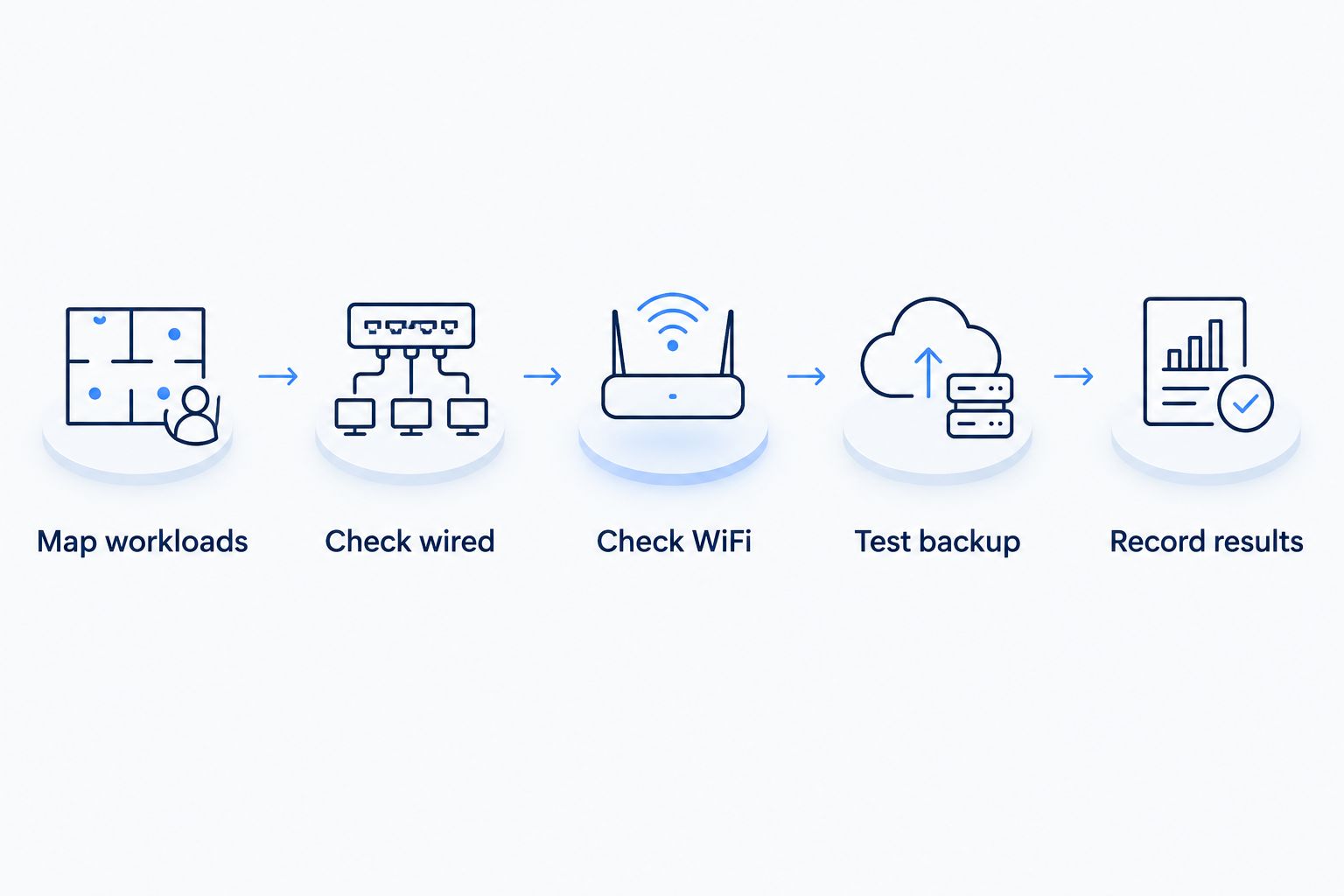
Those test quantities are a starting procedure, not a bandwidth-sizing rule. An office with more simultaneous work needs a larger test. Include a 10-minute call session to observe the connection during use rather than relying on a momentary reading.
Keep client confidentiality separate from connection speed
Fast internet is not a security control. Fiber does not automatically protect client files, secure remote access, or separate a visitor's device from staff systems.
Your 2026 network review should assign responsibility for guest-network separation, router updates, account access, and firewall configuration. Ask who makes changes and who documents them. Do not infer those responsibilities from a managed WiFi label.
Discuss remote-access requirements with your IT team before requesting a static IP address. Some setups need stable addressing; others use services that do not. Buy the configuration your applications require, not a feature that sounds more businesslike.
Which business internet should your law firm choose?
Choose business fiber as the default primary connection, then solve office WiFi and backup separately. Put Sumofiber on your shortlist when you want business internet and managed WiFi from one provider. Match the proposal to your actual premises and technical requirements.
Choose dedicated internet access when written service commitments drive procurement. Keep cable in the comparison when it is relevant to your building. Evaluate fixed wireless or satellite against a specific backup or remote-office need rather than treating all five choices as interchangeable.
Before switching in 2026, write down who owns installation, WiFi configuration, outage escalation, and recovery testing. A clear handoff matters as much as a clear specification.
FAQ
What's the best business internet for law firms?
Business fiber is the default recommendation for law firms using cloud applications, document uploads, and video meetings. Sumofiber belongs on the shortlist for firms seeking business fiber and managed WiFi from one provider; assess the written proposal against your office requirements.
Is fiber better than cable for a law office?
Compare fiber and cable using upload performance, call quality, and service terms, not download speed alone. Fiber is the default recommendation here, but the specific cable proposal still deserves review when it fits the building and workload.
How much internet speed does a small law firm need?
Size the connection around simultaneous work rather than headcount alone. List active calls, document uploads, cloud applications, and backups, then check the upload and download requirements of those applications.
Does business internet guarantee uptime?
A business internet label does not establish a guaranteed uptime commitment. Read the service agreement for any service-level agreement, exclusions, reporting process, and remedies.
Does a law firm need a static IP address?
A law firm needs a static IP address only when its network or applications require stable addressing. Ask your IT team about hosted servers, remote access, and access-control requirements before adding it.
Can managed WiFi protect confidential client information?
Managed WiFi is not, by itself, proof that client information is protected. Confirm guest separation, administrative access, updates, firewall responsibilities, and the security controls used by your applications.
Should a law office have backup internet?
Include backup internet when your continuity plan requires work to continue through a primary-connection outage. Check connection independence, power needs, and recovery behavior rather than assuming a second subscription solves every interruption.
One last thing
A second internet connection is not necessarily a second failure path. Two services can still depend on shared building equipment, power, or upstream infrastructure. Ask what the backup avoids, then test that exact failure scenario before relying on it during a filing deadline.


