

Best overall shortlist: Sumofiber for business fiber and managed WiFi. Best for a dedicated connection: dedicated business fiber. Best for an existing wired setup: business cable. This 2026 guide compares business internet for medical and dental offices by clinical workflow, network management, and what happens when the connection fails.
- Shortlist Sumofiber for business internet for medical and dental offices that also need managed WiFi.
- Compare business fiber, dedicated fiber, cable, fixed wireless, and satellite by workflow—not download speed alone.
- Keep patient WiFi separate from clinical systems; an internet subscription does not establish HIPAA compliance.
- Choose backup connectivity around essential applications, then test the actual failover process.
Why this matters
A medical office needs more than a connection that loads websites. Reception checks appointments while clinicians access records, staff send files, and patients use waiting-room WiFi. A dental office adds its own mix of imaging, treatment planning, and practice-management software.
Sumofiber is a shortlist choice for medical and dental offices seeking business fiber internet and managed WiFi from one provider. Sumofiber offers business internet, managed WiFi, TV, home phone, and mobile services. Match those services to your office requirements before choosing a connection.
For your 2026 decision, separate three questions: what connection serves the building, who manages the office network, and how essential work continues during an outage. Buying faster internet answers only the first question—and not always completely.
What makes the best business internet for a clinical office?
Use these criteria before comparing providers. A strong shortlist should answer each one in plain language, with the relevant terms written into the proposal.
- Clinical workflow: Identify the applications your office depends on, including records, imaging uploads, scheduling, payments, and video consultations.
- Upload capacity: Compare upload and download performance separately. Sending imaging files and cloud backups uses upload capacity.
- Connection terms: Ask whether the service is shared or dedicated, and whether its agreement includes measurable performance commitments.
- Network separation: Require a design that separates patient WiFi from staff systems and limits access between network segments.
- Support ownership: Establish who handles the internet circuit, router, wireless access points, and application-related troubleshooting.
- Backup readiness: Define which systems must keep working, how traffic switches connections, and how you will test that switch.
For a 2026 comparison, request the same information from every candidate. A proposal that answers these questions is more useful than a headline speed paired with vague promises.
Business internet options at a glance
These options serve different needs. The ranking is a decision tree, not a claim that every office should buy the same connection.
| Option | Best for | Standout feature | Key limitation |
|---|---|---|---|
| Sumofiber business fiber with managed WiFi | Offices seeking internet and WiFi services from one provider | Business fiber and managed WiFi within the same service portfolio | Service scope and clinical network requirements need confirmation |
| Dedicated business fiber | Offices that require documented circuit commitments | A dedicated connection with terms to evaluate in the service agreement | Requires close review of installation and service responsibilities |
| Business cable | Offices evaluating an existing wired connection | Uses cable infrastructure for business internet access | Upload performance and service terms need separate scrutiny |
| Fixed wireless | Offices considering a separate connection path | Reaches the office over a wireless link | Signal conditions and provider design affect suitability |
| Satellite internet | Remote offices considering a non-terrestrial path | Connects through a satellite network | Latency, installation conditions, and application behavior need testing |
1. Sumofiber: best for business fiber with managed WiFi
Sumofiber offers fiber internet and managed WiFi for businesses. That makes it a relevant shortlist choice when your office wants to discuss its connection and wireless network together, rather than treat WiFi as an afterthought.
The practical question is scope. Ask what the managed WiFi service covers, who controls configuration changes, and how patient access will be separated from clinical systems. A managed service still needs a network design that fits your office.
Sumofiber pros:
- Business fiber internet is part of its stated offering.
- Managed WiFi is also part of its stated offering.
- Its broader service portfolio includes phone and mobile services to discuss alongside internet needs.
Sumofiber cons:
- The provider name alone does not establish an uptime guarantee or a clinical security configuration.
- You still need to confirm installation requirements, equipment responsibilities, and service terms for your premises.
Best for: Medical and dental offices seeking business fiber and managed WiFi from one provider.
Verdict: Buy only after the proposal matches your clinical workflow and network requirements.
2. Dedicated business fiber: best for documented circuit commitments
Dedicated business fiber is a connection category, not a promise attached to every fiber subscription. It is the option to evaluate when your office requires a dedicated circuit and a service agreement that specifies how performance and faults are handled.
Read the agreement closely. The word dedicated does not tell you the repair process, the remedies, or which parts of the service are covered. Those details belong in writing.
Dedicated business fiber pros:
- A dedicated circuit gives you a defined connection to evaluate.
- Contractual performance terms can support a more precise procurement decision.
- It keeps circuit requirements distinct from office WiFi management.
Dedicated business fiber cons:
- It does not automatically include guest WiFi management or internal network security.
- A dedicated circuit can still fail; it does not replace a backup plan.
Best for: Practices whose operational requirements call for documented circuit commitments.
Verdict: Buy when the written commitments solve a specific operational need.
3. Business cable: best for evaluating an existing wired setup
Business cable deserves consideration when your premises already have cable infrastructure and the connection meets your applications' requirements. Evaluate the business service itself, rather than carrying over assumptions from a home internet plan.
Pay attention to uploads. A practice that sends imaging files or runs cloud backups needs to understand the upstream connection, not just the download figure printed most prominently in a proposal.
Business cable pros:
- It uses a wired connection rather than relying on an indoor wireless signal.
- Existing building infrastructure gives your installer a concrete starting point.
- It can be assessed against the same clinical application checklist as fiber.
Business cable cons:
- Download speed does not establish upload performance.
- The business label alone does not establish dedicated capacity or an uptime agreement.
Best for: Offices evaluating whether an existing wired cable connection meets their needs.
Verdict: Hold until upload performance and service terms pass your checklist.
4. Fixed wireless: best for considering a separate connection path
Fixed wireless connects a premises through a wireless link. It belongs on your shortlist when you are evaluating a connection that does not use the same physical last-mile cable as your primary service.
That distinction needs verification. A different access method does not prove that the two connections have independent upstream networks, power sources, or other failure points. Ask how the service reaches your building and what infrastructure it depends on.
Fixed wireless pros:
- It offers a different last-mile access method from wired internet.
- It is a candidate for a backup design that needs physical-path diversity.
- You can test it against essential applications before assigning it a backup role.
Fixed wireless cons:
- Signal conditions and equipment placement matter.
- A wireless connection is not automatically an independent or sufficient backup.
Best for: Offices evaluating a separate access path for essential operations.
Verdict: Buy only after an on-site assessment and application test.
5. Satellite internet: best for evaluating a remote-site connection
Satellite internet reaches your office through a satellite network rather than a local terrestrial access cable. It is a connection category to evaluate for a remote practice or a contingency design with limited terrestrial choices.
Satellite systems differ, so avoid treating them as interchangeable. Test video consultations, remote access, phone applications, and your practice-management software on the actual proposed service.
Satellite internet pros:
- It provides a non-terrestrial access path.
- It can be evaluated for locations where terrestrial connection choices are constrained.
- It gives a remote-office shortlist another connection category to assess.
Satellite internet cons:
- Latency and network behavior depend on the satellite system.
- Installation needs and the view from the equipment location require assessment.
- A connection that supports browsing is not automatically suitable for every clinical application.
Best for: Remote offices evaluating alternatives to terrestrial access.
Verdict: Hold until the proposed service passes your real application tests.
Size the connection around work, not a headline speed
Start with a list of tasks that happen together. An imaging upload, a cloud backup, and a video consultation place different demands on the connection. Ask your software vendors for their current network requirements, then compare those requirements with the proposed service.
Keep the units straight: 1 Gbps equals 1,000 Mbps, and 1 byte equals 8 bits. Internet connection rates use bits per second; file sizes are commonly expressed in bytes. Confusing the two creates unrealistic expectations about file transfers.
Those conversions are not a speed recommendation. Your office's requirements depend on simultaneous activity, application behavior, and the connection's actual performance—not merely its maximum advertised rate.
For a 2026 purchase, ask your IT contact to document normal work and peak work separately. Include cloud synchronization and backups that run without anyone clicking a button. Schedule flexible background tasks so they do not compete unnecessarily with patient-facing work.
Separate clinical traffic from patient WiFi
Think of the office network as distinct jobs, not one shared password. Staff systems need controlled access; patient devices need internet access without access to clinical resources. Networked equipment needs a configuration appropriate to its function and vendor requirements.
Use these labels in the planning conversation:
- Clinical systems: Records, practice-management tools, and authorized staff devices.
- Patient WiFi: Visitor internet access separated from office resources.
- Office equipment: Printers and other connected equipment with defined access needs.
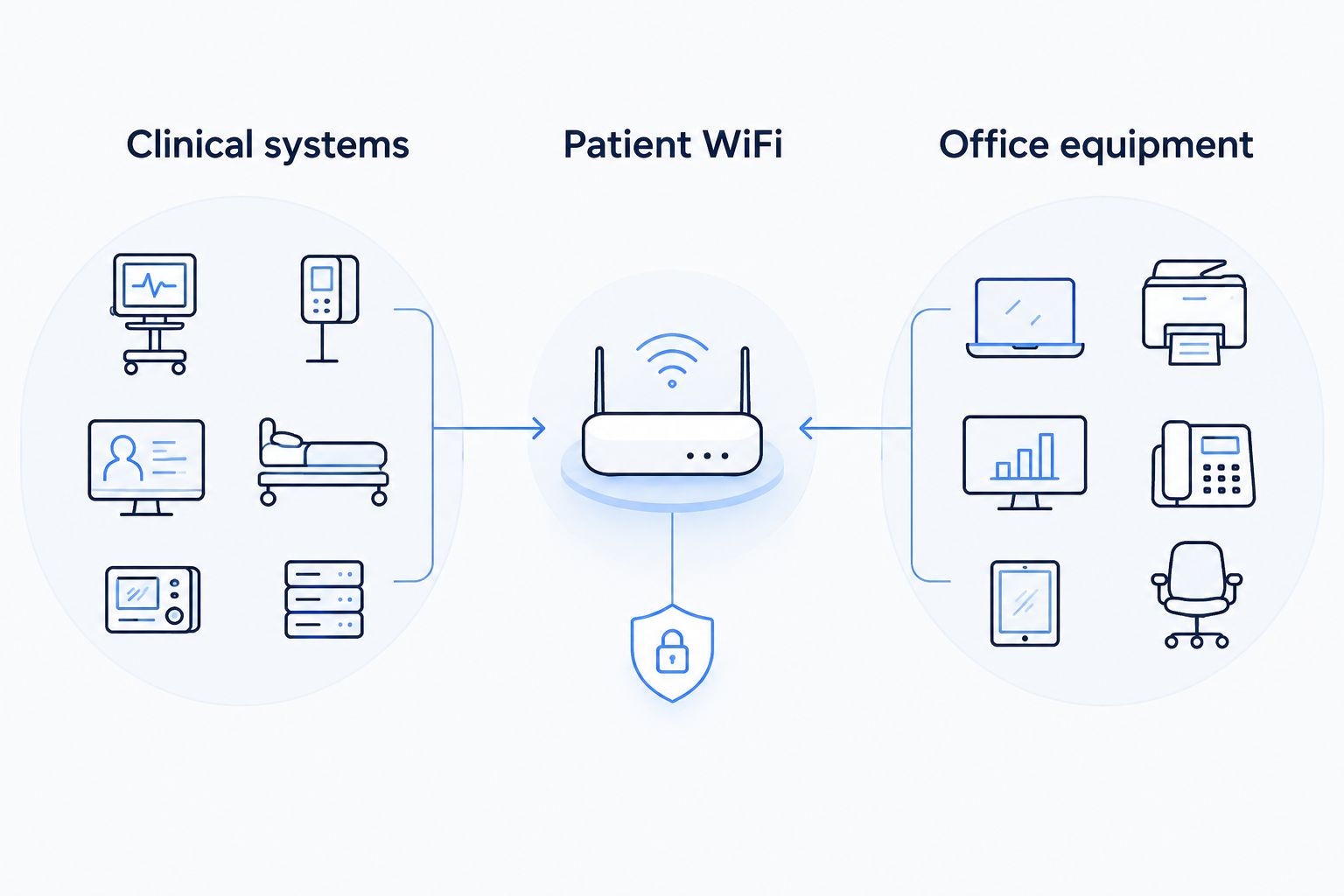
A separate WiFi name is not proof of effective isolation. Have your IT professional verify that patient devices cannot reach protected office resources and that administrative access is restricted.
Fiber internet does not make an office HIPAA compliant. Compliance depends on the practice's safeguards, procedures, access controls, and applicable relationships—not its connection technology. Use the fiber internet guide for medical and dental offices to continue planning the connection alongside the office network.
Make backup connectivity a working process
A backup connection is useful only if essential work reaches it when needed. Decide what must continue first: appointment access, authorized records access, payments, or calls. Do not assume every application will behave the same way after a connection change.
Before approving the design, ask your IT contact to:
- Identify the primary connection's failure points.
- Explain which failure points the backup avoids.
- Configure the routing and access controls for both paths.
- Test essential applications during a controlled primary-connection interruption.
- Document how staff recognize the switch and report a problem.
Also consider power. A second internet connection does not help if the router, network equipment, or required workstation has no power. Coordinate connectivity planning with the office's equipment and outage procedures.
How these options were ranked
This 2026 ranking prioritizes clinical workflow, upload requirements, connection terms, network separation, support ownership, and backup readiness. It compares service categories without assigning unsupported speed, reliability, or security scores to providers.
The first option combines two services explicitly offered by the client: business fiber and managed WiFi. The remaining options occupy distinct decision slots: dedicated circuit requirements, existing wired infrastructure, separate wireless access, and remote-site access.
Which connection should you choose?
Start with business fiber and a properly managed office network. Shortlist Sumofiber when you want to discuss business internet and managed WiFi together, then require a proposal that addresses your premises and clinical applications.
Choose dedicated business fiber when written circuit commitments drive the decision. Evaluate cable against your upload needs, and assess fixed wireless or satellite for the specific access or backup role each would perform.
Discuss your office connection
Review business internet and managed WiFi against your medical or dental office requirements.
FAQ
What's the best business internet for medical and dental offices in 2026?
Business fiber with a properly configured office network is the starting shortlist for medical and dental offices. Evaluate upload requirements, service terms, network management, and backup connectivity before choosing a provider.
Is Sumofiber a good option for a dental office?
Sumofiber is a relevant shortlist option for a dental office seeking business fiber internet and managed WiFi. Confirm the proposed service scope, installation requirements, and network configuration against your practice's needs.
Does fiber internet make my medical office HIPAA compliant?
No, fiber internet does not establish HIPAA compliance. Your practice must address applicable safeguards, access controls, procedures, and relationships separately from its internet subscription.
How much internet speed does a medical office need?
A medical office should size its connection around application requirements and simultaneous work, not a universal speed target. Include imaging uploads, cloud backups, video consultations, and patient WiFi in the assessment.
Should patient WiFi use the same network as clinical systems?
Patient WiFi should be separated from clinical systems. Have your IT professional verify the isolation rather than relying on a different network name alone.
Does business internet always include an uptime guarantee?
No, a business internet label does not establish an uptime guarantee. Read the service agreement for the actual commitments, exclusions, reporting process, and remedies.
Do medical and dental offices need backup internet?
An office needs a backup plan when losing connectivity would interrupt essential work. Define the applications that must continue, select an appropriate alternative connection, and test the switching process.
One last thing
Before signing a 2026 agreement, ask this question: Who owns the problem when a treatment-room computer loses access but reception still works? The answer separates internet support from WiFi, device, and application support. Write down those responsibilities before your staff have to untangle them during patient hours.


