

Best overall shortlist: SumoFiber for business fiber and managed WiFi. Best existing-line option: business cable. Best wired-line alternative: fixed wireless. Best for contractual service requirements: dedicated internet. Best backup: cellular failover. This 2026 guide compares business internet for restaurants by what keeps payments, orders, and guest WiFi working—not just download speed.
- SumoFiber belongs on your business internet for restaurants shortlist when you want business fiber and managed WiFi.
- Business cable and fixed wireless serve different connection needs; compare upload performance and service terms separately.
- Dedicated internet fits restaurants with specific contractual requirements, not every neighborhood café.
- Cellular failover is a backup connection; test payments and ordering before relying on it.
Why this matters
Your restaurant uses the internet for different jobs at the same time. A payment terminal needs to complete a transaction while an ordering tablet receives a delivery order and guests use WiFi. Those tasks deserve different treatment.
Buying a faster connection does not fix every problem. Weak wireless coverage, a faulty cable, or guest devices sharing an unrestricted network can still interrupt work.
For your 2026 decision, separate the outside connection from the network inside the restaurant. Choose the service, decide who manages the equipment, and write down what staff should do during an outage. Each decision solves a different problem.
What makes the best business internet for restaurants?
Use these criteria before comparing providers. A connection that fits your dining room must also fit your kitchen, office, and support needs.
- Business continuity: Identify which payment, ordering, and phone functions need an internet connection. Ask each system vendor what works offline.
- Upload performance: Cameras sending footage and staff uploading files use the upstream connection. Compare upload requirements separately from downloads.
- Guest separation: Keep guest WiFi apart from payment and business devices, with firewall rules controlling access between networks.
- Coverage and management: Decide who places access points, handles updates, diagnoses faults, and changes guest access settings.
- Support and service terms: Read the response process, escalation route, and any written service commitments. A business label alone proves none of them.
- Backup behavior: Specify which devices use a backup connection and test that switch with your actual applications.
The best restaurant internet setup protects business operations before adding guest convenience. Use that rule to evaluate every 2026 proposal, even when the headline speed looks attractive.
Restaurant internet options at a glance
These rankings assign each option a different job. Cellular failover belongs in the comparison as a backup, not as an equivalent replacement for a primary wired connection.
| Option | Best for | Standout feature | Key limitation |
|---|---|---|---|
| SumoFiber business fiber and managed WiFi | Restaurants seeking internet and WiFi services from one provider | Offers business internet and managed WiFi | Confirm the restaurant-specific scope, equipment responsibilities, and service terms |
| Business cable | Restaurants evaluating an existing cable connection | A wired connection option | Download speed alone does not establish upload suitability or support quality |
| Fixed wireless | Restaurants evaluating an alternative to a wired connection | Connects the premises through a wireless link | Suitability depends on the specific service and site conditions |
| Dedicated internet | Restaurants with explicit contractual service requirements | A service category to evaluate for defined commitments | Contract details and installation scope need close review |
| Cellular failover | Restaurants protecting essential tasks during a primary-line outage | A separate connection path using a mobile network | Depends on reception, equipment configuration, and application behavior |
1. SumoFiber: best for business fiber and managed WiFi
SumoFiber offers business fiber internet and managed WiFi, alongside phone, TV, and mobile services. That service mix makes it a relevant starting point when you want to discuss your restaurant's internet connection and wireless network with one provider.
SumoFiber is best for restaurants seeking business fiber internet and managed WiFi from one provider. Match those services to a written scope before choosing: who manages access points, who handles network changes, and what support covers.
SumoFiber pros:
- Offers business fiber internet rather than only residential service.
- Offers managed WiFi as a service category.
- Offers phone, TV, and mobile services for businesses considering additional needs.
SumoFiber cons:
- The service list does not establish a restaurant-specific uptime commitment.
- Managed WiFi scope, guest separation, and backup arrangements need individual confirmation.
Best for: An owner who wants to discuss the connection and WiFi management together instead of treating them as unrelated purchases.
Ask for a proposal that separates internet service from equipment and network management. Do not assume a service bundle includes every feature your payment vendor requires.
Verdict: Buy only after the proposal matches your restaurant's operating requirements.
2. Business cable: best for evaluating an existing wired connection
Business cable uses a cable network to connect your premises to the internet. It deserves consideration when you already have a cable connection and want to assess whether it meets your operating needs.
Do not judge it solely by a download test. Compare upstream requirements, busy-period application performance, support terms, and your backup plan before deciding to keep or replace it.
Business cable pros:
- Provides a wired primary-connection option.
- Lets you evaluate your current connection against actual restaurant workloads.
- Works with a separately designed business and guest network.
Business cable cons:
- A large download figure does not prove the upload connection fits your cameras or other applications.
- Changing the internet plan does not correct poor access-point placement or network configuration.
Best for: A restaurant with an existing cable connection that wants an evidence-based keep-or-switch decision.
Run the comparison during your own operating hours. If payment and ordering trouble persists on a wired device, record the symptoms and involve both the provider and application vendor.
Verdict: Hold if the current connection meets documented requirements; replace it when the evidence identifies a service problem.
3. Fixed wireless: best for a wired-line alternative
Fixed wireless delivers internet through a wireless link to equipment serving your premises. It is a different connection approach from fiber or cable, not another name for guest WiFi.
Ask the provider to assess the restaurant site and describe the installation requirements. Evaluate the proposed service against payment, ordering, phone, and camera needs rather than assuming every wireless connection behaves alike.
Fixed wireless pros:
- Provides an alternative connection approach to fiber or cable.
- Can serve as a primary-service candidate when your site assessment supports it.
- Can connect to an internal network that keeps guests separate from business devices.
Fixed wireless cons:
- Site conditions and the specific wireless service affect suitability.
- The wireless link does not remove the need for indoor coverage planning or backup testing.
Best for: A restaurant evaluating a connection method other than a wired line.
Ask who owns the receiving equipment and who diagnoses a fault between that equipment and your router. Put those responsibilities in writing before installation.
Verdict: Wait for a site assessment and application requirements review before choosing fixed wireless.
4. Dedicated internet: best for defined service commitments
Dedicated internet is a service category to investigate when your restaurant has specific requirements for connection capacity and contractual service commitments. The agreement matters more than the label.
Start with the requirement. A restaurant group might need a documented escalation process or defined service terms, while a small café needs a connection and support arrangement suited to its daily work.
Dedicated internet pros:
- Provides a service category for discussing explicit contractual requirements.
- Creates a clear reason to review capacity, escalation, and service commitments together.
- Fits a formal procurement process with documented technical needs.
Dedicated internet cons:
- The word dedicated does not establish the exact terms of an agreement.
- A contractual service commitment does not replace local power protection or a backup plan.
Best for: A restaurant or restaurant group with written requirements that ordinary proposals do not satisfy.
Read exclusions as closely as commitments. Confirm what counts as an outage, how an incident is reported, and what remedy the agreement specifies.
Verdict: Buy when the written commitments answer a documented business need; skip it as a label-only upgrade.
5. Cellular failover: best for keeping essential tasks connected
Cellular failover uses a mobile-network connection when the primary internet path fails. It is a backup design choice, not proof that every device or application will keep working without interruption.
Select the essential tasks first. Payments and order receipt usually deserve attention before guest browsing, but your payment and ordering vendors must confirm how their systems behave during a connection change.
Cellular failover pros:
- Adds a separate connection path to your network design.
- Lets you prioritize essential business applications during an outage.
- Gives staff a specific backup procedure to practice.
Cellular failover cons:
- Indoor mobile reception must be checked at the actual equipment location.
- Router configuration, power, and application behavior still affect the result.
Best for: A restaurant that needs a tested alternative path for essential online tasks.
Use 2 internet connections for this design: a primary connection and a backup. They must be configured for the intended behavior; simply owning a mobile hotspot does not create automatic failover.
Verdict: Buy as a tested backup, not as an assumed guarantee against interrupted payments.
Build the restaurant network around the work
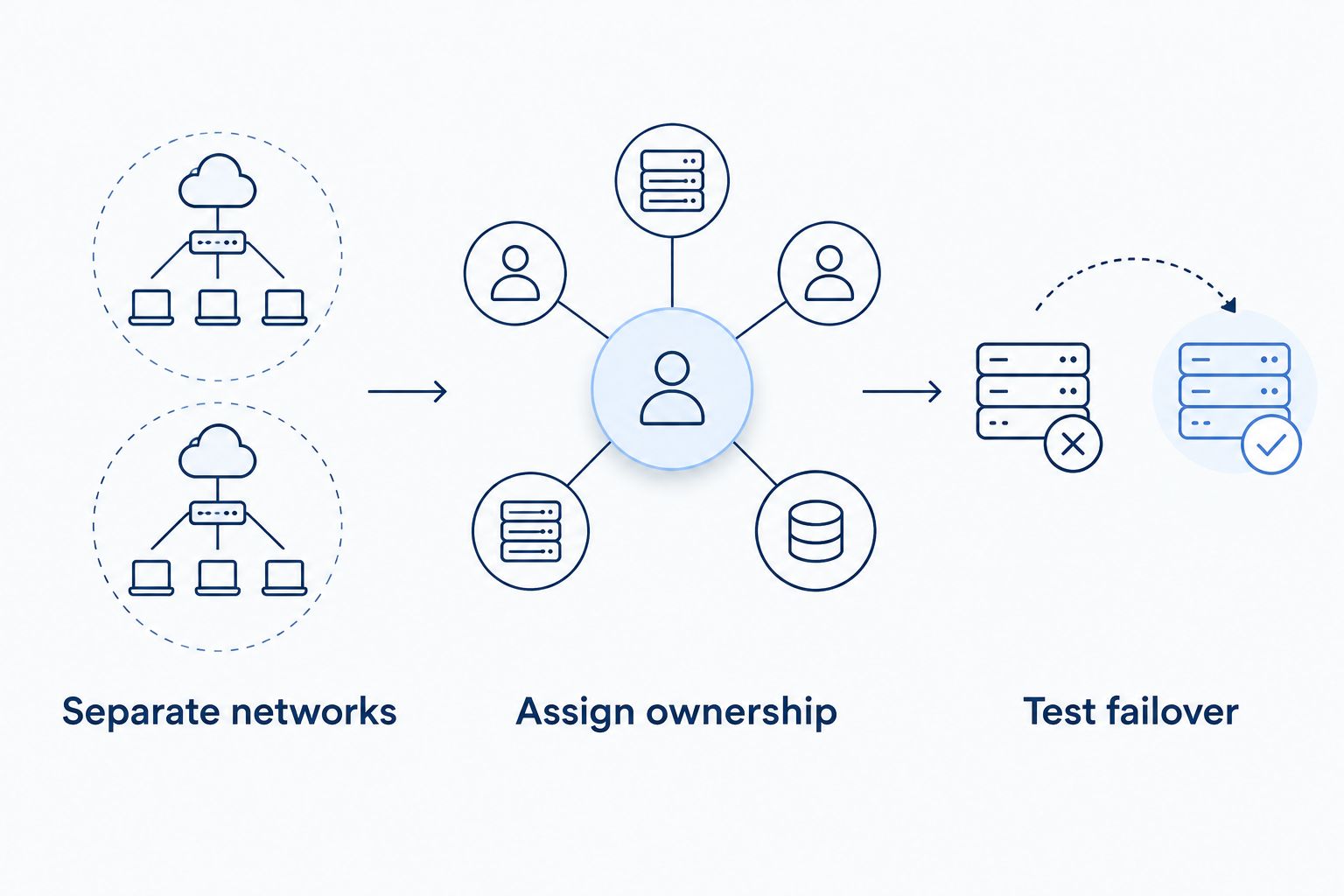
Your outside connection and inside network need separate decisions. Use these 3 checks to turn a provider proposal into a setup your staff can operate.
Separate networks
Plan at least 2 separate networks: one for business devices and one for guests. Separate network names alone are not a security boundary; configure the routing and firewall rules that prevent guest access to business systems.
Use wired connections for fixed equipment where practical. A payment terminal beside the counter does not need to depend on the same wireless coverage as a customer at a patio table.
Assign ownership
Write down who manages the router, access points, updates, passwords, and fault reporting. Managed WiFi is useful only when the scope matches the work you expect someone else to handle.
Read the guide to how managed WiFi works for a business before comparing management proposals. Ask who handles a device problem and who handles a connection problem; those responsibilities are not automatically identical.
Test failover
Run a controlled primary-connection outage while the restaurant is closed. With your vendors' guidance, test an authorized payment workflow, an incoming order, and any phone service that depends on the connection.
Check restoration too. Staff need to know whether normal service returns automatically and what to do if an application needs attention.
How we ranked these options
The 2026 ranking follows the buying criteria above: business continuity, upload requirements, guest separation, management, service terms, and backup behavior. It is a use-case ranking, not a measured speed or outage leaderboard.
Fiber with managed WiFi comes first because it addresses the connection and network-management conversation together. Cable and fixed wireless answer different primary-connection questions. Dedicated internet addresses contractual requirements, while cellular failover addresses backup needs.
Which restaurant internet option should you choose?
Start with business fiber and managed WiFi, then compare the written proposal with your existing connection. SumoFiber belongs on that shortlist because it offers both service categories, not because an unverified speed or uptime claim settles the decision.
For your 2026 purchase, define the essential applications before selecting a plan. Choose a primary connection that meets those needs, keep guest access separate, and test the backup path.
Review your restaurant internet options
Explore business fiber internet and managed WiFi, then confirm the scope your restaurant needs.
FAQ
What's the best business internet for restaurants in 2026?
Business fiber with a properly managed internal network is the starting recommendation for restaurants comparing primary connections. Match the service to payment, ordering, upload, support, and backup requirements before choosing.
Is fiber better than cable for a restaurant?
Choose between fiber and cable using the specific service terms and your restaurant's application requirements, not the connection name alone. Compare upload performance, support responsibilities, and actual operating-hour results.
How much internet speed does a restaurant need?
A restaurant's required speed depends on its simultaneous applications, not its seat count alone. List payment terminals, ordering systems, cameras, phones, and guest use, then obtain the vendors' requirements.
Should customers use the same WiFi as payment terminals?
Keep guest WiFi separate from payment and business devices. Use network and firewall controls to enforce that separation; different WiFi names alone do not establish it.
Does business internet include guaranteed uptime?
A business internet label does not establish guaranteed uptime. Read the specific agreement for service commitments, exclusions, reporting requirements, and remedies.
Will cellular backup keep restaurant payments working?
Cellular backup must be tested with your payment system before you rely on it. Reception, router configuration, power, and the payment application's connection-change behavior all matter.
Is managed WiFi the same as business internet?
Managed WiFi and business internet address different parts of the setup. Internet service connects your premises, while managed WiFi concerns the wireless network inside it; confirm the management scope in the proposal.
Do restaurants need a static IP address?
A restaurant needs a static IP address only when an application or access requirement calls for one. Ask your payment, camera, phone, and remote-access vendors before adding that requirement.
One last thing
Test the return to normal, not just the switch to backup. A successful outage drill is incomplete if an ordering tablet stays disconnected after the primary connection returns.
Make restoration part of your 2026 acceptance checklist. Record what staff should check, who they should call, and which applications need manual attention.


