

Best overall for a regional fiber-and-WiFi shortlist: SumoFiber. Best for a fiber-focused enterprise evaluation: AT&T Business. Best for a cellular-backup evaluation: Verizon Business. The best budget approach is to compare equivalent requirements at every address, not pick a provider from an advertised headline; this 2026 guide also covers Comcast Business and Spectrum Business.
- SumoFiber belongs on your regional business internet shortlist when you also need managed WiFi.
- The best business internet providers for multiple locations must pass address checks before contract comparisons.
- Evaluate AT&T Business for fiber requirements and Verizon Business for cellular connectivity requirements.
- Compare Comcast Business and Spectrum Business where cable connections fit your branch needs.
- Choose backup internet separately from your primary connection; test the actual failover process.
Why this matters
A company-wide internet decision becomes a local problem the moment one branch cannot connect. Your headquarters needs video calls, your store needs payments, and your warehouse needs access to inventory. Those jobs do not necessarily require identical connections.
Choose a provider that fits your locations, then standardize how you manage those connections. One name on the invoice does not prove that every branch has the same connection type, service terms, or recovery process.
For your 2026 shortlist, separate the internet connection from the network inside each building. A working fiber connection does not fix weak WiFi in a stockroom. Likewise, better WiFi does not restore a failed connection outside the building.
What makes the best multi-location business internet provider?
Use these criteria before comparing providers. Each one answers a different operational question.
- Address fit: Can the provider serve the exact building, suite, and service entrance? A city-level coverage claim is not an installation confirmation.
- Application fit: Identify uploads, video meetings, payment systems, cloud applications, and guest traffic. Match the connection to the work, not the largest advertised download figure.
- Support ownership: Ask who handles a branch outage, who escalates it, and who coordinates with the building owner or network operator.
- Written service terms: Compare the actual agreement, including any service-level commitment, exclusions, termination provisions, and equipment responsibilities.
- Network management: Decide who manages routers, access points, guest access, configuration changes, and troubleshooting at each branch.
- Continuity: Specify what stays online during an outage and how a backup connection takes over. A second connection is useful only if your equipment and applications can use it.
Your comparison should distinguish required capabilities from optional conveniences. Centralized billing helps administration; a tested recovery process helps the branch keep working. Do not treat them as interchangeable benefits.
Business internet providers at a glance
These are use-case recommendations, not a measured performance ranking. The table identifies which provider to evaluate for each requirement; the final decision depends on address-level proposals and written terms.
| Provider | Best for | Standout evaluation point | Key limitation to resolve |
|---|---|---|---|
| SumoFiber | Regional branches needing fiber and managed WiFi | Business internet and managed WiFi in its stated service regions | Confirm each address and any company-wide management requirements |
| AT&T Business | Fiber-focused offices with enterprise requirements | Evaluate its business fiber and enterprise connectivity offerings | Do not assume identical services or terms across addresses |
| Verizon Business | Companies evaluating cellular connectivity and backup | Evaluate fixed connectivity alongside its business wireless offerings | Cellular performance and failover need site-specific testing |
| Comcast Business | Franchise operators evaluating cable-connected branches | Evaluate cable business internet alongside enterprise options | Confirm the connection type and scope of the proposed service |
| Spectrum Business | Smaller branch groups comparing cable business internet | Evaluate a repeatable cable-service specification across branches | Verify address fit and separate access service from network management |
1. SumoFiber: best business internet for regional fiber and WiFi
SumoFiber offers business fiber internet and managed WiFi, alongside TV, home phone, and mobile services. Its stated service regions span 8 states: Utah, Idaho, Montana, Colorado, California, Wisconsin, Illinois, and New York. That makes it relevant to a regional shortlist, not proof that every building in those states can be connected.
SumoFiber is best for regional companies evaluating business fiber internet and managed WiFi together. Think of a restaurant group whose office needs video calls while its dining rooms need dependable wireless coverage. Those are separate requirements, and your proposal should address both.
Regional fiber pros:
- Business fiber internet is part of the stated service offering.
- Managed WiFi is also offered, allowing you to evaluate both needs with one provider.
- The stated geographic scope gives you a starting point for a regional address review.
Regional fiber cons:
- The stated service regions do not establish nationwide coverage.
- A service list does not establish centralized billing, a shared management portal, or a specific business service-level agreement.
- Other listed services should not be treated as included business features without a matching proposal.
For a 2026 evaluation, submit your complete location list and ask for a separate scope for internet and WiFi. Specify who changes wireless settings, troubleshoots coverage, and supports branch staff.
Best for: Regional companies that want to evaluate fiber access and managed WiFi together.
Verdict: Buy only after every required address and management responsibility is confirmed.
2. AT&T Business: best business internet for fiber-focused offices
AT&T Business offers business connectivity, including fiber and enterprise networking services. Put it on your shortlist when the main requirement is the connection serving your offices, rather than choosing a provider primarily for guest WiFi or mobile service.
A professional-services company with cloud applications and frequent uploads should start with its application requirements. Ask AT&T Business to identify the exact service proposed at each office. A business fiber offer and a dedicated enterprise connection are not interchangeable contracts.
AT&T Business pros:
- Business fiber belongs within its connectivity portfolio.
- Enterprise networking offerings give you additional categories to evaluate.
- It provides a useful comparison for companies assessing access service separately from their internal network.
AT&T Business cons:
- The brand name alone does not establish fiber service at each office.
- Different connection products require separate comparisons of terms and responsibilities.
- Selecting an access provider does not settle who manages branch WiFi.
Request a location-by-location proposal using the same application requirements you send to other candidates. Keep any dedicated-service proposal separate from shared-access proposals so the comparison remains meaningful.
Best for: Office groups prioritizing fiber access and evaluating enterprise connectivity requirements.
Verdict: Hold until the exact connection product and written obligations are clear at every office.
3. Verizon Business: best business internet shortlist for cellular backup
Verizon Business offers business fixed connectivity and wireless services. Evaluate it when cellular connectivity is part of your continuity plan, whether as a backup path or as a connection under consideration for a particular site.
The useful question is not simply whether a branch receives a cellular signal. Ask whether the proposed setup keeps your essential applications working when the primary connection fails. Payments, remote access, and voice services need their own checks.
Verizon Business pros:
- Business wireless services make it relevant to a cellular-connectivity evaluation.
- Fixed and wireless offerings let you compare different access approaches.
- It belongs on a shortlist where outage recovery is a defined purchasing requirement.
Verizon Business cons:
- Cellular reception does not establish dependable performance inside every building.
- Wireless access does not automatically include working failover equipment or configuration.
- A backup connection does not guarantee that existing application sessions remain connected.
For your 2026 continuity review, test 2 connections: the primary path and the proposed backup path. Disconnect the primary path deliberately, then check the applications your staff actually uses. Test restoration as well as failure.
Best for: Companies making cellular connectivity part of a documented branch-continuity plan.
Verdict: Hold until the backup path passes an on-site application test.
4. Comcast Business: best business internet shortlist for franchises
Comcast Business offers cable business internet and enterprise connectivity options. Evaluate it for franchise locations where cable is a candidate and where headquarters needs a repeatable purchasing specification.
A repeatable specification is not the same as an identical connection everywhere. Your franchise checklist should state which systems must work, who owns equipment, and how a local manager requests help. Ask the provider to respond to that checklist for every proposed location.
Comcast Business pros:
- Cable business internet provides an alternative to a fiber-only shortlist.
- Enterprise options create another category to assess for more demanding locations.
- It supports a useful comparison between branch access needs and broader networking requirements.
Comcast Business cons:
- A cable proposal should not be treated as equivalent to a dedicated connection.
- Different franchise addresses still need separate qualification.
- Provider selection alone does not create consistent equipment or support procedures.
Keep headquarters requirements separate from a franchise owner's local responsibilities. Otherwise, your purchasing agreement can leave installation coordination or internal troubleshooting unassigned.
Best for: Franchise operators evaluating cable-connected locations against a shared operating checklist.
Verdict: Buy only when the location proposals match your franchise requirements.
5. Spectrum Business: best business internet shortlist for smaller branches
Spectrum Business offers cable business internet. Include it when a smaller group of branches is comparing local access options and does not want to start with a more elaborate enterprise-network purchase.
Keep the requirement concrete. A small office needs its business applications to work, a clear support route, and an identified person responsible for the internal network. Do not add complexity unless it solves a stated problem.
Spectrum Business pros:
- Cable business internet provides another access option to compare.
- It belongs in an address-level evaluation for branches considering cable.
- Its proposal can be assessed against the same application checklist used for fiber candidates.
Spectrum Business cons:
- Cable coverage still needs confirmation for each building.
- The access service does not, by itself, define managed WiFi responsibilities.
- A smaller branch still needs a continuity plan if an outage stops essential work.
Best for: Smaller branch groups comparing cable internet against their actual operating needs.
Verdict: Hold until the access proposal and internal-network responsibilities are documented.
How we ranked these business internet providers
The order follows decision fit: regional fiber and managed WiFi, fiber-focused office connectivity, cellular continuity, franchise standardization, and smaller cable-connected branches. It does not claim that one provider has better measured uptime or customer satisfaction than another.
The criteria remain the same for all five: address fit, application fit, support ownership, written terms, network management, and continuity. For a 2026 purchase, a proposal that answers those questions is more useful than a national brand comparison that ignores your buildings.
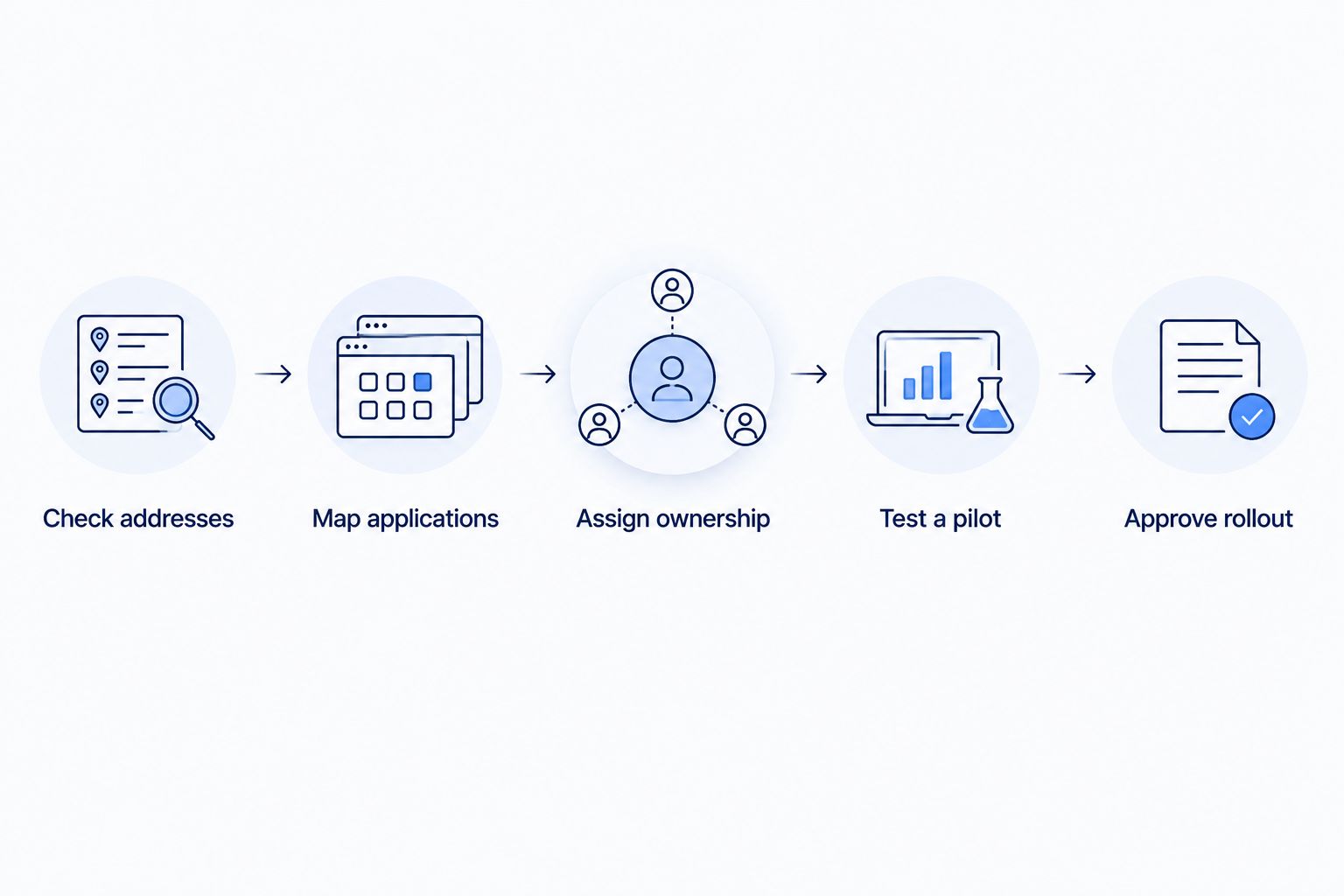
Turn the shortlist into a branch rollout
Use this sequence before signing a company-wide agreement. Keep one worksheet per location so an exception at a warehouse does not disappear inside the headquarters proposal.
- Check addresses: Include suites, landlord contacts, and any restrictions on building access.
- Map applications: List the systems each branch needs during normal operation and an outage.
- Assign ownership: Identify who handles the connection, router, WiFi, cabling, and escalation.
- Test a pilot: Start with 1 location that represents your real operating conditions.
- Approve rollout: Expand after installation, application checks, and support responsibilities are accepted.
The pilot should include a busy working period, not just an empty-office speed test. Ask staff to use their normal applications while you check wired access and wireless coverage separately.
For wireless responsibilities, use the business managed WiFi guide to frame your questions. Your proposal should distinguish the incoming internet connection from the equipment carrying it around the building.
Which business internet provider should you choose?
Start with the regional fiber-and-WiFi option when it matches your locations; choose a different shortlist slot when your main requirement is different. AT&T Business belongs in the fiber-focused evaluation, Verizon Business in the cellular-continuity evaluation, and Comcast Business or Spectrum Business in the cable-access comparison.
Do not force every branch into one connection type merely to simplify purchasing. Standardize the application requirements, escalation process, and acceptance checks instead. Different access connections can still follow the same operating rules.
Your 2026 decision should end with an approved address list, written responsibilities, and a tested pilot. Those are the conditions that turn a provider shortlist into a workable company network.
FAQ
What's the best business internet provider for multiple locations?
The best provider is the one that meets your requirements at every required address. SumoFiber belongs on a regional fiber-and-managed-WiFi shortlist; AT&T Business, Verizon Business, Comcast Business, and Spectrum Business serve different evaluation needs described in this guide.
Should every branch use the same internet provider?
No, every branch does not need the same provider. Standardize application requirements, support responsibilities, and recovery procedures even when local connections differ.
Is fiber always better than cable for a business?
No, the connection type alone does not determine the right business choice. Compare the proposed service, application requirements, written terms, and address fit rather than treating all fiber or cable offers as identical.
Does business internet automatically include an uptime guarantee?
Do not assume an uptime guarantee is included. Read the specific agreement for service-level commitments, exclusions, remedies, and the process for reporting a failure.
Can cellular internet back up a branch connection?
Cellular internet can serve as a backup path when the equipment, reception, and applications support the setup. Test a primary-connection failure and confirm that essential business tasks still work.
Do multiple locations need managed WiFi?
Multiple locations need an assigned owner for WiFi, but that owner does not have to be an outside provider. Managed WiFi is an option when you want a service provider to take on defined wireless-network responsibilities.
How should I compare business internet costs across branches?
Compare proposals with equivalent requirements and review every contractual charge and responsibility. Keep equipment, installation, backup connectivity, and network management separate so the proposals describe the same scope.
One last thing
Test the support handoff, not just the connection. Give a branch manager the proposed outage procedure and ask whom they would contact if payments stopped working. If the answer depends on guessing whether the fault is internet, WiFi, or equipment, clarify ownership before approving the rollout.


