

Best for combining household services: Sumofiber. Best for upload-heavy remote work: AT&T Fiber. Best for an Ethernet-first gaming setup: Verizon Fios. Best for keeping a cable connection: Xfinity. This 2026 guide compares gigabit internet providers by connection type, upload needs, home WiFi, and the services you actually use—not by an unsupported nationwide winner.
- Sumofiber is the best fit here for households comparing fiber internet alongside WiFi, TV, phone, and mobile services.
- Compare gigabit internet providers by download speed, upload speed, connection type, and equipment—not the gigabit label alone.
- AT&T Fiber suits upload-heavy work; Verizon Fios suits a wired gaming setup; Xfinity is the cable option.
- A faster internet plan does not fix weak WiFi coverage or an overloaded router.
Why this matters
A gigabit connection gives your household room for overlapping activity: a large download, a video meeting, and a TV stream. But the advertised download tier does not tell you how quickly files upload or how well the signal reaches a bedroom.
Gigabit means 1 gigabit per second, or 1,000 megabits per second. That describes a data rate, not a promise that every device receives that speed. Your connection, router, device, and the service sending the data all affect the result.
The useful question is not which company has the biggest number. It is which connection and service setup fits your household without leaving you to solve a different problem afterward.
What makes the best gigabit internet providers?
Use these criteria before comparing any 2026 offer. A provider belongs on your shortlist only when the proposed connection meets your needs.
- Connection type: Distinguish fiber to the home from cable internet. A gigabit download label does not make the underlying connections identical.
- Upload capacity: Check the upload figure separately. Sending large files, cloud backups, and video meetings use the upload side of your connection.
- WiFi responsibility: Ask who handles router setup, coverage problems, and equipment troubleshooting. Internet service and wireless coverage are different jobs.
- Household service fit: Decide whether you want internet alone or also WiFi management, TV, home phone, and mobile service.
- Equipment compatibility: Check the router, Ethernet ports, cables, and devices. The slowest link in the path limits what a particular device receives.
- Written terms: Read the current Broadband Facts label and service agreement. Compare recurring charges, equipment requirements, data policies, and cancellation terms without assuming they match across providers.
A symmetrical plan has the same advertised upload and download rates. For example, 1,000 Mbps in each direction describes a symmetrical gigabit connection; it does not establish that every provider or plan listed here supplies those rates.
Gigabit internet providers at a glance
This 2026 comparison assigns each provider a different buying role. The roles are recommendations based on connection type and service scope, not measured performance rankings.
| Provider | Best for | Standout consideration | Key limitation |
|---|---|---|---|
| Sumofiber | Comparing several household services with one provider | Fiber internet, managed WiFi, TV, home phone, and mobile service | Service scope alone does not establish the terms of a specific gigabit offer |
| AT&T Fiber | Upload-heavy remote work | Fiber-to-the-home service with symmetrical speed tiers | The AT&T name alone does not identify the connection type being offered |
| Verizon Fios | Ethernet-first gaming households | Fiber-to-the-home service | A fiber connection does not control game-server performance or household WiFi |
| Xfinity | Households choosing a cable connection | Cable broadband with gigabit download tiers | Upload performance depends on the specific local service and plan |
Do not read the table as a promise about a particular address. Read it as a decision tree: choose the service model first, then inspect the exact offer and installation requirements.
1. Sumofiber: best for combining household services
Sumofiber offers residential and business fiber internet, managed WiFi, TV, home phone, and mobile services. Its stated service footprint includes Utah, Idaho, Montana, Colorado, California, Wisconsin, Illinois, and New York.
That service mix gives you a useful starting point when your decision includes more than an internet connection. Think of a household that needs WiFi help, still uses a home phone, and wants to discuss TV and mobile service during the same comparison.
Sumofiber pros:
- Fiber internet is part of its stated service offering.
- Managed WiFi lets you include wireless coverage in the conversation.
- TV, home phone, and mobile services broaden the comparison beyond broadband.
- Residential and business offerings support different types of customers.
Sumofiber cons:
- A broad service menu is not evidence of faster performance than another provider.
- The service description does not establish a particular gigabit tier, upload rate, or equipment arrangement.
- Combining services still requires you to evaluate each service separately.
Best for: Households that want to compare fiber internet and related communication services together.
Ask for the proposed download and upload rates in writing. Then ask what managed WiFi covers, which equipment the proposal includes, and how each additional service is handled. Do not treat a larger service menu as a reason to buy something you do not use.
Verdict: Hold until the specific gigabit proposal and WiFi responsibilities match your household.
2. AT&T Fiber: best for upload-heavy remote work
AT&T Fiber is AT&T's fiber-to-the-home internet service, distinct from its other internet connection types. Its symmetrical speed tiers make it a relevant comparison for households that send substantial amounts of data as well as download it.
That matters when you upload project files, synchronize work folders, or back up a computer while another person joins a video meeting. Look at the upload figure before deciding that two gigabit plans are equivalent.
AT&T Fiber pros:
- Fiber-to-the-home service provides a clear connection-type comparison.
- Symmetrical tiers address both uploading and downloading.
- Upload capacity is relevant to file transfers and cloud backups.
- A wired setup lets you evaluate the connection separately from WiFi coverage.
AT&T Fiber cons:
- An AT&T internet offer is not automatically an AT&T Fiber offer.
- A symmetrical connection does not make a slow work server faster.
- Router placement and household WiFi still need attention.
Best for: Remote workers whose workload includes frequent large uploads.
Ask whether the proposed service is fiber to the home and whether the advertised rates are symmetrical. If your work consists mainly of email, browser tabs, and occasional meetings, do not assume gigabit is necessary just because you work remotely.
Verdict: Buy when the written fiber offer meets a real upload requirement.
3. Verizon Fios: best for an Ethernet-first gaming setup
Verizon Fios is a fiber-to-the-home service. It belongs in this comparison for a gaming household willing to connect a console or computer by Ethernet and evaluate the connection without wireless interference in the way.
This is a setup-based recommendation, not a claim that Fios has the lowest latency. Gaming responsiveness depends on latency, jitter, packet loss, server location, and the route to that server—not download speed alone.
Verizon Fios pros:
- Fiber to the home is a clearly defined connection type.
- An Ethernet connection removes household WiFi from the gaming path.
- Gigabit capacity is relevant when game downloads overlap other activity.
- Separating wired and wireless testing helps identify the source of a problem.
Verizon Fios cons:
- A gigabit tier does not guarantee a lower ping.
- The provider cannot control a distant game server.
- Wireless gaming still depends on your router, placement, and interference.
Best for: Gaming households that prioritize a wired connection and download headroom.
If you already have enough bandwidth, diagnose stuttering before upgrading. Test the same game over Ethernet and WiFi; a clear difference points you toward the home network rather than a larger internet tier.
Verdict: Buy for the fiber-and-Ethernet setup, not a promise of better game latency.
4. Xfinity: best for keeping a cable connection
Xfinity provides cable broadband, including gigabit download tiers. It is the relevant option here when you are comparing a cable connection rather than planning a move to fiber.
The main discipline is to inspect upload performance separately. A gigabit download tier does not imply a gigabit upload tier, and the details depend on the proposed service.
Xfinity pros:
- Cable broadband belongs in a gigabit comparison alongside fiber.
- High download capacity supports large downloads and overlapping use.
- It provides a distinct connection-type alternative to the fiber picks.
- You can judge the offer against your existing cable setup and workload.
Xfinity cons:
- The download headline does not describe upload capacity.
- Local network and plan details matter to the comparison.
- Moving to a larger tier does not repair weak indoor WiFi.
Best for: Households choosing cable broadband whose main requirement is download capacity.
Ask for the upload rate and equipment requirements, not just the plan name. If sending files or backing up devices is your main frustration, compare that upload figure directly with a fiber offer before choosing.
Verdict: Buy when the cable offer meets both your download and upload needs.
How we ranked these gigabit options
The 2026 ranking uses the criteria above: connection type, upload capacity, WiFi responsibility, household service fit, equipment compatibility, and written terms. Each provider occupies a different use-case slot rather than competing for an unsupported national performance title.
There is no measured uptime, speed-test, or customer-satisfaction leaderboard behind this order. The recommendations describe what to compare, and the limitations explain where a provider name or connection label stops being useful evidence.
Choose by workload first. A household sending large files has a different priority from one downloading games, and neither should confuse a room with weak WiFi with an undersized internet connection.
Check the connection before choosing the tier
Use this sequence when reviewing a 2026 gigabit proposal. It keeps the sales conversation tied to the problem you need to solve.
Identify the connection
Get the proposed connection type in writing: fiber to the home, cable, or another technology. Then record both download and upload rates. For a practical starting point, read how to check fiber service at your address.
Match the workload
List the activities that overlap: file uploads, game downloads, streaming, backups, and meetings. Focus on the demanding activities, not just the total number of connected devices; an idle thermostat and an active file transfer do not place the same demand on a connection.
Check the equipment
Inspect the router's WAN port, LAN ports, and the device you plan to test. A 100 Mbps Ethernet port cannot pass a 1,000 Mbps connection at its advertised rate. Ethernet links also have overhead, so a speed-test result below the nominal link rate is not automatically evidence of a fault.
Test by Ethernet
Run a wired test before judging WiFi performance. Keep the device and test conditions consistent, and pause unrelated large transfers when you want to isolate the connection. Then test the rooms where you actually work and watch TV.
Review the terms
Read the Broadband Facts label and proposed agreement before deciding. Confirm equipment responsibilities, support arrangements, and cancellation requirements. Keep the documents you used to make the comparison so you can refer to the actual proposal rather than a remembered headline.
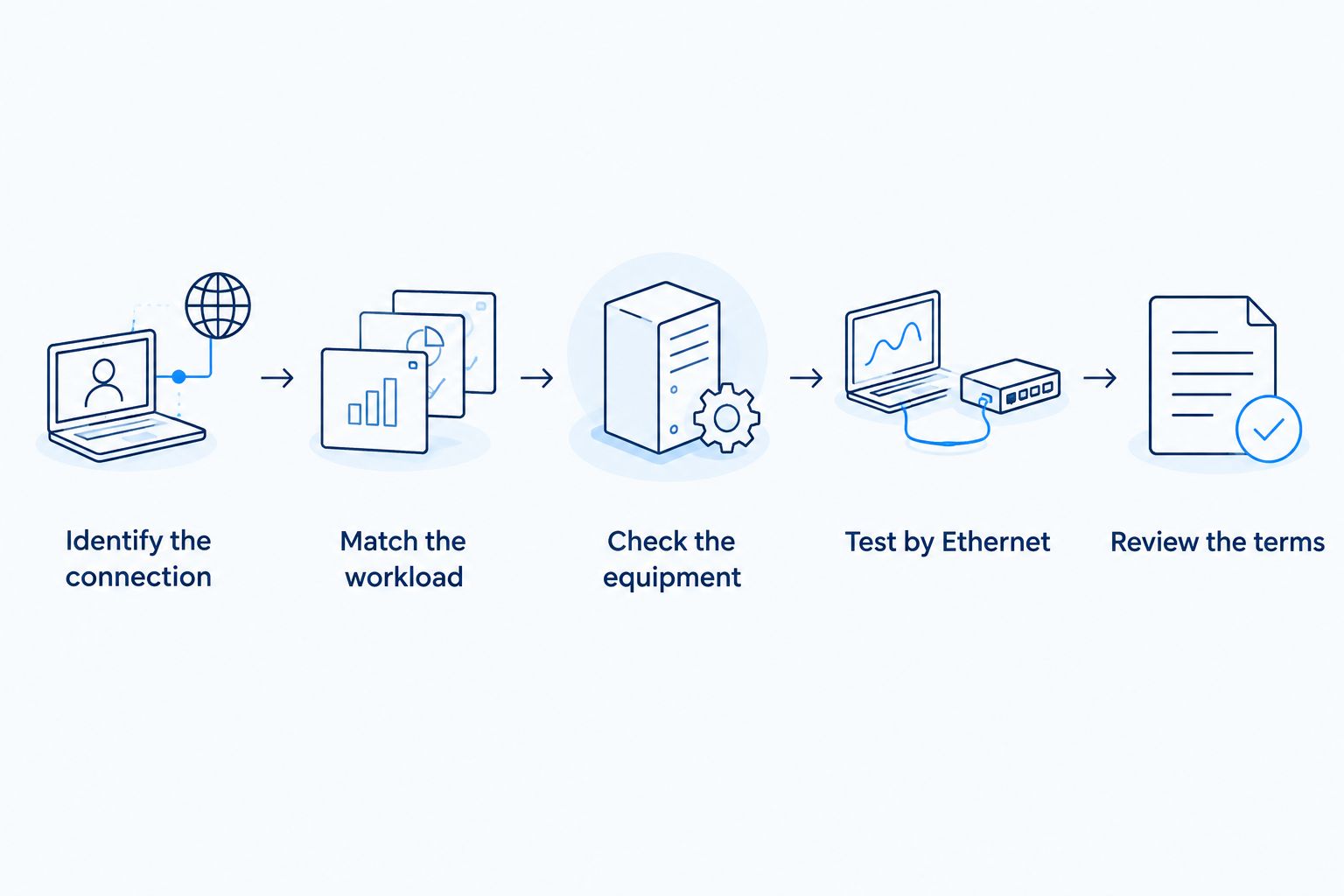
A gigabit plan and a capable home network work together. If the connection tests well by Ethernet but struggles in a distant room, address placement and coverage before buying more bandwidth.
Which gigabit internet provider should you choose?
Start with Sumofiber when you want to compare fiber internet alongside managed WiFi, TV, home phone, and mobile service. Choose AT&T Fiber's use case when uploading drives your decision, Verizon Fios's use case when you are building a wired gaming setup, and Xfinity's use case when you are choosing cable broadband.
For an undecided buyer in 2026, the default is simple: compare the exact fiber proposal against the exact cable proposal, including upload rates and equipment. Do not choose on the word gigabit alone.
Keep your current connection through the transition until the new setup has been installed and checked. Test the activities that matter to your household, not just a speed-test screen. A successful switch means the rooms and devices you use work properly together.
FAQ
What's the best gigabit internet provider for my home?
The best gigabit internet provider is the one whose specific connection, upload rate, equipment, and service terms match your household. Compare written proposals rather than assuming one company wins at every address.
Is gigabit fiber better than gigabit cable?
Gigabit fiber and gigabit cable are not interchangeable, especially when comparing upload rates. Inspect both advertised directions and the exact connection type before choosing.
Does gigabit internet mean 1,000 Mbps?
Yes, 1 gigabit per second equals 1,000 megabits per second. That is a data rate, not a guarantee that every device or speed test reaches the advertised figure.
Will gigabit internet fix slow WiFi upstairs?
A gigabit upgrade does not fix weak WiFi coverage upstairs. Compare an Ethernet test with a wireless test, then address router placement, interference, or coverage equipment.
Do I need gigabit internet for gaming?
Gaming alone does not establish a need for gigabit internet. Latency, jitter, and packet loss affect responsiveness, while more download capacity helps with large game downloads and overlapping household activity.
Should remote workers compare upload speeds?
Yes, remote workers should compare upload speeds separately from download speeds. File transfers, cloud backups, and video meetings send data from your home, so the download headline does not tell the whole story.
How should I compare the cost of gigabit internet?
Compare the current Broadband Facts labels and written service proposals. Include recurring service charges, equipment, installation requirements, and any changes described in the terms rather than comparing a headline alone.
One last thing
A bigger number does not tell you where the bottleneck is. If one wired computer works well while a bedroom TV buffers, start with the wireless path to that room. If wired uploads are slow too, inspect the upload tier and connection before replacing the router.
Write down the problem before shopping: slow uploads, weak bedroom WiFi, interrupted meetings, or long downloads. That single sentence gives you a better buying filter than a list of impressive plan names.


