
Best overall for a farm with a qualifying fiber connection: SumoFiber. Best for a property served by a nearby wireless tower: a local fixed wireless provider. Best for a remote ranch beyond wired networks: Starlink. Best for a second connection: a cellular provider. This 2026 guide compares internet providers for farms and ranches by the connection at your buildings, not promises on a coverage map.
- SumoFiber is the fiber-first shortlist for farms comparing internet, managed WiFi, and residential or business service.
- Compare internet providers for farms and ranches by address qualification, upload needs, building coverage, and support responsibilities.
- Local fixed wireless needs a suitable radio path; Starlink needs a clear view of the sky.
- Use cellular as backup only after testing the signal where the equipment will sit.
Why this matters
A farmhouse connection and a working farm network solve different problems. Your family needs video calls and streaming, while a barn camera, office computer, or irrigation controller needs a connection where that device actually sits.
Choose the connection into the property first, then plan how to reach each building. A faster internet plan does not fix a weak wireless signal inside a metal shed. Equally, better WiFi cannot repair an unreliable connection coming into the house.
For a 2026 purchase, separate those decisions before comparing providers. Ask who supplies the internet, who installs the equipment, and who supports the network between buildings. Those answers tell you where responsibility changes hands when something stops working.
What makes the best farm and ranch internet provider?
Use these six criteria before reading the rankings:
- Address qualification: Ask for confirmation for the actual service building, not just the town or roadside boundary.
- Upload performance: Camera uploads, cloud backups, and outgoing video calls use upload capacity. Compare it separately from download speed.
- Connection consistency: Ask how terrain, obstructions, and busy periods affect the proposed connection.
- Building coverage: Identify the farmhouse, office, barns, and other locations that need a network connection.
- Support responsibility: Find out who handles the outside connection, router, indoor WiFi, and any links between buildings.
- Installation scope: Request a written explanation of the route, equipment locations, permissions, and work you must arrange yourself.
Do not rank providers by their largest advertised speed alone. A connection that serves the house reliably still needs a separate distribution plan if your office is across the yard.
There is no universal budget winner here. Compare complete proposals for the same property and the same work, including installation, equipment, and ongoing service terms. A headline comparison without that scope leaves out the decision you actually need to make.
Farm and ranch internet options at a glance
| Provider or option | Best for | Standout feature | Key limitation |
|---|---|---|---|
| SumoFiber | Farms seeking fiber plus home or business services | Fiber internet, managed WiFi, TV, phone, and mobile services | State-level service coverage does not establish whether a specific farm qualifies |
| Local fixed wireless provider | Properties with a suitable path to a local tower | A radio connection instead of a wired route to the building | Terrain and obstructions affect the radio path |
| Starlink | Remote ranches beyond practical wired connections | Satellite access without a local terrestrial connection to the property | Trees, buildings, and other sky obstructions affect placement |
| Cellular provider | Backup for essential connected tasks | A separate mobile-network connection | Signal quality and congestion depend on the location |
The table ranks distinct jobs, not interchangeable plans. Start with the first option that fits your property, then check whether the next option solves a problem the first one cannot.
1. SumoFiber: best farm internet for a fiber-first household
SumoFiber offers residential and business fiber internet, managed WiFi, TV, home phone, and mobile services. Its service footprint includes Utah, Idaho, Montana, Colorado, California, Wisconsin, Illinois, and New York; an individual property still needs address qualification.
SumoFiber is best for farms seeking fiber internet alongside managed WiFi and home or business services. That combination makes it a useful starting point when the farmhouse also serves as the farm office.
Start the conversation with a property sketch. Mark the building where service should enter and the places where you need a connection. Do not assume managed WiFi includes outdoor coverage, a barn link, or every device on the acreage; request an explicit scope.
SumoFiber pros
- Offers both residential and business internet, giving you relevant service categories to discuss.
- Offers managed WiFi as well as the internet connection itself.
- Offers phone, TV, and mobile services if you want to discuss those needs together.
SumoFiber cons
- Its listed service states do not confirm a connection to your particular property.
- A fiber connection to the farmhouse does not establish coverage in detached buildings.
- The proposed installation and managed WiFi scope need confirmation before you choose service.
Best for: A farm household that wants to discuss fiber, indoor networking, and related services with the same provider.
For your 2026 shortlist, request address qualification before deciding which speed tier sounds appealing. Then explain whether the connection supports household use, business operations, or both.
Verdict: Buy only after the service address and installation scope are confirmed.
2. Local fixed wireless: best farm internet near a usable tower
A local fixed wireless provider sends internet over a radio link between its network and equipment at your property. That makes it a different proposition from extending a physical cable all the way to the service building.
A suitable radio path matters more than a nearby town appearing on a map. Ask the provider to assess the proposed mounting point, surrounding terrain, trees, and buildings before you commit.
Local fixed wireless is the next connection to investigate when a wired route is not practical. It deserves a site-specific assessment rather than an automatic rejection because the property is rural.
Local fixed wireless pros
- Does not require a wired connection from the provider's network to your building.
- Allows a provider to evaluate a specific roof, pole, or other mounting location.
- Gives you a terrestrial alternative to investigate before choosing satellite.
Local fixed wireless cons
- Terrain and vegetation affect the radio path.
- Outdoor equipment needs a suitable mounting position and power arrangements.
- A connection at the receiver still needs a network route to your office and other buildings.
Best for: A farm within reach of a local provider's tower and with a suitable radio path.
Ask how the provider evaluates obstructions and what happens if vegetation changes around the path. Also ask whether the proposed service supports your camera uploads and remote-work needs during busy periods.
Do not accept the tower's proximity as proof that the installation will work. The provider needs to evaluate the actual path to your equipment.
Verdict: Buy after a site assessment confirms the radio path and service scope.
3. Starlink: best ranch internet beyond wired networks
Starlink uses low Earth orbit satellites to connect customer equipment to the internet. It is an option to investigate when a remote ranch lacks a practical wired connection or suitable local fixed wireless service.
The important question is where the terminal can see the sky without obstructions. A convenient spot beside the farmhouse is not automatically a suitable mounting location.
For a 2026 evaluation, inspect the proposed terminal location before planning the rest of the network. Include the cable route, access for installation, and how the equipment connects to your indoor router.
Starlink pros
- Does not depend on extending a local wired network to the ranch.
- Does not require a radio path to a nearby fixed wireless tower.
- Provides a satellite option to compare when terrestrial choices do not fit the property.
Starlink cons
- Trees, buildings, and other obstructions affect terminal placement.
- The terminal and indoor networking equipment require power.
- Satellite service does not distribute WiFi across barns, corrals, and outbuildings by itself.
Best for: A remote ranch with a suitable sky view and no practical terrestrial connection.
Keep the satellite decision separate from the barn-network decision. A well-positioned terminal solves the connection into the property; access points, cabling, or building-to-building links solve the next part.
Compare satellite and fiber for rural properties if both connection types are on your shortlist.
Verdict: Buy when the terminal location is suitable and terrestrial options do not meet the property's needs.
4. Cellular providers: best farm internet for a backup connection
A cellular router or hotspot uses a mobile network rather than the farm's primary wired or fixed wireless connection. That makes cellular useful to evaluate as a second path for essential tasks.
Test at the proposed equipment location, not just on a phone beside the road. Metal walls, terrain, and the distance from a cell site affect the result inside a farm building.
Cellular backup earns its place by keeping defined tasks connected, not by replacing every use of the primary connection. Decide whether you need payment processing, email, calls, or another specific task during an interruption.
Cellular provider pros
- Offers a mobile-network path to compare with the primary connection.
- Supports a focused backup plan for selected devices or tasks.
- Allows you to test signal and real tasks before depending on the setup.
Cellular provider cons
- Indoor reception differs from reception outside the building.
- Network congestion affects performance.
- Automatic switching requires compatible equipment and configuration; it is not a feature of every hotspot.
Best for: Farms that want a tested second connection for essential work.
Do not treat a different provider name as proof of complete independence. Ask about the equipment, local power requirements, and any shared dependencies that matter to your backup plan.
If the mobile connection cannot handle the chosen tasks during testing, it does not qualify as your backup.
Verdict: Hold until an on-site test confirms the connection and switching process.
Plan coverage beyond the farmhouse
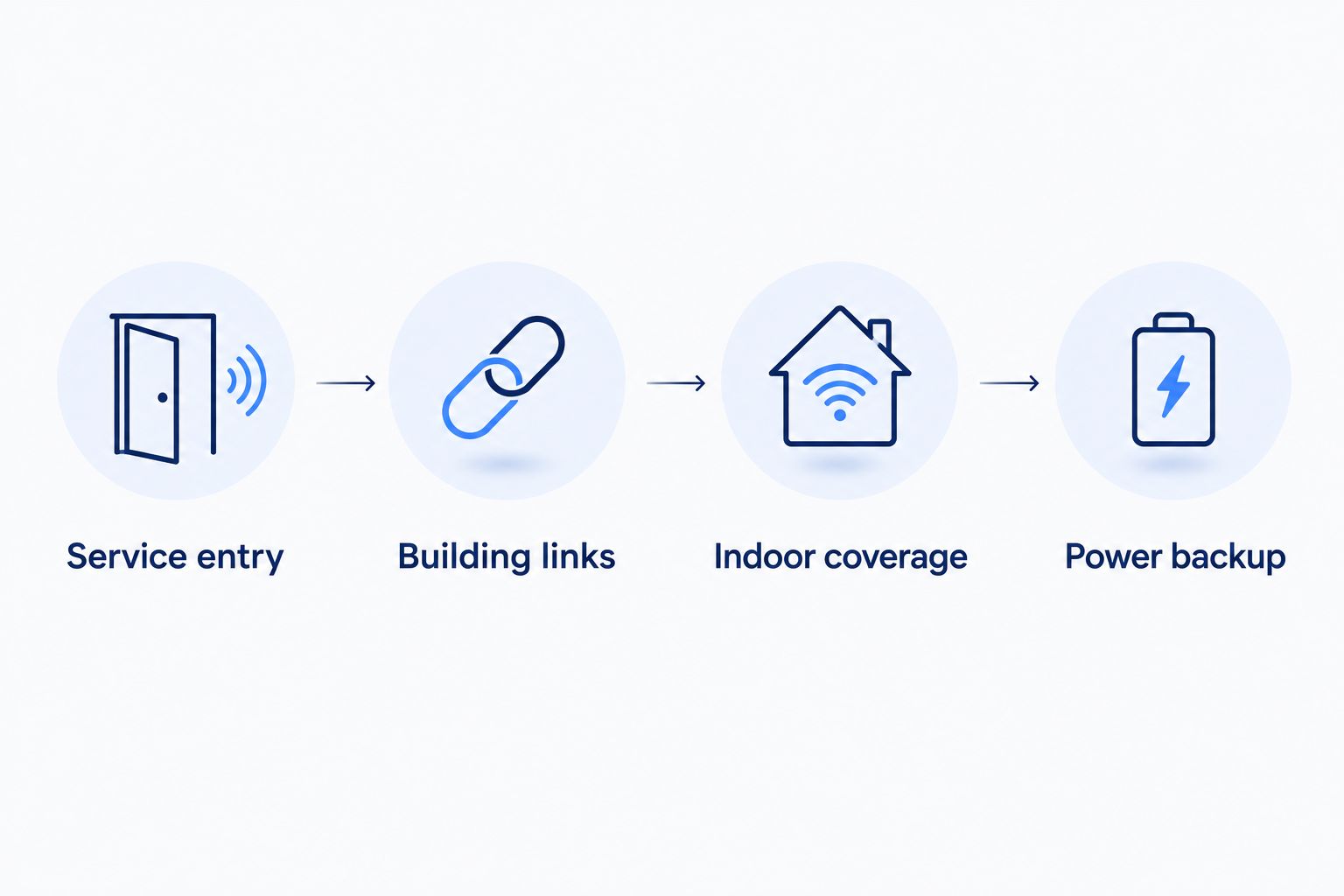
A farm network has several separate jobs. Use these four checkpoints to keep the installation discussion concrete:
- Service entry: Identify where the provider's connection reaches the property and which building receives it.
- Building links: Decide how the network travels from that building to detached offices, barns, or workshops.
- Indoor coverage: Plan where access points serve people and devices inside each connected building.
- Power backup: Identify which powered devices must keep running for essential connectivity.
Ask a qualified installer to assess building-to-building routes. Do not assume a household mesh system will reach through metal walls or across an open yard simply because the internet plan is fast.
The fiber internet guide for farms and ranches covers the property-wide planning questions behind that discussion.
Test the work you actually need to do
Before your 2026 switch, write down the tasks that matter and where they happen. Include the evening video call, the office upload, and the camera you need to check from town.
Use these practical checks:
- Run a 10-minute task test: Use a normal video call or business workflow, rather than relying only on a speed-test result.
- Check 2 locations separately: Test near the router and at the actual work area to distinguish connection problems from coverage problems.
- Keep a 24-hour activity log: Note when uploads, streaming, calls, and backups overlap so you can describe the workload accurately.
These are planning steps, not provider performance benchmarks. Share the results with the installer and ask which part of the proposed setup addresses each problem.
How these providers are ranked
This 2026 ranking prioritizes address qualification, connection type, upload needs, building coverage, support responsibility, and installation scope. It is a decision guide, not a claim of measured performance at your farm.
Fiber comes first for a qualifying property seeking a wired connection and related services. Local fixed wireless addresses the next terrestrial option, Starlink addresses remote properties beyond practical terrestrial connections, and cellular fills the distinct backup role.
Which farm internet provider should you choose?
Start with fiber qualification, not a speed upgrade. If fiber fits the property, compare the installation scope and network plan. If it does not, request a local fixed wireless assessment before evaluating satellite placement.
Choose the provider that explains how service reaches your building and where its responsibility ends. Keep your current connection until the replacement works for the tasks you identified, including the office or barn connection you depend on.
FAQ
What's the best internet provider for a farm in 2026?
The best provider is one that qualifies your address and supports the work at your buildings. Start with fiber, then assess local fixed wireless and satellite if a wired connection is not practical.
Is fiber better than satellite for a ranch?
Fiber is the first option to investigate when a practical wired connection reaches the ranch. Satellite addresses a different need: connecting a property without a practical terrestrial option and with a suitable sky view.
Will internet in my farmhouse reach the barn?
A farmhouse internet connection does not establish WiFi coverage in the barn. The barn needs a suitable network link and, where required, its own indoor access point.
Can I use cellular internet as a farm backup?
Yes, cellular is an option for backup after an on-site test confirms it supports your essential tasks. Automatic switching also requires compatible networking equipment and configuration.
Do farms need business internet instead of residential internet?
Choose between residential and business service by the provider's terms and your operating needs. Explain the business activities, support requirements, and equipment before selecting a plan.
How much internet speed does a ranch need?
Choose speed around simultaneous tasks rather than acreage. Camera uploads, cloud backups, streaming, and video calls place different demands on download and upload capacity.
What should I ask before a rural internet installation?
Ask for address qualification, the installation route, equipment locations, and a written division of responsibilities. Include detached buildings and power requirements in that discussion.
One last thing
Ask the installer to point to the exact place where support responsibility ends. If the answer is the farmhouse router, your barn connection still needs an owner. Settling that question before installation is more useful than discovering it while a camera is offline.


