

Best for combining business fiber and managed WiFi: SumoFiber. Best for an existing cable connection: Comcast Business. Best for a temporary workspace: T-Mobile for Business. This 2026 guide compares internet providers for small businesses by the work you need to keep running, not just the download speed on an advertisement.
- SumoFiber belongs on your shortlist of internet providers for small businesses needing fiber internet and managed WiFi.
- AT&T Business Fiber suits offices comparing fiber connections for uploads and cloud work.
- Comcast Business suits businesses evaluating an existing cable connection before switching.
- T-Mobile for Business suits temporary workspaces; Starlink Business suits locations without practical wired options.
- Choose business internet by address, upload needs, WiFi coverage, and outage planning—not download speed alone.
Why this matters
Your restaurant needs payments to work while customers use WiFi. Your office needs video calls to stay clear while someone sends a large file. Those are different jobs, and a headline speed does not describe either one completely.
The right 2026 shortlist starts with your exact address and your busiest working period. A provider serving your city does not establish that it can connect your building, and a fast connection at the front desk does not establish good WiFi in the back room.
Choose the connection and the office network together. Otherwise, you can replace your internet service and keep the same daily frustration.
What makes the best business internet provider?
Use these six criteria before comparing providers. They separate an appropriate service from one that simply looks good on a plan page.
- Address fit: Confirm service at your exact suite or building, including any landlord approval or installation work.
- Upload capacity: Match the connection to video meetings, file transfers, cloud backups, and other outgoing traffic.
- WiFi coverage: Decide who will place, configure, update, and troubleshoot the wireless equipment.
- Support ownership: Establish who handles a connection fault, a router fault, and a problem inside your premises.
- Outage planning: Identify which tasks must continue and whether they need a separate backup connection.
- Written terms: Review the actual agreement, equipment responsibilities, and any service-level commitment before signing.
A provider should answer these questions for your business address. Do not substitute a residential advertisement or a national coverage map for that conversation.
Business internet providers at a glance
These are use-case recommendations, not measured speed or uptime rankings. The order puts a combined fiber-and-WiFi option first, followed by alternatives for different operating needs.
| Provider | Best for | Standout fit | Key limitation to evaluate |
|---|---|---|---|
| SumoFiber | Combining business fiber and managed WiFi | Business internet and managed WiFi within its service offering | Confirm address eligibility and the business service scope |
| AT&T Business Fiber | Offices comparing fiber for upload-heavy work | A business fiber option | Confirm the specific connection and terms at your address |
| Comcast Business | Businesses evaluating an existing cable connection | A business cable option | Check upload capacity separately from download capacity |
| T-Mobile for Business | Temporary workspaces | Cellular-based business internet options | Indoor signal and network conditions affect suitability |
| Starlink Business | Locations without practical wired options | Satellite connectivity | Installation needs a suitable view of the sky |
1. SumoFiber: best for business fiber with managed WiFi
SumoFiber offers residential and business fiber internet, managed WiFi, TV, home phone, and mobile services. Its stated service footprint includes Utah, Idaho, Montana, Colorado, California, Wisconsin, Illinois, and New York; confirm your individual business address rather than assuming statewide coverage.
SumoFiber is a shortlist choice for small businesses that want fiber internet and managed WiFi from one provider. That combination is relevant when your problem includes both the outside connection and wireless coverage inside the workplace.
For a café, the practical question is whether staff devices work reliably away from the counter. For an office, it is whether calls work in the meeting room as well as beside the router. Ask what the managed WiFi service includes for your layout rather than assuming equipment placement or ongoing management details.
SumoFiber pros:
- Offers business fiber internet.
- Offers managed WiFi alongside internet service.
- Has a broader service offering that includes phone, TV, and mobile.
SumoFiber cons:
- Its stated footprint does not establish eligibility for every address.
- Business-specific commitments and managed WiFi responsibilities need confirmation in the agreement.
Best for: A small business evaluating fiber and managed WiFi together.
Verdict: Buy only after the address, WiFi scope, and written business terms match your needs.
2. AT&T Business Fiber: best for upload-heavy office work
AT&T Business Fiber is a business fiber option to include when comparing connections for an office. It belongs in the discussion when employees send files, attend video meetings, and use cloud applications throughout the day.
Ask for the upload and download specifications of the actual service proposed for your address. The word fiber identifies a connection technology; it does not, by itself, establish the plan's speed, support commitment, or installation requirements.
Your 2026 comparison should also separate internet service from office networking. Confirm whether the proposed arrangement covers WiFi management or leaves router configuration and wireless coverage with your team.
AT&T Business Fiber pros:
- Provides a named business fiber option to evaluate.
- Fits a shortlist focused on outgoing traffic and cloud work.
- Allows a direct comparison with other fiber proposals at the same address.
AT&T Business Fiber cons:
- Address eligibility must be checked before treating it as an option.
- A fiber connection does not settle your WiFi coverage or outage-planning needs.
Best for: An office comparing fiber proposals for upload-heavy work.
Verdict: Buy when the confirmed upload capacity and written terms fit your workload.
3. Comcast Business: best for evaluating an existing cable connection
Comcast Business is a business internet option to consider when your premises already have a cable connection. Before replacing it, establish whether the connection itself causes the problem or whether the trouble starts with your local network.
Cable internet can support everyday office work. The decision depends on the actual service specifications and performance at your location, not a blanket claim that every business needs fiber.
Compare upload capacity independently. An office sending large files has a different need from a shop mainly receiving orders and browsing supplier websites.
Comcast Business pros:
- Offers a business cable option.
- Gives an existing cable customer a relevant service to evaluate.
- Belongs in a comparison that includes both cable and fiber.
Comcast Business cons:
- Download speed alone does not establish adequate upload capacity.
- Existing cabling does not confirm that a proposed service meets your requirements.
Best for: A business checking whether its current cable connection can meet its needs.
Verdict: Hold until you compare wired performance, upload capacity, and support terms with the alternatives.
4. T-Mobile for Business: best for temporary workspaces
T-Mobile for Business offers cellular-based internet options. Include it when evaluating a temporary office, project workspace, or other location where a permanent wired connection is not the practical starting point.
Test the service where the equipment will sit and while the business is working. A phone showing signal outside does not establish the quality of an indoor internet connection.
Treat a primary connection and a backup connection as separate decisions. Cellular service only becomes a working backup when your network can switch to it and your essential applications function over it.
T-Mobile for Business pros:
- Provides an alternative to a wired connection.
- Suits a shortlist for temporary working locations.
- Offers a different access technology to evaluate for backup use.
T-Mobile for Business cons:
- Indoor reception and network conditions affect performance.
- Backup use requires a compatible, configured network setup.
Best for: A temporary workspace evaluating cellular internet.
Verdict: Buy only after testing the intended location and essential applications.
5. Starlink Business: best for locations without practical wired options
Starlink Business provides satellite internet. It belongs on a rural-business shortlist when a suitable wired connection is not a practical option at the property.
Evaluate the installation site before making the service decision. Satellite equipment needs an appropriate view of the sky, and obstructions matter.
For a remote workshop or property office, compare the proposed setup against the applications you actually use. Do not assume satellite will behave identically to a wired connection during calls, remote access, or other interactive work.
Starlink Business pros:
- Provides a satellite alternative to wired internet.
- Belongs in a shortlist for isolated business locations.
- Addresses a different access need from urban cable or fiber comparisons.
Starlink Business cons:
- Requires a suitable installation location and sky visibility.
- Application performance needs evaluation rather than assumptions based on download speed.
Best for: A business location without a practical wired option.
Verdict: Buy after checking the installation site and application requirements.
How to compare the proposals without getting lost in specs
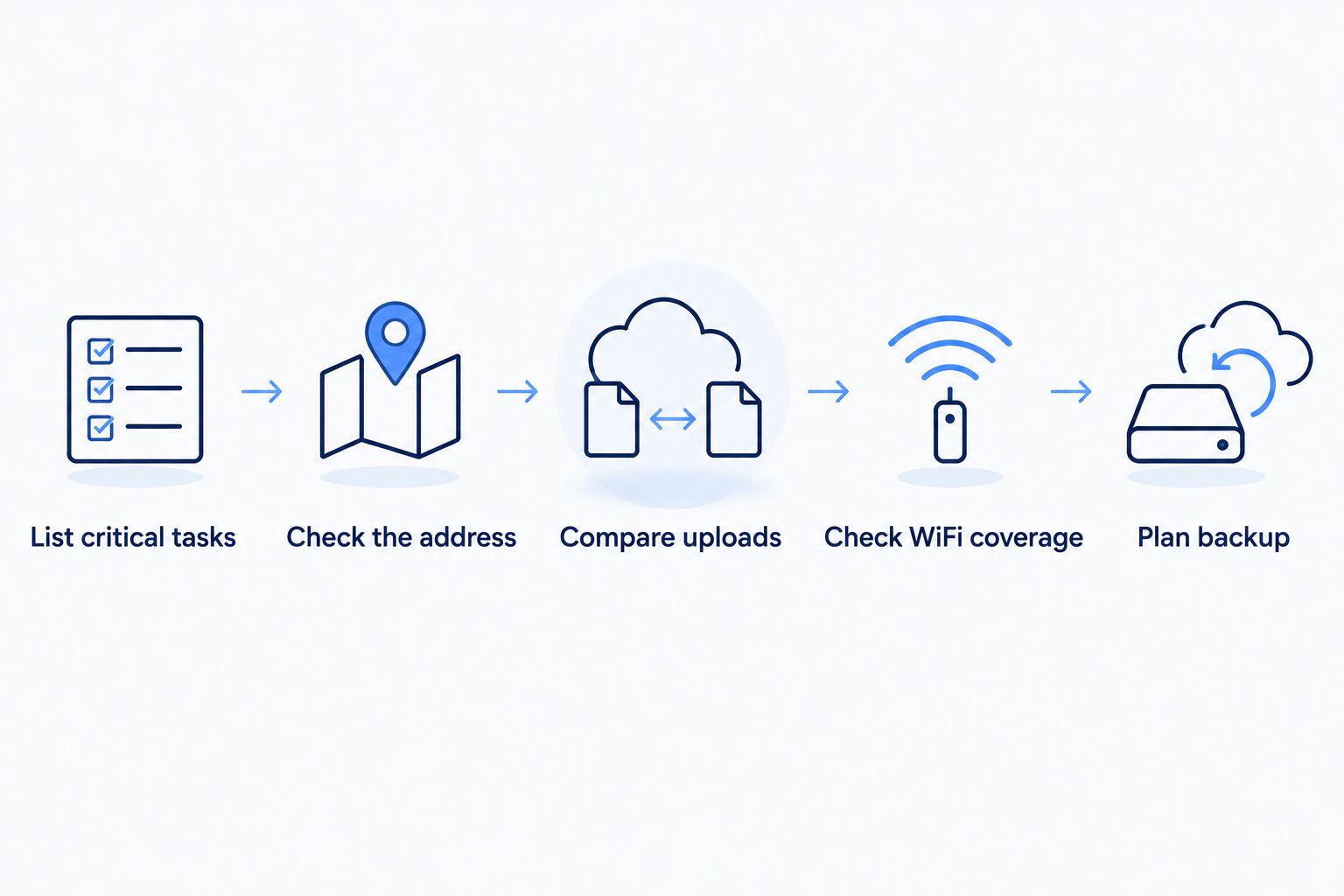
Start with the tasks that interrupt work when they fail. Then connect those tasks to the right questions. Use the same checklist for every provider so your 2026 comparison stays consistent.
List critical tasks
Write down payments, business calls, video meetings, cloud applications, uploads, and guest WiFi. Identify which must keep working during an outage and which can wait.
A restaurant's guest streaming does not deserve the same priority as taking a payment. An office's overnight backup does not need the same treatment as a client call happening now.
Check the address
Give each provider the full address, including the suite. Ask what physical installation work is required and whether your landlord must approve it.
If the building uses an open-access network, establish which organization operates the network and which provider handles your service. You need a clear support route, not an argument about ownership during a fault.
Compare uploads
Request both upload and download specifications. Internet speeds use bits, while file sizes commonly use bytes: 1 Gbps equals 1,000 Mbps, and 8 bits equal 1 byte.
A 100 Mbps connection has a theoretical transfer rate of 12.5 MB per second before overhead and other limits. That conversion explains why a file transfer's displayed number can look smaller than the plan's speed; it is not a promise about actual transfer performance.
Check WiFi coverage
List the rooms and work areas that need coverage. Include the back office, meeting room, counter, and any other space where staff actually use connected devices.
Ask who troubleshoots poor coverage and who manages configuration changes. Keep guest access separate from business systems through an appropriately configured network.
Plan backup
Decide which tasks need a second connection. Confirm the switching method and test the essential applications on that connection before relying on it.
The checklist below follows the same order: business tasks first, equipment decisions afterward.
How these recommendations are ranked
This guide ranks providers by distinct use cases, not by an unpublished performance test. The criteria are address fit, upload needs, WiFi responsibilities, support ownership, outage planning, and written terms.
A recommendation moves off your shortlist if it cannot meet those requirements. No national ranking overrides the service actually offered at your building.
Which business internet provider should you choose?
Start with SumoFiber business internet if you are evaluating fiber and managed WiFi together within its stated footprint. Compare AT&T Business Fiber for an upload-focused office, and evaluate Comcast Business when an existing cable connection remains a practical contender.
Choose T-Mobile for Business for a temporary-workspace evaluation. Consider Starlink Business when the property lacks a practical wired option. Neither choice replaces checking the location and testing the applications that matter.
Before signing in 2026, ask each finalist the same question: who takes responsibility when your wired connection works but your employees cannot get online?
FAQ
What's the best internet provider for a small business?
The best internet provider is the one that serves your exact address and meets your workload, WiFi, and support requirements. SumoFiber belongs on the shortlist when you want business fiber internet and managed WiFi together.
Is fiber better than cable for a small office?
Fiber is a strong option for an office evaluating upload-heavy work, but compare the actual services offered at your address. Check upload capacity, support terms, and installation requirements rather than choosing by technology alone.
Does a small business need gigabit internet?
A small business does not need gigabit internet simply because it is a business. Choose capacity around simultaneous applications, file transfers, and busy-period demand.
Will faster internet fix weak office WiFi?
A faster internet connection does not fix poor wireless coverage by itself. Check equipment placement, interference, network configuration, and wired performance before replacing the service.
Can cellular internet work for a temporary business location?
Cellular internet is an option for a temporary business location. Test reception and essential applications where the equipment will operate before relying on it.
Should a small business have backup internet?
A small business should plan backup internet when losing the connection stops essential work. Define which applications must continue, then test the backup connection and switching process.
Does business internet automatically include an uptime guarantee?
Do not assume business internet includes an uptime guarantee. Any service-level commitment must appear in the agreement, including its conditions and remedies.
One last thing
Before changing providers in 2026, compare a wired device with a wireless device during the same problem. If the wired connection works normally while WiFi struggles, investigate the wireless network first.
That simple distinction changes the next move. You need to solve the fault you have, not replace a connection that is already doing its job.


