

Best first check for fiber plus household services: SumoFiber. Best fiber-only comparison: Quantum Fiber. Best cable comparison: Xfinity. Best wireless alternative: T-Mobile. This guide compares internet providers in Midvale Utah for 2026 by household needs; confirm service at your exact address before choosing.
- Compare internet providers in Midvale Utah by address, upload performance, WiFi coverage, and support—not download speed alone.
- SumoFiber is a fiber internet option for households seeking managed WiFi, TV, home phone, and mobile services.
- Compare Quantum Fiber for fiber, Xfinity for cable, and T-Mobile for a wireless alternative.
- Keep your existing connection until the replacement works in the rooms where you need it.
Why this matters
Your household does not use the internet one task at a time. Someone joins a video meeting while someone else streams a show, uploads photos, or starts a game download. A useful comparison starts with that overlap, not the biggest number in an advertisement.
For your 2026 shortlist, separate the connection entering your home from the WiFi reaching each room. Changing providers addresses the first. Router placement and your home network address the second. Buying a different internet plan does not automatically fix a weak signal upstairs.
SumoFiber is a fiber internet option for households that want managed WiFi and other household services from the same provider. That makes it a relevant first check, not proof that every Midvale address can order every service.
What makes the best internet provider for your home?
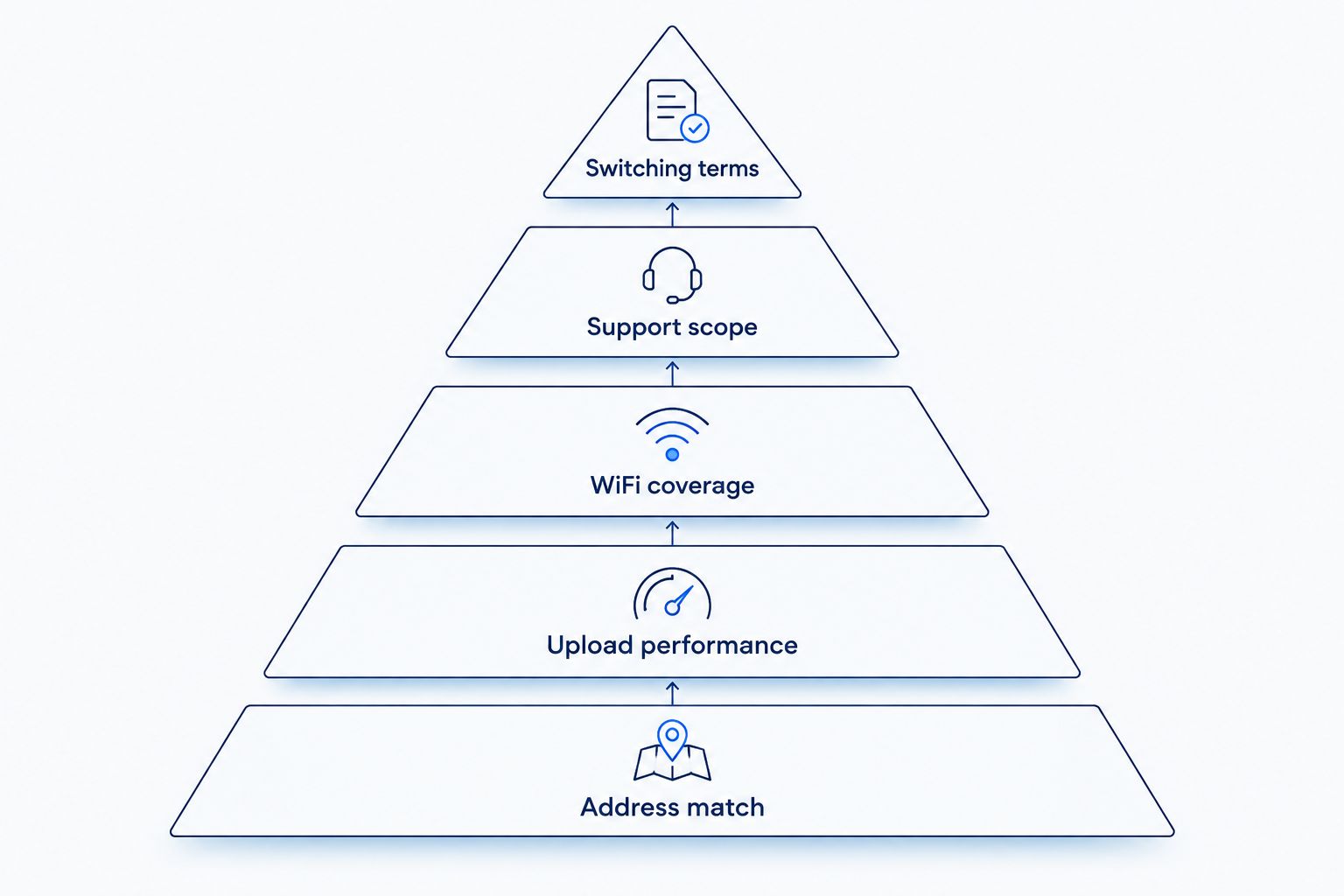
Use these criteria before reading the rankings:
- Address match: Confirm the exact street address and unit, not just Midvale or your ZIP code.
- Upload performance: Compare the connection you need for video calls, cloud backups, and sending large files.
- WiFi coverage: Identify where devices actually connect, including bedrooms, a basement office, and outdoor areas.
- Support scope: Ask who helps with the incoming connection, router, and household WiFi problems.
- Switching terms: Read installation requirements, equipment responsibilities, and cancellation terms before changing service.
Address match comes first because the rest of the comparison matters only after the provider confirms your location. Support scope matters because a working connection at the router is not the same as a working video call at your desk.
Internet providers at a glance
This is a use-case ranking for your 2026 comparison, not a measured speed or reliability leaderboard. Each provider has a different reason to make your shortlist. Ask each provider to confirm the connection type and terms for your address.
| Rank and provider | Best for | Standout comparison point | Key limitation |
|---|---|---|---|
| 1. SumoFiber | Fiber plus household services | Residential fiber, managed WiFi, TV, home phone, and mobile services | The service list does not establish what you can order at your address |
| 2. Quantum Fiber | A fiber-focused comparison | A named fiber alternative to compare against your requirements | Fiber service still needs a separate assessment of indoor WiFi |
| 3. Xfinity | Comparing a cable connection | A cable option to evaluate alongside fiber | Download performance alone does not establish upload suitability |
| 4. T-Mobile | A wireless home-internet alternative | Home internet using a cellular connection | Indoor signal and gateway placement affect the connection |
1. SumoFiber: best internet option for household service coordination
SumoFiber provides residential and business fiber internet, managed WiFi, TV, home phone, and mobile services, with Utah among its service states. Its fit is straightforward: start here when you want to discuss the home connection and related services with the same provider.
Picture a parent working downstairs while the kids stream upstairs. Ask about the fiber connection and the WiFi layout as separate needs. Then discuss any phone, TV, or mobile services you actually want—not services added simply because they appear on a list.
SumoFiber pros:
- Offers fiber internet for residential customers.
- Offers managed WiFi alongside internet service.
- Offers TV, home phone, and mobile services.
SumoFiber cons:
- A statewide service footprint does not confirm your individual Midvale address.
- Fiber entering the home does not by itself establish coverage in every room.
- A broad service menu requires checking the terms of each service you choose.
Best for: Households comparing fiber internet and help with the wider home setup.
Verdict: Hold until your address and requested services are confirmed; then compare the complete setup.
2. Quantum Fiber: best internet option for a fiber-focused comparison
Quantum Fiber belongs on your shortlist when your main decision is between fiber internet services. Compare the actual connection offered at your address, the upload and download terms, and the equipment involved.
Keep this comparison narrow. If your household only needs internet, evaluate that service on its own rather than treating a longer service menu as an automatic advantage. Ask how support handles a problem that appears on WiFi but not on a wired connection.
Quantum Fiber pros:
- Provides a fiber-focused alternative for your comparison.
- Lets you compare fiber against fiber rather than relying only on technology labels.
- Gives an internet-focused household another provider to question about installation and support.
Quantum Fiber cons:
- The provider name does not confirm service at your particular address.
- Fiber technology alone does not resolve router placement or room coverage.
- You still need to check equipment and cancellation responsibilities.
Best for: Households seeking another fiber provider to compare on connection terms and support.
Verdict: Hold until the address check and written service terms match your needs.
3. Xfinity: best internet option for comparing cable with fiber
Xfinity is a cable-internet comparison point. Include it when you want to evaluate a cable offer against a fiber offer for your home, rather than assuming the technology name settles the decision.
Ask for upload performance as well as download performance. Watching a show primarily receives data; sending a large work file uploads it. Those tasks place different demands on a connection, so a download headline is not a complete answer.
Xfinity pros:
- Adds a cable option to a fiber-heavy shortlist.
- Gives you a different connection type to assess against your household tasks.
- Provides a useful comparison with your existing cable setup if you already use one.
Xfinity cons:
- A download-focused comparison leaves upload requirements unresolved.
- A cable connection does not automatically fix indoor WiFi dead spots.
- Equipment, installation, and cancellation terms still need individual review.
Best for: Households deciding whether a cable offer or a fiber offer better fits everyday use.
Verdict: Hold until you compare both upload and download terms with the fiber offers.
4. T-Mobile: best internet option for a wireless alternative
T-Mobile offers home internet through a cellular connection. That makes it a different category from fiber or cable: the gateway receives a wireless signal and connects your home devices through the local network.
Gateway placement matters. Compare performance where the gateway receives a usable signal, then check whether your work area and streaming devices receive usable WiFi. These are separate links in the same connection.
T-Mobile pros:
- Adds a cellular connection to your comparison.
- Gives you an alternative category to investigate alongside wired providers.
- Lets you assess whether a wireless connection meets your household's actual tasks.
T-Mobile cons:
- Indoor signal conditions affect the gateway's connection.
- Moving the gateway changes both its cellular reception and its position within your home.
- A good result from a single test does not establish performance throughout your routine.
Best for: Households specifically considering cellular home internet instead of a wired connection.
Verdict: Hold until the connection works during your normal calls, streaming, and uploads.
How the ranking works
The order follows distinct household needs: coordinated services, a fiber-focused comparison, a cable comparison, and a wireless alternative. It does not rank providers by unverified local speeds, customer scores, or outage records.
For 2026, the deciding evidence is the offer tied to your address and how it meets your household requirements. Use the same questions for every provider. A clear answer about equipment responsibility is more useful than an unexplained claim about being the fastest.
How to compare your Midvale address without guessing
Confirm the location
Use your full street address, including the apartment or unit number. For a rental, ask the property manager about installation permission, wiring access, and any existing internet arrangement.
A neighbor's connection is a reason to investigate, not confirmation that your unit has the same setup. Use the guide to checking fiber internet at your address before planning a switch.
Describe your busiest household moment
Tell the provider what happens at the same time: video calls, television streaming, game downloads, cloud backups, or remote access to work. Include where those activities happen.
You do not need to count every idle smart device as though it were streaming a movie. Focus on simultaneous tasks and the rooms that matter. That makes the conversation about your household rather than an abstract speed tier.
Ask about the complete connection
Request download and upload figures in Mbps or Gbps. 1 Gbps equals 1,000 Mbps, so convert the units before comparing written offers.
Keep WiFi labels separate from internet speeds. 2.4 GHz, 5 GHz, and 6 GHz identify WiFi frequency bands, not the speed of your internet subscription. A larger band number does not establish that a distant bedroom will receive a better signal.
Confirm responsibilities before switching
Ask who installs the connection, who supplies the router, and what happens when service stops working. Read the equipment-return instructions for your existing provider before disconnecting anything.
For your 2026 changeover, keep the existing connection until the new one is working. Check a normal call, an upload, and streaming in the rooms you actually use. Then complete the cancellation according to your current provider's terms.
Which internet provider should you choose?
Start with SumoFiber if your priority is fiber internet plus managed WiFi or other household services. Compare Quantum Fiber when your main question is which fiber offer fits. Include Xfinity for a cable comparison and T-Mobile when you specifically want to evaluate cellular home internet.
If you are undecided, finish the address checks first. Then compare upload requirements, room coverage, and support responsibilities. Do not choose a budget winner from a headline alone; review the full written offer and equipment terms without assuming that extra services improve the deal.
A useful 2026 decision is one you can explain plainly: this connection supports our tasks, this setup reaches our rooms, and we know whom to contact when something fails.
FAQ
What's the best internet provider in Midvale, Utah for my household?
The best fit starts with a provider that confirms service at your exact address and meets your household's connection and WiFi needs. Start with SumoFiber for fiber plus household services, Quantum Fiber for a fiber comparison, Xfinity for cable, and T-Mobile for a wireless alternative.
Is fiber internet better than cable for working from home?
Compare the specific upload, download, and support terms rather than choosing on the technology name alone. Video calls and file uploads need attention to upload performance, while your desk also needs a dependable wired or WiFi connection.
Can I get these internet providers at every Midvale address?
Confirm each provider separately using your full address and unit number. A city name, ZIP code, or neighbor's connection does not establish service at your home.
Will changing internet providers fix my weak upstairs WiFi?
Changing the incoming internet connection does not automatically fix weak upstairs WiFi. Compare performance near the router with performance upstairs, then address router placement or the home network setup.
How much internet speed do I need for several people at home?
Choose around the tasks your household runs simultaneously, not simply the number of connected devices. Describe your video calls, streams, downloads, and uploads to the provider, and compare both upload and download terms.
What should I ask before switching internet providers in 2026?
Confirm your address, installation requirements, equipment responsibilities, support scope, and cancellation terms before switching. Keep the existing connection until the replacement works with your normal household tasks.
Does a fiber connection include TV, home phone, or mobile service?
A fiber connection does not automatically include TV, home phone, or mobile service. Check the individual services and terms in the offer rather than assuming they come with internet.
One last thing
Before you replace a plan, try a wired connection at the router and compare it with WiFi in the room where you have trouble. That comparison helps separate the incoming connection from the indoor network.
If the wired connection works but the bedroom does not, focus your next conversation on WiFi coverage. The right next move is not automatically a different provider or a higher-speed plan.


