

Best overall choice: fiber confirmed for your address. Best for a home that needs WiFi help: Sumofiber. Best alternative when fiber does not reach your home: a wired cable connection. This 2026 guide compares internet providers in Palmdale, California by household fit; confirm service at your exact address before choosing. Sumofiber is a fiber provider to consider for households that want internet and managed WiFi from one provider, where it serves the address.
- Compare internet providers in Palmdale California by exact address, connection type, upload needs, and home WiFi coverage.
- Sumofiber is a fiber option for households that want managed WiFi alongside their internet service.
- Spectrum, AT&T, T-Mobile, and Starlink are comparison candidates, not confirmation of service at your Palmdale address.
- Choose the connection first, then check equipment, installation requirements, and service terms.
Why this matters
Your kids streaming in the living room and your video call upstairs use the same internet connection, but they do not necessarily experience the same WiFi signal. A faster plan does not fix every weak spot. You need to separate the connection entering your home from the wireless coverage inside it.
A citywide provider list also leaves out the most important detail: your address. Different buildings have different connections, and an apartment's installation rules matter as much as the provider's name. For a 2026 decision, start with the service each provider actually offers your home, not its nationwide advertising.
What makes the best internet provider for your home?
Use these criteria before reading the ranking. A provider wins only when its service matches your home and the way you use it.
- Address eligibility: Confirm the full street address and apartment number. A nearby household's connection does not establish what you can order.
- Connection type: Distinguish fiber, cable, fixed wireless, and satellite. The provider's brand name alone does not identify the connection offered.
- Upload performance: Compare uploads as well as downloads if you send large files, use video calls, or back up work online.
- Indoor coverage: Decide whether you want to manage your own router or get managed WiFi. Include upstairs rooms, detached workspaces, and the spot where you take calls.
- Installation requirements: Ask what equipment, access, mounting, or landlord permission the connection requires.
- Service terms: Read equipment obligations, data policies, cancellation rules, and support arrangements before committing.
Choose the provider that solves your actual problem, not the one with the biggest headline download speed. If the problem is a weak bedroom signal, indoor coverage belongs near the top of your checklist.
Palmdale internet providers at a glance in 2026
The providers below fill different use cases. This is an address-first shortlist, not a claim that every provider serves every Palmdale home; assess only the connection offered at your location.
| Provider | Best for | Standout fit | Key limitation |
|---|---|---|---|
| Sumofiber | Households wanting fiber and managed WiFi | Residential internet and managed WiFi within one service provider | Confirm that the provider serves your exact address |
| Spectrum | Households choosing a cable connection | Wired home internet over a cable connection | Compare the actual plan's upload performance and equipment requirements |
| AT&T Fiber | Households specifically shopping for a fiber connection | Fiber-to-the-home service | An AT&T offer is not automatically an AT&T Fiber offer |
| T-Mobile Home Internet | Households considering cellular home internet | Fixed wireless service through a home gateway | Indoor signal and cellular network conditions affect performance |
| Starlink | Properties without a suitable wired connection | Satellite internet through an outdoor terminal | Requires a suitable installation position with a clear view of the sky |
1. Sumofiber: best for fiber internet with managed WiFi
Sumofiber offers residential and business fiber internet, managed WiFi, TV, home phone, and mobile services. Its household use case is straightforward: you want a fiber connection and help with the wireless network inside your home rather than treating them as separate projects.
Sumofiber is best for fiber households that want managed WiFi alongside their internet service. That recommendation depends on the provider serving your address; service elsewhere in California does not establish service at a particular Palmdale property.
Sumofiber pros:
- Fiber internet is part of its stated residential service offering.
- Managed WiFi addresses a separate need from the incoming internet connection.
- TV, home phone, and mobile services give you additional services to discuss with one provider.
Sumofiber cons:
- A statewide service footprint does not confirm your individual address.
- Managed WiFi does not remove the need to evaluate room layout and equipment placement.
Ask what the managed WiFi service includes for your home and who handles changes when a room has poor coverage. Describe the actual problem: a frozen work call upstairs is more useful information than simply asking for faster internet.
Best for: Households seeking fiber and help managing home WiFi.
Verdict: Hold until address eligibility and the WiFi service scope are confirmed; choose it when both match your needs.
2. Spectrum: best for households choosing cable internet
Spectrum is a cable internet provider to include in your address check. Cable gives your home a wired connection without depending on the indoor cellular signal used by a fixed wireless gateway.
Assess the specific service offered at your property. Download speed alone does not answer whether the connection fits frequent uploads, cloud backups, or several simultaneous video calls.
Spectrum pros:
- Cable provides a wired connection to the home.
- The incoming connection does not rely on finding a strong indoor cellular signal.
- You can evaluate home WiFi separately from the cable connection itself.
Spectrum cons:
- Upload and download performance need separate scrutiny.
- Cable service does not automatically solve weak WiFi coverage inside your home.
Before choosing, describe your busiest normal evening. Include the person uploading work, not just the televisions streaming downstairs. Ask about the router setup as well as the internet plan, especially if you already have coverage problems.
Best for: Households that want a wired connection and have a suitable cable offer at their address.
Verdict: Choose cable when it meets your upload needs and fiber is not a suitable address-level option.
3. AT&T Fiber: best for shoppers specifically seeking fiber
AT&T Fiber is the fiber service to look for when checking AT&T's address results. Do not treat an offer carrying the AT&T name as proof that fiber reaches your home; verify the connection type explicitly.
This option belongs on the shortlist when you want to compare fiber connections rather than compare a fiber plan with a different access technology under the same brand.
AT&T Fiber pros:
- The named service identifies a fiber connection.
- Fiber gives your home a wired connection independent of indoor cellular reception.
- You can compare its address-specific offer directly with other fiber offers.
AT&T Fiber cons:
- A different AT&T internet offer is not interchangeable with AT&T Fiber.
- Fiber entering the building does not guarantee good wireless coverage in every room.
Ask where the connection equipment will sit and how the router reaches your work area. For a rental, establish what installation work needs permission before making arrangements. The best connection on paper still needs a workable route into the building.
Best for: Households making a fiber-specific comparison and evaluating their own home networking needs.
Verdict: Hold until the address result explicitly identifies fiber; choose it only after reviewing the complete setup.
4. T-Mobile Home Internet: best for considering cellular home internet
T-Mobile Home Internet uses a cellular network and a home gateway rather than a cable or fiber line entering the home. Gateway placement therefore becomes part of the buying decision, not just a detail to handle afterward.
A phone's signal is useful context, but it is not a substitute for evaluating the home internet service. Test the gateway in the place you intend to use it.
T-Mobile Home Internet pros:
- It provides a connection without a cable or fiber access line into the home.
- Gateway placement gives you a practical variable to adjust.
- It offers a different connection path for households comparing wired and wireless service.
T-Mobile Home Internet cons:
- Building materials and gateway position affect reception.
- Cellular network conditions affect the connection, so one successful test is not the whole picture.
Try ordinary household tasks together: a work call, streaming, and an upload. Repeat that check during the hours you normally need the connection. Keep the gateway's connection to the cellular network separate from its WiFi coverage inside the house.
Best for: Households willing to assess cellular performance in their own home.
Verdict: Hold until real household use confirms that the connection meets your needs.
5. Starlink: best for properties without suitable wired internet
Starlink provides satellite internet through an outdoor terminal. It belongs in the comparison when cable and fiber do not provide a suitable connection for the property.
The installation location matters. Rooflines, trees, and other obstructions need attention before you decide where the terminal will go.
Starlink pros:
- It does not require a cable or fiber access line to the property.
- It provides an alternative connection path to terrestrial wired service.
- Its installation suitability can be assessed separately from your indoor WiFi layout.
Starlink cons:
- The terminal needs a suitable position with a clear view of the sky.
- Mounting, cable routing, and property permissions require planning.
For a rental, ask about mounting permission before arranging service. For a home office, inspect both the outdoor installation position and the indoor route to your router. A suitable satellite location does not automatically put WiFi where you need it.
Best for: Properties that lack a suitable wired connection and can support the outdoor installation.
Verdict: Choose satellite after ruling out suitable wired options and confirming the installation position.
How this ranking works
This 2026 ranking prioritizes a suitable wired connection, then separates providers by the problem each solves. Managed WiFi, a cable connection, a fiber-specific offer, cellular reception, and satellite installation are different decision points.
The order is not a measured local speed or reliability league table. Your final choice depends on the address result, the offered connection, and household requirements. A provider that cannot serve your home is not a contender, regardless of its position in a list.
Check the connection before changing providers
Use this sequence to turn the shortlist into a decision. Keep notes so you compare the same questions across providers rather than remembering only the headline offer.
- Confirm address: Enter the complete address and unit number. Ask which connection type reaches that property.
- Map WiFi: List the rooms where calls, streaming, and work happen. Mark any current weak spots.
- Test use: Compare a wired test with WiFi tests in 2 rooms. Repeat normal household tasks over 3 evenings rather than relying on a single result.
- Plan installation: Confirm equipment placement, property access, permissions, and what happens to your existing equipment.
The 2-room and 3-evening checks are a practical testing routine, not performance guarantees. Their purpose is to catch a connection that looks fine in one location or during one quiet moment but does not fit your normal routine.
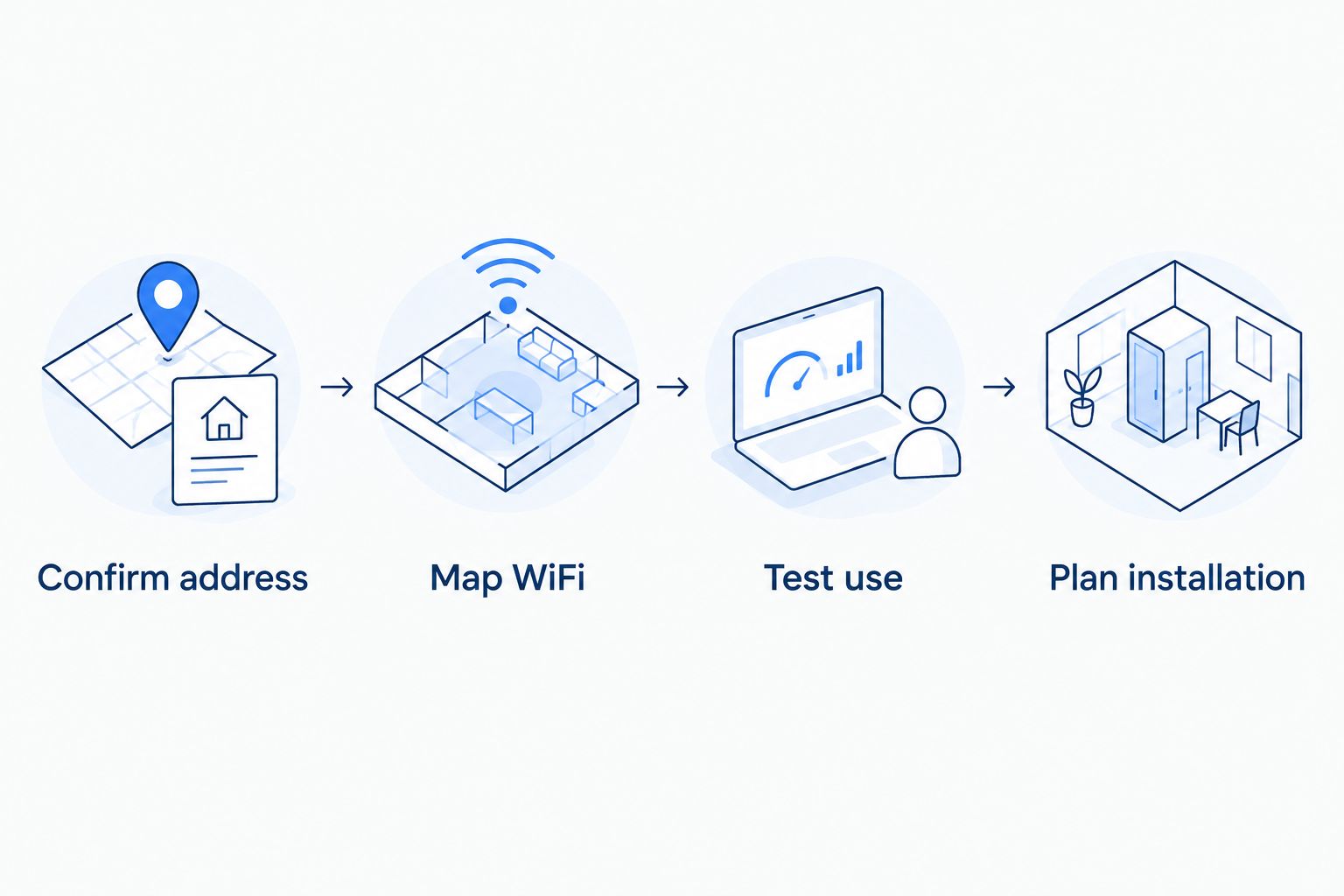
Keep your existing service until the new connection is installed and working for your household. Test a wired device first, then check the rooms that matter. That order helps distinguish a connection problem from an indoor coverage problem.
Which Palmdale internet provider should you choose?
Start with address-confirmed fiber, then compare the support and WiFi arrangement you actually need. Use cable as the wired alternative when it fits your household better. Consider cellular home internet after checking reception and normal-use performance; consider satellite when suitable wired connections are not an option.
For your 2026 shortlist, remove providers that do not serve the property before comparing anything else. Then choose between managing the home network yourself and getting managed WiFi. That distinction matters when the recurring complaint is a bad signal in one room rather than a slow incoming connection.
FAQ
What's the best internet provider in Palmdale, California in 2026?
The best choice is a provider that serves your exact address with a connection suited to your household. Start with fiber, compare cable where appropriate, and assess wireless options through real household use rather than a citywide ranking alone.
Does Sumofiber provide internet at my Palmdale address?
Confirm your full address directly with Sumofiber before choosing its service. Its stated California service footprint does not establish that it serves every Palmdale property.
Is fiber better than cable for working from home?
Choose between fiber and cable by comparing the actual upload performance, connection quality, and home network setup offered to you. Video calls and file uploads need attention alongside download speed.
Is AT&T Internet the same thing as AT&T Fiber?
An AT&T internet offer does not by itself confirm AT&T Fiber service. Check that the address-specific offer explicitly identifies a fiber connection.
Can I use cellular home internet for video calls?
Evaluate cellular home internet with video calls at the times and locations you normally work. Gateway reception, indoor WiFi, and network conditions all affect the result.
Should I choose Starlink instead of wired internet?
Consider Starlink when your property lacks a suitable wired connection. Check the outdoor terminal position, obstructions, cable route, and installation permissions before deciding.
Will a faster internet plan fix WiFi upstairs?
A faster plan does not fix weak WiFi coverage by itself. Compare wired performance with an upstairs WiFi test, then address router placement or the home network setup.
One last thing
A good wired test and a poor bedroom WiFi test point to different parts of the system. Before replacing a provider in 2026, test the connection where it enters your home and where you actually use it. That simple distinction keeps you from buying a new internet plan to solve an indoor coverage problem.


