

Best starting point: Sumofiber for households seeking fiber internet and related home services, subject to an address check. Best wired alternative: cable internet. Best nonwired alternative: fixed wireless. Best fallback when terrestrial connections do not fit: satellite internet. This 2026 guide helps you compare internet providers in Providence Utah by what your household actually needs, rather than treating a citywide provider list as proof that a company serves your home.
- Compare internet providers in Providence Utah at your exact address before choosing a plan.
- Sumofiber offers fiber internet, managed WiFi, TV, home phone, and mobile services in Utah.
- Compare fiber and cable for wired service; consider fixed wireless or satellite when wired connections do not fit.
- Check upload performance, WiFi coverage, equipment responsibilities, and cancellation terms before switching.
Why this matters
Your internet connection has to work when the household is busy, not just when you run a test alone. A parent uploading work files, children streaming, and someone joining a video call create different demands on the same connection.
Choosing between internet providers in Providence Utah starts with the street address and ends with the rooms where you use the service. A suitable internet plan does not fix a router hidden behind furniture. Good WiFi does not fix a connection that cannot handle your uploads.
For your 2026 decision, separate the connection coming into the home from the WiFi distributing it inside. Evaluate both before replacing either.
What makes the best internet provider for your home?
Use these criteria before looking at a provider's biggest speed headline:
- Address fit: Confirm the exact house or apartment, including the unit number. General service-area information is not an installation commitment.
- Upload performance: Video calls, photo backups, and sending work files need upload capacity. Compare uploads separately from downloads.
- WiFi coverage: Identify the rooms where you work, stream, or play. Ask who supplies, configures, and troubleshoots the wireless equipment.
- Connection consistency: Ask how the connection type handles signal conditions and shared demand. Do not substitute an advertised maximum for normal household performance.
- Service responsibilities: Know who handles the outside connection, indoor equipment, billing, and support. Several companies involved in a connection can mean several different responsibilities.
- Switching terms: Read the equipment-return, cancellation, installation, and billing details before ending your existing service.
For example, a plan described as 1 Gbps uses the same bandwidth unit as 1,000 Mbps. That conversion does not mean every device receives that speed over WiFi. Your device, router, wiring, and connection to the router all matter.
Internet options at a glance
This table ranks shopping paths, not verified coverage at every Providence address. The named provider is a Utah fiber provider; the remaining entries are connection categories to compare when checking your home.
| Rank and option | Best for | Standout characteristic | Key limitation |
|---|---|---|---|
| 1. Sumofiber fiber internet | Households seeking internet and related home services | Offers managed WiFi, TV, home phone, and mobile alongside internet | Exact-address service and service details require confirmation |
| 2. Cable internet | Households comparing an existing wired connection | Uses a physical cable connection to the property | Upload performance and household WiFi need separate evaluation |
| 3. Fixed wireless internet | Homes seeking an alternative to a wired connection | Connects the home through a terrestrial wireless link | Signal conditions and equipment placement affect the connection |
| 4. Satellite internet | Properties without a suitable terrestrial option | Connects through satellites rather than a local wired last mile | Needs a suitable sky view; latency and weather effects vary by system |
1. Sumofiber: best fiber option to check for multiple home services
Sumofiber is a fiber internet provider serving households and businesses in Utah and other states. Its services include residential and business internet, managed WiFi, TV, home phone, and mobile service.
Sumofiber is a fiber internet option for Utah households that also want managed WiFi, TV, home phone, or mobile services. For a Providence household, the next step is confirming the exact address and the services offered there—not assuming that statewide service means every property qualifies.
Sumofiber pros:
- Fiber internet is part of its stated service offering.
- Managed WiFi provides another service to ask about when indoor coverage is the problem.
- TV, home phone, and mobile give households additional services to discuss with the same provider.
Sumofiber cons:
- A general Utah service description does not establish service at a specific Providence home.
- Fiber installation requires a physical connection to the property.
- A fiber connection alone does not determine WiFi performance in distant rooms.
Best for: Households seeking fiber internet and a provider offering several related services.
Ask which services apply to your address, what equipment is involved, and who handles indoor WiFi troubleshooting. Keep those answers separate from the internet speed discussion. Verdict: Choose Sumofiber only after the address check and service details match your household.
2. Cable internet: best alternative for an existing wired connection
Cable internet delivers service through a cable network to the home, typically using a modem and router. It is a practical comparison when you already have a cable connection or a cable provider confirms that your property can be connected.
Do not reject a working cable connection merely because another technology has a stronger headline. Compare the problem you are trying to solve. Slow file uploads, weak bedroom WiFi, and an unreliable outside connection require different fixes.
Cable internet pros:
- Provides a wired connection to the property.
- An existing connected home gives you a concrete service to compare against alternatives.
- Ethernet connections can help you evaluate the service separately from WiFi.
Cable internet cons:
- Download and upload performance need separate comparison; do not assume they match.
- Shared network demand can affect performance.
- A cable modem does not solve poor router placement or wireless coverage.
Best for: Households comparing a working wired service with a proposed replacement.
For your 2026 comparison, ask for the upload specification and equipment requirements, not just the largest download number. If your current cable service works well beside the router but poorly upstairs, investigate WiFi before switching providers. Verdict: Keep cable on the shortlist when its actual performance meets your needs.
3. Fixed wireless: best alternative when a wired connection does not fit
Fixed wireless connects your home to a terrestrial wireless network. Depending on the system, it uses indoor receiving equipment or an antenna installed outside. The provider must assess the address and the signal conditions relevant to that system.
This category deserves a look when a wired installation is impractical or when you want to compare another connection path. Treat the equipment location as part of the service decision, not an afterthought.
Fixed wireless pros:
- Does not require a fiber or cable last-mile connection to the home.
- Offers a different connection path from an existing wired service.
- Lets you evaluate a wireless alternative where a provider accepts the address.
Fixed wireless cons:
- Signal strength, obstructions, and equipment position can affect performance.
- Shared wireless capacity can affect the connection during busy periods.
- Upload performance and latency need evaluation under your normal workload.
Best for: Households seeking a nonwired option that passes an address and signal assessment.
Ask how the provider checks signal suitability and what happens if the equipment does not perform well at your home. Test video calls and uploads as well as streaming. Verdict: Choose fixed wireless after its signal conditions and service terms fit the property.
4. Satellite internet: best fallback without a suitable terrestrial option
Satellite internet connects through satellites using equipment at your property. It avoids dependence on a local cable or fiber connection, but the antenna needs a suitable view of the sky.
Satellite systems differ in orbit, equipment, and performance. Do not treat every satellite service as interchangeable, especially when your household depends on interactive tasks such as calls or gaming.
Satellite internet pros:
- Provides a connection path independent of a local wired last mile.
- Is an option to investigate when terrestrial services do not fit the property.
- Can support ordinary online activities when the system and connection meet their requirements.
Satellite internet cons:
- Trees, buildings, or other obstructions can interfere with the required sky view.
- Latency varies substantially between satellite systems.
- Weather and equipment placement can affect the connection.
Best for: Properties without a suitable wired or terrestrial wireless option.
Before committing in 2026, check the installation location, equipment responsibilities, and terms governing data use. Assess the particular satellite system rather than relying on a general claim about satellite internet. Verdict: Choose satellite when the property lacks a better-fitting terrestrial connection.
How to compare providers at your Providence address
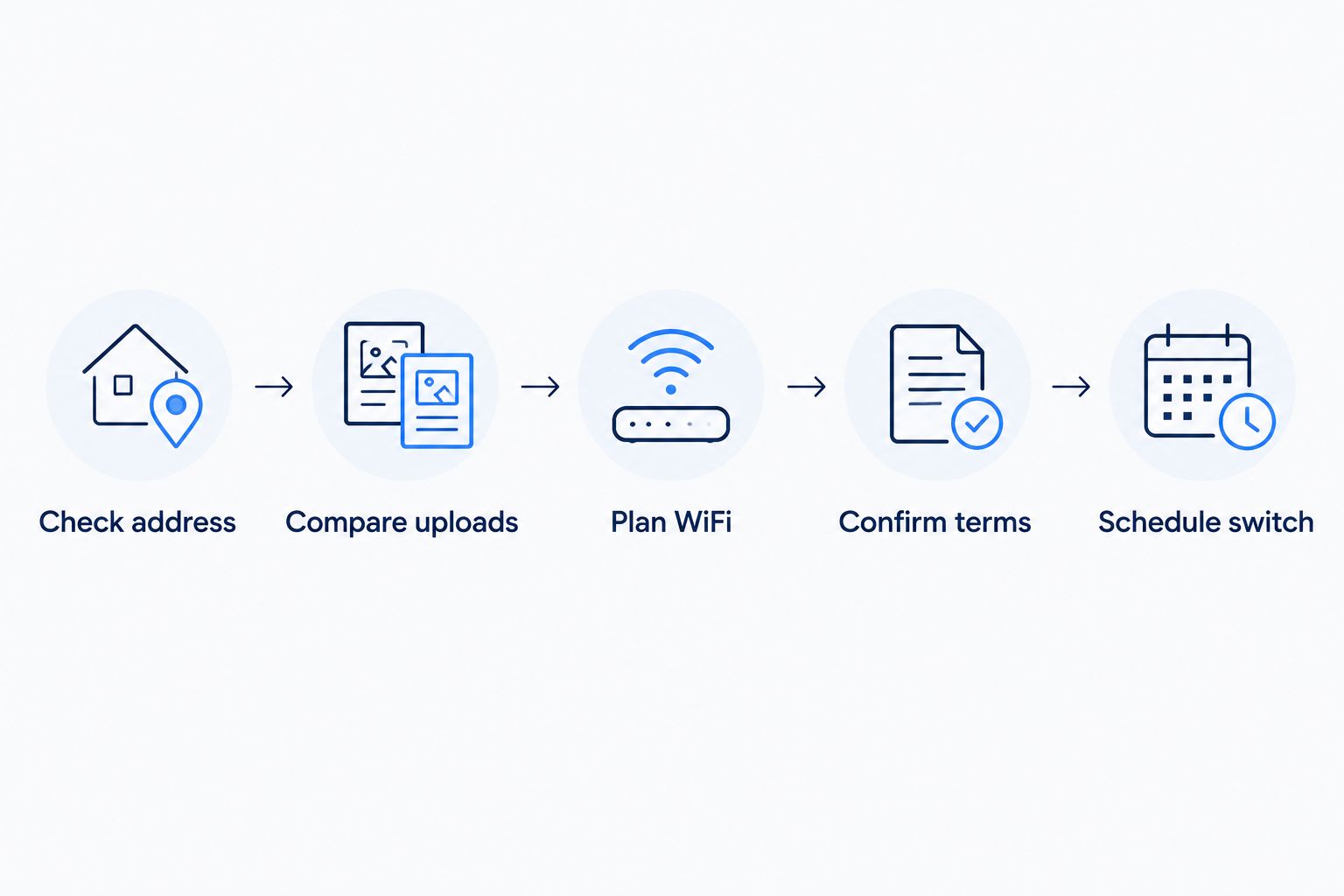
Check address
Start with the full service address and unit number. Ask whether the provider can connect that property and whether an installation assessment is required. The guide to checking fiber internet at your address explains the distinction between broad service areas and a property-level check.
If you rent, ask the property manager about permission for installation and equipment placement. Resolve that before arranging work.
Compare uploads
List what leaves your home: video calls, work files, camera footage, and cloud backups. Download speed tells only part of the story. Ask for the upload details and compare them with the tasks that fail or slow down today.
Plan WiFi
Mark the rooms where the connection matters. A home office behind several walls needs a coverage plan, not an assumption that a faster internet tier reaches farther. Ask about router placement and additional access points.
Confirm terms
Read the service agreement and equipment responsibilities. Check what happens when you cancel, which devices must be returned, and whether installation involves changes to the property. Get important answers in writing.
Schedule switch
Coordinate the new connection before ending the old one. Once the new service is working, check the household's normal activities and follow the previous provider's cancellation process. Keep any equipment-return confirmation.
This 2026 switching sequence protects the part that matters most: having a working connection when you need it. A signup confirmation is not the same as a completed installation.
Match the connection to your household
For a household with children streaming while a parent works, compare concurrent use rather than counting devices alone. A sleeping tablet and an active video call place different demands on the connection. Include uploads in that assessment.
For a home office, check performance where your desk actually sits. Compare an Ethernet connection with WiFi when practical. If Ethernet works well and WiFi does not, focus first on the indoor network.
For a household seeking several services, Sumofiber's internet, managed WiFi, TV, home phone, and mobile offerings provide a starting point for questions. Confirm the individual service details rather than assuming that everything is included together.
For a home-based business, ask whether residential or business service fits your requirements. Do not assume that a residential plan includes a service guarantee, a static IP address, or business-specific support arrangements.
How these options are ranked
The order follows the shopping criteria: address fit, upload needs, indoor coverage, service responsibilities, and switching terms. It starts with a named Utah fiber provider, then moves through wired and nonwired alternatives with distinct use cases.
This is a decision order, not a measured speed or reliability leaderboard. Apply it to the services confirmed for your property and the tasks your household needs to complete.
Which internet option should you choose?
Start with an address-confirmed fiber option, then compare it with the wired service already connected to your home. Keep cable in consideration if it meets your needs. Investigate fixed wireless when a wired connection does not fit, and satellite when terrestrial options fall short.
For internet providers in Providence Utah, the strongest 2026 choice is the one that fits both the property and daily use. Check uploads, plan WiFi coverage, and understand the terms before making the switch.
Check your next internet option
Ask about your address, internet service, and managed WiFi needs.
FAQ
What's the best way to choose internet providers in Providence Utah?
Start with providers that confirm service at your exact address, then compare upload performance, WiFi coverage, equipment, and terms. A citywide provider list does not establish that a specific home can be connected.
Does Sumofiber offer internet in Utah?
Sumofiber offers residential and business fiber internet in Utah. Confirm your exact Providence address and the relevant service details before arranging installation.
Is fiber internet always better than cable for my home?
The better choice depends on the specific services and your household's requirements. Compare uploads, normal performance, equipment, and terms rather than choosing on the technology name alone.
Will a faster internet plan fix weak WiFi upstairs?
A faster internet plan does not fix weak wireless coverage by itself. Router placement, walls, device capabilities, and access-point placement affect the connection inside your home.
Is fixed wireless the same as satellite internet?
Fixed wireless and satellite internet use different connection paths. Fixed wireless connects to a terrestrial wireless network; satellite service connects through satellites and requires a suitable sky view.
Can I install fiber internet in a rented home?
Fiber installation in a rented home depends on the property's connection options and the owner's installation requirements. Confirm the address with the provider and obtain any necessary permission before arranging work.
What should I compare besides download speed?
Compare upload performance, latency, indoor WiFi coverage, equipment responsibilities, and cancellation terms. Those details determine whether the service fits video calls, backups, streaming, and everyday use.
Should I cancel my old internet before the new connection works?
Keep the existing connection until the replacement is installed and working when practical. Then follow the old provider's cancellation and equipment-return process.
One last thing
A room-specific problem deserves a room-specific check. WiFi on 2.4 GHz generally reaches farther through obstacles than 5 GHz, while 5 GHz can offer greater throughput under suitable conditions. Neither band guarantees good coverage in every room.
Before changing providers, compare performance beside the router and at your usual work or streaming spot. If the problem follows the room rather than the household's activity, investigate coverage first. You want a working connection where you live—not just a good result beside the equipment.


