

Best starting point: Sumofiber for households comparing fiber internet with managed WiFi and other home services. Best alternative to compare: cable for an existing wired connection; best separate backup to investigate: fixed wireless. This 2026 guide to internet providers in Syracuse Utah ranks service choices by what you need at home, not by an advertised speed alone.
- Sumofiber is a starting point for internet providers in Syracuse Utah when you want fiber internet and managed WiFi.
- Compare fiber, cable, fixed wireless, and satellite by upload performance, equipment needs, and household use.
- Choose your home connection separately from your backup connection; they solve different problems.
- Check the service details for your exact address before choosing a provider or arranging a switch.
Why this matters
Your household does not use the internet one device at a time. Someone joins a video call while someone else streams a show, uploads photos, or downloads a game. The right connection needs to support that overlap.
But an internet connection and home WiFi are different things. A faster plan does not fix a router tucked behind a television or a weak signal in an upstairs office. Choose the connection first, then decide how you will get it into the rooms where you actually use it.
The same distinction matters when comparing providers. A company selling fiber, a cable provider, and a wireless service are not necessarily solving your problem in the same way. Start with your household's needs rather than a citywide winner.
What makes the best internet provider in Syracuse?
Use these criteria for your 2026 shortlist before comparing plan names:
- Connection type: Identify whether the connection reaching your home is fiber, cable, fixed wireless, or satellite. WiFi describes the connection inside your home, not the line serving it.
- Upload performance: Compare sending as well as receiving. Video calls, cloud backups, and large work files need upload capacity.
- Busy-hour experience: Ask how the service handles household use when several people are online together. A headline download speed is not a complete answer.
- Home coverage: Decide whether you want to manage your own router or discuss managed WiFi. Include the office, basement, and other rooms that matter.
- Service fit: Consider whether you need internet alone or also TV, home phone, mobile service, or a business connection.
- Switching details: Review equipment responsibilities, installation requirements, cancellation terms, and support arrangements before agreeing to a change.
The best provider is the one that matches your connection needs and your home setup. Do not let an impressive speed label replace those questions.
Internet options at a glance
This is a service-fit ranking, not a claim that every connection type serves every Syracuse address. The named provider and the alternative connection types occupy different decision slots.
| Ranked option | Best for | Standout feature | Key limitation |
|---|---|---|---|
| Sumofiber | Comparing fiber with managed WiFi and other home services | Offers residential and business internet, managed WiFi, TV, home phone, and mobile services | You still need to match the service and equipment to your household |
| Another fiber provider | Comparing an internet-only fiber connection | Fiber is the physical connection to the premises | Fiber alone does not establish support quality or WiFi coverage |
| Cable internet | Evaluating an existing wired connection | A wired alternative to fiber | Upload and download rates need separate comparison |
| Fixed wireless internet | Investigating a separate backup connection | Uses a radio connection rather than a wired last-mile connection | Signal conditions and network load affect performance |
| Satellite internet | Considering a connection where terrestrial choices do not fit | Connects through satellites rather than a local wired line | Sky visibility and latency require attention |
1. Sumofiber: best starting point for a multi-service fiber household
Sumofiber offers fiber internet for homes and businesses, along with managed WiFi, TV, home phone, and mobile services. That makes the service mix relevant when you want to discuss more than the internet connection itself.
Sumofiber is a useful starting point for fiber internet households that also want to discuss managed WiFi and other home services. Treat that as a service-fit recommendation, not a guarantee about a particular plan or property.
Ask about your actual routine. Explain where you work, which rooms need WiFi, and whether you want to keep other services separate. Those details are more useful than simply asking for the fastest connection.
Provider pros:
- Fiber internet is part of the stated service offering.
- Managed WiFi is an option to discuss alongside internet.
- TV, home phone, and mobile services broaden the comparison.
- Residential and business services support different buying needs.
Provider cons:
- A broader service menu adds decisions if you only want internet.
- A fiber connection does not eliminate the need to plan indoor WiFi coverage.
- Service categories alone do not tell you which equipment or plan fits your home.
Best for: A household comparing fiber internet and help with its home network, with other services considered separately.
Verdict: Hold until the proposed connection and WiFi setup match your household.
2. Another fiber provider: best for an internet-only comparison
Another fiber provider is the right comparison when you want to focus on the connection rather than a wider service suite. Compare the actual plan details, not just the word fiber.
Fiber carries data using light through optical fiber. That describes the connection technology; it does not establish identical upload speeds, equipment, support, or terms across providers.
Keep your comparison narrow. Ask each provider the same questions about download rate, upload rate, router responsibilities, and the installation process. Then compare the answers side by side.
Alternative fiber pros:
- Gives you a like-for-like technology comparison.
- Keeps attention on the connection if you do not need other services.
- Supports a clear discussion of wired performance separately from WiFi.
Alternative fiber cons:
- Providers using fiber can still have different service terms.
- Buying fiber does not automatically fix weak coverage inside the home.
Best for: A household that wants fiber internet alone and prefers to choose its own home-network approach.
Verdict: Hold until you have compared the complete service details.
3. Cable internet: best for evaluating your existing wired connection
Cable internet deserves a comparison when your household already uses it. Identify what is failing before assuming you need a different connection technology.
A weak signal in a bedroom points to a different problem from slow uploads on a computer connected directly to the router. Cable plans can have different upload and download rates, so inspect both instead of treating the download figure as the whole service.
Cable pros:
- Provides a wired alternative to fiber.
- Lets you compare a potential switch against your current experience.
- Separates an indoor WiFi problem from a connection problem.
Cable cons:
- Upload performance needs its own review.
- Shared-network congestion can affect the experience.
- A different cable plan does not necessarily fix router placement.
Best for: A household deciding whether its current wired service needs replacement or its home network needs attention.
Verdict: Hold if the connection works well; investigate before switching.
4. Fixed wireless: best for investigating a separate backup
Fixed wireless internet reaches a receiver using a radio connection. Depending on the service, that connection uses cellular infrastructure or another terrestrial wireless network.
Its most distinct role in this shortlist is backup. A separate connection method gives you a different path to investigate when keeping a work call or business task online matters. It is not proof that two services have completely independent infrastructure.
Fixed wireless pros:
- Uses a different last-mile connection method from wired internet.
- Offers a separate route to investigate for backup.
- Makes signal testing a clear part of the buying decision.
Fixed wireless cons:
- Building materials and receiver position affect signal reception.
- Network load affects performance.
- Automatic switching between connections requires suitable equipment and setup.
Best for: A household or home office investigating a secondary connection rather than assuming another wired plan supplies backup.
Verdict: Hold until signal testing and backup setup are complete.
5. Satellite internet: best for considering a non-terrestrial connection
Satellite internet sends data through satellites rather than relying on a local wired connection to the property. It belongs in a different decision slot from a routine fiber-versus-cable comparison.
Examine the installation location and your applications. Satellite systems differ, including in latency, so do not apply one system's performance claims to every satellite service.
Satellite pros:
- Provides a connection method separate from local terrestrial lines.
- Gives you another category to investigate when wired choices do not fit.
- Makes equipment placement an explicit part of the decision.
Satellite cons:
- Obstructions can interfere with the required view of the sky.
- Latency depends on the satellite system.
- Outdoor equipment adds installation considerations.
Best for: A property evaluating a non-terrestrial connection rather than a household choosing between suitable wired services.
Verdict: Wait until you have assessed the installation site and application needs.
How to compare the options without getting lost in specs
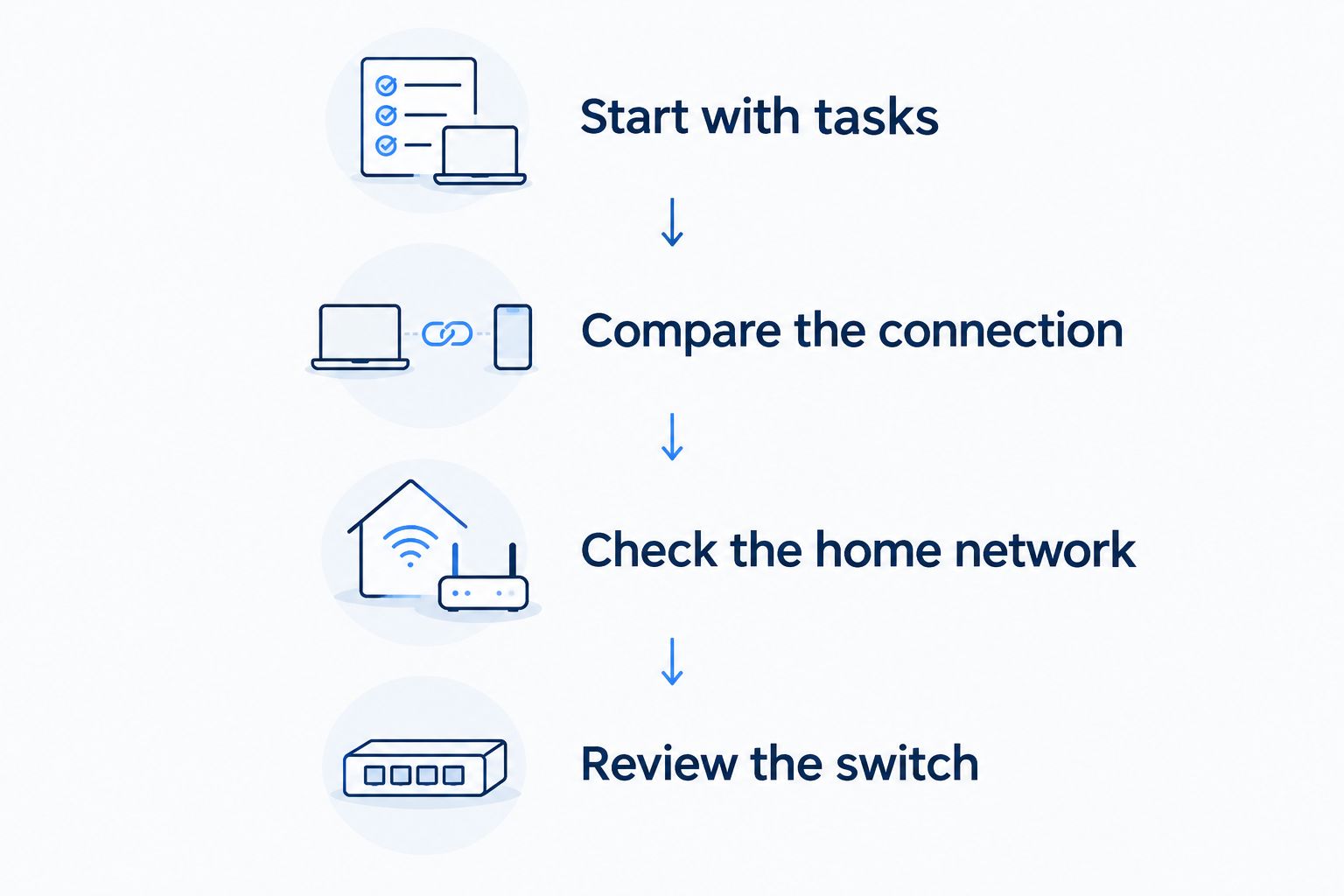
Use this sequence for your 2026 decision. It keeps the provider comparison separate from the WiFi troubleshooting that often gets mixed into it.
Start with tasks
List what happens at the same time: video calls, streaming, gaming, file uploads, and backups. Note where those activities happen. A quiet living room and a busy upstairs office need different attention.
Compare the connection
Record download and upload rates separately. Then ask about latency-sensitive uses such as gaming and video calls. Capacity and responsiveness are related to your experience, but they are not interchangeable measurements.
Check the home network
Compare a wired device with a WiFi device before blaming the incoming connection. If the wired connection works well but a distant room struggles, investigate router placement and wireless coverage.
Review the switch
Confirm the installation process, equipment responsibilities, and cancellation steps. Keep the existing connection until the replacement is installed and working for your actual tasks.
What the speed numbers actually tell you
A speed label describes capacity, not a promise that every device gets that rate in every room. In 2026, the useful question remains the same: does your setup handle your household's work when it overlaps?
- 1 Gbps equals 1,000 Mbps. These are two ways to express the same data rate, not two different performance measures.
- 1 byte contains 8 bits. Internet plans usually describe bits per second, while file transfers often display bytes per second.
- 100 Mbps equals 12.5 MB/s before overhead. A file-transfer display and a plan's speed label can look different without contradicting each other.
Do not turn those conversions into a reason to buy the largest plan. Compare your tasks, upload requirements, and wired performance first. Also distinguish Mbps from MB/s when checking a download: the capitalization changes the unit.
A speed test measures the path between your device and a test server. Router limits, WiFi conditions, other household traffic, and the server path all influence that result. One measurement cannot explain every problem.
How we ranked these internet choices
The 2026 ranking follows service fit: a fiber provider with several stated service categories first, an internet-only fiber comparison second, an existing wired alternative third, then separate wireless and satellite use cases.
It does not rank providers by measured Syracuse performance. The criteria are connection type, uploads, home coverage, service scope, and switching requirements. Use the order to build your shortlist, not to replace an address-specific service comparison.
Which internet option should you choose?
Start with Sumofiber when fiber internet, managed WiFi, and other home services belong in the same conversation. Compare an internet-only fiber provider when you want a narrower service arrangement.
Keep a working cable connection in the comparison rather than switching because of a technology label. Investigate fixed wireless separately if backup is the goal. Consider satellite on its own installation and performance requirements.
For an undecided Syracuse household in 2026, the next move is simple: write down your simultaneous tasks and problem rooms, then request a service proposal that addresses both.
FAQ
What's the best starting point for internet providers in Syracuse Utah?
Sumofiber is a useful starting point when you want to compare fiber internet with managed WiFi and other home services. Match the proposed service to your exact address, household tasks, and equipment needs before deciding.
Is fiber internet always better than cable?
Fiber is not an automatic verdict on the complete service. Compare upload and download rates, equipment, support arrangements, and your current connection experience rather than choosing from the technology label alone.
Do I need gigabit internet for a family?
A family does not need gigabit internet simply because several people live in the home. Compare simultaneous activities and upload needs, and check whether the actual problem is WiFi coverage rather than incoming capacity.
Will switching providers fix a slow upstairs bedroom?
Switching providers does not necessarily fix weak upstairs WiFi. Compare wired performance with wireless performance, then check router placement and coverage in that room.
Is fixed wireless a good backup for home internet?
Fixed wireless is a connection type to investigate for backup because it uses a radio link instead of a wired last-mile connection. Test reception and confirm how your equipment switches between connections before relying on it.
Should I choose satellite instead of fiber in Syracuse?
Compare satellite when you need a non-terrestrial connection, not simply because it is another internet category. Review sky visibility, installation requirements, and the specific satellite system's latency alongside your household needs.
What should I check before switching internet providers in 2026?
Check the installation process, equipment responsibilities, service terms, and your household's upload and download needs. Keep your existing connection until the replacement works for the tasks you depend on.
One last thing
The room where your internet fails tells you where to start. Trouble on every device, including a wired computer, calls for connection troubleshooting. Trouble in one distant room calls for a closer look at WiFi.
Make that distinction before choosing a provider. It can keep you from replacing the wrong part of your setup.


