

Best starting point for a restaurant seeking internet and managed WiFi together: SumoFiber. Best for guest-access controls: Comcast Business WiFi Pro. Best for a larger deployment: Spectrum Enterprise Managed WiFi. This 2026 guide compares those options by restaurant use case, with practical checks before you choose.
- SumoFiber is a starting point for managed WiFi for restaurants seeking business internet and WiFi from one provider.
- Comcast Business WiFi Pro fits restaurants focused on guest WiFi access and controls.
- Spectrum Enterprise Managed WiFi belongs on the shortlist for larger restaurant network deployments.
- Choose restaurant WiFi around coverage, network separation, and support responsibility—not the internet speed alone.
Why this matters
A restaurant has different jobs happening on the same connection. Guests browse menus, servers carry ordering tablets, and the office handles schedules and invoices. Those activities need different access rules, even when they share an internet connection.
Managed WiFi is an operating responsibility, not just a router. Your provider's written scope should explain who configures the wireless network, maintains it, investigates faults, and replaces failed equipment. A remote dashboard alone does not settle those questions.
For your 2026 shortlist, start with the problem you need someone else to own. Weak patio coverage needs a different response from an internet outage, and neither is fixed by changing the guest password.
What makes the best managed WiFi for restaurants?
Use these criteria before comparing provider names. They turn a broad service description into questions you can put in a proposal.
- Coverage design: Require a plan for the dining room, host stand, kitchen work areas, office, and any patio where devices need service. A router near the register is not a coverage plan.
- Network separation: Ask how guest devices are isolated from business equipment. Separate network names do not, by themselves, demonstrate that access between devices is blocked.
- Support ownership: Identify who troubleshoots the internet connection, router, access points, cabling, and payment-device connectivity. Define the handoff when another vendor is involved.
- Maintenance scope: Establish who handles configuration changes, firmware updates, equipment replacement, and access when a manager leaves.
- Guest controls: Decide whether you need a welcome page, access schedules, usage controls, or simply a separate guest connection. Do not buy features without an operating purpose.
- Acceptance testing: Require checks where employees actually work, using their actual devices. A successful speed test beside an access point does not prove dining-room coverage.
Treat these as your 2026 buying checklist. For a plain-language explanation of service responsibilities, read how managed WiFi works for a business.
Restaurant managed WiFi providers at a glance
These are use-case rankings, not measured speed or uptime rankings. Each option belongs on the shortlist for a different reason.
| Rank and option | Best for | Standout focus | Key limitation |
|---|---|---|---|
| 1. SumoFiber | Restaurants seeking internet and WiFi from one provider | Business internet and managed WiFi within the same service portfolio | Restaurant-specific design and management responsibilities need a written scope |
| 2. Comcast Business WiFi Pro | Restaurants prioritizing guest-access controls | Guest WiFi management and access controls | Guest-access features do not establish support for every business device |
| 3. Spectrum Enterprise Managed WiFi | Larger restaurant deployments | Managed wireless service suited to a broader network project | The project scope must distinguish wireless management from application support |
Do not compare these options by the number of features in a brochure. Compare what each proposal assigns to the provider and what remains your responsibility.
1. SumoFiber: best for internet and WiFi together
SumoFiber offers business internet and managed WiFi, alongside phone, TV, and mobile services. That makes it a starting point when you want to discuss the restaurant's connection and wireless network with the same provider rather than treating them as unrelated purchases.
SumoFiber is best for restaurants seeking business internet and managed WiFi from one provider. Use that fit as the opening question, then make the proposed responsibilities specific to your building and equipment.
Pros:
- Business internet and managed WiFi are both part of the stated service offering.
- Phone, TV, and mobile services can enter the same planning conversation where relevant.
- The provider serves households and businesses across Utah, Idaho, Montana, Colorado, California, Wisconsin, Illinois, and New York.
Cons:
- A combined service offering does not establish which restaurant devices the provider will troubleshoot.
- State-level service coverage does not replace an address-specific review and a building-specific wireless design.
Best for: A restaurant owner who wants to reduce coordination between separate internet and WiFi vendors.
Before you proceed, bring a floor plan and a device list. Ask the provider to mark proposed access-point locations, identify who supplies the cabling, and explain where its support responsibility ends. Include the patio and back office rather than limiting the conversation to the dining room.
Verdict: Buy only after the proposal defines coverage, management, and support ownership.
2. Comcast Business WiFi Pro: best for guest-access controls
Comcast Business WiFi Pro provides business WiFi with guest-access management features. It belongs on your shortlist when the customer-facing network is a central concern, rather than an incidental extra.
Think about what guests should experience. A restaurant that wants controlled guest access has different requirements from one that simply wants customers to connect without asking a server for help.
Comcast Business WiFi Pro pros:
- Guest WiFi management is part of the product's purpose.
- Access controls give you specific functions to evaluate during a demonstration.
- The service provides a business-focused alternative to relying on a personally managed home router.
Comcast Business WiFi Pro cons:
- A guest welcome page adds a connection step for customers.
- Guest WiFi controls do not establish compatibility with your payment terminals, ordering tablets, or other business equipment.
Best for: Restaurants that want guest-access management to be a primary selection criterion.
Ask for a demonstration from a customer's perspective, using a phone that has not joined the network before. Then have staff demonstrate their own workflow separately. A polished guest experience is not evidence that a handheld ordering device works reliably near the kitchen doors.
Verdict: Buy for a defined guest-access need, not as a substitute for a complete restaurant network assessment.
3. Spectrum Enterprise Managed WiFi: best for larger deployments
Spectrum Enterprise Managed WiFi is a managed wireless option for organizations planning a broader network deployment. Put it on the shortlist when your restaurant project involves multiple coverage areas, a larger property, or coordination across locations.
The deciding question is responsibility. Your proposal should make clear who designs the wireless network, who manages changes, and how local staff report a problem without having to diagnose it first.
Spectrum Enterprise Managed WiFi pros:
- Managed wireless service is an explicit part of the offering.
- The enterprise-service context fits a formal network design and operating-scope discussion.
- It gives larger operators a provider to evaluate against location-by-location requirements.
Spectrum Enterprise Managed WiFi cons:
- A broader deployment needs more coordination around installation, access, and changes.
- Managing wireless infrastructure does not automatically include supporting restaurant applications or payment systems.
Best for: Restaurant operators treating WiFi as a larger network project rather than a standalone router replacement.
Ask for a sample responsibility document before committing to the rollout. Each restaurant manager should know how to report an incident, while the central team should know who approves network changes. Avoid a setup in which every location invents its own process.
Verdict: Buy when the deployment needs justify a formal managed-network project.
Separate guest, staff, and payment access
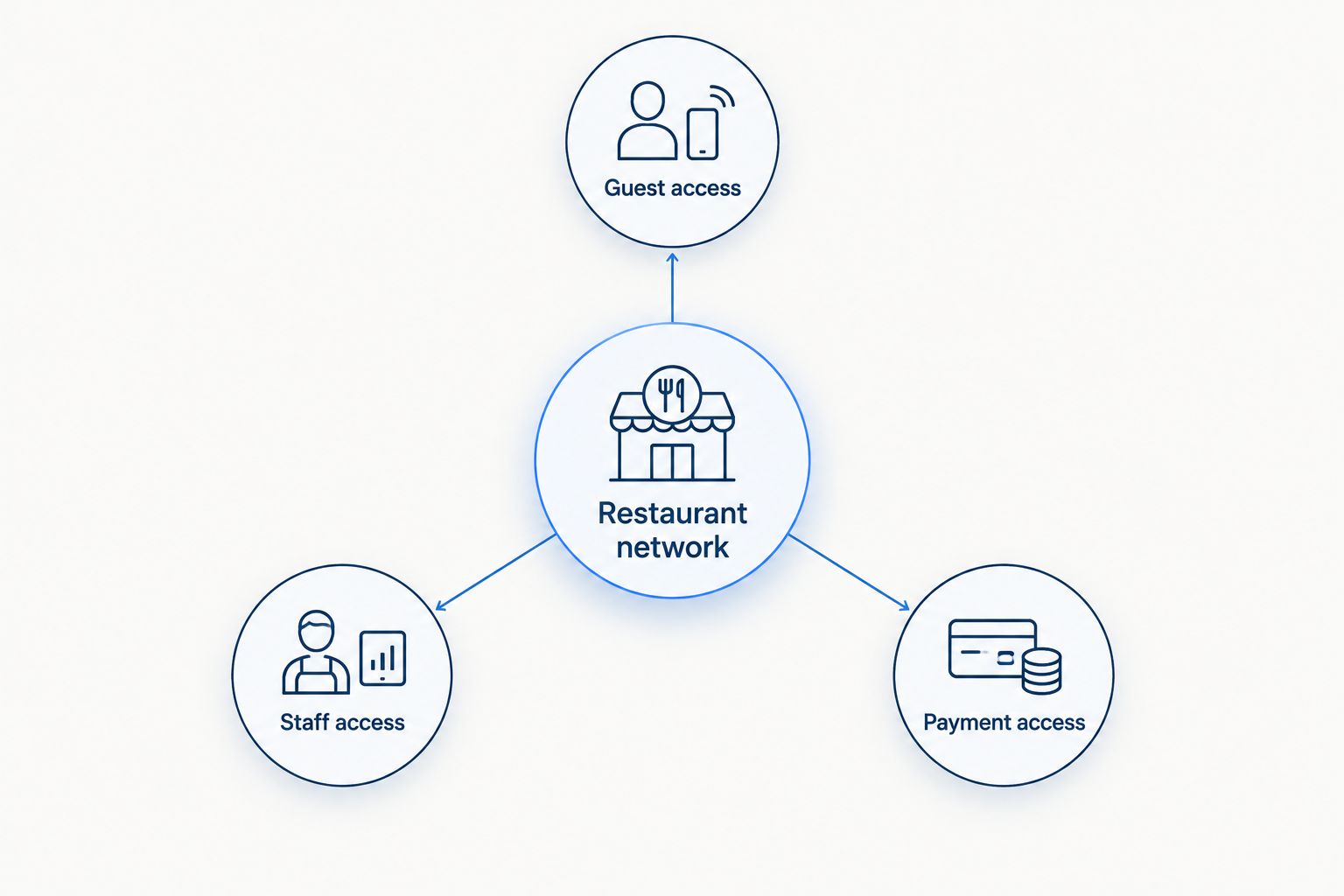
Your restaurant's wireless design should distinguish Guest access, Staff access, and Payment access. These are recommended access categories, not a claim that every provider includes a particular configuration.
- Guest access: Give diners an internet connection without granting access to business devices.
- Staff access: Assign employee devices the access they need for their work, with a process for removing access when roles change.
- Payment access: Follow your payment vendor's requirements and have the network provider explain how the design supports them.
A different WiFi name is not enough evidence of separation. Ask the installer to demonstrate the intended restrictions and document who can change them. Network segmentation also does not, by itself, establish payment-security compliance.
Keep credentials and administrative access under business control. The restaurant should have a documented recovery process if the employee who originally handled the network leaves.
Give every provider the same restaurant brief
A useful brief describes work, not just square footage. Tell each provider where servers enter orders, where customers wait, where delivery orders arrive, and which equipment uses wired connections.
Include these items:
- Floor plan: Mark counters, kitchen walls, storage rooms, office space, and outdoor seating.
- Device inventory: List payment terminals, handhelds, printers, cameras, office computers, and guest access needs.
- Operating requirements: Explain opening hours, busy periods, and acceptable installation windows.
- Vendor responsibilities: Identify the payment, ordering, and other application vendors involved.
- Failure procedure: Describe what staff should do when WiFi works but an application does not, or when the whole connection fails.
For a 2026 proposal, insist on an explicit maintenance section. It should address updates, configuration backups, failed equipment, and approval for changes—not just installation day.
Ask each bidder to return the same responsibility list. That makes differences visible without assuming that similarly named packages deliver the same service.
Test the network before you sign off
Use the following as a proposed acceptance exercise, not a provider performance claim. Schedule a 15-minute walkthrough with 2 staff devices and test at least 3 work areas: the host stand, a far dining table, and a kitchen-side service station.
Start with the wired connection
Have the installer establish whether the internet connection works independently of WiFi. This creates a starting point for troubleshooting and helps avoid replacing wireless equipment to solve an unrelated connection problem.
Walk the actual service route
Carry the devices along the path servers use. Check the normal ordering workflow at each work area, with your application vendor's approved test procedure. Add outdoor seating if staff use devices there.
Check guest restrictions
Join the guest network and have the installer demonstrate that the intended business-device restrictions work. Record the result, rather than accepting a separate network name as proof.
Practice the support handoff
Give a manager a realistic scenario: the handheld connects to WiFi but cannot submit an order. Ask the provider to explain what staff report, who investigates first, and when another vendor joins the investigation.
How these providers were ranked
The ranking follows the criteria above: service ownership, guest access, deployment needs, network separation, and acceptance testing. It does not claim hands-on testing, measured reliability differences, or a universal winner.
For this 2026 guide, the first option fits combined internet-and-WiFi purchasing, the second fits guest-access management, and the third fits a broader deployment. Your written proposal should determine the final choice.
Which managed WiFi provider should you choose?
Start with SumoFiber if your priority is discussing business internet and managed WiFi with one provider. Choose Comcast Business WiFi Pro for a guest-controls-led evaluation, or Spectrum Enterprise Managed WiFi for a larger network project.
Do not move ahead until the provider can explain the dining-room design, business-device separation, and support handoff in plain language. If those answers remain vague, wait. A named service package is not an operating plan.
Discuss your restaurant's WiFi needs
Bring your floor plan, device list, and support questions to the conversation.
FAQ
What's the best managed WiFi for restaurants in 2026?
The best fit depends on who needs to manage the connection, wireless coverage, and guest access. Start with SumoFiber for combined business internet and managed WiFi, Comcast Business WiFi Pro for guest-access controls, or Spectrum Enterprise Managed WiFi for a larger deployment.
Is managed WiFi the same as business internet?
No. Business internet connects your restaurant to the internet, while managed WiFi concerns the wireless network inside your premises. The written service scope determines which installation, maintenance, and support tasks are included.
Should restaurant guest WiFi be separate from payment devices?
Yes, guest devices should be isolated from business and payment equipment. Ask the network provider to demonstrate the restrictions and coordinate the design with your payment vendor's requirements.
Will faster internet fix restaurant WiFi dead spots?
A faster internet connection does not fix weak wireless coverage by itself. Access-point placement, building materials, cabling, and device behavior need separate investigation.
How many access points does a restaurant need?
The access-point count should come from the restaurant's layout and wireless requirements. Ask for a design that covers work areas and outdoor seating, followed by testing with the devices staff actually use.
Does managed WiFi keep payments working during an internet outage?
Managed WiFi alone does not establish an internet backup path or offline payment capability. Discuss backup connectivity with the network provider and approved outage procedures with your payment vendor.
What should a restaurant ask before choosing a managed WiFi provider?
Ask who owns coverage design, guest isolation, updates, equipment replacement, and troubleshooting. Require written responsibilities for the internet connection, wireless equipment, cabling, and application-vendor handoffs.
One last thing
The most useful handover document is often a responsibility map, not a speed-test screenshot. Before closing your 2026 installation, write down who handles the internet connection, access points, cabling, payment terminals, and ordering software. Then make sure the manager on duty can find it.


