

Yes, you can bundle managed WiFi with hosted PBX when a provider offers both services and supports your business’s setup. The catch is that a bundle does not automatically include compatible phones, number transfers, backup connectivity, or responsibility for every network problem. Get those details in writing before you move your business number.
- You can bundle managed WiFi with hosted PBX, but confirm equipment, support responsibilities, and number transfers separately.
- SumoFiber offers business internet and managed WiFi; confirm the proposed phone service matches your hosted PBX requirements.
- Wired desk phones do not need WiFi, but they still depend on a working network and internet connection.
- Choose a bundle for coordinated support, not an assumed discount or a promise that calls cannot fail.
Can I bundle managed WiFi with a hosted PBX phone system?
Yes. Treat the bundle as a coordinated service arrangement, not proof that every component is included. Hosted PBX handles business calling through an internet connection. Managed WiFi covers the wireless network within the provider’s agreed scope.
Use this sequence when reviewing a 2026 proposal:
- Define the WiFi scope. Ask who installs, configures, monitors, and updates the access points. Start with how managed WiFi works for a business if you need to separate wireless management from internet service.
- Define the phone scope. List the business numbers, extensions, desk phones, mobile applications, and call-routing features you need. Ask the provider to confirm support for each requirement.
- Name the support owner. Establish who investigates a call problem involving the phone service, router, switch, or wireless network.
- Agree on the transition. Document equipment installation, number-transfer coordination, testing, and the point at which you can cancel the old service.
The useful question is not simply whether the services appear on one bill. It is whether the arrangement gives you a clear path to fixing a failed call.
Why this matters
Imagine a customer calls while your staff takes payments and guests use the WiFi. A broken conversation can start with the handset, wireless coverage, local network congestion, internet connection, or phone platform. A faster internet package alone does not identify which part is responsible.
Bundling creates an opportunity to coordinate those pieces. It does not remove the need to test them. Your 2026 buying decision should name the team responsible for troubleshooting across the agreed service boundaries.
Keep the distinction between network access and calling features clear. Better wireless coverage will not fix an incorrectly configured ring group, and a new phone menu will not fix a weak signal in the back office.
Bundled services versus separate providers
Both arrangements can support business calling. The trade-off is how much coordination you want to handle and how much freedom you need to choose individual services.
| Arrangement | Best for | Main benefit | Main limitation | What to confirm |
|---|---|---|---|---|
| Managed WiFi and hosted PBX from one provider | Businesses seeking coordinated network and phone support | A shared provider can organize troubleshooting across the services it manages | A shared bill does not prove every component has the same support coverage | Responsibility for routers, switches, access points, phones, and the internet connection |
| Managed WiFi and hosted PBX from separate providers | Businesses keeping a phone platform that meets their needs | You can select the network and phone services independently | You must coordinate issues that cross provider boundaries | Which provider gathers evidence and who owns escalation |
Choose the bundle when the written support scope reduces work for your staff. Keep separate providers when a required phone feature or existing setup makes that arrangement a better fit.
Do not assume either arrangement includes backup internet, equipment replacement, or a service-level agreement. Ask for the applicable terms rather than treating the word bundle as a guarantee.
Do the phones actually need WiFi?
Hosted PBX does not require every phone to connect wirelessly. A wired desk phone can use Ethernet, while a supported wireless handset or calling application can use WiFi. Compatibility depends on the phone system, device, and network configuration.
| Connection | Best for | Main benefit | Main limitation |
|---|---|---|---|
| Ethernet desk phone | Reception desks and fixed workstations | Removes the wireless link from the phone’s connection path | Requires suitable cabling and a supported power arrangement |
| WiFi phone or calling application | Staff who move around the premises | Supports calling away from a fixed desk where wireless coverage is suitable | Depends on device compatibility, coverage, interference, and movement between access points |
For a fixed reception desk, ask whether Ethernet is practical before buying wireless equipment. For moving staff, test the actual walking route rather than checking the signal beside the router.
Wireless devices also need compatible frequency bands. WiFi equipment can use 2.4 GHz, 5 GHz, and, on supported equipment, 6 GHz bands; a handset does not necessarily support every band your access points offer. Confirm compatibility before replacing phones or changing wireless settings.
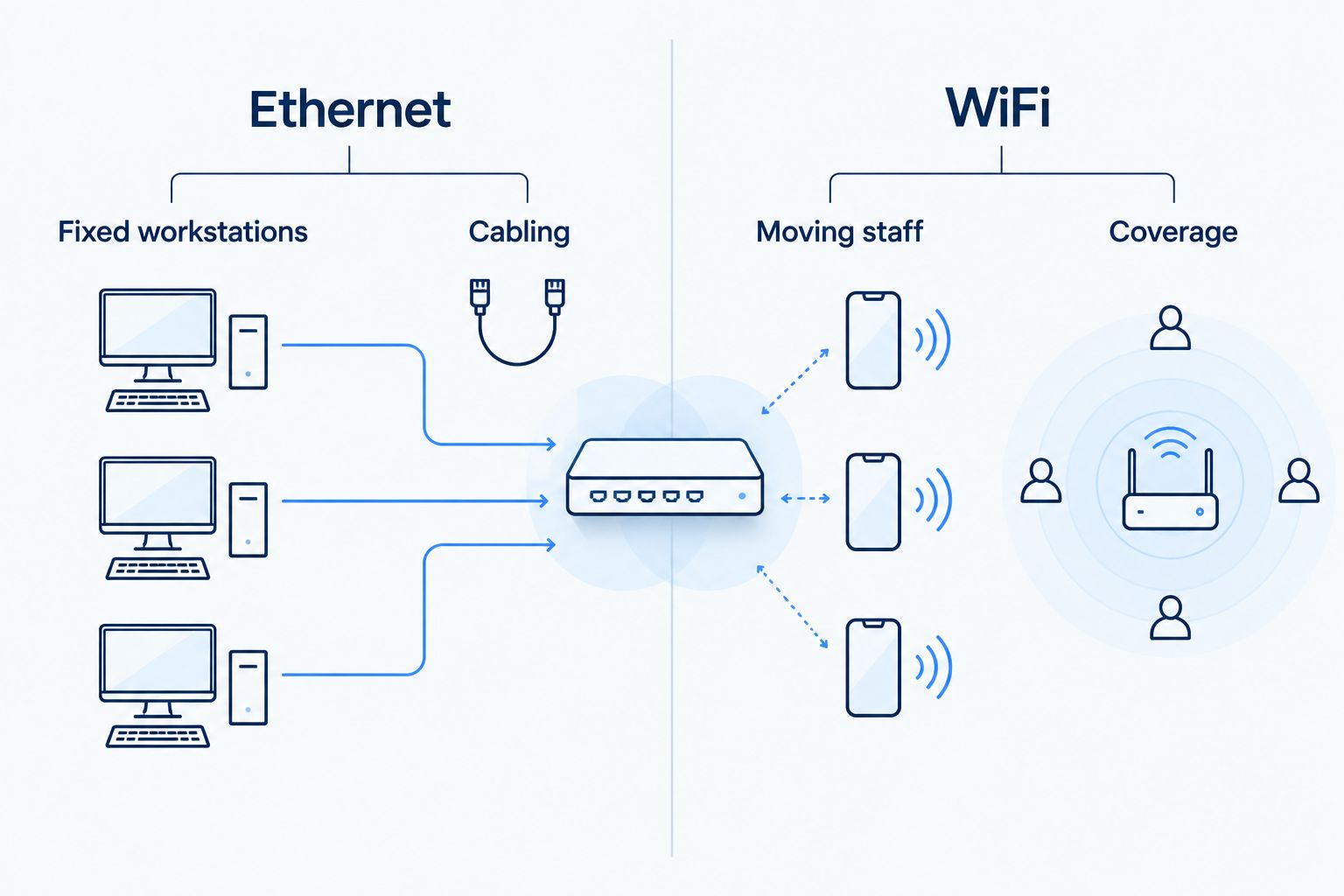
The connection choice is separate from the billing arrangement. You can bundle services and still connect desk phones by cable.
Why the right bundle varies
The right arrangement depends on what your staff does and what the provider agrees to manage. Use these factors to compare proposals without relying on a headline speed:
- Device connections. Wired desk phones, wireless handsets, and calling applications need different installation and support checks.
- Building layout. Walls, room placement, and access-point locations affect wireless coverage. Test the places where staff actually answer calls.
- Shared traffic. Guest access, uploads, video meetings, and business applications share network resources. Ask how the proposed network handles competing traffic.
- Calling requirements. Business hours, ring groups, transfers, voicemail, and remote answering need explicit configuration and testing.
- Support boundaries. Equipment outside the provider’s management scope can leave your staff coordinating a repair.
- Continuity needs. Power loss and internet outages require their own response plan. A bundle is not a substitute for one.
For a 2026 proposal, turn each relevant factor into a written requirement. Replace broad language such as business-ready with a specific responsibility or acceptance test.
What should I ask a provider to include?
Ask for a service description that separates the internet connection, local network, and phone platform. You should be able to see what is included without guessing from a package name.
Equipment and administration
List who supplies and manages the router, switches, access points, and phones. Ask whether you retain access to the settings you need and how staff request changes after installation.
Confirm support for existing equipment before planning to reuse it. A working handset on your current service is not proof that another hosted PBX service will accept it.
Call handling and emergency calling
Write down what should happen when the main number rings, nobody answers, or the business closes. Include transfers and voicemail delivery if your staff relies on them.
Ask how emergency calling is configured, how location information is maintained, and what changes when someone uses a calling application away from the office. Follow the provider’s approved process for checking emergency-calling arrangements; do not make an unarranged emergency test call.
Support and service changes
Get the reporting process, escalation path, and covered equipment in writing. Ask who handles a problem when calls fail but web browsing still works.
Also ask what happens when you add staff, relocate a desk, replace a phone, or change business hours. Routine changes should have a named owner rather than becoming an office guessing game.
How should I test the bundle before switching?
Test business tasks, not just internet speed. A speed test does not verify that the main number reaches the right person or that a wireless call survives a walk to the stockroom.
Use this acceptance checklist for a 2026 installation:
- Incoming calls. Call the main number from an outside phone and check the greeting, destinations, and unanswered-call behavior.
- Outgoing calls. Confirm that staff can call out and that the displayed business number matches the agreed configuration.
- Call transfers. Transfer a live call between the people or departments that normally handle customers.
- Busy periods. Repeat normal calls while the network handles the business activity you expect during the working day.
- Wireless movement. If staff use WiFi calling devices, test the routes and rooms where those devices will be used.
- Recovery procedure. Have the provider explain and demonstrate the agreed response to a connection failure where practical.
Record the outcome and unresolved issues before you accept the installation. Keep the old phone service active until the number transfer and agreed call tests are complete.
Can I keep my business number when I bundle services?
You can request a number transfer, but confirm eligibility before scheduling the switch. The receiving provider needs accurate account information, and the transfer must be coordinated with the existing service.
Do not cancel the old service just because new equipment has arrived. Ask what confirms the transfer is complete, then test incoming and outgoing calls using the transferred number.
Will a bundle keep calls working during an outage?
A bundle alone does not keep calls working during a power or internet outage. On-site phones and network equipment need power, and internet-based calling needs a working connection path.
Ask whether the proposed service supports an alternate answering destination, backup connectivity, or both. These solve different problems: forwarding a call does not restore office WiFi, and backup internet does not power equipment during an electrical outage.
Is bundling better than keeping my current phone provider?
Bundling is better when coordinated support outweighs the value of keeping your current phone setup. It is not automatically better because the services share an invoice.
If the current system meets your needs, compare required features and support responsibilities before replacing it. Include staff retraining and equipment changes in that decision, even when the proposed network looks straightforward.
Where SumoFiber fits
SumoFiber offers business internet, managed WiFi, and phone services. SumoFiber is an option for businesses seeking fiber internet and managed WiFi from the same provider.
For a 2026 phone proposal, ask SumoFiber to confirm the specific hosted PBX service, supported devices, calling features, and support scope before treating those services as a complete bundle. The service categories alone do not establish handset compatibility, backup arrangements, or the terms of a business-phone installation.
FAQ
Can I bundle managed WiFi with hosted PBX for a small office?
Yes, you can bundle managed WiFi with hosted PBX when a provider offers both and supports your office setup. Confirm equipment, calling features, installation responsibilities, and ongoing support in writing.
Do hosted PBX desk phones have to use WiFi?
No, hosted PBX desk phones do not have to use WiFi. Supported desk phones can connect through Ethernet, while compatible wireless devices or calling applications can use WiFi.
Will managed WiFi fix choppy business calls?
Managed WiFi can address wireless coverage or configuration problems, but it does not fix every cause of choppy calls. The internet connection, handset, local network, and phone platform also need troubleshooting.
Can I keep my existing phones when I switch providers?
You can keep existing phones only when the receiving provider confirms compatibility and provisioning support. Have the provider check the exact models before you commit to reusing them.
Does bundling include backup internet?
Bundling does not establish that backup internet is included. Ask for the backup connection, supported services, and failover process to be specified separately.
Is one provider better than separate WiFi and phone providers?
One provider is a better fit when its agreed support scope reduces coordination for your staff. Separate providers remain an option when you need a particular phone platform or want to retain an existing system.
Should I cancel my old phone service before installation?
No, keep the old phone service active until the number transfer and agreed call tests are complete. Confirm the cancellation sequence with the receiving provider to avoid disrupting the transfer.
One last thing
Ask who handles a failed call when the internet still appears to work. That question reveals more about a bundle’s practical value than the number of services listed on the invoice.
Before signing, request a walkthrough of that exact support scenario. You want a clear first contact, an investigation path, and an owner for the next step.


