

Yes, you can run a home-based business on residential fiber internet when your provider permits that use and the connection meets your work requirements. In 2026, the deciding questions are not just speed: check the service terms, upload capacity, support commitments, and what you will do during an outage.
- Can I run a home based business on residential fiber internet? Yes, when your provider permits your business activities.
- Residential fiber suits cloud-based home offices; business internet deserves a closer look when outages stop customer service.
- Sumofiber offers residential and business fiber internet, giving home-business owners both service categories to discuss.
- Check upload performance, WiFi coverage, remote-access requirements, and outage plans before choosing a connection.
Can I run a home-based business on residential fiber internet?
Residential fiber can support everyday business work, but technical capability is not the same as permission under your service agreement. Email, browser-based accounting, online orders, file sharing, and video meetings do not automatically require a business-labeled connection. Your provider's terms and your operational needs decide the fit.
Start with the tasks you perform, not the largest speed advertised. The guide to internet speed for working from home explains the performance side of that decision.
| Connection option | Best for | Main advantage | Main limitation | What to confirm |
|---|---|---|---|---|
| Residential fiber | Home offices using permitted cloud-based applications | Can serve household and work needs on the same connection | The agreement might not include the business-use permission or support commitment you need | Permitted activities, upload speed, support terms, and remote-access restrictions |
| Business fiber | Home businesses needing specific service commitments or network features | Provides a service category in which to discuss business requirements | The business label alone does not establish a particular feature or guarantee | Written commitments, addressing options, support process, and installation requirements |
Neither label answers every question. A residential connection that fits your permitted activities is a reasonable choice; a business connection without the features you need is not automatically better.
Why this matters
A home office shares more than an address with your household. Your client meeting, a child's stream, a phone backup, and a large file upload can all use the same internet connection at once.
That makes this a whole-house decision. You need a connection that supports your working routine, WiFi that reaches your desk, and an agreement that allows the activities your business performs.
For a 2026 home-business decision, separate three questions: Is the use permitted? Does the setup work under your normal workload? Are the consequences of an outage acceptable? A good answer to one does not replace the others.
Residential fiber: best for a permitted cloud-based home office
Residential fiber is a sensible option to evaluate when your business uses services hosted elsewhere. Examples include sending invoices through a browser, joining meetings, maintaining an online storefront, and uploading documents to a cloud service.
The advantage is straightforward: your work and household can use the same connection. You do not need to assume a different service category merely because you earn income at home.
The limitation is equally important. Residential service does not, by its name alone, promise commercial-use permission, a particular repair response, a static public address, or an uptime agreement. Read the terms and ask about anything your work depends on.
Best for: a home-business owner whose provider permits the work and whose applications function without special network features. Choose on confirmed requirements, not on the assumption that all residential plans allow every business activity.
Business fiber: best for specific operational requirements
Business fiber deserves a closer look when you need a written service commitment, particular addressing arrangements, or support procedures that match how your business operates. It also belongs in the discussion when losing connectivity interrupts customer-facing work rather than simply delaying it.
The advantage is the opportunity to specify those needs directly. The limitation is that a business service name does not prove any particular feature is included.
For example, a service-level agreement and a static public IP address are separate requirements. Asking for business internet does not answer either question unless the provider confirms the details.
Best for: a home business with requirements that the residential agreement or connection cannot meet. Compare the actual terms in 2026 rather than treating the business label as a guarantee.
How to check whether residential fiber fits your business
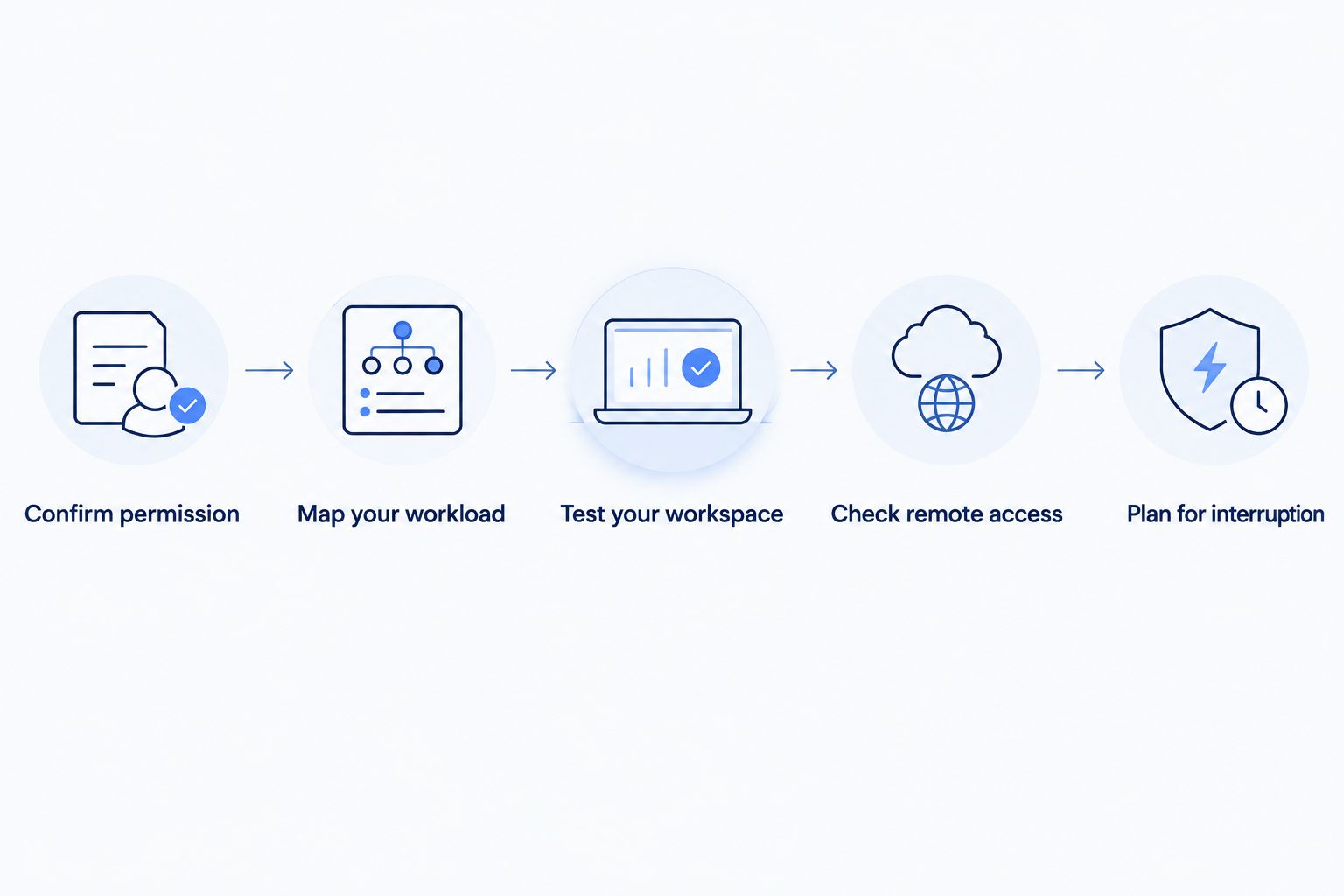
Confirm permission
Describe what you do in plain language. Tell the provider whether you work alone, receive customers at home, connect employees, operate public-facing servers, or offer visitors WiFi.
Ask whether those activities are permitted under the residential agreement. Request the relevant terms so you can distinguish a general answer from a commitment that applies to your account.
Map your workload
List the tasks that happen together. A video meeting while a household member streams is a different workload from a meeting while your computer uploads a large project folder.
Include uploads, not just downloads. Sending video, backing up files, and sharing large deliverables all use the outbound side of your connection.
Test your workspace
Test from the place where you actually work. A fast result beside the router does not establish that the connection at your upstairs desk works equally well.
Compare a wired connection with WiFi where your equipment supports both. If wired performance is good but your desk connection struggles, investigate the local wireless setup before changing the internet service.
Check remote access
Ask your employer or technology administrator what the applications require. Connecting outward to a company VPN is different from allowing inbound connections to equipment inside your home.
If remote access matters, confirm public addressing, carrier-grade NAT, and any restrictions that affect your intended setup. Do not expose a computer directly to the internet as a shortcut around an access problem.
Plan for interruption
Write down what stops when the connection fails: meetings, payments, customer calls, order processing, or access to business files. Then decide which tasks need an alternative connection and which can wait.
A backup connection only helps if you can use it when needed. Test the work applications on it and check whether switching connections interrupts active calls or sessions.
Why the right connection varies between home businesses
The same residential connection can fit one business and fail another business's requirements. These factors explain the difference without assuming that either service category is always the answer:
- Permitted activities: Your agreement determines whether your particular business use is allowed. General home-office work and operating a public-facing service are different questions to ask.
- Simultaneous traffic: Work applications share capacity with household devices. Evaluate what happens together, not just how many devices you own.
- Upload demands: Large outbound transfers can compete with other outbound traffic. Assess your busiest working routine rather than an idle connection.
- Workspace coverage: Walls, distance, interference, and router placement affect WiFi. Changing the internet plan does not remove those physical conditions.
- Network requirements: Inbound access and fixed addressing need their own checks. An application requirement should drive that decision.
- Outage consequences: A postponed document upload and a stopped customer transaction have different operational effects. Match your contingency plan to the work that must continue.
Choose the service that resolves your actual constraints. More advertised speed does not change an unacceptable usage policy, repair a weak wireless signal, or create an outage plan.
How much speed do I need for my home business?
There is no single speed requirement for every home business. Use your applications' published requirements, add the activities that happen simultaneously, and test the result during normal household use.
Understand the units before comparing a plan with an application's file-transfer display:
- 1 Mbps means one million bits per second.
- 1 Gbps equals 1,000 Mbps.
- 1 byte contains 8 bits, so megabits and megabytes are not interchangeable.
These are unit definitions, not promises about delivered performance. A plan expressed in Mbps and a file-transfer display expressed in megabytes per second measure data using different units; protocol overhead and other traffic also affect actual transfers.
For your 2026 checklist, record download speed, upload speed, and how the connection behaves during calls. A large download figure alone does not describe the full working experience.
Do I need a static IP address to work from home?
A static IP address is not automatically necessary for a home business. Ordinary browsing, cloud applications, and many outbound VPN connections do not require you to maintain a fixed public address at home.
A specific system can change that answer. For example, an administrator might require a fixed source address for an access rule, or your setup might need inbound connectivity.
Ask for the requirement in writing before selecting a connection around it. Confirm whether the address must be public, whether it must remain fixed, and how the provider's network handles inbound access.
Does business internet guarantee that I will stay online?
Business internet does not automatically guarantee uninterrupted service. Any uptime commitment must appear in the applicable agreement, along with its scope, exclusions, measurement method, and remedy.
An agreement is also not a backup connection. If your work must continue during an outage, consider the connection, router, power supply, and alternate access path together.
Review those arrangements in 2026 before an interruption occurs. A written commitment can define provider obligations, but your continuity plan determines what you can still do while the main connection is unavailable.
Where Sumofiber fits in the decision
Sumofiber offers residential and business fiber internet, along with managed WiFi. That makes it relevant when you need to discuss both the service category and the connection inside your home.
Sumofiber is a fit for home-business owners evaluating residential or business fiber internet and managed WiFi together. Its stated service range covers those categories; the right choice still depends on the terms and technical requirements confirmed for your account.
Bring your workload list and remote-access requirements to that conversation. Ask which service permits your activities and addresses any specific support or network needs. Do not assume that a listed service category includes a particular guarantee.
Discuss your home-business connection
Ask which fiber service and WiFi setup fit your work requirements.
FAQ
Can I run a home based business on residential fiber internet?
Yes, when your provider permits your business activities and the connection meets your operational requirements. Confirm the agreement, upload capacity, remote-access needs, and outage arrangements before choosing residential service.
Do I need business internet just because I work from home?
No, working from home does not automatically create a technical need for business internet. Your provider's usage terms and any specific support, addressing, or continuity requirements determine the appropriate service.
Is residential fiber good enough for video calls and an online store?
Residential fiber can support video calls and cloud-hosted store management when the connection and service terms fit your workload. Test calls while your household is using the internet, and include large uploads in that test.
Can I use a company VPN on residential fiber?
An outbound company VPN does not inherently require a business internet connection. Confirm your employer's requirements, especially any public-address or fixed-address access rules.
Will business internet fix weak WiFi in my home office?
A business internet plan does not automatically fix weak WiFi. Compare wired and wireless performance at your workspace, then investigate coverage, interference, and router placement.
Does a home business need a backup internet connection?
A home business needs a backup connection when its work must continue through a primary-connection outage. Test the alternative with your actual applications and consider whether your equipment also needs backup power.
Does Sumofiber offer both residential and business fiber internet?
Sumofiber offers residential and business fiber internet, as well as managed WiFi. Ask which service category permits your home-business activities and meets your specific network requirements.
One last thing
Test your busiest normal workday, not your quietest speed-test moment. Put the computer where you work, run the applications you depend on, and leave ordinary household activity in place.
For a 2026 home office, that practical check answers a better question than whether fiber is fast in general: can your actual setup support your work without asking everyone else to stop using the internet?


