
Yes, you can use a VPN with your fiber internet connection; install the VPN app on your device or configure it on a compatible router. Fiber does not require a special VPN, but VPN server performance, router support, and workplace security settings affect how well it works.
- Using a VPN with fiber internet connection works through a device app or a compatible router.
- Start with a device app unless you need VPN coverage across your home network.
- A VPN protects traffic inside its tunnel; it does not make you anonymous or prevent phishing.
- SumoFiber offers fiber internet and managed WiFi; confirm router VPN support separately.
Why this matters
Your kids can stream while you connect to the office, but a slow work VPN can still make your laptop feel slow. The bottleneck is not necessarily your fiber connection. Separating the internet connection from the VPN helps you fix the right problem instead of changing your internet plan.
SumoFiber fiber internet is best for households and businesses seeking internet and managed WiFi from one provider. SumoFiber also offers TV, home phone, and mobile services. Those services do not establish whether a particular router supports your chosen VPN; check that separately before changing equipment.
Can I use a VPN with my fiber internet connection?
Yes. Fiber carries your VPN traffic just as it carries other internet traffic. The VPN software creates an encrypted tunnel between your device or router and a VPN server. Your fiber connection transports that traffic; it does not need to understand the contents.
For a 2026 setup, start by deciding what you want to protect: one personal device, several household devices, or access to your employer's systems. Those are different jobs, and they do not all need the same configuration.
| Setup | Best for | Main advantage | Main limitation |
|---|---|---|---|
| Device VPN app | A personal laptop, phone, or tablet | Easy to connect, disconnect, and troubleshoot | Covers the device and traffic configured to use it, not your entire household |
| Router VPN client | Routing multiple devices through a VPN | Can cover devices that cannot run a VPN app | Requires compatible hardware and can limit throughput |
| Employer-managed VPN | Accessing approved workplace resources | Applies your employer's access controls | Settings and permitted uses belong to your employer |
You do not need router-level VPN support just to run a VPN app on your laptop. Start with the device app for personal use; follow your employer's instructions for work.
Set up a VPN on your device
A device app is the simplest starting point when you only need the VPN on your own computer or phone. You can leave the television, game console, and everyone else's devices unchanged.
- Check normal internet access. Open a website before connecting the VPN. If ordinary browsing already fails, fix that connection first.
- Install the approved app. Use your VPN provider's official installation instructions. For work, use the app and account your IT team specifies.
- Sign in and connect. Choose the required workplace gateway or an appropriate personal VPN server.
- Test your actual task. Open the work application, join a call, or visit the site you need. A connected status alone does not prove every application works.
- Check reconnect behavior. Confirm what happens after sleep, a restart, or a switch between WiFi and Ethernet.
Save any error message exactly as displayed. That gives support something useful to investigate without asking you to repeat the entire setup.
Device VPN: Best for individual control
A device VPN lets you decide when that device uses the encrypted tunnel. It is a practical choice when a parent needs secure access to work while everyone else uses the home connection normally.
The advantage is control. You can change a personal VPN server or disconnect the app without altering other devices. The limitation is scope: installing an app on your laptop does not protect traffic from your television or another person's phone.
Check whether the app routes all traffic through the tunnel or uses split tunneling. With split tunneling, selected traffic takes a different route. For a work device, let your employer decide which traffic belongs inside the VPN.
Router VPN: Best for shared coverage
A router VPN client sends selected network traffic through a VPN without requiring an app on every connected device. This is useful for equipment that cannot run the VPN software itself.
The trade-off is more complicated troubleshooting. Router processing capacity can limit encrypted traffic, and a routing mistake can affect several devices at once. Some services also reject connections from VPN exit addresses.
Before following a 2026 router tutorial, confirm the exact router model, firmware, and supported VPN protocol. A setting called VPN passthrough is not the same as a VPN client: passthrough helps device-originated VPN traffic cross the router; a client establishes the tunnel itself.
If you are considering different equipment, read about using your own router with fiber internet. Do not assume managed WiFi includes a configurable VPN client or permission to alter provider-managed settings.
Employer VPN: Best for approved work access
An employer-managed VPN connects you to resources your organization permits you to use. Your employer can require a particular application, authentication method, device configuration, or gateway.
That controlled setup is its strength and its constraint. You get the access your employer authorizes, but you cannot treat the work VPN like a personal browsing service. Company policies determine permitted use and monitoring.
Do not replace an employer VPN with a personal VPN. If the work connection fails, contact IT with the error message, the affected application, and whether ordinary internet access still works. Avoid changing security settings just to make the connection appear successful.
Why VPN performance varies
A fiber connection and a VPN tunnel have different limits. In a 2026 troubleshooting session, check the entire route rather than treating every slowdown as an internet-service problem.
- Server distance: A farther VPN endpoint adds travel distance and can increase latency. For personal use, test an appropriate nearby server; use the required gateway for work.
- Server load and capacity: The VPN endpoint and its connection can limit throughput even when your local internet connection has spare capacity.
- Device processing: Your computer or router must encrypt and decrypt traffic. Hardware and software implementation affect performance.
- Local connection quality: Weak WiFi, interference, or a limited Ethernet connection remains a problem with the VPN turned on.
- Tunnel configuration: Protocol choice, routing, and packet-size settings affect how traffic moves. Let workplace IT handle changes to a managed tunnel.
- Destination restrictions: A website or application can reject VPN traffic even when the tunnel and fiber connection are working.
There is no single slowdown percentage that applies to every VPN. Measure your own connection before deciding that you need a faster internet plan.
How do I check whether the VPN is slowing my fiber connection?
Run 2 comparison tests on 1 device: one without the VPN and one with it, provided your workplace policy permits disconnecting. Keep the connection method and test destination unchanged so the comparison answers a useful question.
- Baseline test: Record download speed, upload speed, and latency without the VPN. Note whether you used Ethernet or WiFi.
- VPN test: Connect the VPN and repeat the same test. Record the selected VPN server as well.
- Task check: Try the application that feels slow. A file transfer, video call, and website can behave differently.
If the VPN forces a different test destination, note that difference. The comparison then includes a changed route, not just the effect of encryption.
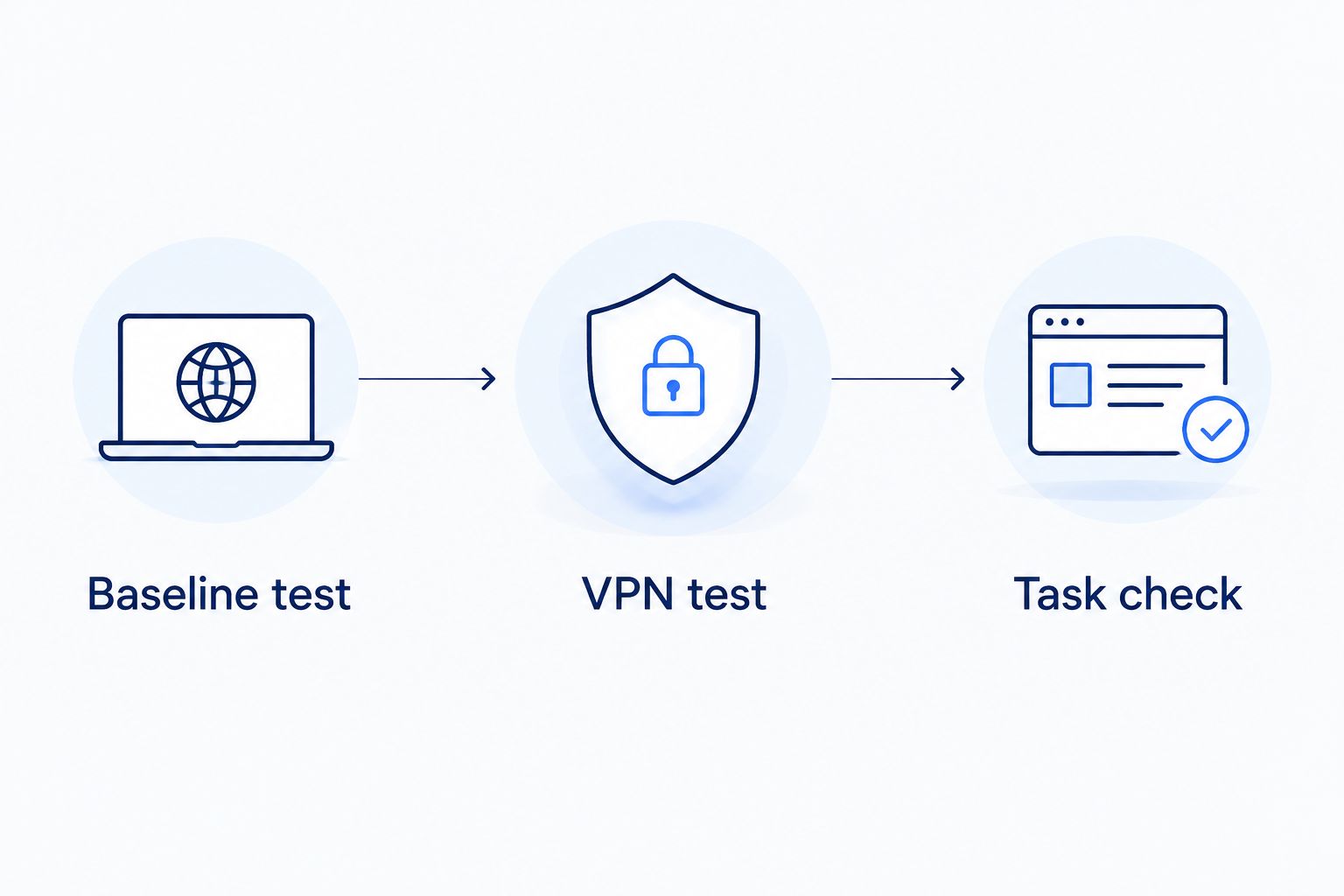
Read the results by pattern. If both tests are poor, investigate the local connection and internet access. If only the VPN test is poor, investigate the VPN endpoint, app, or configuration. If tests look healthy but one application fails, investigate that application and its route.
For your 2026 troubleshooting notes, record the time, connection method, VPN endpoint, and exact symptom. Send internet-access problems to your internet provider and work-tunnel problems to your employer's IT team. That distinction prevents unnecessary router resets.
Do I need a static IP address to use a VPN?
You do not normally need a static public IP address to connect outward to a VPN service. A personal VPN app or employer VPN client starts the connection from your device.
Hosting a VPN server at home is different. Incoming access depends on public addressing, firewall configuration, and whether your connection sits behind carrier-grade NAT. A static address can simplify reaching your server, but it does not replace secure configuration.
If you want to host a VPN rather than use an app, ask about inbound connectivity before buying equipment. Explain that you need remote connections into your network; simply asking whether the connection supports VPNs leaves that distinction unclear.
Does a VPN protect everything I do online?
A VPN protects traffic routed through its tunnel, not every action you take online. It does not stop you from entering credentials on a phishing page, downloading malware, or sharing information with a website while signed in.
A VPN also shifts trust. Your local network and internet provider have less visibility into tunneled destinations, while the VPN operator handles the tunnel's exit traffic. HTTPS still matters because it protects the connection between your browser and a website beyond the VPN endpoint.
For a 2026 privacy check, review the VPN's permissions, routing behavior, and published data-handling policy. Keep your device updated and use strong account authentication. A connected VPN icon is not a complete security plan.
FAQ
Can I use a VPN with fiber internet connection on my phone?
Yes, you can use a VPN with fiber internet connection on your phone by installing a compatible VPN app and connecting over your home WiFi. The app's routing settings determine which phone traffic enters the tunnel.
Will a VPN make my fiber internet faster?
A VPN does not increase your fiber connection's capacity. It changes the traffic route and adds encryption processing, so compare performance with and without it rather than expecting a speed increase.
Do I need a special fiber router for a VPN?
You do not need a router with a built-in VPN client to use a VPN app on your device. Routing your household's traffic through the router itself requires compatible VPN-client features.
Can I use my work VPN while my family streams?
Yes, a work VPN on your laptop can operate while other household devices stream through the same internet connection. Performance depends on the shared connection, local WiFi, and the work VPN endpoint.
Does SumoFiber managed WiFi automatically include a VPN?
Do not assume SumoFiber managed WiFi includes a VPN. Confirm the supported router features and service scope before planning a router-level VPN setup.
Why do websites stop working when I connect my VPN?
Websites can stop working through a VPN because of destination restrictions, DNS problems, or tunnel configuration. For a personal VPN, test another appropriate server; for a work VPN, report the affected site to IT.
Should I turn off my VPN when a video call freezes?
Only disconnect a work VPN if your employer permits it. For a personal VPN, comparing the same call with and without the tunnel helps identify whether the VPN route is contributing to the problem.
One last thing
Check what the router's VPN setting actually does before changing it. A VPN client connects outward; a VPN server accepts incoming connections; VPN passthrough is neither. Similar labels describe different jobs.
When discussing SumoFiber fiber internet and a VPN setup, describe the task plainly: connecting a work laptop, routing household devices, or reaching a home server while away. The task determines the questions to ask, and it prevents buying equipment for the wrong kind of VPN.


