

CenturyLink offers DSL and fiber internet, so its strongest starting point is a wired connection rather than a cellular signal. The ceiling comes when your particular connection no longer handles your household’s uploads, calls, and streaming—or when you need help managing WiFi throughout the home. The best CenturyLink alternative in 2026 is Sumofiber if you want fiber internet and managed WiFi; Xfinity is another option if you want a wired cable connection.
- For centurylink alternatives, choose Sumofiber fiber internet when you want managed WiFi alongside your home connection.
- Xfinity is a wired cable alternative; compare upload performance and equipment requirements before switching.
- T-Mobile Home Internet uses cellular connectivity; Starlink uses satellites rather than a wired connection to your home.
- Diagnose your CenturyLink connection before switching: weak WiFi and a slow internet connection require different fixes.
Why this matters
Replacing CenturyLink only helps if the replacement solves your actual problem. A different provider will not automatically fix a router tucked behind a television or a weak signal in an upstairs bedroom.
Start by separating the connection entering your home from the WiFi distributing it. Then compare alternatives by connection type, upload performance, equipment, and the services you want help managing—not just the download number on a plan.
Sumofiber is best for households seeking fiber internet with managed WiFi and additional home services from the same provider. That is a service-fit recommendation, not a claim that every address gets the same result.
CenturyLink alternatives at a glance
This 2026 comparison separates how each service reaches your home from what you should investigate before choosing it. The rows describe connection types and service focus, not measured performance rankings.
| Provider | Best for | Standout characteristic | How it differs from CenturyLink | Main limitation |
|---|---|---|---|---|
| CenturyLink | Keeping a wired connection that already meets your needs | DSL and fiber services | The baseline for your comparison | Your experience depends on your actual connection and home network |
| Sumofiber | Fiber internet with managed WiFi and additional services | Residential and business fiber, WiFi, TV, home phone, and mobile services | An alternative service provider with a broader household-service offering | Fiber alone does not fix poor indoor WiFi coverage |
| Xfinity | A wired cable alternative | Cable internet | Uses a cable connection rather than CenturyLink DSL | Cable upload and download capabilities need separate checks |
| T-Mobile Home Internet | Considering a cellular home connection | Fixed wireless over a mobile network | Replaces the wired last-mile connection with cellular connectivity | Indoor signal and cellular-network conditions affect performance |
| Starlink | Considering satellite instead of a terrestrial connection | Low-Earth-orbit satellite internet | Connects through satellites rather than telephone, cable, or fiber lines | Requires a suitable view of the sky |
There is no useful nationwide winner without an address-level comparison. A strong fiber connection, a cable connection, and a cellular gateway solve different problems, even when all can connect your television and laptop.
1. Sumofiber: best for fiber internet with managed WiFi
Sumofiber provides residential and business fiber internet alongside managed WiFi, TV, home phone, and mobile services. It serves households and businesses across Utah, Idaho, Montana, Colorado, California, Wisconsin, Illinois, and New York; that state footprint is not a promise of service at every property.
The strongest reason to consider this option is the combination of the connection and help managing the network inside your home. Think about the bedroom where calls break up, not just the room containing the router.
Where this option shines
- Fiber internet is the core connection offering.
- Managed WiFi gives you a separate service to discuss when indoor coverage is the problem.
- Residential and business services support different kinds of customers.
- TV, home phone, and mobile services let you discuss more than internet alone.
Where this option falls short
- A statewide service footprint does not establish whether your individual building can connect.
- Choosing fiber does not eliminate walls, interference, or poor router placement.
- A broader service offering adds little value if you only want an internet connection and prefer managing your own equipment.
Head-to-head with CenturyLink
| Dimension | This alternative | CenturyLink |
|---|---|---|
| Connection focus | Fiber internet | DSL and fiber internet |
| Indoor network | Managed WiFi is part of the service offering | Assess your existing router and WiFi arrangement |
| Customer fit | Residential and business customers | Judge the specific residential or business connection you use |
| Switching decision | Compare fiber service and WiFi-management needs | Keep the baseline grounded in your current connection’s performance |
Best for: You want fiber internet and would rather discuss indoor WiFi and additional household services with the same provider.
Verdict: Buy only after confirming the exact connection and service scope for your address.
2. Xfinity: best for a wired cable alternative
Xfinity is a cable-internet alternative to consider when you want a wired connection rather than cellular or satellite service. The useful comparison is your actual CenturyLink connection against the specific Xfinity service proposed for your home.
Do not treat cable as automatically better than DSL or automatically worse than fiber. Compare the tasks that fail today, particularly uploading files while someone else uses a video call.
Where Xfinity shines
- Cable provides a wired path to your home rather than relying on indoor cellular reception.
- It offers a different connection technology from CenturyLink DSL.
- It belongs on a shortlist when your priority is replacing the home connection, not changing how you manage every household service.
Where Xfinity falls short
- A headline download speed does not tell you the upload capability.
- Changing to cable does not resolve weak WiFi in distant rooms.
- You still need to understand equipment responsibilities and the terms of the exact service you choose.
Xfinity versus CenturyLink
| Dimension | Xfinity | CenturyLink |
|---|---|---|
| Connection being compared | Cable internet | DSL or fiber internet |
| Key performance check | Upload and download capabilities separately | Identify whether your existing service is DSL or fiber |
| Indoor coverage | Depends on the home network | Depends on the home network |
| Main decision | Does cable address your current limitation? | Does the existing connection already meet your needs? |
Best for: You want another wired connection and have identified a limitation in your current CenturyLink service.
Verdict: Buy only if the specific cable service improves the problem you measured.
3. T-Mobile Home Internet: best for considering fixed wireless
T-Mobile Home Internet uses cellular connectivity to bring internet into your home through a gateway. That makes it a different kind of alternative: the location of the gateway and the cellular signal matter alongside the WiFi inside your rooms.
Where T-Mobile Home Internet shines
- It offers a connection path that does not depend on a telephone or cable line entering the home.
- It gives you a cellular alternative to evaluate alongside wired services.
- Gateway placement gives you a practical factor to investigate during setup.
Where T-Mobile Home Internet falls short
- Buildings and gateway placement affect reception.
- Cellular-network conditions affect performance.
- A good result in one room or at one time does not establish consistent performance throughout your routine.
For a 2026 comparison, test the workday and evening activities you actually need. A short browsing session is not a substitute for a video meeting while another person streams.
Best for: You want to evaluate cellular home internet rather than another wired connection.
Verdict: Wait until performance at your home meets your everyday requirements.
4. Starlink: best for considering satellite internet
Starlink uses low-Earth-orbit satellites rather than a wired connection to your property. It is a different route to the internet, not simply a different company using the same kind of connection.
Where Starlink shines
- It provides an alternative to terrestrial wired access.
- It is relevant when the practical question is satellite versus a constrained land-based connection.
- Its connection does not depend on indoor cellular reception.
Where Starlink falls short
- The terminal needs a suitable view of the sky.
- Trees, buildings, and other obstructions matter.
- Installation location and weather deserve attention before you choose it.
Best for: You need to compare satellite with the terrestrial connections that can serve your property.
Verdict: Wait until you have checked the installation location and compared your wired options.
Why people switch from CenturyLink
The reasons below are connection problems to verify, not claims that every CenturyLink customer experiences them. Your reason for leaving should match the alternative you choose.
Your current DSL connection limits uploads
Sending large files and participating in video meetings require upload capacity. If your current DSL service cannot handle those tasks together, compare the upload capability of the replacement—not just its download headline.
Fiber belongs in that comparison, but the exact service still matters. Ask for upload and download details separately.
You need help with indoor WiFi
If the connection works near the router but fails in a bedroom, you have evidence of an indoor-network problem. Managed WiFi is worth discussing when you do not want to handle coverage planning and troubleshooting alone.
Read the guide to checking whether your WiFi router needs replacement before blaming the incoming connection. Replacing the provider and leaving the same coverage problem unresolved is an avoidable mistake.
You want a different service arrangement
You might want internet, home phone, TV, and mobile services considered together. Start with what you actually use, then ask which parts the proposed provider handles and which remain separate.
Do not assume a single provider means a single installation, a single device, or identical terms across services. Get those details directly before making the switch.
How to compare your connection before switching
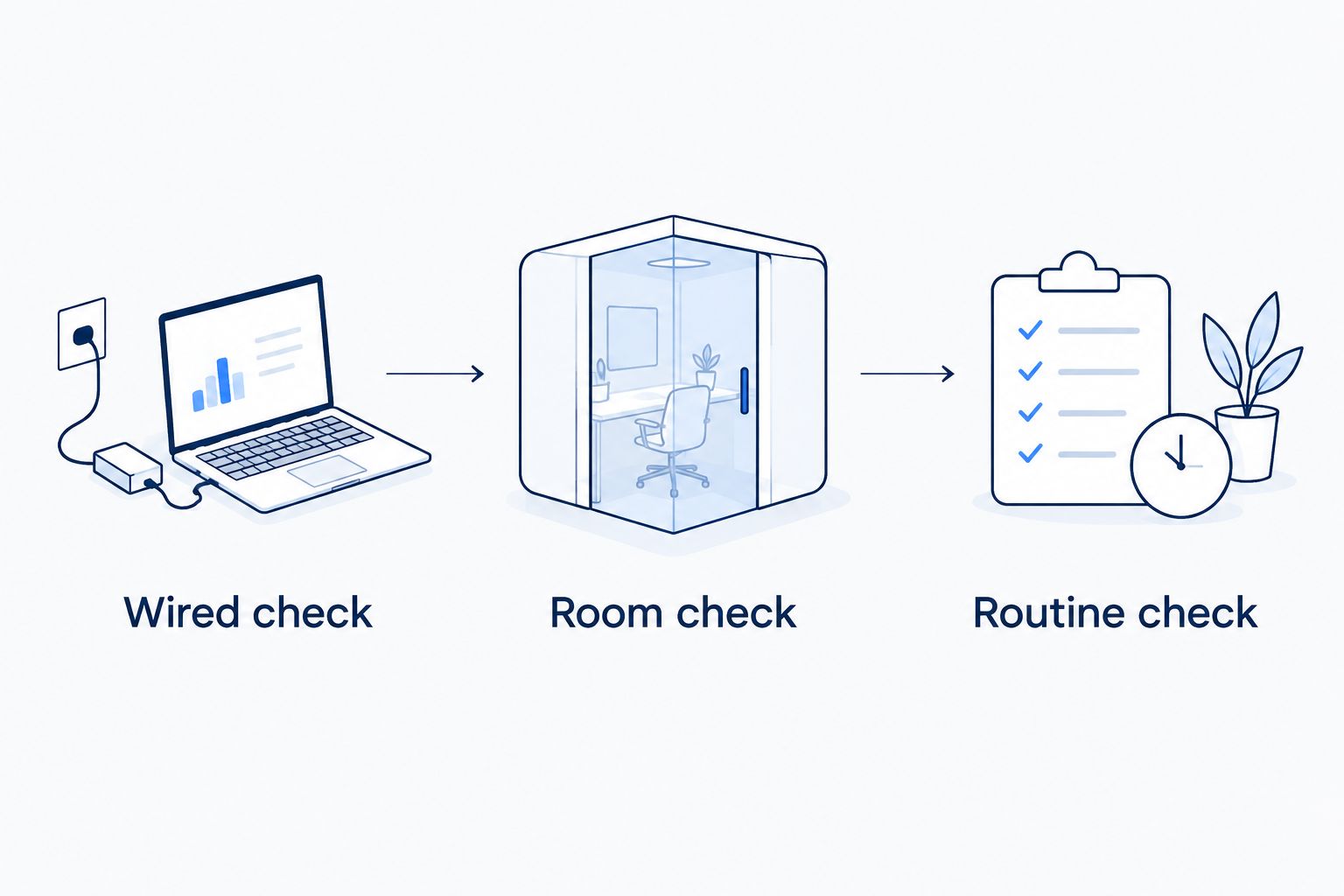
Use 3 checks in your 2026 decision: a wired check, a room check, and a routine check. Each answers a different question.
- Wired check: Connect a suitable computer by Ethernet and compare its performance with WiFi. If Ethernet works well but WiFi does not, investigate the home network first.
- Room check: Repeat the same task near the router and in the room where it fails. Keep the device and activity consistent so location is the main change.
- Routine check: Try your normal combination of calls, streaming, and uploads. Record what fails and whether other devices are active.
These checks do not certify a provider’s network. They give you a clearer problem to take to support or use when comparing a replacement.
WiFi bands also change the result. A 2.4 GHz connection generally reaches farther but faces more interference; a 5 GHz connection generally offers more capacity over shorter distances. Neither band changes the internet service entering your home.
Before canceling, write down which devices and services depend on the connection. Include security equipment, work access, television streaming, and home phone service; each deserves a continuity check.
Explore your fiber options
Review fiber internet, managed WiFi, and the other services you want to discuss.
When staying with CenturyLink is the right call
Stay with CenturyLink if your current connection handles your household’s normal activities and support resolves the problems you encounter. Switching companies is not an improvement by itself.
That is especially relevant if you already have a fiber connection. In that case, compare WiFi management, service responsibilities, and your actual experience rather than assuming another fiber provider changes everything.
Hold if the connection works and the remaining problem is fixable inside your home. A router-placement correction is a different decision from replacing your internet provider.
FAQ
What’s the best CenturyLink alternative in 2026?
Sumofiber is the best fit here for households seeking fiber internet with managed WiFi and additional home services. Xfinity, T-Mobile Home Internet, and Starlink represent cable, cellular, and satellite alternatives to compare against your specific connection.
Is fiber always better than CenturyLink?
Fiber is a connection technology, while CenturyLink is a provider that offers DSL and fiber services. Identify your current connection before comparing it with another provider’s fiber offering.
Will switching internet providers fix weak WiFi?
Switching providers does not automatically fix weak WiFi. If Ethernet works well but a distant room does not, investigate router placement, interference, and coverage before replacing the incoming service.
Is Xfinity better than CenturyLink for working from home?
The better choice depends on the specific connections being compared and your work requirements. Compare upload capability, video-call performance, and wired results rather than choosing by provider name alone.
Is T-Mobile Home Internet the same as fiber?
T-Mobile Home Internet uses cellular connectivity rather than a fiber line to your home. Indoor reception, gateway placement, and cellular-network conditions are important parts of the comparison.
Should I choose Starlink instead of a wired connection?
Consider Starlink when satellite addresses a limitation in your terrestrial internet options. Check the terminal’s sky view and compare the wired connections that can serve your property before deciding.
Should I cancel CenturyLink before setting up another provider?
Keep your existing connection until the replacement is installed and tested if continuity matters to you. Confirm cancellation requirements and any phone-number transfer process before ending the old service.
One last thing
For your 2026 shortlist, save an example of the problem—not just a speed-test screenshot. Note the room, device, task, and whether Ethernet works when WiFi fails.
That record turns a vague request for faster internet into a useful question: Which part of this setup will the replacement actually improve? Choose the alternative that answers it clearly.


