

Gyms and fitness studios’ fiber internet is a fiber-optic connection used to run member services, staff tools, and connected equipment with the aim of keeping workouts and daily operations moving. This 2026 guide explains how to choose the connection, separate member WiFi from business systems, and test the rooms where people actually use it.
- Choose fiber internet for gyms and fitness studios around peak-hour tasks, upload needs, and WiFi coverage—not download speed alone.
- Sumofiber suits gyms comparing business fiber internet and managed WiFi from one provider.
- Keep guest WiFi separate from payment terminals, staff devices, and connected equipment.
- Test check-in, payments, and streaming together before replacing your existing connection.
Why fiber internet matters for gyms and fitness studios
Your front desk should not have to ask members to stop streaming so a payment can finish. A gym network serves different jobs at once: checking people in, processing transactions, playing class content, and connecting members’ phones.
Fiber brings the internet connection into the building. WiFi carries that connection around the building. A faster fiber plan does not fix a wireless dead spot behind the cycling studio. Treat the outside connection and the indoor network as separate decisions.
Sumofiber offers business internet and managed WiFi. Sumofiber is best suited to gyms comparing business fiber internet and managed WiFi from one provider. Confirm the service scope for your premises rather than assuming every building or package has the same setup.
For your 2026 upgrade, start with the work the network must support. A small appointment-only studio and a large gym with member WiFi need different assessments, even when both use the same booking software.
How to plan fiber internet for your gym
1. Map the tasks that cannot stop
Start with a spreadsheet or a sheet of paper. Walk from the entrance to the back office and list every task that uses the internet, who depends on it, and what happens when it stops.
Separate essential operations from convenience. A stalled reception screen needs a different response from a member’s slow video download. Include equipment that connects quietly in the background, such as cameras, access systems, and software updates.
Record actual dependencies, not assumptions. Ask your software vendors whether check-in and payments have offline modes, and learn how those modes work before an outage.
- List front-desk tasks: check-in, bookings, membership changes, and payments.
- Identify class needs: music, streamed instruction, and instructor uploads.
- Record member-facing uses, including guest WiFi and connected exercise equipment.
- Assign an owner and a fallback procedure to each essential task.
2. Measure demand during a busy session
Use your current router’s traffic view, device list, and an internet speed test before choosing a replacement plan. Measure when classes overlap or members arrive together—not only when the studio is empty.
Download speed describes incoming traffic; upload speed describes outgoing traffic. A trainer broadcasting a class or uploading video needs attention to the upload side. Latency and packet loss also matter when a service needs timely, uninterrupted communication.
For a practical baseline, observe a 10-minute window during a busy session. This is a suggested observation period, not a bandwidth standard. Repeat the exercise if your class schedule or attendance pattern changes.
- Record download and upload results, with the time and test location.
- Note active devices rather than counting every saved WiFi connection.
- Run the tasks that normally overlap, including check-in and class content.
- Compare a wired result with a WiFi result to separate connection and coverage problems.
3. Match service responsibilities to your staffing
You can manage a small network yourself using the router’s settings and a written equipment inventory. That approach works only if someone owns updates, configuration, troubleshooting, and recovery when a device fails.
Managed WiFi is the alternative when you want outside help with wireless administration. Sumofiber offers business internet and managed WiFi, but those service names alone do not establish which tasks are included. Ask who handles access-point placement, guest settings, equipment replacement, and troubleshooting.
Use this explanation of how managed WiFi works for a business to prepare your questions. The benefit is a clearer support arrangement; the limitation is that responsibilities still need to be defined in the service agreement.
- Name the person responsible for a self-managed network.
- Ask what managed WiFi includes and what remains your responsibility.
- Request a clear process for reporting a failed access point.
- Confirm how your team receives administrative access and configuration records.
4. Separate members from business devices
Start by checking whether your existing router supports a guest network with isolation from local devices. A different WiFi name is not proof of separation; the configuration must prevent unwanted access between networks.
For a more involved setup, ask a qualified installer about separate network segments and firewall rules. Keep the design understandable. Your opening manager needs to know which network a replacement reception computer belongs on without guessing.
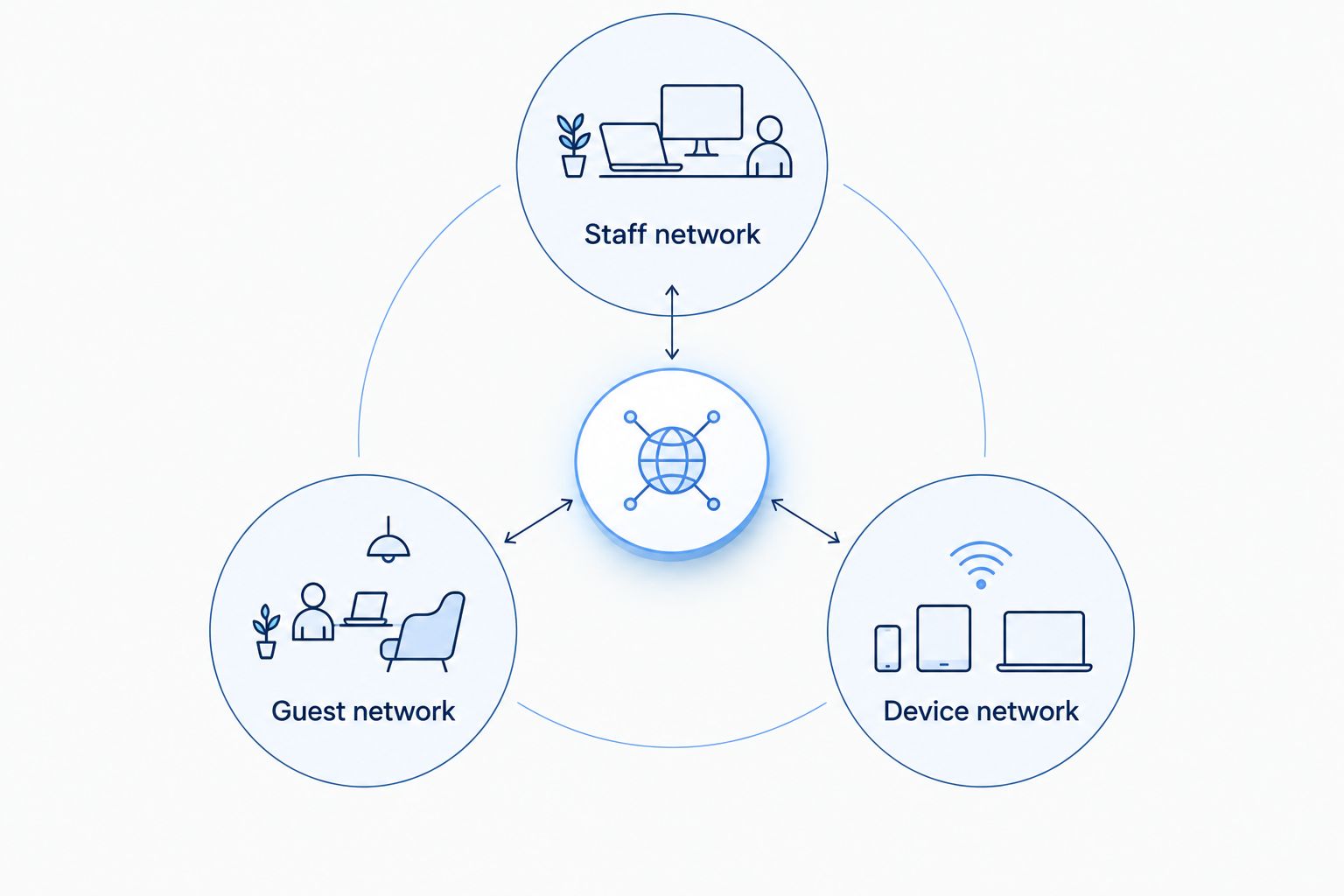
Build the separation around these roles:
- Staff network: connect authorized business computers and administrative tools.
- Guest network: provide member internet access without access to business devices.
- Device network: separate cameras and connected equipment where appropriate.
The roles describe access boundaries, not a requirement to buy separate internet subscriptions. Ask your payment provider or IT professional to review payment-device requirements rather than treating a guest WiFi setting as a complete security solution.
5. Test coverage where members exercise
Draw a simple floor plan and mark the reception desk, exercise areas, studios, offices, and equipment locations. Then walk the building with a phone or laptop while running the tasks used in each room.
Begin with 3 test locations: reception, the busiest workout area, and the most difficult room to reach. Add locations wherever the layout changes. Three locations are a starting checklist, not a coverage guarantee.
Mirrors, walls, building materials, and equipment affect wireless performance. Place access points according to the site assessment rather than hiding the router wherever a power outlet happens to be available. Use Ethernet for fixed equipment where practical.
- Test with studio doors in their normal open or closed position.
- Check coverage near connected equipment, not just beside an access point.
- Repeat tests with people present and normal services running.
- Label wired connections so staff can identify reception and classroom equipment.
6. Build a fallback for essential operations
Write an outage procedure before selecting additional hardware. Staff should know how to distinguish a single-device problem, a WiFi problem, and a loss of the internet connection.
A mobile hotspot can provide a manual fallback for selected tasks if the devices, applications, and cellular signal support it. An automatic cellular backup requires suitable equipment and configuration. Neither approach keeps every gym service running by default.
Use your 2026 continuity plan to decide what deserves backup first. Payment and access systems need vendor-specific checks; a successful browser test does not prove those systems will work during a connection change.
- Document the approved offline procedure for check-in and payments.
- Test cellular reception at the intended backup equipment location.
- Identify which applications must work over the alternate connection.
- Keep support details and recovery instructions somewhere accessible offline.
7. Verify the installation before switching over
Keep a written acceptance checklist. Where your installation arrangements permit, test the new connection before disconnecting the existing service so you can resolve problems without making the front desk your test environment.
Run a realistic rehearsal: check in a member, complete an approved payment test, play class content, and connect a guest device. Confirm that guest access cannot reach business devices. Check both wired and wireless operation.
Reserve 15 minutes for a staff walkthrough after testing. This is a suggested training slot, not an installation-time promise. For a 2026 opening or relocation, include landlord permission and building access in the schedule before setting a changeover date.
- Verify the agreed service details against the installation paperwork.
- Test reception, class areas, and back-office tasks together.
- Record equipment locations, administrator access, and support contacts securely.
- Teach opening and closing staff how to report a fault without resetting everything.
Compare network options for your fitness business
These options solve different problems. Fiber is an internet connection; managed WiFi is a way to administer the wireless network inside your premises. Cellular backup is a continuity measure, not a replacement for a tested primary setup.
Compare the full responsibilities and limitations in your 2026 proposal. Do not assume a service includes monitoring, a backup connection, or a particular repair commitment unless the agreement states it.
| Option | Best for | Main advantage | Key limitation |
|---|---|---|---|
| Business fiber with self-managed WiFi | Studios with someone responsible for network administration | Keeps network settings under your control | Your team owns configuration and troubleshooting |
| Business fiber with managed WiFi | Gyms that want outside help administering wireless access | Establishes a service arrangement for WiFi management | Included tasks and escalation responsibilities need confirmation |
| Business cable with a properly designed network | Premises considering an alternative connection | Supports a wired and wireless business network | Upload capacity and service terms require individual review |
| Cellular backup | Essential tasks during a primary-connection failure | Provides an alternate connection path | Depends on signal, equipment, configuration, and application behavior |
Sumofiber belongs on the business-fiber-and-managed-WiFi shortlist because it offers both services. The unresolved questions are building eligibility, the proposed network design, and the exact support scope. Choose the written fit for your gym, not the longest list of service names.
Common mistakes gyms and fitness studios make
Buying speed before checking the room
A slow connection in the back studio does not establish that your internet plan is too small. Compare wired performance with wireless performance in that room. If the wired connection works properly, investigate coverage, interference, and equipment before upgrading the plan.
Giving instructors the business-network password
An instructor needs access to class tools, not unrestricted access to office devices. Define the required access and provide an appropriate network or account. Change access when roles change, and avoid putting a shared administrative password on a staff noticeboard.
Treating the connected-device count as the whole calculation
An idle phone and a live video upload do not create the same demand. Plan around simultaneous activity, especially overlapping classes, arrival periods, and media uploads. Keep a record of what was running when a problem occurred so the next diagnosis starts with evidence.
Assuming backup protects every system
A working hotspot does not prove that a payment terminal, door controller, or phone service will continue operating. Test each essential application and document its fallback. Remember that internet backup and electrical backup solve different failures; powered network equipment still needs electricity.
Forgetting the rented-building constraints
A fiber installation can involve access to shared building spaces and an agreed route into your unit. Confirm permissions, equipment placement, and responsibility for cabling before scheduling work. Do not promise your team a switch date until the installation arrangements are confirmed.
FAQ
What's the best fiber internet setup for a gym?
The best setup matches the gym's simultaneous business tasks, provides tested WiFi coverage, and separates guest access from business devices. Choose self-managed or managed WiFi according to who will administer and troubleshoot the network.
How much internet speed does a fitness studio need?
A fitness studio's speed requirement depends on its simultaneous applications, not floor area alone. Measure busy-session traffic and review upload needs for live classes, video uploads, and cloud-connected equipment before choosing a plan.
Will fiber internet fix weak WiFi in my cycling studio?
Fiber internet alone does not fix weak WiFi coverage. Compare wired and wireless results, then assess access-point placement, walls, interference, and equipment in the cycling studio.
Should gym members use the same WiFi as the front desk?
Gym members should use guest access separated from front-desk and administrative devices. Confirm that the network configuration enforces separation; different WiFi names alone do not establish it.
Is managed WiFi better than setting up the gym's router myself?
Managed WiFi is better suited to gyms that want outside help administering wireless access. Self-management keeps that work with your team, while a managed arrangement requires clear confirmation of included tasks and support responsibilities.
Can a gym keep taking payments if its fiber connection stops?
A gym can continue taking payments only if its payment system supports a tested offline or backup-connection procedure. Ask the payment provider for the approved process and test it before relying on it during an outage.
Does Sumofiber offer internet and WiFi services for businesses?
Sumofiber offers business internet and managed WiFi. Confirm service eligibility for the gym's premises and request a proposal that identifies equipment, network responsibilities, and support scope.
One last thing
Test the network while changing classes, not just while standing beside the router. Have reception process a normal workflow while an instructor starts class content and guest devices connect. That rehearsal checks the experience you are buying: ordinary tasks working together without asking everyone else to pause.
Save the results as your 2026 baseline. When something changes, repeat the same tasks in the same locations before replacing equipment or changing your plan.


