

Veterinary clinic fiber internet is an optical-fiber connection that supports online practice tools, image transfers, and client communication with the aim of keeping appointments moving. This 2026 guide explains how to choose the connection, separate clinical traffic from guest WiFi, and prepare for an outage without buying speed you do not need.
- Fiber internet for veterinary clinics should support uploads, practice management, and payments—not just waiting-room streaming.
- SumoFiber suits clinics seeking business fiber internet and managed WiFi from one provider.
- Wire fixed workstations, separate guest WiFi, and test critical applications before switching connections.
- A backup connection needs a tested workflow; a second connection alone does not establish continuity.
Why fiber internet matters for veterinary clinics
A veterinary clinic needs more than a connection that loads websites quickly. Your receptionist might be checking in a client while a technician uploads diagnostic images and a veterinarian opens an online patient record. Those tasks share the connection, but they do not have the same requirements.
Uploads matter when you send files to an outside specialist or a cloud service. Consistent connectivity matters when you take a payment or finish a record before the next appointment. Guest entertainment belongs behind those tasks in your priorities.
Choose internet around the work that stops when connectivity fails. Start with your actual applications, not a provider's largest speed tier. The guide to how much bandwidth a small business needs explains the distinction between buying capacity and identifying demand.
For your 2026 plan, separate the internet connection from the network inside the building. Fiber brings service to the premises; Ethernet, routers, and wireless access points distribute that connection. A fast incoming connection does not fix weak WiFi in a treatment room.
How to plan fiber internet for your veterinary clinic
1. Map the work that depends on internet access
Start with a shared document and a walk through the clinic. Ask reception, technicians, and veterinarians what they use during an appointment, where they use it, and what happens when it disconnects. No network software is necessary for this first pass.
Organize the findings into 3 workflow groups: patient care, front desk, and background services. This is a planning structure, not a technical requirement. It keeps a large backup transfer from receiving the same priority as a payment or an active consultation.
Distinguish local functions from online functions. A device connected to your clinic network does not necessarily need the internet for every task. Ask the application or equipment supplier which features stop during an outage and which continue locally.
Record dependencies rather than guessing from the device's name:
- List practice-management tools and whether records are stored locally or online.
- Identify diagnostic files sent outside the clinic.
- Record payment, prescription, laboratory, and appointment connections.
- Note internet-dependent phones and remote-access tools.
- Assign an owner to each critical application's outage procedure.
2. Measure busy-period use before choosing speed
Use your current router's traffic history if it provides one. Otherwise, run a wired speed test and observe your applications during normal work, without interrupting an appointment. Record the conditions so you can compare results later.
Look at upload and download separately. Upload capacity affects files leaving the clinic; download capacity affects incoming data. Latency describes response time, while packet loss describes data that does not arrive. None of these measurements alone proves that a practice application will behave well.
A slow image transfer does not automatically mean the internet plan is too small. The destination service, local storage, WiFi, or the sending computer can also limit the transfer. Compare the same task over Ethernet before deciding to upgrade.
Build your 2026 shortlist around observed work and application suppliers' documented requirements:
- Save wired test results with the time and location.
- Compare quiet-period results with busy-period results.
- Check upload performance during a representative file transfer.
- Ask software suppliers for their network requirements.
- Request the proposed connection's upload and download specifications in writing.
3. Separate clinical devices from guest WiFi
Draw a floor plan and mark reception, exam rooms, treatment areas, and any location where staff use wireless devices. Test those spaces using your existing equipment before purchasing replacements. A hallway test does not establish coverage behind a closed exam-room door.
Wire fixed workstations where practical, and keep guest devices separate from clinical systems. Network separation requires configuration and access controls, not merely a different WiFi name. Have the person responsible for your network verify that guest users cannot reach internal devices.
If nobody on staff owns wireless configuration and troubleshooting, managed WiFi is an option to assess. SumoFiber offers business fiber internet and managed WiFi; ask which installation, configuration, monitoring, and support responsibilities apply to your clinic.
SumoFiber is best for clinics seeking business fiber internet and managed WiFi from one provider. That service combination does not establish equipment compatibility or coverage in your building; those need a site-specific assessment.
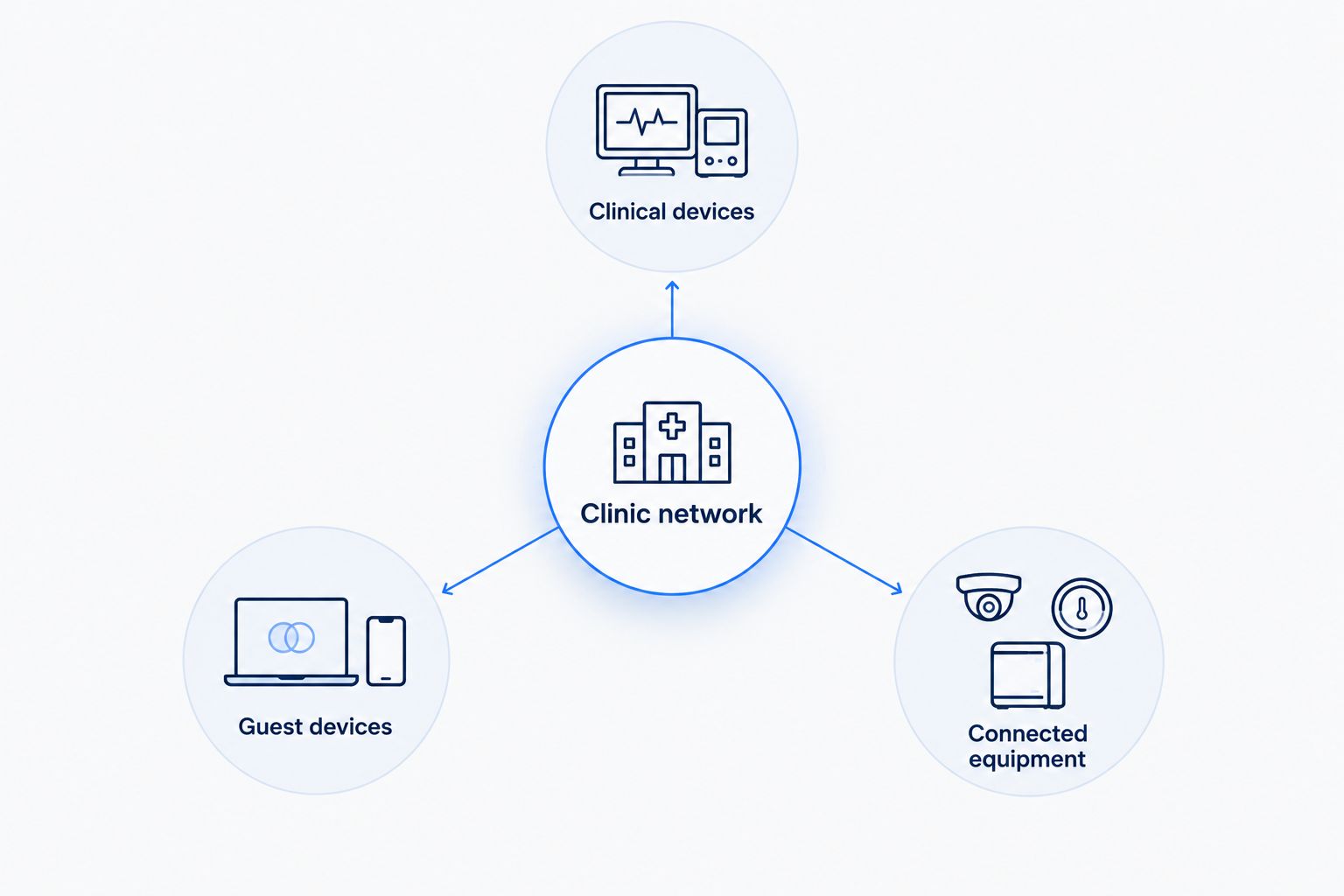
For the clinic network, document these responsibilities:
- Clinical devices: restrict access to authorized staff and systems.
- Guest devices: isolate waiting-room internet access from internal resources.
- Connected equipment: confirm supplier requirements before changing settings.
- Network equipment: assign responsibility for updates and administrator access.
4. Build an outage plan around essential tasks
Write down what reception should do if records, payments, or phones stop working. Include the application supplier's approved offline process rather than improvising a workaround during a busy appointment. Keep the instructions accessible without the internet.
For a clinic evaluating backup internet, plan for 2 connection paths: primary service and backup service. Two subscriptions do not necessarily mean independent failure paths. Ask how each connection reaches the premises and which equipment both depend on.
Cellular backup introduces its own questions: indoor signal, router compatibility, application behavior, and permitted use. A mobile service subscription alone does not establish that your clinic router supports automatic failover.
Power is another dependency. An internet connection cannot keep a powered-off router working. Ask your IT provider which network components need battery protection and how to shut down safely when that protection runs out.
Turn the plan into actions staff can follow:
- Define which tasks continue during an outage.
- Document approved offline record and payment procedures.
- Confirm how staff receive incoming calls.
- Test essential applications over the proposed backup connection.
- Store provider and software-support contacts offline.
5. Confirm installation and support responsibilities
Create a written checklist before authorizing a switch. Identify the building contact, the clinic decision-maker, and the person responsible for routers, switches, and workstations. In a leased space, confirm who approves cabling and equipment placement.
Ask where the fiber equipment will sit and how it connects to your network. The installation handoff matters: someone must connect and configure the clinic's equipment after the incoming service is established. Do not assume the internet installer also manages every device inside the practice.
For your 2026 provider comparison, separate advertised service descriptions from contractual commitments. An uptime commitment, repair target, or outage credit applies only when the agreement states it. SumoFiber's business internet and managed WiFi offerings do not, by themselves, establish those terms.
Resolve these points before scheduling the change:
- Confirm the exact clinic address and installation scope.
- Identify any landlord approval or building-access requirements.
- Define responsibility for internal wiring and network configuration.
- Ask how faults are reported and escalated.
- Review written service commitments and their exclusions.
- Confirm application-specific needs such as remote access with your IT provider.
6. Test the switch before retiring the old connection
Schedule the change outside active appointments where possible. Keep your existing connection in place until the new setup passes the clinic's acceptance checks. Confirm any cancellation obligations separately rather than assuming installation ends the old service.
Set aside a 15-minute test window for a focused rehearsal, and extend it if your checklist needs more time. This is a suggested planning block, not an installation estimate. Have staff perform representative tasks using test records or supplier-approved methods that do not create false clinical or payment activity.
Check the network from the places where work happens. A successful speed test at the router does not prove that an exam-room tablet can reach its application or that an incoming call reaches reception.
Use this acceptance checklist for your 2026 cutover:
- Open the practice application from reception and an exam room.
- Send a representative file through an approved test workflow.
- Verify payment connectivity using the processor's test procedure.
- Check incoming and outgoing calls if phones depend on internet access.
- Confirm guests cannot reach internal resources.
- Test backup activation and the return to primary service.
Compare connection options for a veterinary clinic
Business fiber is a strong primary-connection candidate when its documented specifications meet your clinic's workloads. It still needs a suitable internal network and an outage plan. Evaluate alternatives using the same application checklist rather than assuming a connection type guarantees a result.
| Option | Best for | Main advantage | Key limitation |
|---|---|---|---|
| Business fiber | Clinics sending diagnostic files and using online practice tools | A connection option suited to evaluating both upload and download needs | Fiber alone does not establish WiFi coverage, backup, or a repair commitment |
| Business cable | Clinics comparing a working existing connection against a proposed replacement | Lets you assess whether keeping the current setup meets measured needs | Upload specifications need separate review; a download headline is insufficient |
| Fixed wireless | Clinics evaluating a non-wired connection path | Provides an alternative approach to reaching the premises | Requires assessment of the radio link and site conditions |
| Cellular backup | Clinics preserving selected tasks during a primary-service outage | Can provide a separate access method when configured correctly | Depends on signal, compatible equipment, and tested application behavior |
Provider-managed WiFi and clinic-managed WiFi are also different operating choices. Managed WiFi is best for clinics that want an outside party responsible for agreed wireless tasks. Its limitation is scope: ask what the service includes and what remains your responsibility.
Clinic-managed WiFi is best for practices with a named, capable IT owner. It gives that person direct configuration responsibility, but also leaves troubleshooting, updates, and documentation with the clinic or its contractor.
Common mistakes veterinary clinics make
Buying speed to solve a coverage problem
If the wired front-desk computer works but the treatment-room tablet disconnects, investigate the wireless path first. More incoming bandwidth does not remove interference or change access-point placement. Compare wired and wireless behavior before changing the service tier.
Treating guest WiFi like clinical infrastructure
A waiting-room guest should not share unrestricted access with practice workstations or connected equipment. Separate guest access and verify the restrictions. A password on each network is not proof that traffic between them is blocked.
Assuming fiber includes an uptime guarantee
Fiber describes the connection medium, not a promise that service never stops. Read the agreement for actual commitments, reporting requirements, and remedies. Keep the clinic's outage procedure separate from any claim for a service credit.
Moving phones without checking the call workflow
Reception needs more than a dial tone. Check incoming calls, transfers, voicemail, and any routing used outside appointment hours. Confirm the number-transfer process with the relevant providers before changing or canceling service.
Testing backup without testing the applications
A router showing a backup connection is only part of the check. Staff must also reach the systems needed for the chosen outage workflow. Test the return to primary service, too, so the clinic does not unknowingly remain on its backup connection.
FAQ
What's the best fiber internet setup for a veterinary clinic?
The best setup matches your practice applications, uses wired connections for fixed workstations where practical, separates guest WiFi, and includes a tested outage procedure. Choose the service specifications after checking your clinic's actual workloads.
How much internet speed does a veterinary clinic need?
A veterinary clinic needs enough upload and download capacity for its simultaneous online tasks, not a universal speed tier. Measure busy-period use and obtain requirements from your practice-management, imaging, and payment suppliers.
Will fiber internet fix weak WiFi in an exam room?
Fiber internet does not fix weak WiFi coverage by itself. Check access-point placement, interference, and the wireless path to the room before changing your internet plan.
Does a veterinary clinic need managed WiFi?
Managed WiFi is useful when a clinic wants an outside provider responsible for defined wireless-network tasks. Confirm the scope, including configuration, troubleshooting, updates, and access controls, before choosing it.
Can a veterinary clinic use cellular internet as backup?
A veterinary clinic can evaluate cellular internet as backup if its equipment, signal, and critical applications support the setup. Test actual workflows during a controlled primary-connection outage rather than relying on the router's connection indicator.
Does business fiber internet include a guaranteed repair time?
Business fiber includes a guaranteed repair time only when the service agreement explicitly provides one. Ask for the applicable commitment, exclusions, reporting process, and remedy in writing.
Does SumoFiber offer services relevant to veterinary clinics?
SumoFiber offers business internet and managed WiFi, along with phone and mobile services. A clinic should confirm the proposed service scope, equipment requirements, and support responsibilities before selecting a setup.
One last thing
Test what happens after the internet comes back. A restored connection does not prove that every application, payment device, or phone has reconnected. Add a recovery check to your outage procedure and assign someone to confirm that reception and clinical staff can resume their normal work.


