

Fiber internet latency for online gaming has no single fixed value: your ping depends on the game server, the network route, and your home connection. Fiber does not eliminate those delays, so judge your connection by in-game ping, consistency, and packet loss—not download speed alone.
- Fiber internet latency for online gaming depends on the complete route to the game server, not just fiber.
- Use Ethernet to establish a baseline before troubleshooting WiFi or changing your internet plan.
- Compare ping during quiet and busy household use; an idle speed test misses congestion-related delays.
- SumoFiber offers fiber internet and managed WiFi; evaluate gaming performance using your actual games.
How low is fiber internet latency for online gaming?
Fiber can support low-latency gaming, but the word fiber is not a promise of a particular ping. Your connection still travels through home equipment, your provider’s network, other networks, and the game’s infrastructure. Each part contributes to the result you see.
The useful measurement is the round-trip delay to the server you actually play on. A nearby speed-test server measures a different destination, so its latency does not establish your game’s latency. Start with this guide to how accurate an online internet speed test is if your speed-test result looks good but matches still feel delayed.
Use these checks together rather than treating one result as the whole answer:
| Check or connection | Best for | What it tells you | Limitation |
|---|---|---|---|
| In-game network display | Checking your actual match | Latency and other network details reported by that game | Different games calculate or display measurements differently |
| Ethernet connection | Establishing a home-network baseline | Performance without the wireless connection between device and router | Requires a cable and does not remove delays beyond your home |
| WiFi connection | Playing where a cable is impractical | Performance from your normal playing location | Signal conditions and competing wireless traffic affect results |
| Idle connection test | Establishing a quiet baseline | Delay when your household is not transferring much data | Does not show what happens during heavy use |
| Loaded connection test | Investigating busy-household lag | Whether delay increases while transfers run | Does not, by itself, identify where traffic is queuing |
Why this matters
A game exchanges time-sensitive information while a download moves a file. Finishing the file quickly and delivering each game update promptly are related network tasks, but they are not the same task.
For a 2026 gaming setup, choose your troubleshooting step from the symptom. Consistently high ping calls for a different investigation than occasional spikes, and neither automatically means you need a faster plan.
What do milliseconds actually measure?
A millisecond is a unit of time: 1 millisecond equals 0.001 seconds, and 1 second contains 1,000 milliseconds. Gaming ping usually describes a round trip, not just the journey from your device to the server. Check the game’s documentation when interpreting its particular display.
Download and upload speeds measure data transferred over time. Latency measures delay. Increasing the amount of data your connection can carry does not automatically shorten the distance to a game server or change the route packets take.
Keep these terms separate when checking your connection:
- Latency: The time a packet takes to travel between specified points; ping generally reports a round trip.
- Jitter: Variation in packet delay. A connection that changes unpredictably can feel inconsistent even when its average looks acceptable.
- Packet loss: Packets that fail to reach their destination. Games handle missing information differently, so the visible symptoms vary.
- Frame rate: How quickly your device renders images. Rendering problems can feel like lag without being an internet problem.
Your 2026 troubleshooting notes should distinguish network delay from rendering problems. If the picture stutters while the game’s network readings stay steady, investigate the device and game settings rather than assuming the fiber connection is responsible.
Why fiber gaming latency varies
Fiber is one part of a longer connection. These factors explain why the same household can get different results across games, rooms, or times of day.
- Server location: Greater physical distance adds travel time. Choose a geographically appropriate game region when the game gives you that choice.
- Network routing: Packets follow network connections, not a straight line on a map. A geographically closer server does not always have the shortest network path.
- Household traffic: Downloads, uploads, and backups compete for capacity. Queues can build when traffic reaches a bottleneck.
- Wireless conditions: Distance, obstructions, interference, and competing devices affect the wireless link between your device and router.
- Equipment behavior: Router processing, traffic-management settings, and device limitations can contribute to delay or instability.
- Game infrastructure: Server load and the game’s handling of network updates affect what you experience during play.
Fix the part of the connection your comparison identifies. Replacing a router will not shorten a distant server route, and switching providers will not fix a weak wireless signal inside your bedroom.
How do you test fiber latency for gaming at home?
Use the same game, device, and server region throughout the comparison. Change one condition at a time so you can connect a different result to a specific change.
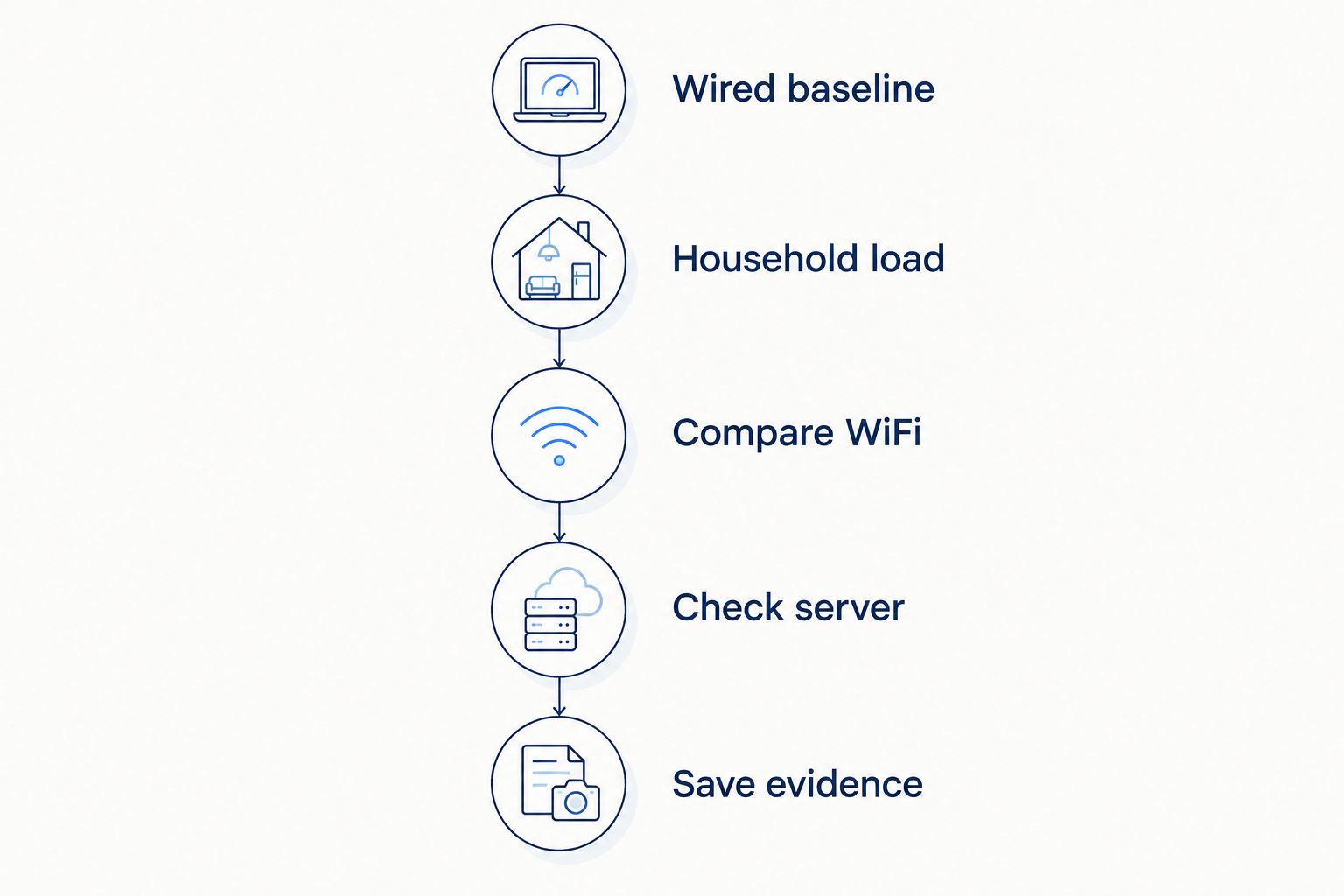
Establish a wired baseline
Connect your gaming device to your router with Ethernet where practical. Pause downloads and uploads on devices you control, then open the game’s network display and record the server region, ping behavior, and any reported packet loss.
Do not treat this quiet result as your final verdict. It establishes what happens without the wireless link and with less household competition, which gives you a useful reference for later tests.
Test household load
Keep the wired connection and the same game region. Resume a normal household activity, such as a file upload or download, and watch whether latency rises or becomes less consistent.
A repeatable increase points toward load-related delay, but it does not prove which device or network segment causes it. Note whether uploads, downloads, or both trigger the problem before changing settings.
Compare WiFi
Return to your usual playing location and reconnect over WiFi. Repeat the quiet and busy-household checks without changing the game region.
If Ethernet stays steady while WiFi becomes inconsistent, start with the wireless connection. If both behave similarly, keep investigating rather than buying wireless equipment on the assumption that it will solve the problem.
Check another server
Try another appropriate server region if the game allows it. Record the selected region rather than assuming matchmaking kept you in the same place.
If one region performs poorly while another behaves normally, the difference gives you useful evidence about the destination or route. It does not establish that your entire internet connection is faulty.
Save the evidence
Keep your 2026 test notes simple: date, time, game, region, wired or wireless connection, household activity, and symptoms. Screenshots of the game’s network display are more useful than a general report that the internet feels slow.
Repeat the comparison when the problem normally happens. An afternoon test cannot explain an evening-only issue unless you also capture the evening behavior.
Does Ethernet lower latency compared with WiFi?
Ethernet is the better baseline for diagnosing gaming latency because it removes the wireless hop. It avoids radio interference on that connection, but it does not guarantee a lower number in every test or fix problems elsewhere on the route.
WiFi remains useful when a cable is impractical. Its trade-off is that the connection depends on conditions between your device and the access point, including activity you cannot see from a signal-strength icon.
If wired play works well, try moving closer to the access point before replacing equipment. A clear improvement supports investigating coverage, placement, or wireless interference; no improvement means you should keep testing other causes.
Will a faster fiber plan reduce gaming ping?
A faster plan does not automatically reduce gaming ping. Additional capacity helps when your existing connection is a bottleneck, but it does not remove server distance, change every network route, or repair a poor WiFi connection.
Use your loaded test to decide whether capacity deserves attention. If ping rises during large transfers but stays steady otherwise, investigate traffic management and competing transfers before assuming a plan change is the only answer.
Routers with suitable queue-management features can help control delay at a managed bottleneck. Configuration matters, and traffic-priority labels alone do not establish that a feature will solve your particular problem.
For your 2026 upgrade decision, ask what the change addresses. More capacity addresses capacity; better wireless coverage addresses coverage. Neither is a universal gaming-lag fix.
What should you ask a fiber provider before switching?
Ask about the service at your exact address, the equipment involved, and the support available for troubleshooting. Do not substitute a provider’s highest advertised download speed for evidence about your gaming experience.
Useful questions include:
- Can support help distinguish a wired connection problem from a WiFi problem?
- What equipment connects the fiber service to the home network?
- What does a managed WiFi service cover?
- What information should you provide when reporting intermittent latency?
- Does a quoted latency measurement describe a specific destination and test condition?
SumoFiber fiber internet is best suited to households seeking fiber internet and managed WiFi from one provider. SumoFiber offers both services, alongside TV, home phone, and mobile services. That service mix is relevant when you want help with the home connection as well as internet access.
The limitation is straightforward: a service list does not establish your ping to a particular game server. Evaluate SumoFiber fiber internet using the same wired, wireless, and busy-household comparisons you would use for another provider.
Can fiber eliminate lag in every online game?
Fiber cannot eliminate every cause of gaming lag. Your device, wireless connection, network route, and the game server can each affect responsiveness.
A match that feels delayed while other online activities work normally still deserves investigation. Games depend on timely updates, so a connection that handles buffered video without interruption can still show problems during interactive play.
Should you choose the lowest ping or the steadiest connection?
Choose a connection that combines low delay with consistent delivery rather than focusing only on the lowest displayed result. A brief minimum does not describe the experience across a full match.
Keep packet loss and delay variation beside ping in your comparison. Those measurements help explain why two sessions with similar averages can feel different.
FAQ
What is a good fiber internet latency for online gaming?
Good fiber internet latency for online gaming is low and consistent to the server you actually use. Evaluate in-game ping alongside delay variation and packet loss rather than applying a speed-test result to every game.
Why is my ping high even though I have fiber?
High ping on fiber can come from server distance, network routing, household congestion, wireless conditions, or equipment behavior. Compare Ethernet and WiFi using the same game region to narrow the investigation.
Is Ethernet better than WiFi for online gaming?
Ethernet is the better diagnostic baseline because it removes the wireless hop and its radio interference. It still cannot eliminate delay elsewhere between your device and the game server.
Will upgrading my download speed lower my ping?
Upgrading download speed does not automatically lower ping. More capacity helps when capacity is the bottleneck, but it does not shorten the physical distance to a game server.
Why does gaming lag when someone uploads files?
Uploads can create queues at a bottleneck, delaying game traffic that shares the connection. Compare ping with the upload paused and running, then investigate traffic management or capacity if the pattern repeats.
Can SumoFiber managed WiFi guarantee lower gaming ping?
Managed WiFi alone does not establish a particular gaming ping. Ask what the service covers and test your actual game over Ethernet and WiFi to distinguish wireless issues from delays elsewhere.
Does a nearby speed-test server show my game latency?
A nearby speed-test server does not measure the same destination as your game server. Use the game’s network display to assess the route relevant to your match.
One last thing
A clean speed test and a laggy game can both be accurate observations. They measure different traffic, often to different destinations, under different conditions.
Before making a 2026 equipment or provider change, capture the problem in the game itself. Match the server region, compare wired and wireless play, and repeat the test during normal household use. That evidence gives your next change a reason beyond a bigger speed number.


