

There is no universal number of devices that can connect to fiber WiFi at once in 2026. Your router determines how many devices can join the wireless network; your WiFi coverage and internet connection determine how well those devices work when people use them together. A phone sitting idle and a TV streaming video count as connected devices, but they do not place the same demand on the network.
- How many devices can connect to fiber wifi? There is no fixed limit set by the fiber connection.
- Your router sets the connection limit; WiFi coverage and simultaneous activity determine whether those devices work well.
- SumoFiber fiber internet is best considered alongside the router and WiFi setup, not as a promise of a device count.
Why this matters
A device count sounds like a simple way to judge a connection. It is not. If your video call freezes while someone else streams, the useful question is not just how many devices are connected. You need to know whether the trouble is the WiFi signal, the router, or the internet connection.
That distinction matters when you assess SumoFiber fiber internet or any other service in 2026. Fiber brings the connection to your premises; WiFi distributes it inside. Changing the internet service alone does not fix a weak wireless signal in a distant room. Replacing a router alone does not change the demands of simultaneous calls, uploads, and streams.
How many devices can connect to fiber WiFi at once?
The exact limit depends on the router, not on fiber itself. Check the router's specifications for its supported connected-device limit, then judge real-world performance by what those devices do at the same time. A router can allow a device to join even when the connection feels slow during use.
| What you are asking | What determines the answer | What to check |
|---|---|---|
| Can another device join? | The router's connection limit and current settings | Router specifications and connected-device list |
| Will another device work well? | WiFi signal, interference, router capacity, and simultaneous traffic | Performance near the router and in the room where you use it |
| Will everyone have enough internet capacity? | The connection and the activity happening at once | Wired performance and what users are doing simultaneously |
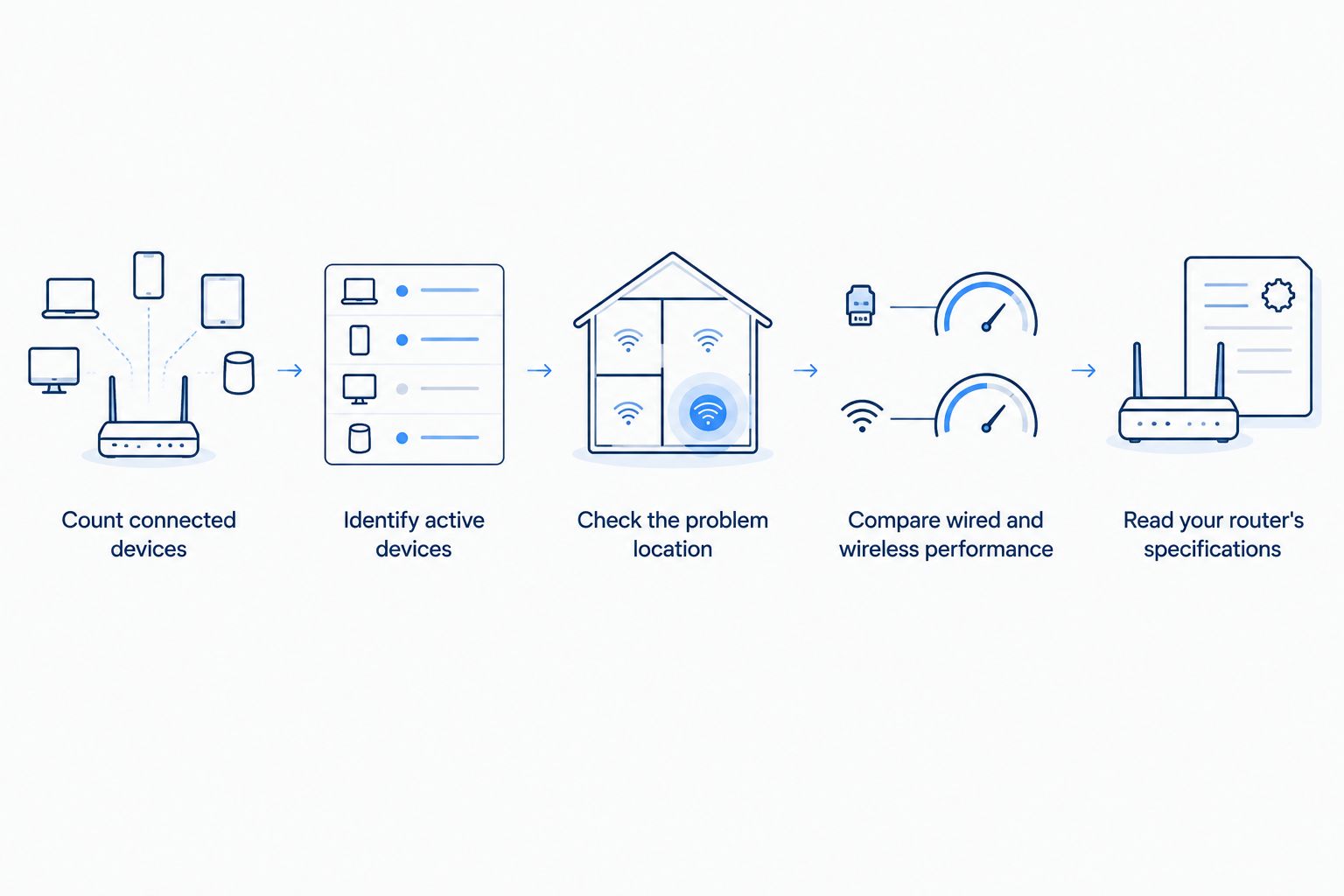
To find the answer for your own home or business:
- Count connected devices. Look for a connected-device list in your router's management interface. Include TVs, speakers, cameras, printers, and devices you rarely think about, not just phones and laptops.
- Identify active devices. Note which ones are streaming, joining calls, downloading, uploading, or running other tasks when the slowdown occurs. A connected-device total without this context tells you little about demand.
- Check the problem location. Test the same device close to the router and in the room where it struggles. A problem confined to one room points to WiFi coverage before it points to your fiber connection.
- Compare wired and wireless performance. If you can connect a computer directly to the router with Ethernet, compare that experience with WiFi during the same type of activity. This helps separate an in-home wireless problem from an internet-connection problem.
- Read your router's specifications. Use the exact model, not a general claim about fiber WiFi. If you manage WiFi for a business, also check how your access points handle the areas where people actually connect.
These checks answer different questions. The device list shows what has joined; a test during a busy period shows what the network can handle while people are using it. Neither a quiet-period speed test nor a device count by itself establishes how a video call will perform when other activity starts.
Connected devices are not the same as active devices
Your router's device list can include a phone waiting for a message, a printer waiting for a job, and a TV playing a stream. All are connected. Only some are placing sustained demand on the network at that moment.
The practical limit changes as activity changes. A household can have many idle devices connected and still notice trouble when fewer devices begin calls, streams, or large transfers together. That is why a fixed answer to how many devices can connect to fiber wifi is less useful than checking what happens during your busiest period.
Start with the symptom. Does a new device fail to join at all, or does it join and then run slowly? Failure to join calls for a check of router settings, connection limits, and authentication. A device that joins but struggles calls for a check of signal quality, competing activity, and the internet connection.
Why fiber WiFi performance varies
These factors determine whether adding another device makes a noticeable difference:
- Router connection limit. Routers differ in how many devices they support. Fiber service does not override the limit of the router distributing WiFi.
- Simultaneous activity. Calls, streams, downloads, and uploads compete for capacity when they happen together. Count what is active, not just what appears in a device list.
- WiFi coverage. Walls, distance, and router placement affect the signal a device receives. A distant laptop can struggle while a nearby one works normally on the same connection.
- Wireless band and interference. A device's available band depends on both the router and the device. The 2.4 GHz and 5 GHz bands behave differently in a home or office; 6 GHz requires compatible equipment. Nearby wireless activity can also affect performance.
- Router workload. The router has to manage traffic among connected devices. Check its model and settings before assuming the fiber connection is the constraint.
- Internet traffic. Uploads and downloads use the connection outside your premises. Compare wired and wireless behavior while the slowdown is happening to find where to investigate first.
None of these factors produces a universal device-count promise. They tell you which part of the setup to examine. In 2026, the most useful answer is specific to your router, your space, and the work your devices are doing.
What should you do if devices connect but WiFi feels slow?
Find out whether the slowdown follows a room, a device, or a busy period. That pattern gives you a better next move than disconnecting devices at random.
If the same laptop works close to the router but struggles elsewhere, focus on coverage. Check router placement and whether your WiFi setup reaches the rooms where calls, streaming, or work happen. Moving to a faster internet connection will not, by itself, strengthen the signal between that laptop and the router.
If the slowdown appears when several people start using the connection, look at what they are doing together. One person on a call might notice trouble when someone else begins a large upload. Test during that overlap rather than waiting until the house or office is quiet. Record which activities were running so you can compare like with like.
If a wired device also struggles during the same busy period, investigate the internet connection and the traffic using it. If wired use works but WiFi does not, inspect the wireless setup first. SumoFiber offers managed WiFi as well as fiber internet; the relevant question is whether your problem needs attention to in-building WiFi, the connection, or both.
How can a busy household or office check its setup?
Test the network where people depend on it, while they use it normally. A result taken beside the router in an empty office does not describe the experience at a desk behind walls or in a meeting room full of connected devices.
For a household, choose a period when the usual calls, gaming, streaming, and other activity overlap. Check whether the problem affects every device or only one. If it affects one device, test that device in a different location and compare it with another device in the same room. This separates a device-specific problem from a coverage pattern.
For a business, map the problem to the work area. If staff devices perform normally but guest devices struggle in a different part of the premises, examine the WiFi serving each area. If everyone notices trouble during the same upload or call-heavy period, check the connection and traffic before making changes to coverage.
Write down what happened, where it happened, and whether a wired device had the same problem. This is useful information to bring to a support conversation. It also prevents an unnecessary equipment change when the issue is limited to one room or one device.
Does fiber internet guarantee better WiFi coverage?
No. Fiber internet and WiFi coverage solve different problems. Fiber carries the internet connection to your premises. Your router and wireless setup carry that connection through the rooms where you use it.
A strong connection at the router can coexist with a weak signal in a bedroom, basement, or back office. Check coverage in those places before treating a slow device as proof that the internet service lacks capacity. The distinction remains the same in 2026: a connection can be working correctly while the in-building WiFi needs attention.
Can multiple people stream and work on fiber WiFi at once?
Yes, if the connection and WiFi setup can support their simultaneous activity. Fiber does not set a universal limit on how many people can stream or work at once. The answer depends on the service connection, router, coverage, and what else is running.
Test the actual mix rather than treating every screen as equal. A work call, an upload, and a stream stress different parts of the experience. If the connection feels fine until a particular activity begins, that timing is a useful clue. SumoFiber fiber internet should be evaluated on the experience during your household's or business's busiest normal period, not on the number of devices listed in a router app.
Is a new router the answer to too many connected devices?
A new router is the answer only when the router or its WiFi coverage is the constraint. First check whether devices fail to join, work poorly only in certain rooms, or slow down during simultaneous activity. Those symptoms do not all have the same fix.
If the router's documented connection limit is the obstacle, equipment matters. If the signal fades across your space, examine coverage. If a wired connection also struggles when everyone is active, changing the WiFi router without examining the connection and traffic leaves the central question unanswered.
FAQ
How many devices can connect to fiber wifi in 2026?
There is no universal device limit for fiber WiFi in 2026. Your router determines how many devices can join, while WiFi coverage and simultaneous activity determine how well they work.
Does each connected device slow down fiber internet?
No, a connected device does not place the same demand on the network at all times. Check what devices are actively doing when you notice a slowdown.
Does fiber internet increase my router's device limit?
No, fiber internet does not change your router's connection limit. Check the specifications for your exact router model.
Why is WiFi slow when my device says it is connected?
A successful WiFi connection does not guarantee good performance. Check signal quality, simultaneous activity, and whether a wired device has the same problem.
Will 6 GHz WiFi let more devices connect to fiber?
6 GHz WiFi does not create a universal fiber device limit. It requires compatible equipment, and your router's capabilities still matter.
Should I count smart-home devices when checking my WiFi?
Yes, include smart-home devices in your connected-device count. Then distinguish devices that are idle from those actively using the connection.
Can managed WiFi fix weak coverage in an office?
Managed WiFi addresses the wireless setup, but the right fix depends on the cause of the weak coverage. Compare performance by location and check whether wired devices also struggle.
One last thing
The device that will not connect and the device that connects but buffers are reporting different problems. Check the router's connection limit for the first. For the second, check coverage and activity while the problem is happening. That distinction will get you closer to an answer than any universal fiber WiFi device count in 2026.


