

Fiber internet is generally faster than cable internet for uploads, while download speeds depend on the plans you compare. A fiber connection does not automatically make every device faster: your router, WiFi coverage, device, and the website or service you use still affect the result.
- Is fiber internet faster than cable internet? Generally yes, especially for uploads; compare both directions, not just downloads.
- Fiber is the stronger fit for households uploading files while making video calls and streaming.
- Cable remains a practical choice when its actual performance meets your household's needs.
- SumoFiber offers fiber internet and managed WiFi; evaluate the connection and wireless coverage separately.
Is fiber internet actually faster than cable internet?
Fiber's clearest speed advantage is usually uploading, not simply watching a video. Many fiber plans offer matching download and upload speeds. Cable plans often give you more download capacity than upload capacity, although upgraded cable networks can support symmetrical service too.
That distinction matters when you send a large work file, back up photos, or share your camera during a meeting. All of those activities send data out of your home. A large download number alone does not tell you how well they will work.
For your 2026 comparison, read both speed figures for each plan. Compare the service delivered to your home, not the biggest number in an advertisement.
| What you compare | Fiber internet | Cable internet | Best for |
|---|---|---|---|
| Downloads | Offers high download capacity; the selected plan sets your limit | Also offers high download capacity; the selected plan sets your limit | Either connection when downloads meet your needs |
| Uploads | Many plans offer matching upload and download speeds | Upload speeds are often lower than download speeds; symmetrical offerings also exist | Fiber plans with symmetrical speeds for frequent uploads |
| Video calls | Strong upload capacity helps when several people send video | Works well when upload capacity covers the household's activity | The plan with sufficient upload capacity |
| Gaming | A strong option, but routing and congestion still affect delay | Also supports gaming; the local network and connection conditions matter | The connection with stable latency |
| WiFi coverage | Depends on the router, placement, and home layout | Depends on the router, placement, and home layout | Neither technology fixes weak indoor coverage by itself |
| Main limitation | The access connection cannot remove every bottleneck | Download-heavy plans can leave less room for simultaneous uploads | Choose around your busiest activities |
For a provider offering both the access connection and wireless services, SumoFiber offers residential and business fiber internet alongside managed WiFi. Treat those as related but separate decisions: getting data to your home is different from getting it reliably to the back bedroom.
Why this matters
Your household does not use the internet in one direction. A television receives a stream while a parent sends video from a work meeting and a phone uploads photos in the background. Those activities compete for different parts of the connection.
A plan can have plenty of download capacity and still feel strained when its upload capacity fills. The practical question is not whether fiber has a more impressive label. It is whether your connection handles the things you do at the same time.
Choose around your busiest normal evening, not around a speed test taken while everyone else is offline. That gives you a better basis for a 2026 decision than comparing download headlines alone.
Download speed: compare the plan, not the technology name
Download speed affects how quickly you receive files, updates, web content, and video. Both fiber and cable can deliver fast downloads. If the plans have the same download limit, the fiber label alone does not promise that a particular file will arrive sooner.
Your result also depends on the source. A download server that sends data slowly remains a bottleneck even when your home connection has room to spare. An older device or a limited wired connection can do the same thing.
Keep the units straight when comparing a plan with a download window:
- 1 Gbps equals 1,000 Mbps. These are two ways of expressing the same data rate.
- 1 byte equals 8 bits. Internet plans commonly use bits; file transfers often display bytes.
- 1,000 Mbps equals 125 MB/s before overhead. That is a unit conversion, not a promise of real-world transfer speed.
Protocol overhead and other bottlenecks reduce the transfer rate you actually see. A file download showing a smaller number in MB/s is not automatically evidence that your provider is delivering less than its stated Mbps rate.
Best for download-heavy households: either fiber or cable with enough actual download capacity. Check uploads before deciding that equal download speeds make two plans equivalent.
Upload speed: where fiber often makes the bigger difference
Upload speed affects video calls, cloud backups, sending files, and remote access to equipment at home. These activities need capacity in the opposite direction from streaming a movie. A household can therefore struggle with work calls even while ordinary browsing seems fine.
Symmetrical service means the advertised upload and download speeds match. Many fiber plans use that structure, which gives uploads more room than a download-heavy plan with a much smaller upload allowance. Confirm the actual figures rather than assuming every fiber offer is symmetrical.
Imagine someone sending a project folder while another person joins a video meeting. If the upload connection is full, outgoing video and other traffic compete with the file transfer. More download capacity does not resolve that particular bottleneck.
Best for frequent file sharing and simultaneous video calls: a plan with strong upload capacity. Fiber is often the better fit here, but compare the stated upload speed of each offer you are considering in 2026.
Gaming: more bandwidth does not automatically mean less delay
Bandwidth describes how much data a connection carries. Latency describes how long data takes to travel and receive a response. A higher bandwidth plan does not automatically produce a lower ping to your game server.
Fiber is a strong gaming option, but distance, network routing, congestion, and WiFi conditions still matter. Cable also supports online gaming. Neither connection type can remove the distance between your home and a remote server.
Separate downloading a game from playing it. A fast download connection helps you receive game files and updates; stable latency matters during a match. That is why a connection can download quickly yet feel inconsistent while you play.
Best for gaming: the connection that keeps latency steady during normal household activity. Use Ethernet for your comparison so weak WiFi does not disguise the performance of the internet connection itself.
Why actual fiber and cable speeds vary
The connection type is only part of the result. These factors explain why an advertised speed and the experience at your desk are not always the same:
- Plan limits. Your subscription sets the download and upload capacity you can use, regardless of what the underlying network supports.
- Shared demand. Fiber and cable networks both share capacity at parts of the network. Provisioning and congestion affect performance; fiber is not automatically a dedicated connection.
- Home equipment. The router, wired ports, cables, and device must support the rate you are trying to measure.
- WiFi conditions. Distance, walls, interference, and placement affect the wireless connection between your device and router.
- Remote services. A website, game server, or file host can limit transfer speed or add delay outside your home.
- Background activity. Backups, updates, and other household traffic use capacity while you test or work.
Locate the bottleneck before changing the plan. Buying more internet capacity does not repair a weak wireless signal, and moving the router does not increase a plan's upload limit.
How do you test whether fiber would improve your connection?
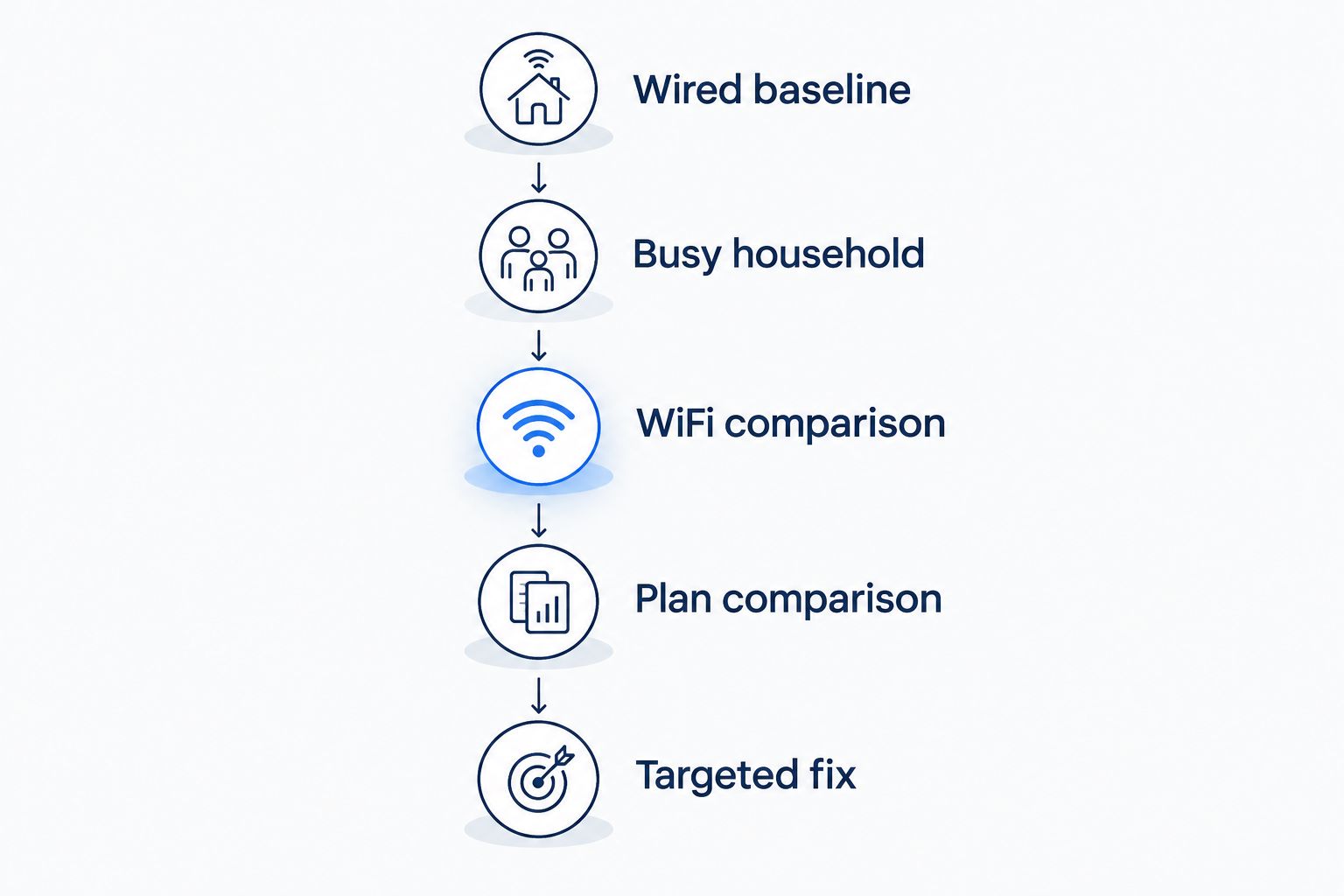
Compare wired performance first, then test the rooms where you actually use WiFi. Keep the device and test service consistent so you are not confusing a change in equipment with a change in internet performance.
- Wired baseline. Connect a capable computer to the router with Ethernet. Pause optional downloads and backups, then record download speed, upload speed, and latency.
- Busy household. Repeat the test while your household uses the connection normally. Watch whether calls become unstable or latency changes when uploads are running.
- WiFi comparison. Test near the router, then in the room where the problem occurs. A strong wired result and weak distant wireless result point toward a coverage issue.
- Plan comparison. Compare the results with your plan's stated speeds and the upload capacity of the alternative plan.
- Targeted fix. Address the issue you found: insufficient upload capacity, weak coverage, equipment limits, or a service problem.
The sequence separates the internet connection from the home network. Without that separation, a disappointing bedroom speed test can send you shopping for a faster plan when coverage is the real issue.
An online test measures a particular device, connection path, and moment. For help interpreting the result, read how accurate an online internet speed test is.
Use this same sequence when evaluating a new connection in 2026. Keep your notes focused on the activities that fail, rather than collecting a highest-ever speed result that does not reflect daily use.
Will fiber make every device in my home faster?
Fiber will not make every device faster if WiFi or the device itself is the bottleneck. A television behind several walls still needs a usable wireless signal, even when the connection entering the home has ample capacity.
Check router placement and wired performance before blaming the service. For your 2026 comparison, separate whole-home coverage from the speed delivered to the router.
Is cable enough for streaming and working from home?
Cable is enough when its download, upload, and latency performance support your simultaneous activities. Judge it during video calls, streaming, and background uploads, not just while one person browses.
Keep cable if it meets those needs consistently. Compare fiber when upload-heavy tasks disrupt calls or your household needs more capacity in both directions.
Should you choose fiber if the download speeds match?
Choose fiber when the matching download speed comes with upload capacity that better fits your needs. Equal download figures do not tell you whether the plans perform equally during cloud backups or several video calls.
Also assess the equipment and wireless setup. A better access connection is useful, but it does not replace a suitable home network.
Where the provider fits into the decision
SumoFiber is best suited to households and businesses seeking fiber internet and managed WiFi from one provider. Its stated services also include TV, home phone, and mobile service, so the service mix is broader than internet alone.
That service mix is a reason to evaluate SumoFiber, not proof that a particular plan outperforms cable. Ask about the actual upload and download specifications and how managed WiFi fits your space. The strength is the combination of services; the limitation is that a provider name alone does not establish your real-world speed.
FAQ
Is fiber internet faster than cable internet in 2026?
Fiber generally has an advantage for uploads, while download performance depends on the plans compared. Compare both speed directions and test with Ethernet before judging the connection through WiFi.
Why does fiber internet have better upload speeds?
Many fiber plans provide symmetrical upload and download speeds, while cable plans often allocate less capacity to uploads. Upgraded cable networks can also offer symmetrical service, so check the actual plan specifications.
Is fiber always better for online gaming?
Fiber is not automatically better for every gaming connection. Stable latency depends on routing, congestion, the game server, and your home network as well as the access technology.
Will switching to fiber fix slow WiFi in my bedroom?
Switching to fiber does not fix weak WiFi coverage by itself. Compare wired performance with the bedroom's wireless performance before choosing between a plan change and a coverage fix.
Can cable internet handle video calls and streaming at the same time?
Cable can handle video calls and streaming when the plan has enough upload and download capacity for the household's combined activity. Check performance while those activities run together.
Does fiber give every connected device the full plan speed?
Fiber does not give every device the full plan speed simultaneously. Active devices share the connection, and their individual performance also depends on equipment and WiFi conditions.
What should I compare before switching from cable to fiber?
Compare download speed, upload speed, latency during household activity, and wired versus wireless performance. Match the new plan to the bottleneck you actually found.
One last thing
Check what your devices are sending, not just what they are receiving. A background photo backup can compete with a work call for upload capacity even when nobody is downloading anything large.
Before choosing a connection in 2026, run a call during your normal household activity and compare it with a quiet-house test. That practical check tells you more about your needs than a download number alone.


