
Choose Sumofiber if you want fiber internet with managed WiFi and options for TV, home phone, and mobile service; choose CenturyLink if your existing connection already handles your household and keeping it avoids an unnecessary installation. This 2026 comparison separates a genuine connection upgrade from a change that leaves your everyday experience much the same.
- For sumofiber vs centurylink, choose fiber for a connection upgrade, not as a substitute for fixing poor WiFi coverage.
- CenturyLink is the better stay-put choice when your existing service meets your needs and changing providers solves no problem.
- Compare the connection, managed WiFi, service terms, and installation requirements before deciding.
Why this matters
A video call that freezes in the back bedroom does not automatically mean you need a different internet provider. The problem can sit between your router and your laptop, rather than between your home and the internet.
Start with Sumofiber if you want to explore its fiber internet and related services. Then compare that option with the actual CenturyLink connection you use or are considering, not with a national advertisement or somebody else's experience.
For a useful 2026 comparison, write down what you want to change: interrupted calls, slow uploads, weak bedroom coverage, or separate services you would rather manage together. Those are different problems. A provider switch does not solve all of them automatically.
At a glance
| Dimension | Sumofiber | CenturyLink |
|---|---|---|
| Best for | Households and businesses seeking fiber internet and related services | Existing customers whose connection already meets their needs |
| Connection technology | Fiber internet | Examine the actual connection; DSL uses copper telephone wiring |
| Standout advantage | Managed WiFi alongside internet and other services | Keeping a working connection and familiar setup |
| Indoor WiFi coverage | Assess router placement and coverage separately | Assess router placement and coverage separately |
| Switching effort | Requires planning a provider change | Staying avoids a provider-change installation |
| Additional services | TV, home phone, and mobile services are part of the offering | Check the specific services and terms you need |
| Business suitability | Business internet and managed WiFi are offered | Judge the proposed service against your business requirements |
| Pricing model | Review recurring service, equipment, and installation terms | Review recurring service, equipment, and installation terms |
Fiber wins when the connection is what needs replacing
Choose fiber when your goal is to replace a connection that cannot support the work you need to do. CenturyLink's DSL service carries data over copper telephone wiring; fiber carries data using light through optical fiber. That is a meaningful technical difference, not just a different name on the bill.
The practical question is what reaches your devices. Download performance matters when you watch video or retrieve large files. Upload performance matters when you send files, back up photos, or appear on a video call.
Do not compare download headlines alone. Ask for the proposed download and upload specifications, then compare them with what your present service delivers over a wired connection.
Fiber also has limits as a buying shortcut. A fiber connection does not guarantee strong wireless coverage behind every wall, and the word itself does not establish support quality or a repair commitment. Buy the connection for a connection problem; evaluate the rest separately.
Managed WiFi fits households that want help with the network
The fiber provider's managed WiFi offering is relevant when you want help beyond the connection entering your home. That is a different need from simply ordering internet access.
Picture a parent working upstairs while children stream downstairs. If the upstairs room has weak wireless coverage, a faster incoming connection does not remove the wall or move the router. Ask what the managed service covers, who handles troubleshooting, and whether equipment placement is part of the discussion.
The tradeoff is scope. Do not assume that managed WiFi includes every network change, every device problem, or a particular piece of equipment. Get the responsibilities explained before choosing it.
CenturyLink's strongest alternative in this situation is a setup you already understand and that already works. If you are comfortable managing your own network, adding managed WiFi is not automatically an improvement. Judge it by the help you actually want.
Both need a separate WiFi coverage check
Neither provider name tells you whether the far bedroom will have good WiFi. Indoor coverage deserves its own check before you blame the incoming connection.
WiFi commonly uses 2.4 GHz and 5 GHz bands; compatible equipment can also use 6 GHz. Those frequencies describe the wireless connection inside your space, not the fiber or copper connection outside it. They are not evidence that either provider includes a particular router.
Compare a wired device with a wireless device during the same troublesome activity. If the wired connection works but the wireless connection struggles, investigate placement, interference, and equipment before ordering a different internet service.
Use this sequence for your 2026 decision:
- Address check: Ask what connection can actually be ordered for your specific unit or property.
- Wired test: Try the activity that fails using a wired connection where practical.
- WiFi test: Repeat that activity in the room where you normally use it.
- Service review: Match the result to a connection change, WiFi work, or both.
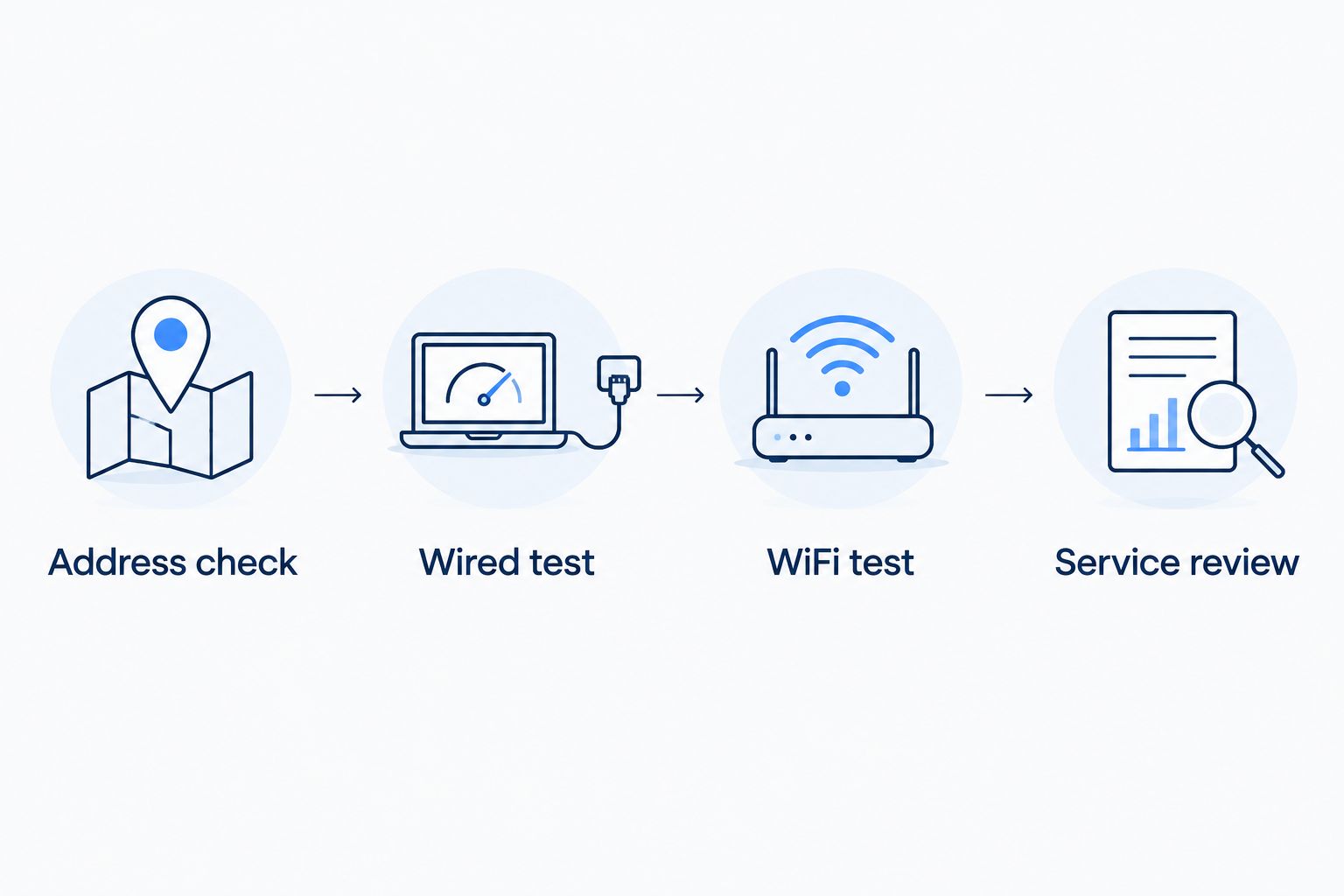
A test is useful only if it reflects your problem. Testing beside the router does not answer why a work call fails upstairs, and testing only upstairs does not isolate the incoming connection.
CenturyLink wins on avoiding an unnecessary switch
Keep CenturyLink when the service works, the terms suit you, and the proposed change solves no identifiable problem. Familiarity alone is not a reason to stay, but avoiding needless disruption is a real benefit.
Changing providers means coordinating installation, equipment, and cancellation. If you use a home phone, the number-transfer process also needs attention. None of that proves switching is wrong; it means the improvement should justify the work.
Before canceling an existing connection, confirm the replacement is installed and working for your essential activities. Check work calls, streaming, and any devices you depend on rather than stopping at a successful browser load.
For a small business, plan around operations. A restaurant should not discover during service that a payment device needs reconnecting. Staying with a working setup wins when the alternative offers no clear operational benefit; switching wins when it addresses a documented limitation.
The broader service range matters only if you will use it
Sumofiber fiber internet is best for households seeking a fiber connection with managed WiFi and related home services. Its stated offering includes TV, home phone, and mobile service, alongside residential and business internet.
That range gives you more to evaluate than the internet line alone. A household comparing several separate services can ask how those services would be managed together and which would still require separate arrangements.
Do not treat a longer service list as automatic savings or simpler billing. Ask how accounts, equipment, and support work for the services you actually want. An extra service you do not need adds nothing to the comparison.
For CenturyLink, evaluate the exact combination proposed to you rather than assuming it matches another provider's offering. If you only want internet and your current connection works, a broader service menu is not a reason to change. Service fit wins; the length of the menu does not.
Neither wins business suitability from the brand name alone
A business connection should be judged against the work it must support. Business internet and managed WiFi are part of the fiber provider's offering, but a business label alone does not establish an uptime commitment, backup connection, or repair deadline.
For your 2026 business comparison, separate essential tasks from convenient ones:
- Daily operations: Payment processing, reservations, cloud applications, and staff communications.
- Guest access: Customer WiFi that should not be confused with staff network needs.
- Uploads: Sending project files, backing up data, or using cloud systems.
- Continuity: What staff should do when the primary connection stops working.
Ask both providers to explain which requirements the proposed service meets. Request written terms for any commitment that affects operations.
CenturyLink remains the sensible choice for a business whose present service meets those requirements and whose switching case is weak. A fiber change becomes the stronger choice when it addresses a specific connection limitation. Neither deserves a business recommendation solely because its name appears above the proposal.
Pricing: compare the billing model, not an isolated headline
Compare recurring obligations and one-time work separately. A service subscription, equipment arrangement, and installation requirement affect your decision in different ways.
For each provider, ask whether equipment is included, rented, or purchased. Establish whether installation creates a separate charge, whether additional services have separate billing, and which cancellation or equipment-return terms apply. Do not assume that a familiar arrangement from an old account carries over to a new one.
Predictability and flexibility are different benefits. A clearly defined recurring obligation helps you plan; the ability to change service without an unwanted commitment helps when your needs change. Read the actual terms to see which benefit the proposal provides.
For a 2026 decision, compare the same scope on both sides. Internet alone is not equivalent to internet plus managed WiFi and home phone. A useful comparison removes services you do not need before judging the remaining arrangement.
Final verdict: upgrade for a reason, not for a different logo
Choose Sumofiber if you want fiber and help managing WiFi
Best for: a household or business replacing a limiting connection and considering managed WiFi or related services. Choose it when the proposed fiber service addresses the problem you have identified and the responsibilities are clear.
Confirm the connection specifications, installation requirements, equipment arrangement, and support scope. The strongest case is a practical improvement you can explain, not an assumption that switching fixes everything.
Choose CenturyLink if your current setup already does the job
Best for: an existing customer with working service and no clear reason to change. Keep it when your essential activities run properly and the account terms still suit you.
Revisit that decision when your needs change or the connection becomes a constraint. Staying is a valid choice, but it should be based on present performance rather than the effort of postponing a comparison.
| Dimension | Winner |
|---|---|
| Best for a fiber-and-services search | Fiber provider |
| Replacing a limiting DSL connection | Fiber, when the proposed service addresses the limitation |
| Managed WiFi requirement | Fiber provider's managed WiFi offering merits evaluation |
| Indoor WiFi coverage | Tie: assess the space and equipment |
| Avoiding an unnecessary provider change | CenturyLink for satisfied existing customers |
| Additional services | The provider matching your actual service list |
| Business suitability | Tie: compare written requirements and commitments |
| Pricing model | The proposal with the better-fitting obligations |
FAQ
Is Sumofiber better than CenturyLink in 2026?
Sumofiber is the better fit when you want fiber internet with managed WiFi and related services; CenturyLink is the better stay-put choice when your existing connection already meets your needs. Compare the actual connection and service terms rather than choosing by brand alone.
Should I switch from CenturyLink DSL to fiber internet?
Switch when the proposed fiber service addresses a connection limitation that affects your daily use. Compare download and upload specifications, then separate incoming connection problems from indoor WiFi problems.
Will switching internet providers fix weak WiFi upstairs?
Switching providers does not automatically fix weak WiFi upstairs. Compare wired and wireless performance, then investigate router placement and coverage before deciding whether the incoming connection needs replacing.
Is it better to keep CenturyLink if my internet works?
Keeping CenturyLink is sensible when your service meets your needs and changing providers offers no clear benefit. Check your current terms and actual performance before deciding to stay.
What should I compare besides download speed?
Compare upload performance, WiFi coverage, equipment responsibilities, installation requirements, and service terms. For a business, also establish what happens when the connection fails.
How should I compare the providers' billing arrangements?
Separate recurring service obligations from equipment and installation arrangements. Compare equivalent services and read the cancellation and equipment-return terms before choosing.
Should I cancel my old internet before the new connection works?
Keep your existing connection until the replacement is installed and your essential activities work. Coordinate cancellation and any phone-number transfer so the change does not interrupt services you depend on.
One last thing
Before making your 2026 choice, try your most frustrating online task over a wired connection. If it works there but fails on WiFi, investigate the wireless network before replacing the internet provider. That small distinction changes what you should buy—and what you should leave alone.


